
koala73/worldmonitorConnectors
Real-time global intelligence dashboard. AI-powered news aggregation, geopolitical monitoring, and infrastructure tracking in a unified situational awareness interface
86k
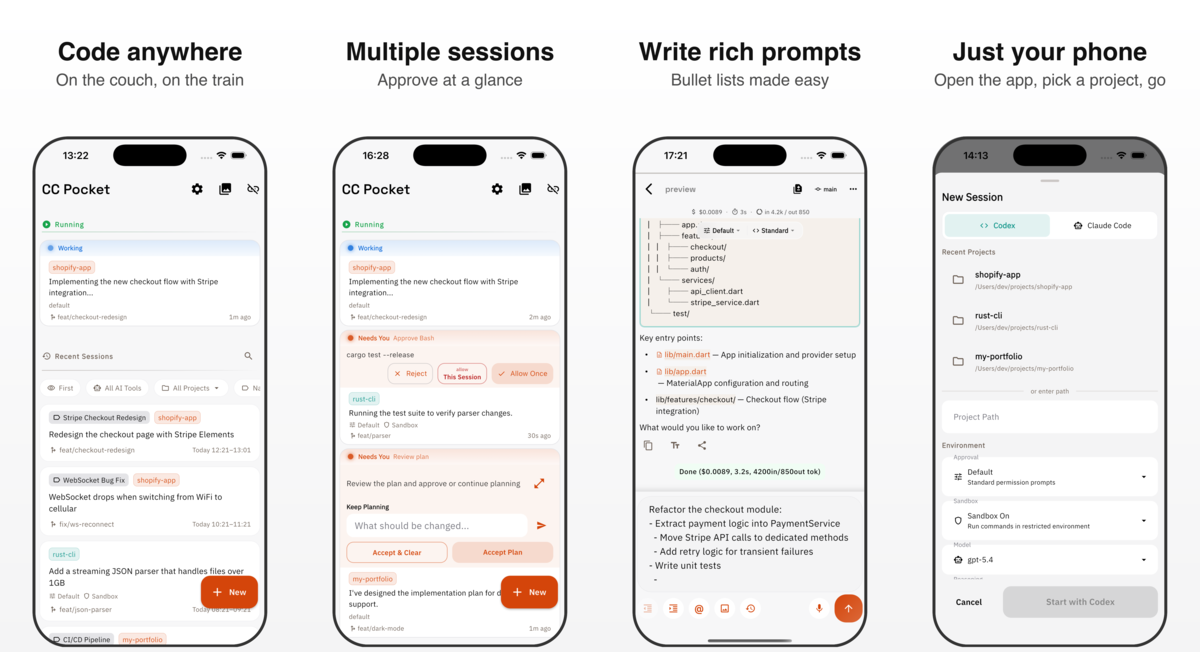
CC Pocket is a phone-first client for Codex and Claude. The app connects to a local Bridge Server running on your machine, so you can start tasks, approve steps, review diffs, and continue the same session across devices.
Builders who want to control Codex or Claude sessions from a phone, tablet, or desktop without moving code off their own machine.
You can start, steer, and review agent work from mobile instead of staying at the terminal.
Each session is a room for prompts, replies, approvals, and follow-up questions, with markdown, voice input, and image attachments.
You can resume the same session from the CLI, phone, tablet, or Mac, with larger screens showing chat, files, and git changes side by side.
Outgoing messages queue while you are offline, then resend after reconnecting, and missed streaming updates are recovered.
You can browse files, inspect code and image diffs, stage changes, commit, push, or revert.
The app connects to the Bridge Server on your own machine over QR code, saved host, mDNS, or manual WebSocket URL.
The bridge can run as a background service on macOS launchd or Linux systemd, and the README recommends Tailscale for remote access.
npx @ccpocket/bridge@latest
Your agents. In your pocket.
Codex and Claude, with a chat UI made for your phone. Start a task, approve the next step, and review the result. Pick up the same work on your tablet or Mac.
Explore CC Pocket · Free to use · Open source
日本語版 README | 简体中文版 README | 한국어 README
npx @ccpocket/bridge@latest
| Platform | Install |
|---|---|
| iOS / iPadOS |  |
| Android |  |
| macOS | Download the latest .dmg from GitHub Releases. Look for releases tagged macos/v*. You can also install using Homebrew Cask with brew install --cask cc-pocket. |
| Linux (experimental) | Download the latest .tar.gz from GitHub Releases. Look for releases tagged linux/v*. Alternatively, install the community-maintained AUR package with yay -S cc-pocket-bin. |
| Windows (experimental) | Download the latest .zip from GitHub Releases. Look for releases tagged windows/v*. |
CC Pocket is free to use. If it helps your workflow, please consider becoming a Supporter in the app. Supporter purchases help cover development and AI tooling costs.
New to mobile coding agents? See How to run Codex from iPhone or Android.
CC Pocket is MIT licensed so you can treat it as a starting point for your own agent workflow, not only as a finished app.
For a deeper implementation overview, see the technical stack page or the agent-readable Markdown.
CC Pocket has two parts:
CC Pocket app <-> Bridge Server on your machine <-> Codex / Claude
The app is the interface you use. The Bridge Server runs locally on the machine that has access to your projects, shell, git repository, and agent CLI. Your code stays on your own machine instead of moving into a hosted IDE.
On the same network, connect with the QR code, mDNS discovery, or a manual
ws:// / wss:// URL.
For access away from home or the office, Tailscale is the recommended setup:
ws://<host-tailscale-ip>:8765 from CC Pocket.For an always-on host, the Bridge Server can also be registered as a background service:
npx @ccpocket/bridge@1 setup
Service setup supports macOS launchd and Linux systemd.
For Bridge flags and persisted service settings such as BRIDGE_ALLOWED_DIRS,
see the Bridge package README.
ANTHROPIC_API_KEY by default. Subscription authentication
requires explicit Bridge opt-in with BRIDGE_ALLOW_CLAUDE_OAUTH=1 because
Anthropic's current official guidance has an unclear scope for this architecture.
See Claude authentication troubleshooting.git clone https://github.com/K9i-0/ccpocket.git
cd ccpocket
npm install
cd apps/mobile && flutter pub get && cd ../..
Common commands:
| Command | Description |
|---|---|
npm run bridge | Start Bridge Server in dev mode |
npm run bridge:build | Build the Bridge Server |
npm run dev | Restart Bridge and launch the Flutter app |
npm run test:bridge | Run Bridge Server tests |
cd apps/mobile && flutter test | Run Flutter tests |
cd apps/mobile && dart analyze | Run Dart static analysis |
For end-to-end checks with a local Bridge and mobile app, see Development Testing.
See CONTRIBUTING.md for contribution guidelines.
Sign in to join the discussion.
No comments yet. Be the first to say what this is good for.
Real-time global intelligence dashboard. AI-powered news aggregation, geopolitical monitoring, and infrastructure tracking in a unified situational awareness interface
High-performance code intelligence MCP server. Indexes codebases into a persistent knowledge graph — average repo in milliseconds. 158 languages, sub-ms queries, 99% fewer tokens. Single static binary, zero dependencies.

Universal provider proxy for OpenAI Codex & Claude Code — use any LLM (Claude, Gemini, Grok, DeepSeek, Ollama…) with Codex CLI, App, SDK, and Claude Code

Git-native persistent memory for AI coding agents. Implements Google OKF v0.2 with sub-300µs in-memory BM25 search, embedded MCP server, and progressive disclosure. Slashes token bloat by 80% with zero external databases or dependencies. Built in pure Go.

Local-first code intelligence graph for MCP and CLI. Builds a persistent map of your codebase so AI coding tools read only what matters, with benchmarked context reductions on reviews and large-repo workflows.

Stop your AI from making things up — it proposes, deterministic tools decide, every claim checked against ground truth with evidence. Grounded facts and context survive resets. Reverse engineering is the proving ground. MCP server + CLI.