
koala73/worldmonitorConnectors
Real-time global intelligence dashboard. AI-powered news aggregation, geopolitical monitoring, and infrastructure tracking in a unified situational awareness interface
86k
Context Sync adds a persistent memory layer to AI coding tools through MCP. It stores project identity, decisions, file structure, git context, and optional Notion lookup so your agent can retrieve context later.
Builders who want their agent to remember project context across sessions.
You can resume work with remembered context instead of re-explaining the project every time.
Stores project identity, stack, decisions, constraints, and other context with `set_project`, `remember`, and `recall`.
Lets an agent inspect files and folders with `structure`, `read_file`, and `search`.
Captures repo state and supports `status`, `context`, `hotspots`, `coupling`, `blame`, and `analysis`.
Installs `post-commit`, `pre-push`, `post-merge`, and `post-checkout` hooks for context capture when `set_project` runs inside a git repo.
Adds read-only Notion search and page reading through the `notion` tool.
Configures supported tools during global install and provides manual setup guidance when auto-config fails.
npm install -g @context-sync/server
context-sync-setup
npx context-sync-setup
Local-first project memory for AI coding tools over MCP.
Context Sync gives an agent a persistent memory layer for a codebase:
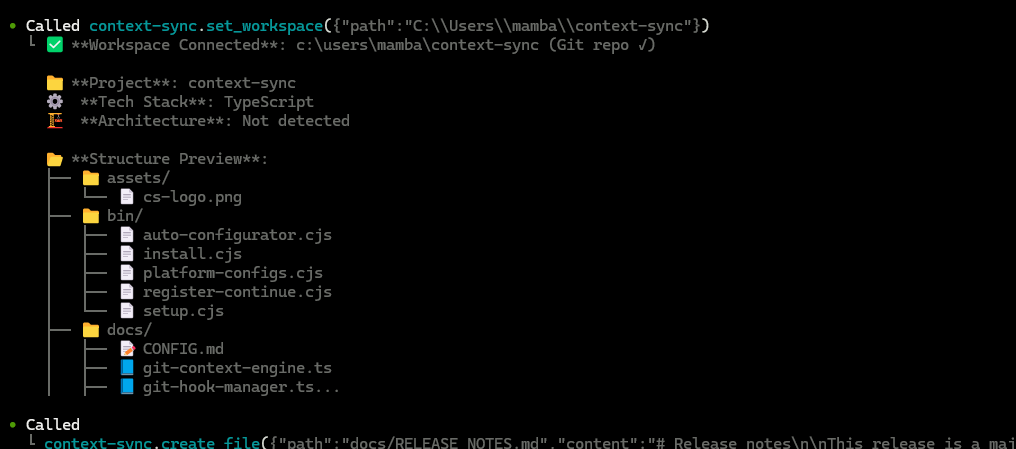
Context Sync is built for session continuity. Instead of relying on a model to remember earlier conversations, it stores the project context that matters and makes it retrievable through a small MCP tool surface.
The current core tools are:
set_projectrememberrecallread_filesearchstructuregitnotionInstall globally:
npm install -g @context-sync/server
Auto-configuration runs during global install. After install, restart your AI tool.
If you install locally instead of globally, auto-config does not run. Use the manual config guide in docs/CONFIG.md.
Check that context-sync appears in your MCP tool list:
codex mcp listclaude mcp listIf auto-config fails, use docs/TROUBLESHOOTING.md and docs/CONFIG.md.
Run the setup wizard if you want Notion integration:
context-sync-setup
or:
npx context-sync-setup
Notion support is intentionally read-only at the tool surface:
notion({ action: "search", query: "..." })notion({ action: "read", pageId: "..." })Start every new session by setting the project first:
1. set_project({ path: "/absolute/path/to/project" })
2. recall()
3. structure({ depth: 2 })
4. read_file({ path: "src/index.ts" })
5. remember({ type: "decision", content: "Use SQLite for local storage" })
Recommended pattern:
set_project once per project/session startrecall to recover contextstructure and search to exploreread_file for focused inspectionremember when something should survive the current sessionWhen you run set_project inside a git repository, Context Sync can install hooks for automatic context capture.
Installed hooks:
post-commitpre-pushpost-mergepost-checkoutHooks are marked with Context Sync Auto-Hook, and existing hooks are backed up first.
The git tool supports:
statuscontexthotspotscouplingblameanalysisDefault locations:
~/.context-sync/data.db~/.context-sync/config.json~/.context-sync/install-status.jsonCustom database options:
context-sync --db-path /absolute/path/to/dbCONTEXT_SYNC_DB_PATHSee docs/DATA.md for storage details.
Sign in to join the discussion.
No comments yet. Be the first to say what this is good for.
Real-time global intelligence dashboard. AI-powered news aggregation, geopolitical monitoring, and infrastructure tracking in a unified situational awareness interface
High-performance code intelligence MCP server. Indexes codebases into a persistent knowledge graph — average repo in milliseconds. 158 languages, sub-ms queries, 99% fewer tokens. Single static binary, zero dependencies.

Universal provider proxy for OpenAI Codex & Claude Code — use any LLM (Claude, Gemini, Grok, DeepSeek, Ollama…) with Codex CLI, App, SDK, and Claude Code

Git-native persistent memory for AI coding agents. Implements Google OKF v0.2 with sub-300µs in-memory BM25 search, embedded MCP server, and progressive disclosure. Slashes token bloat by 80% with zero external databases or dependencies. Built in pure Go.

Local-first code intelligence graph for MCP and CLI. Builds a persistent map of your codebase so AI coding tools read only what matters, with benchmarked context reductions on reviews and large-repo workflows.

Stop your AI from making things up — it proposes, deterministic tools decide, every claim checked against ground truth with evidence. Grounded facts and context survive resets. Reverse engineering is the proving ground. MCP server + CLI.