

Sandbox
@GLips/Figma-Context-MCP

MCP server for Figma layout data

This MCP server gives your coding agent access to Figma files, frames, and groups. It translates Figma API responses into a smaller set of layout and styling details so the agent can use the design as build context instead of a screenshot.

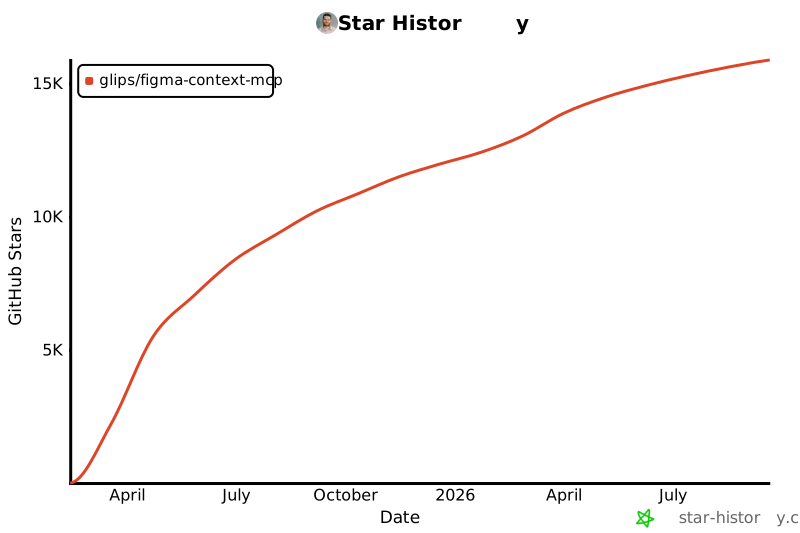
15,834 stars1.3k forksTypeScriptUpdated 7d ago
Creating a UI with Figma to Cursor MCP Server
Graham Lipsman148k views • 1 year ago
Who it's for

Builders who use Cursor or other AI coding tools and want to build from Figma layouts.

What it delivers

You can ask your agent to implement a Figma design with clearer context and less back-and-forth.

What it does

Figma file access

Connects an agent to Figma files, frames, and groups through Model Context Protocol.

Context simplification

Reduces Figma API data to the layout and styling details most relevant to the model.

Cursor setup

Provides config examples for Cursor and other MCP-capable clients on macOS, Linux, and Windows.

Command-line startup

Runs as a local MCP server through `npx -y figma-developer-mcp --figma-api-key=YOUR-KEY --stdio`.

README

FramelinkFramelink

Framelink MCP for Figma

Give your coding agent access to your Figma data.
Implement designs in any framework in one-shot.

weekly downloads MIT License Discord
Twitter

Give Cursor and other AI-powered coding tools access to your Figma files with this Model Context Protocol server.

When Cursor has access to Figma design data, it's way better at one-shotting designs accurately than alternative approaches like pasting screenshots.

See quickstart instructions →

Demo

Watch a demo of building a UI in Cursor with Figma design data

Watch the video

How it works

  1. Open your IDE's chat (e.g. agent mode in Cursor).
  2. Paste a link to a Figma file, frame, or group.
  3. Ask Cursor to do something with the Figma file—e.g. implement the design.
  4. Cursor will fetch the relevant metadata from Figma and use it to write your code.

This MCP server is specifically designed for use with Cursor. Before responding with context from the Figma API, it simplifies and translates the response so only the most relevant layout and styling information is provided to the model.

Reducing the amount of context provided to the model helps make the AI more accurate and the responses more relevant.

Getting Started

Many code editors and other AI clients use a configuration file to manage MCP servers.

The figma-developer-mcp server can be configured by adding the following to your configuration file.

NOTE: You will need to create a Figma access token to use this server. Instructions on how to create a Figma API access token can be found here.

MacOS / Linux

{
  "mcpServers": {
    "Framelink MCP for Figma": {
      "command": "npx",
      "args": ["-y", "figma-developer-mcp", "--figma-api-key=YOUR-KEY", "--stdio"]
    }
  }
}

Windows

{
  "mcpServers": {
    "Framelink MCP for Figma": {
      "command": "cmd",
      "args": ["/c", "npx", "-y", "figma-developer-mcp", "--figma-api-key=YOUR-KEY", "--stdio"]
    }
  }
}

Or you can set FIGMA_API_KEY and PORT in the env field.

If you need more information on how to configure the Framelink MCP for Figma, see the Framelink docs.

Star History
Star History Chart

Learn More

The Framelink MCP for Figma is simple but powerful. Get the most out of it by learning more at the Framelink site.


Files in the repo

Repository payload25 top-level entries
  • .claude
  • .github
  • scripts
  • src
  • .env.example
  • .gitignore
  • .nvmrc
  • .prettierrc
  • .release-please-manifest.json
  • CHANGELOG.md
  • CLAUDE.md
  • CONTRIBUTING.md
  • eslint.config.js
  • lefthook.yml
  • LICENSE
  • package.json
  • pnpm-lock.yaml
  • README.md
  • release-please-config.json
  • ROADMAP.md
  • SECURITY.md
  • server.json
  • tsconfig.json
  • tsup.config.ts
  • vitest.config.ts

Discussion (0)

Ask about usage, or say what you built with it

Sign in to join the discussion.

No comments yet. Be the first to say what this is good for.

More connectors

High-performance code intelligence MCP server. Indexes codebases into a persistent knowledge graph — average repo in milliseconds. 158 languages, sub-ms queries, 99% fewer tokens. Single static binary, zero dependencies.

43k

Universal provider proxy for OpenAI Codex & Claude Code — use any LLM (Claude, Gemini, Grok, DeepSeek, Ollama…) with Codex CLI, App, SDK, and Claude Code

14k
okf-memory/
okf-agent-memory

Git-native persistent memory for AI coding agents. Implements Google OKF v0.2 with sub-300µs in-memory BM25 search, embedded MCP server, and progressive disclosure. Slashes token bloat by 80% with zero external databases or dependencies. Built in pure Go.

547
tirth8205/
code-review-graph

Local-first code intelligence graph for MCP and CLI. Builds a persistent map of your codebase so AI coding tools read only what matters, with benchmarked context reductions on reviews and large-repo workflows.

31k
2akouwu/
reverify

Stop your AI from making things up — it proposes, deterministic tools decide, every claim checked against ground truth with evidence. Grounded facts and context survive resets. Reverse engineering is the proving ground. MCP server + CLI.

1.1k
t8y2/dbxConnectors

20 MB lightweight cross-platform database client for 90+ databases, including MySQL, PostgreSQL, SQLite, Redis, MongoDB, DuckDB, SQL Server, and Dameng. Built-in AI, MCP Server, CLI, desktop and Docker. | 轻量级跨平台数据库管理工具,支持 MySQL、PostgreSQL、SQLite、Redis、MongoDB、达梦等 90+ 数据库,提供桌面端、Docker、CLI、内置 AI 助手和 MCP Server。

19k