High-performance code intelligence MCP server. Indexes codebases into a persistent knowledge graph — average repo in milliseconds. 158 languages, sub-ms queries, 99% fewer tokens. Single static binary, zero dependencies.
MCP server for Unity Editor control
Unity MCP bridges MCP clients to the Unity Editor so an assistant can act on the project instead of only talking about it. The Unity package exposes editor actions, while the Python server and client config make those actions available through tools in Claude Code, Cursor, Codex, Gemini CLI, and other MCP clients.
Builders who want their agent to manage Unity scenes, scripts, assets, tests, and builds inside the Editor.
You can ask an agent to do Unity work in natural language instead of switching between chat and the Editor.
What it does
Unity editor control through MCP
Exposes Unity actions as MCP tools so a client can drive the Editor directly.
Asset and scene management
Creates and edits scenes, GameObjects, and project assets from assistant commands.
Script editing and validation
Lets the agent edit C# scripts and use Roslyn validation workflows.
Testing and profiling
Supports running tests and profiling tasks from the connected client.
Multi-client setup
Works with multiple MCP clients and includes configuration for detected clients.
Tool grouping and routing
Supports tool groups and multi-instance routing for different Unity workflows.
README

Proudly sponsored and maintained by Aura — the AI assistant for Unreal & Unity.
And don't miss Godot AI, the new open source project from the makers of MCP for Unity.
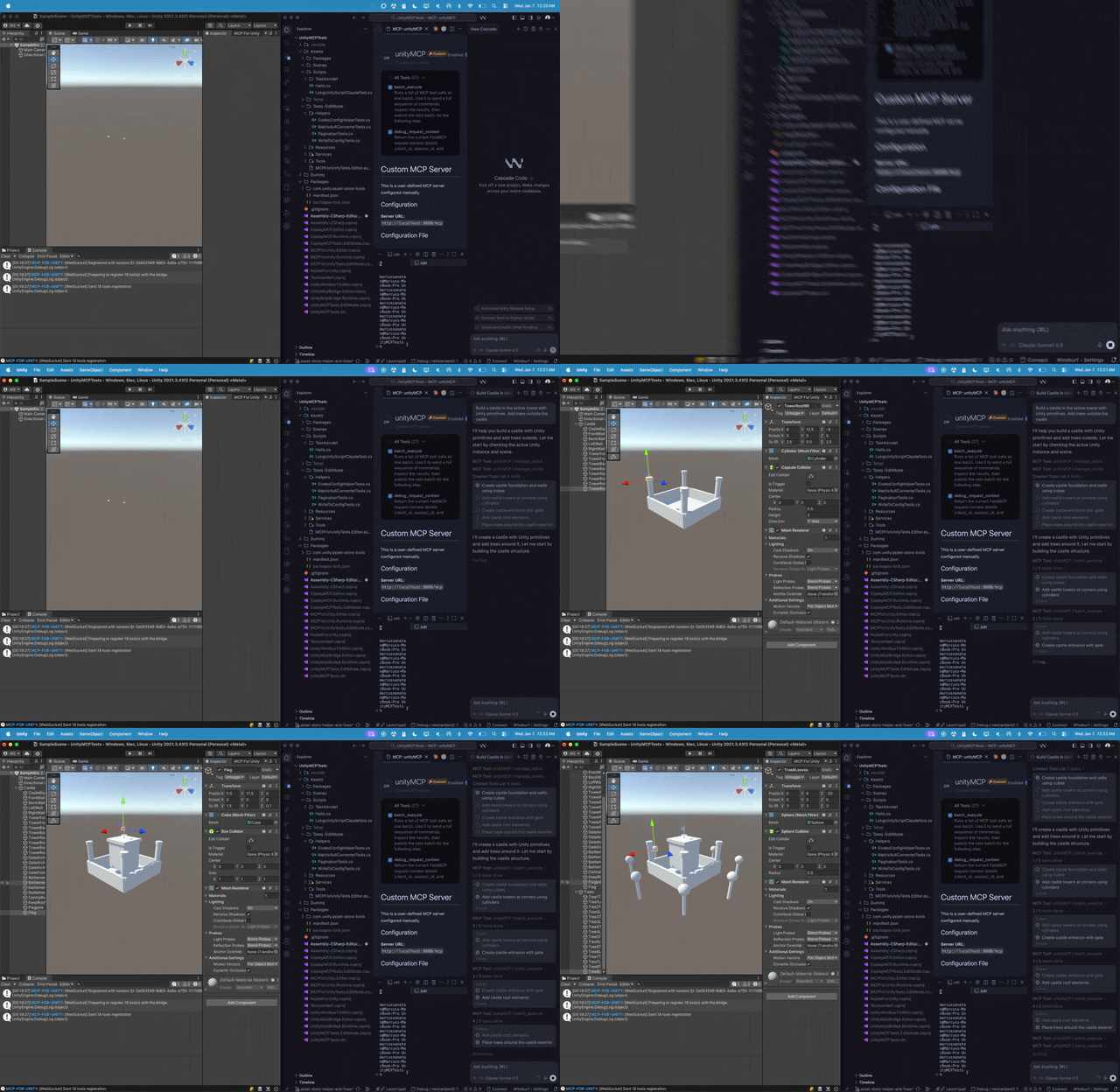
Create your Unity apps with LLMs. MCP for Unity bridges AI assistants — Claude, Codex, VS Code, local LLMs, and more — with your Unity Editor via Model Context Protocol. Give your LLM the tools to manage assets, control scenes, edit scripts, run tests, and automate your game dev workflows.
Recent Updates
- v10.0.0 (2026-06-30)
- v9.7.3 (2026-06-15)
- v9.7.1 (2026-05-24)
- v9.7.0 (2026-05-22)
- v9.6.8 (2026-04-27)
Full history: Release Notes.
What it does
Control the Unity Editor in natural language from any MCP client — create scenes & GameObjects, edit C# scripts, manage assets, run tests, profile, and build. 47 focused MCP tool entrypoints, any client, free & MIT.
Browse the full tool catalog →
Quickstart
Requirements: Unity 2021.3 LTS → 6.x · Python 3.10+ (via uv). Works with any MCP client — Claude Desktop & Code, Cursor, VS Code, Windsurf, Cline, Gemini CLI, and more.
- Install — Unity → Package Manager → Add from git URL:
https://github.com/CoplayDev/unity-mcp.git?path=/MCPForUnity#main(pin#v10.0.0for this release, oropenupm add com.coplaydev.unity-mcp) - Configure —
Window → MCP for Unity → Configure All Detected Clients. - Prompt — "Create a cube at the origin and add a Rigidbody." The cube appears in seconds.
Community
- Discord — chat with maintainers and other contributors
- Issues — bugs and feature requests
- Discussions — design ideas and broader questions
- Security: see SECURITY.md for private reporting
Contributing
See CONTRIBUTING.md. Branch off beta, not main. The full dev setup, testing, and release process live in the Contributing docs.
Advanced
- Multiple Unity instances — Multi-Instance Routing
- Tool groups (vfx / animation / ui / testing / etc.) — Tool Groups
- v10 asset generation and upgrade notes — v10 Migration
- Roslyn script validation — Roslyn Validation
- Remote-hosted server with auth — Remote Server Auth
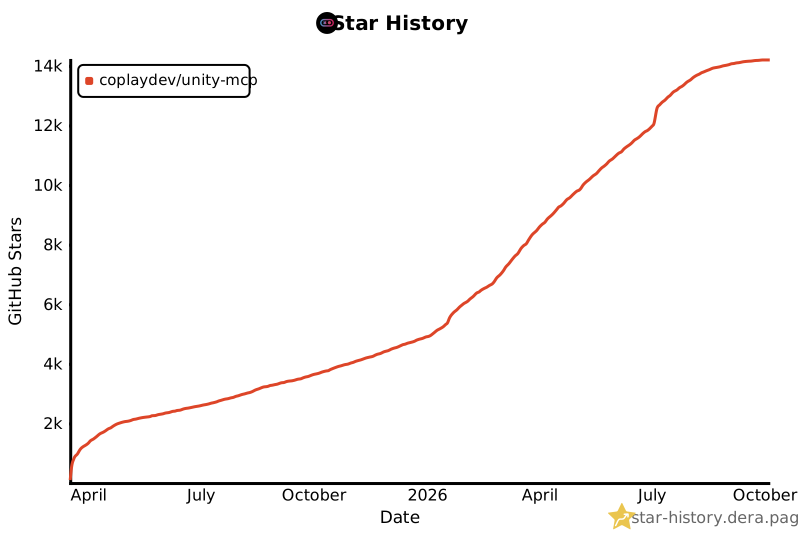
Star History
Citation
If MCP for Unity helped your research, please cite it.
@inproceedings{wu2025mcpunity,
author = {Wu, Shutong and Barnett, Justin P.},
title = {{MCP-Unity}: {Protocol-Driven} Framework for Interactive {3D} Authoring},
year = {2025},
isbn = {9798400721366},
publisher = {Association for Computing Machinery},
address = {New York, NY, USA},
url = {https://doi.org/10.1145/3757376.3771417},
doi = {10.1145/3757376.3771417},
series = {SA Technical Communications '25}
}
Unity AI Tools by Aura
Aura offers 2 AI tools for Unity:
- MCP for Unity is available freely under the MIT license.
- Aura for Unity is a premium Unity/Unreal AI assistant built for game devs.
Disclaimer
This project is a free and open-source tool for the Unity Editor, and is not affiliated with Unity Technologies.
License: MIT — see LICENSE.
Files in the repo
- .claude
- .github
- CustomTools
- docs
- MCPForUnity
- scripts
- Server
- TestProjects
- tools
- unity-mcp-skill
- website
- .dockerignore
- .gitattributes
- .gitignore
- .mcpbignore
- CLAUDE.md
- CODE_OF_CONDUCT.md
- CONTRIBUTING.md
- docker-compose.yml
- LICENSE
- manifest.json
- mcp_source.py
- README.md
- SECURITY.md
Discussion (0)
Ask about usage, or say what you built with itSign in to join the discussion.
No comments yet. Be the first to say what this is good for.
More connectors

Universal provider proxy for OpenAI Codex & Claude Code — use any LLM (Claude, Gemini, Grok, DeepSeek, Ollama…) with Codex CLI, App, SDK, and Claude Code
Git-native persistent memory for AI coding agents. Implements Google OKF v0.2 with sub-300µs in-memory BM25 search, embedded MCP server, and progressive disclosure. Slashes token bloat by 80% with zero external databases or dependencies. Built in pure Go.
Local-first code intelligence graph for MCP and CLI. Builds a persistent map of your codebase so AI coding tools read only what matters, with benchmarked context reductions on reviews and large-repo workflows.
Stop your AI from making things up — it proposes, deterministic tools decide, every claim checked against ground truth with evidence. Grounded facts and context survive resets. Reverse engineering is the proving ground. MCP server + CLI.
20 MB lightweight cross-platform database client for 90+ databases, including MySQL, PostgreSQL, SQLite, Redis, MongoDB, DuckDB, SQL Server, and Dameng. Built-in AI, MCP Server, CLI, desktop and Docker. | 轻量级跨平台数据库管理工具,支持 MySQL、PostgreSQL、SQLite、Redis、MongoDB、达梦等 90+ 数据库,提供桌面端、Docker、CLI、内置 AI 助手和 MCP Server。