
palmier-io/
palmier-pro

macOS video editor built for AI
14k
This repository is a React and TypeScript app for drafting, scheduling, and posting LinkedIn content. It uses Gemini AI for generation and research, a calendar for planning, and LinkedIn OAuth for direct posting.
Builders who want an AI app for LinkedIn posts, planning, and scheduling.
You can draft and schedule LinkedIn content in one place instead of managing posts manually.
Generates LinkedIn posts with Gemini AI.
Creates text posts, image posts, and carousel or document posts.
Researches topics and best practices before writing.
Lets you schedule and manage posts in a calendar view.
Creates multiple post variations at once.
Posts to LinkedIn through OAuth integration.
git clone https://github.com/AgriciDaniel/linkedin-content-creator.git
cd linkedin-content-creator
npm install
cp .env.example .env
# Start the development server
npm run dev

# Start with OAuth proxy server (for LinkedIn posting)
npm run dev:full
npm run build
npm run preview
# Run all E2E tests
npm run test:e2e

# Run tests with UI
npx playwright test --headed

# Run specific test file
npx playwright test e2e/app.spec.ts
An AI-powered application for generating and scheduling engaging LinkedIn posts. Built with React, TypeScript, and powered by Google's Gemini AI.
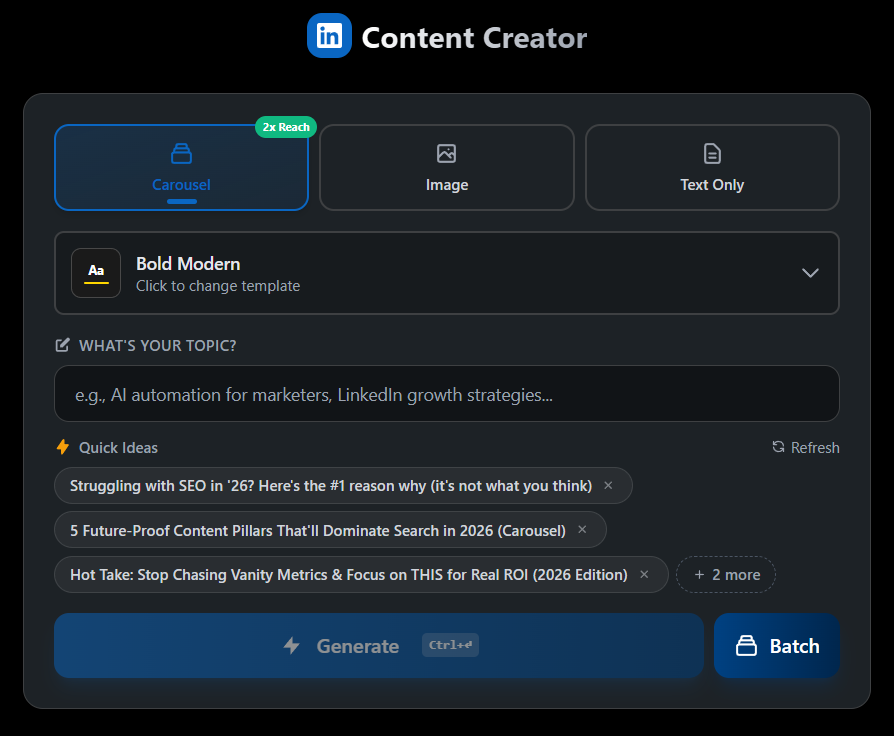
Clone the repository
git clone https://github.com/AgriciDaniel/linkedin-content-creator.git
cd linkedin-content-creator
Install dependencies
npm install
Configure environment variables
Copy .env.example to .env and fill in your API keys:
cp .env.example .env
Required API Keys
| Service | Required | Purpose | Get it from |
|---|---|---|---|
| Gemini API | Yes | AI content generation | Google AI Studio |
| LinkedIn OAuth | Yes | Post to LinkedIn | LinkedIn Developers |
| Firecrawl API | Optional | Web research | Firecrawl |
Add your Gemini API key in the app's Settings panel, or set it in .env.local:
GEMINI_API_KEY=your_gemini_api_key
http://localhost:5000 (main app)http://localhost:5001 (OAuth proxy server)openidprofilew_member_social.env# Start the development server
npm run dev
# Start with OAuth proxy server (for LinkedIn posting)
npm run dev:full
npm run build
npm run preview
# Run all E2E tests
npm run test:e2e

# Run tests with UI
npx playwright test --headed

# Run specific test file
npx playwright test e2e/app.spec.ts
├── components/        # React components
├── services/          # API and business logic services
├── e2e/              # Playwright E2E tests
├── server/           # OAuth proxy server
├── public/           # Static assets
└── types/            # TypeScript type definitions
The app includes comprehensive E2E tests:
App created by Agrici Daniel
Join our community for tips, updates, and support:
MIT License - see LICENSE for details.
Built by Agrici Daniel - AI Workflow Architect.
Sign in to join the discussion.
No comments yet. Be the first to say what this is good for.
macOS video editor built for AI

Powerful AI Client

Open-source multi-agent AI desktop client — build and command your AI agent team through conversation. A commander LLM dispatches sub-agents in parallel or in series; agents self-evolve via reflection and skill crystallization. Local-first, BYO LLM keys (Claude · OpenAI · Gemini · DeepSeek · Kimi · GLM · Qwen). macOS / Windows / Linux.

Natively — Free open-source AI meeting assistant, interview copilot, and note taker. The best alternative to Cluely, Otter, Granola, Final Round AI, Fireflies, and Interview Coder. Real-time transcription, AI meeting notes, lecture recording, local RAG, BYOK, and stealth mode. Runs locally. No subscriptions. No data breaches.

An offline-first scientific writing workspace powered by Claude. LaTeX + Python + 100+ scientific skills all running locally.
A Plugin-Based Multi-Agent System for In-Editor Academic Writing, Review, and Editing