




HKUDS/
Vibe-Trading

HKUDS/Vibe-TradingOther
"Vibe-Trading: Your Personal Trading Agent"
33k
Natively is a desktop app for real-time transcription, meeting notes, interview help, and local memory. It runs on macOS and Windows, supports BYOK or local models, and keeps data on your machine by default.
People who want a local copilot for meetings, interviews, and lecture notes.
You can capture conversations, turn them into notes, and ask follow-up questions from local history.
Captures meeting audio live and turns speech into text with low latency.
Generates notes from live conversations and supports different note styles through built-in modes.
Stores and searches past meetings locally so you can ask about previous conversations.
Uses PDFs, DOCX, and TXT files as context for answers.
Hides the app during screen sharing and keeps the interface out of the way.
Works with your own API keys or local Ollama models.
xattr -cr /Applications/Natively.app
xattr -cr ~/Downloads/Natively-2.0.2-arm64.dmg # Or your specific filename
git clone https://github.com/Natively-AI-assistant/natively-cluely-ai-assistant.git
cd natively-cluely-ai-assistant
npm install
npm run build:native
npm start
If you’re looking for a hosted desktop recording API, consider checking out Recall.ai, an API that records Zoom, Google Meet, Microsoft Teams, in-person meetings, and more.
The best free alternative to Cluely, Final Round AI, LockedIn AI, and Interview Coder.
Same UI as Cluely. More features. $0 for personal/non-commercial use. Source available. No data breaches.






Competitors charge $20–$149/month, store your data on their servers, and one already breached 83,000 users. Natively costs $0, runs locally, and has never had a data breach. Your keys, your models, your machine.



Requires macOS 12+ (Apple Silicon & Intel) or Windows 10/11
👥 9,000+ Users · 🔥 700+ DAU · 💸 $0 vs $149/mo rivals · ⚡ <500ms latency · 🛡️ 0 data breaches
Natively started as a pixel-perfect recreation of Cluely's interface — then kept going. If you've used Cluely, you already know how to use Natively. Same overlay, same workflow, same shortcuts. Except it's free for personal, educational, research, and non-commercial use, source-available, runs locally, supports any LLM, and has never breached a single user's data.
Looking for a free personal-use Cluely alternative? A source-available Cluely clone? You found it.
"Natively is significantly faster than Cluely when it comes to response time and screen analysis. The latency is practically non-existent."
— Premium User
"Just wanted to say thanks! Natively helped me completely crack the first two rounds of my Software Engineering interviews. The responses were incredibly fast and accurate."
— Private Email Feedback
"Used the free version of Natively for my interviews and just landed a massive summer internship. It took all the stress out of the live coding and behavioral rounds!"
— Private Email Feedback
While other tools act as simple API wrappers, Natively is a complete, native intelligence system designed specifically for high-stakes meetings and interviews.
Every star pushes Natively higher in GitHub search, helping developers and job seekers find a free, private alternative instead of paying $149/month for tools that store their data on someone else's server.

This demo shows a complete live meeting scenario:
| Feature | Natively | Cluely | Pluely | LockedIn AI | Final Round AI |
|---|---|---|---|---|---|
| Price | ✅ Free (BYOK) | ⚠️ $20/mo | ✅ Free | ❌ $55–70/mo | ❌ $149/mo |
| Source license | Personal-use source license | ❌ | ✅ | ❌ | ❌ |
| Local data / private | ✅ Yes | ❌ Cloud servers | ✅ Yes | ❌ Cloud servers | ❌ Cloud servers |
| Any LLM (BYOK) | ✅ Yes | ❌ Vendor-locked | ⚠️ Limited | ❌ Vendor-locked | ❌ Vendor-locked |
| Local AI (Ollama) | ✅ Yes | ❌ | ❌ | ❌ | ❌ |
| Local Whisper (On-Device) | ✅ Yes | ❌ | ❌ | ❌ | ❌ |
| Real-time <500ms | ✅ Yes | ⚠️ 5–90s lag | ✅ Yes | ✅ ~116ms | ⚠️ Slowest |
| Dual audio channels | ✅ System + Mic | ❌ Single stream | ❌ | ❌ | ❌ |
| Local RAG memory | ✅ SQLite + sqlite-vec | ❌ | ❌ | ❌ | ❌ |
| Meeting history | ✅ Full dashboard | ⚠️ Limited | ❌ | ❌ | ⚠️ Limited |
| Screenshot OCR | ✅ Yes | ⚠️ Limited | ❌ | ✅ Yes | ⚠️ Limited |
| Stealth mode | ✅ Undetectable | ❌ | ❌ | ❌ | ❌ Visible to proctors |
| Process Disguise | ✅ Terminal, Settings, etc | ❌ | ❌ | ❌ | ❌ |
| Resume & context | ✅ Pro | ❌ | ❌ | ✅ Yes | ✅ Yes |
| Custom Personas/Modes | ✅ Pro | ✅ Yes | ❌ | ❌ | ⚠️ Limited |
| Custom Context & Notes | ✅ Pro | ❌ | ❌ | ❌ | ❌ |
| Multi-Key API Pools | ✅ Yes | ❌ | ❌ | ❌ | ❌ |
| Profile Intel Router | ✅ Yes | ❌ | ❌ | ❌ | ❌ |
| Eager Code Expansion | ✅ Yes | ❌ | ❌ | ❌ | ❌ |
| Live Follow-Up Resolver | ✅ Yes | ❌ | ❌ | ❌ | ❌ |
| Real-Time Latency Trace | ✅ Yes | ❌ | ❌ | ❌ | ❌ |
| Phone Link Companion | ✅ Yes | ❌ | ❌ | ❌ | ❌ |
| Auto-Calendar Sync | ✅ Yes | ❌ | ❌ | ❌ | ❌ |
| Smart Task Sync | ✅ Yes | ❌ | ❌ | ❌ | ❌ |
| Speaker Diarization | ✅ Yes | ❌ | ❌ | ❌ | ❌ |
| Hands-Free Auto Answer | ✅ Beta | ❌ | ❌ | ❌ | ❌ |
| Browser Page Capture | ✅ Chrome extension | ❌ | ❌ | ❌ | ❌ |
| JD Role Insight | ✅ Pro | ❌ | ❌ | ⚠️ Limited | ⚠️ Limited |
| 9 Built-in Modes | ✅ Yes | ⚠️ Limited | ❌ | ❌ | ⚠️ Limited |
| Codex CLI Integration | ✅ Yes | ❌ | ❌ | ❌ | ❌ |
| Offline SLM Mode | ✅ Yes | ❌ | ❌ | ❌ | ❌ |
| Stateful Intelligence OS | ✅ Yes | ❌ | ❌ | ❌ | ❌ |
| Hindsight LTM Vector DB | ✅ Yes | ❌ | ❌ | ❌ | ❌ |
| Regional STT Relay | ✅ Yes | ❌ | ❌ | ❌ | ❌ |
| Data breach history | ✅ None | ❌ 83k users exposed | ✅ None | ✅ None | ✅ None |
Legend: ✅ Full support · ⚠️ Partial or limited · ❌ Not available
The UI is intentionally familiar — if you've used Cluely, there's zero learning curve.
Cluely's mid-2025 data breach exposed personal information, full interview transcripts, and screenshots of 83,000 users. Every word spoken during an interview was stored on their servers — and then leaked. They charge $20/month for this privilege.
By default, Natively stores everything on your local machine, with only limited anonymous telemetry (basic GA4 install tracking, zero personal data). Your transcripts, API keys, and screenshots never leave your machine when using your own keys. The codebase is source-available under the Natively Personal Use Source License v1.0 and auditable. Zero breaches — that is the only acceptable standard for a tool that listens to your interviews.
Unlike Cluely's rigid interface, Natively also gives you complete control over the AI: Custom Persona Modes (Tech, Sales, Recruiting) to strictly format behavior, and Reference Files capabilities to upload PDFs so the AI knows exactly the context of the job or meeting before it starts.
LockedIn AI is the most expensive tool in the category at $55–70/month. It locks you into a single cloud LLM with no option for local inference. Every transcript and response passes through their servers.
Natively supports every major model (Gemini, GPT, Claude, Groq) via bring-your-own-key, and offers 100% offline mode through Ollama. You pay only for the API tokens you actually use — or pay nothing at all by running Llama 3 locally. No subscription, no vendor lock-in.
Final Round AI is the most expensive option at $149/month, optimized for pre-interview prep and mock interviews but with the slowest live latency in the category. Critically, its taskbar icon is visible to proctoring software, making it detectable during monitored interviews.
Natively delivers <500ms end-to-end latency using Rust-based native audio capture with Zero-Copy ABI Transfers. Its undetectable stealth mode hides from the dock, disguises process names, and syncs state across all windows — battle-tested and hardened across five major releases.
Pluely is a solid lightweight alternative (~10MB, Tauri-based) and it has Linux support, which Natively does not yet offer. Credit where it is due.
But Pluely is a basic overlay. It has no local RAG, no meeting history, no dual audio channels, and no dashboard. Natively is a complete intelligence system: it remembers your past meetings via local vector search, separates system audio from your microphone, and gives you a full management dashboard with export to Markdown, JSON, and Text.
Interview Coder is a paid tool focused specifically on coding interview assistance. Natively does everything Interview Coder does — and more — for free:
| Natively | Interview Coder | |
|---|---|---|
| Price | ✅ Free (BYOK) | ❌ Paid |
| Source license | Personal-use source license | ❌ |
| Works on LeetCode / HackerRank | ✅ | ✅ |
| Screenshot + OCR analysis | ✅ | ✅ |
| Real-time overlay | ✅ | ✅ |
| Local AI / offline mode | ✅ Ollama | ❌ |
| Behavioral interview support | ✅ | ❌ |
| System design support | ✅ | ❌ |
| Meeting history & RAG | ✅ | ❌ |
| Any LLM (BYOK) | ✅ | ❌ Locked |
| Data stored locally | ✅ | ❌ Cloud |
Natively covers the full interview loop — not just the coding round.
Parakeet AI offers basic live meeting assistance but has no persistent memory, no meeting history, and no local vector search. Natively remembers your past meetings via local RAG, lets you ask questions across all your history, and gives you a full dashboard to manage, export, and search everything. Furthermore, Natively includes Custom Persona Modes allowing the AI to structure notes and behave optimally for specific flavors of conversations, instead of relying on Parakeet's one-size-fits-all model.
Natively works as a free, undetectable AI coding interview assistant for standard online assessments. It captures your screen, analyzes the problem, and gives you real-time hints, solutions, and explanations — all through an invisible overlay that doesn't interfere with your coding environment.
Works undetected on:
How it works:
⚠️ Important: Natively is not designed to bypass dedicated proctoring software like Pearson VUE, ProctorU, or Respondus Lockdown Browser — these run at the OS level and are a different category entirely. For standard online coding assessments without dedicated proctoring software, Natively's stealth mode is not detectable.






Stop managing four separate services. One key. Zero configuration.
Are you managing separate accounts for your AI reasoning, live transcription, fast inference, and web search? Juggling multiple API keys, rate limits, and invoices across completely different categories of tools is unnecessary overhead. Natively API replaces all of those categories with one flat subscription.
Under the hood, Natively API connects you to the absolute best models for the optimal user experience:
Your current unbundled stack:
Replaced by Natively API:
| Feature | Standard ($8/mo) | Pro ($15/mo) | Max ($25/mo) | Ultra ($35/mo) |
|---|---|---|---|---|
| All-in-One Cloud AI Access | ✅ Yes | ✅ Yes | ✅ Yes | ✅ Yes |
| Real-Time Transcription | ✅ Yes | ✅ Yes | ✅ Yes | ✅ Yes |
| Included Natively Pro Desktop App | ❌ No | ✅ Yes | ✅ Yes | ✅ Yes |
| Premium Support | ❌ No | ✅ Yes | ✅ Yes | ✅ Yes |
| Higher Monthly Quotas | ❌ No | ✅ Yes | ✅ Yes | ✅ Yes |
Don't start the long way. Skip the 20-minute manual setup. One Natively subscription skips all of it — AI, transcription, and web search are ready immediately.




While Natively is free for personal, educational, research, and non-commercial use, we also offer a Pro Edition (available as Lifetime or Yearly subscriptions) designed specifically for power users and job seekers. Purchasing a Pro license gives you an edge in the job market, all while directly supporting the continued development of Natively.
We've launched the official $NAT token on Printr! Holders who maintain a specific balance of $NAT tokens in their connected wallet automatically unlock access to all Natively Pro features.
| Feature | Natively Free | Natively Pro |
|---|---|---|
| Bring Your Own Key (BYOK) Models | ✅ | ✅ |
| Local AI Support (Ollama) | ✅ | ✅ |
| Local Whisper STT (On-Device) | ✅ | ✅ |
| Real-Time Speech-to-Text (<500ms) | ✅ | ✅ |
| Multi-Key API Pools & Key Rotation | ✅ | ✅ |
| Profile Intelligence Router (v3) | ✅ | ✅ |
| Auto Answer (Beta) | ✅ | ✅ |
| Browser Companion & Page Capture (Chrome) | ✅ | ✅ |
| 9 Built-in Modes (incl. Seminar, Call Center) | ✅ | ✅ |
| Skills — Upload & Manage Custom Personas | ✅ | ✅ |
| Meeting Notes with Follow-Up Email Draft | ✅ | ✅ |
| Eager Code UI Expansion | ✅ | ✅ |
| Live Follow-Up Resolver | ✅ | ✅ |
| Real-Time Latency Tracing | ✅ | ✅ |
| Two New Meeting UI Styles (Liquid Glass/Modern) | ✅ | ✅ |
| Live Contextual Assistant | ✅ | ✅ |
| Screenshot & Slide OCR Analysis | ✅ | ✅ |
| Undetectable & Stealth Modes | ✅ | ✅ |
| Meeting Dashboard & Offline RAG History | ✅ | ✅ |
| Stateful "Intelligence OS" | ✅ | ✅ |
| Hindsight Long-Term Memory (LTM) | ❌ | ✅ |
| Job Description (JD) & Resume Context Awareness | ❌ | ✅ |
| Automated Company Research & Dossiers | ❌ | ✅ |
| Role Insight — JD Requirement Coverage Scoring | ❌ | ✅ |
| Live Salary & Offer Negotiation Copilot | ❌ | ✅ |
| Custom Persona Modes (Sales, Tech, etc.) | ❌ | ✅ |
| Custom Context & Notes | ❌ | ✅ |
| Reference Files (PDF/DOCX/TXT upload) | ❌ | ✅ |
| Phone Link Companion App | ❌ | ✅ |
| Auto-Calendar & Task Sync | ❌ | ✅ |
| Speaker Diarization | ❌ | ✅ |
| Priority Feature Access & Support | ❌ | ✅ |


Everything since v2.7.0 in one release. The 2.8.0–2.8.6 builds were never published here, so their work ships in this update too.
| Feature | What it does |
|---|---|
Auto Answer Beta | Answers appear on their own the moment the other person finishes a question. Natively judges whether an answer is actually wanted and stays silent when it isn't — no card to dismiss, no button to press. Off by default; enable in Settings → General. |
Browser Companion Chrome | Press ⌘/Ctrl+Y to pull the page you're looking at into your next answer — a job description, a coding problem, documentation. One click enables it everywhere. |
Hindsight Long-Term Memory Pro | A local vector database that indexes your past meetings, profiles and documents, so Natively recalls what was said weeks ago — not just this session. Opt-in from Settings. |
Role Insight Pro | Paste a job description and see every requirement pulled out, checked against your profile, and scored for coverage. |
| Seminar & Call Center Modes | Seminar for strict file-grounded Q&A (thesis defenses, paper walkthroughs); Call Center for support calls framed as issue → resolution → escalation. Brings the built-in count to 9. |
| NVIDIA NIM & NVIDIA Speech | A new provider for both text and real-time transcription, with nine streaming models to choose from. |
| Skills Upload & Delete | Add a skill as a file or folder with a preview before it installs, and remove ones you no longer want — no more editing folders by hand. |
Natively is a desktop AI assistant for live situations:
It provides:
All while remaining invisible, fast, and privacy-first.
You explicitly control:
[!NOTE] macOS Users (Both Apple Silicon & Intel Macs supported):
"Unidentified Developer": If you see this, Right-click the app > Select Open > Click Open.
"App is Damaged": If you see this, run the command in Terminal based on your download:
For .zip downloads:
xattr -cr /Applications/Natively.appFor .dmg downloads:
- Open Terminal and run:
xattr -cr ~/Downloads/Natively-2.0.2-arm64.dmg # Or your specific filename- Install the natively.dmg
- Open Terminal and run:
xattr -cr /Applications/Natively.app
Natively is 100% free to use with your own keys.
Connect any speech provider and any LLM. No subscriptions, no markups, no hidden fees. All keys are stored locally.
Connect Natively to any leading model or local inference engine.
| Provider | Best For |
|---|---|
| Gemini 3.1 / 3.7 Series | Recommended (and the default): 2M-token context & low cost. |
| OpenAI (GPT-5.4 & o3) | High reasoning capabilities. |
| Anthropic (Claude 4.6) | Coding & complex nuanced tasks. |
| Groq (Llama 3.3/Scout 4) | Insane speed (near-instant answers) & screenshot analysis. |
| NVIDIA NIM | NVIDIA-hosted open models, plus Riva streaming speech. |
| LiteLLM Gateway | Route through your own proxy with a built-in model picker. |
| Ollama / LocalAI | 100% Offline & Private (No API keys needed). |
| OpenAI-Compatible | Connect to any custom endpoint (vLLM, LM Studio, etc.) |
Note: You only need ONE speech provider to get started. We recommend Google STT ,Groq or Deepgram for the fastest real-time performance.
Your credentials:
What You Need:
Setup Summary:
roles/speech.clientgit clone https://github.com/Natively-AI-assistant/natively-cluely-ai-assistant.git
cd natively-cluely-ai-assistant
npm install
npm run build:native
Create a .env file:
# Cloud AI
GEMINI_API_KEY=your_key
GROQ_API_KEY=your_key
OPENAI_API_KEY=your_key
CLAUDE_API_KEY=your_key
GOOGLE_APPLICATION_CREDENTIALS=/absolute/path/to/service-account.json

# Speech Providers (Optional - only one needed)
DEEPGRAM_API_KEY=your_key
ELEVENLABS_API_KEY=your_key
AZURE_SPEECH_KEY=your_key
AZURE_SPEECH_REGION=eastus
IBM_WATSON_API_KEY=your_key
IBM_WATSON_REGION=us-south

# Local AI (Ollama)
USE_OLLAMA=true
OLLAMA_MODEL=llama3.2
OLLAMA_URL=http://localhost:11434

# Default Model Configuration
DEFAULT_MODEL=gemini-3.1-flash-lite-preview
npm start
npm run dist
This runs: Vite build → TypeScript compile → native module build → electron-builder
Natively can answer without being asked. When the other person finishes a question, an LLM judge decides whether it is genuinely a question aimed at you — and either answers it or stays silent.
A Chrome extension that hands the page you're on to Natively.
Create local SKILL.md files to give the AI specialized instructions for any task. Skills are invoked directly from the overlay chat:
/ or $ to open a live skill picker — filtered autocomplete with arrow-key navigation, just like Claude Code's slash commands/skill-name directly to activate a skill inlineSKILL.md file or a whole skill folder and preview what it does before it installs — no manual file copyingSKILL.md with YAML frontmatter name: and description: in ~/Library/Application Support/natively/skills/<folder>/Natively understands that listening to a meeting and talking to an AI are different tasks. We treat them separately:
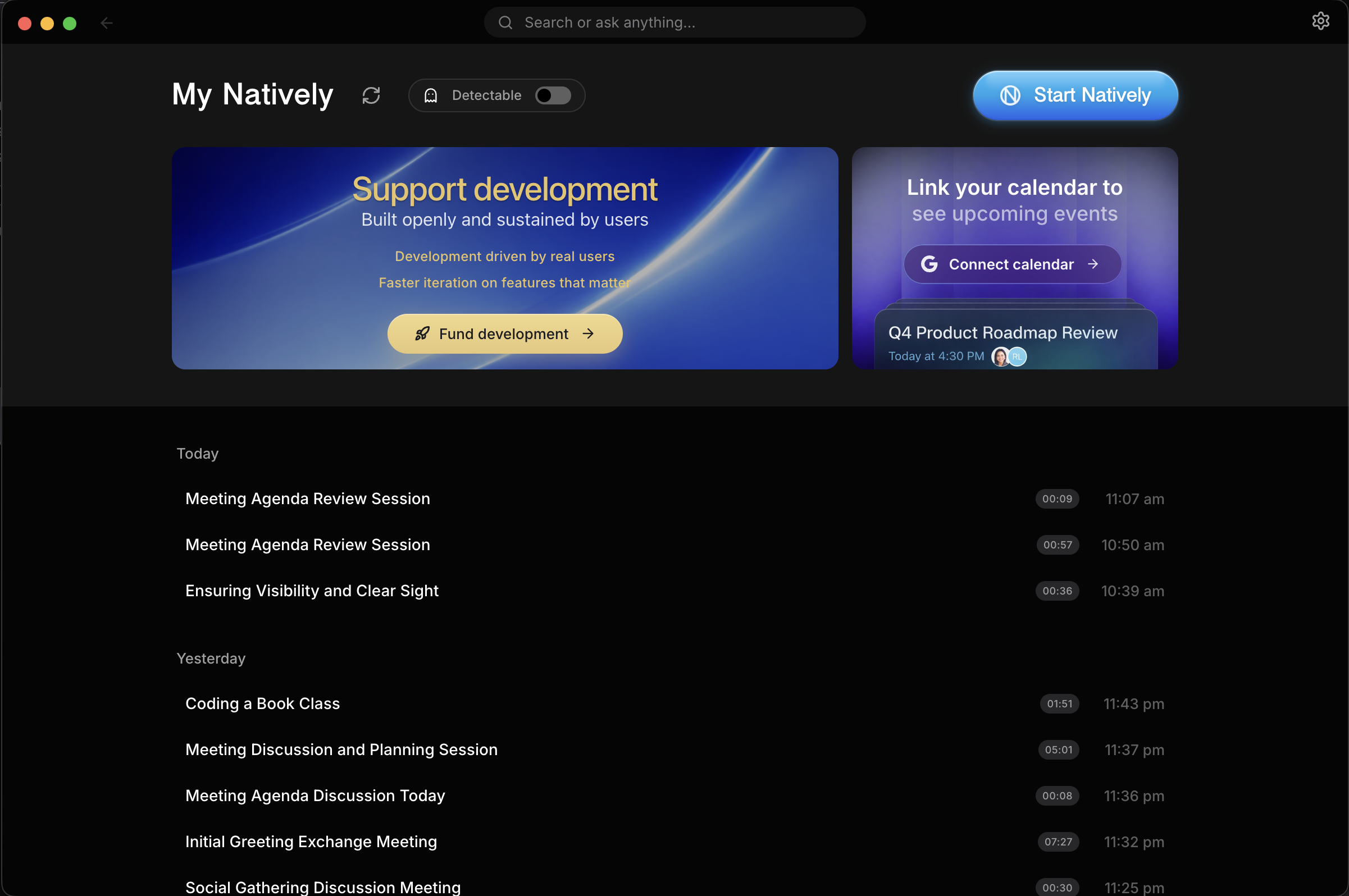
Cmd+K / Ctrl+K)sqlite-vec).Natively includes a powerful, local-first meeting management system to review, search, and manage your entire conversation history.
timeline
    title Natively Product Roadmap
    section Recently Completed
        Personas : ✅ 9 Built-in Modes & Templates
        Auto Answer : ✅ Hands-Free Answering (Beta)
        Browser : ✅ Chrome Companion Extension
        Notes : ✅ Rebuilt Meeting Notes
        Trial : ✅ 10-Minute Free Trial
    section Short-term (1-3 mos)
        System Design : Visualization MVP
        Tokens : Integration POC
    section Medium-term (3-6 mos)
        Personas : Persona library expansion
        System Design : Advanced diagram types
        Tokens : Community features
        Platform : Mobile app development
    section Long-term (6+ mos)
        Collaboration : Collaborative features
        Ecosystem : Plugin ecosystem
        Platform : Multi-language support
Natively processes audio, screen context, and user input locally, maintains a rolling context window, and sends only the required prompt data to the selected AI provider (local or cloud).
No raw audio, screenshots, or transcripts are stored or transmitted unless explicitly enabled by the user.
napi::Buffer — enabling continuous audio capture without V8 garbage collection pressure, achieving significantly lower latency and CPU usage than typical Electron-based competitors)sqlite-vec)Natively is intended for:
Users are responsible for complying with:
This project does not encourage misuse or deception.
Contributions are welcome! Please see our CONTRIBUTING.md for full guidelines on how to get started.
Quality pull requests will be reviewed and merged.
| Maintainer | Role | Support |
|---|---|---|
| @evinjohnn | macOS Build |  |
| @razllivan | Windows Build | |
Licensed under the Natively Personal Use Source License v1.0.
Natively is source-available, not open-source.
You are allowed to view, fork, modify, and run this code for personal, educational, research, and non-commercial use.
You are not allowed to use this codebase, forks, modified versions, or substantially similar derivative works for SaaS, resale, paid tools, subscriptions, client work, commercial products, startup products, agency work, or any other profit-oriented use without written permission from Natively AI Private Limited.
Public forks must clearly state that they are based on Natively, originally developed by Natively AI Private Limited.
Commercial license requests: natively.contact@gmail.com · https://natively.software
Note: This project is available for sponsorships, ads, or partnerships – perfect for companies in the AI, productivity, or developer tools space.
Star this repo if Natively helps you succeed in meetings, interviews, or presentations!
Yes for personal, educational, research, and non-commercial use. Natively is source-available under a personal-use source license. You only pay for what you use by bringing your own API keys (Gemini, OpenAI, Anthropic, etc.), or use it 100% free by connecting to a local Ollama instance. Commercial use requires a separate written license.
Yes. Natively uses a Rust-based system audio capture that works universally across any desktop application, including Zoom, Microsoft Teams, Google Meet, Slack, and Discord.
Natively is built on Privacy-by-Design. By default, all transcripts, vector embeddings (Local RAG), and keys are stored locally on your machine. We collect only limited anonymous telemetry (no personal user data).
Natively is a powerful assistant for any professional situation. However, users are responsible for complying with their company policies and interview guidelines.
Simply install Ollama, run a model (e.g., ollama run llama3), and Natively will automatically detect it. Enable "Ollama" in the AI Providers settings to switch to offline mode.
Auto Answer (Beta) responds without you asking. When the other person finishes a question, Natively judges whether it's genuinely aimed at you and either answers or stays silent — rhetorical asides and questions meant for someone else are ignored. It is off by default; enable it in Settings → General.
No — it's optional. It adds one thing: pressing ⌘/Ctrl+Y hands the page you're currently reading to Natively, so a job description, a coding problem, or a page of documentation becomes context for your next answer. Without it, screenshot OCR still covers anything on screen.
Cluely is a $20/month cloud-based tool that stores all data on their servers. In mid-2025, Cluely suffered a data breach that exposed personal information, transcripts, and screenshots of 83,000 users. Natively is free for personal/non-commercial use, source-available, and stores everything locally. It supports any LLM (not just one vendor), offers local AI via Ollama, and has battle-tested stealth mode. Natively has never had a data breach because there is no server to breach.
Yes. Natively hides from the dock, disguises process names as harmless system utilities (Terminal, Activity Monitor, System Settings), and syncs state across all windows. It has been hardened across five major releases and tested against screen share detection in Zoom, Teams, and Google Meet. This is best-effort, not guaranteed — on macOS 15.4+ Apple can let modern capture tools see it anyway, and a phone camera always can.
Google Meet, Teams, and QuickTime hide Natively automatically — nothing to configure. Zoom is the one exception: whether it respects Natively's "don't capture me" flag depends on one setting.
Go to Zoom → Settings → Share Screen → Advanced → Screen capture mode and choose "Advanced capture with window filtering."
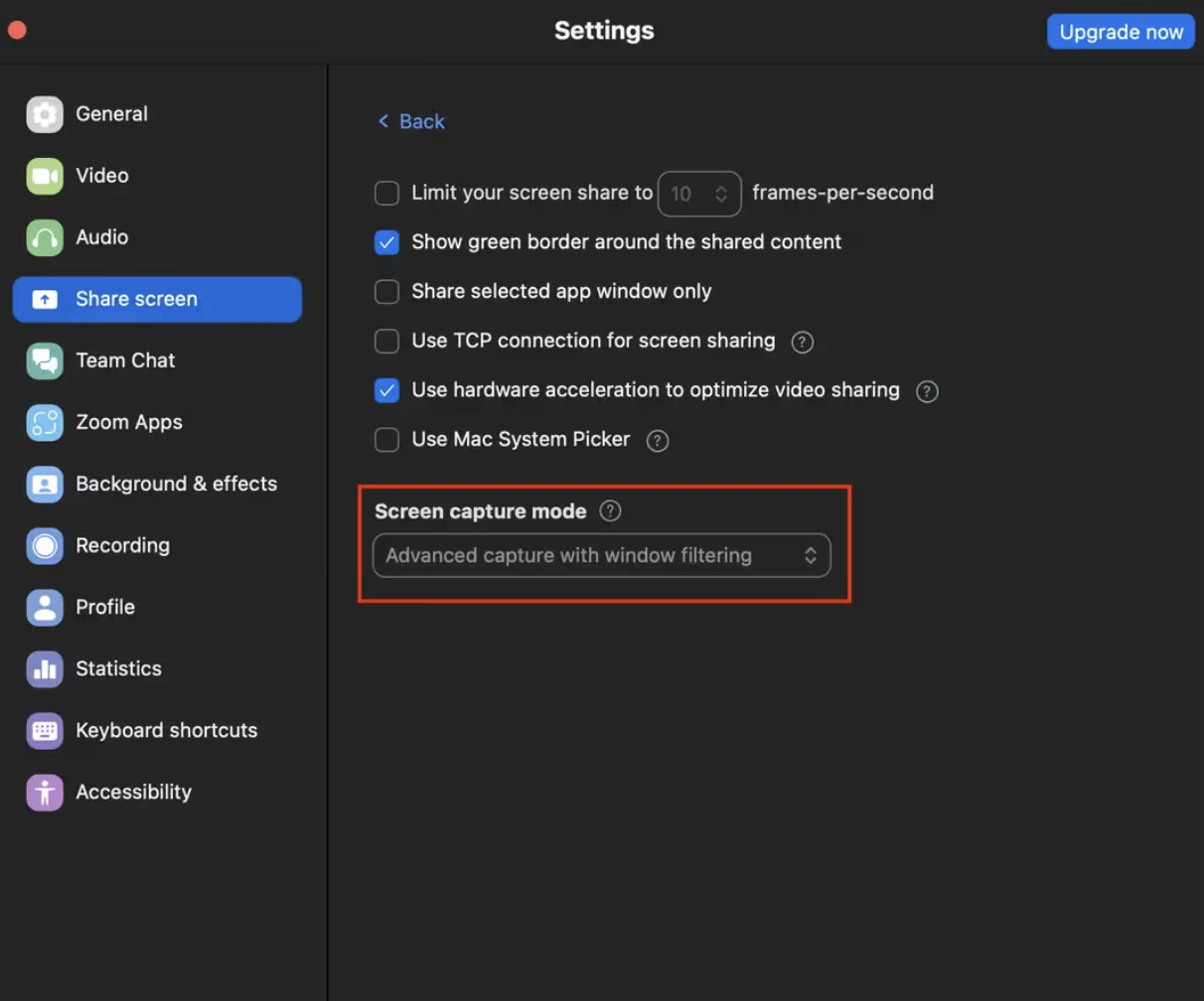
The "...with window filtering" modes tell Zoom to leave out windows that mark themselves as private, which is exactly what Natively does. "Advanced capture without window filtering" grabs the raw screen and will show Natively, so avoid it.
Yes. Natively's screenshot + OCR captures any visible coding problem and returns a full solution through the invisible overlay. It works on LeetCode, HackerRank, CoderPad, Codility, HackerEarth, Karat, and any browser-based coding environment.
For standard online assessments (LeetCode, HackerRank, CoderPad, etc.), Natively is not detectable — it runs as a disguised system process and the overlay never appears in screen recordings or screen shares. It is not designed to bypass dedicated proctoring software like Pearson VUE, ProctorU, or Respondus Lockdown Browser, which operate at the OS level.
Yes. Natively does everything Interview Coder does — screenshot OCR, real-time coding assistance, invisible overlay — and adds behavioral interview support, system design help, local RAG memory, and any-LLM BYOK. All for free.
Natively is a free-for-personal-use, source-available alternative to:
| Tool | What Natively replaces |
|---|---|
| Cluely | Real-time AI meeting copilot — without the $20/mo fee or data breach risk |
| Final Round AI | Live AI interview copilot — without the $149/mo fee or proctor-visible taskbar icon |
| LockedIn AI | Real-time interview assistant — without cloud lock-in or $70/mo |
| Interview Coder | AI coding interview helper — with full meeting context, not just coding rounds |
| Parakeet AI | Live meeting assistant — with local RAG memory and full history dashboard |
| Metaview | Automated meeting notes — source-available and locally stored |
| Otter.ai | Transcription and meeting summaries — without cloud storage |
| Fireflies.ai | Meeting recorder and AI notetaker — fully local storage |
| Teal | Job search and interview assistant — fully local and free |
ai-assistant · meeting-notes · interview-helper · cluely-alternative · cluely · lockhead-ai · lockheed-ai · parakeet-ai · interview-coder · final-round-ai · metaview-alternative · otter-ai-alternative · fireflies-alternative · local-ai · ollama · electron · privacy-first · source-available · real-time-transcription · interview-copilot · ai-meeting-assistant · moltbot
Sign in to join the discussion.
No comments yet. Be the first to say what this is good for.
"Vibe-Trading: Your Personal Trading Agent"

OpenHuman is an open source personal AI for Mac, Windows and Linux — local-first memory, agent orchestration, and deep research.

Your Personal AI Assistant; easy to install, deploy on your own machine or on the cloud; supports multiple chat apps with easily extensible capabilities.
User-friendly AI Interface (Supports Ollama, OpenAI API, ...)

macOS video editor built for AI
AIPOCH Open-Science is an open-source, local-first, model-agnostic AI research workbench for macOS, Windows, and Linux, with scientific agents, Python/R notebooks, data connectors, and reproducible provenance.