
koala73/worldmonitorConnectors
Real-time global intelligence dashboard. AI-powered news aggregation, geopolitical monitoring, and infrastructure tracking in a unified situational awareness interface
86k
Zotero MCP connects your Zotero library to Claude and other MCP-compatible assistants. It exposes search, metadata lookup, annotation tools, citation helpers, and write actions through the Model Context Protocol, with optional semantic search and PDF text extraction. It can run against the local Zotero API, the web API, or a hybrid setup, and it also ships a standalone `zotero-cli` for terminal use. The repository includes setup commands, database sync commands, and Docker support for running the server.
Builders who want Claude Code, Cursor, or another MCP client to work directly with a Zotero research library.
You can ask your agent to find papers, summarize them, inspect citations, and update your library from one place.
Connects Zotero to Claude, ChatGPT-style MCP clients, and other assistants through the Model Context Protocol.
Indexes your library with embeddings so you can search by concept, not just keywords, using local, OpenAI, Gemini, or Ollama models.
Search by title, author, content, citation key, collections, tags, and recent additions, with metadata export in markdown or BibTeX.
Extracts PDF annotations with page numbers, reads Zotero notes, and supports creating or updating notes and annotations.
Adds items by DOI, URL, ISBN, or file, manages collections and tags, and helps find duplicates.
Provides `zotero-cli` for search, browse, and edit workflows in the terminal with JSON output for scripts.
Supports local read-only access, web API access, and hybrid mode with local reads plus web writes.
Can show citation tallies and retraction alerts through the Scite API.
uv tool install zotero-mcp-server
zotero-mcp setup  # Auto-configure (Claude Desktop supported)
pip install zotero-mcp-server
zotero-mcp setup  # Auto-configure (Claude Desktop supported)
pipx install zotero-mcp-server
zotero-mcp setup  # Auto-configure (Claude Desktop supported)
uv tool install "zotero-mcp-server[all]"    # Full install with all features
uv tool install "zotero-mcp-server[semantic]" # Just semantic search
# Check for updates
zotero-mcp update --check-only

# Update to latest version (preserves all configurations)
zotero-mcp update
# Configure during initial setup (recommended)
zotero-mcp setup

# Or configure semantic search separately
zotero-mcp setup --semantic-config-only




Zotero MCP seamlessly connects your Zotero research library with ChatGPT, Claude, and other AI assistants (e.g., Cherry Studio, Chorus, Cursor) via the Model Context Protocol. Review papers, get summaries, analyze citations, extract PDF annotations, and more!
[semantic] extra)[pdf] extra)[scite] extra)zotero-cli)--json on every command for pipelines and agents; short aliases (s, g, ann, coll) for interactive useIf your agent has shell access (Claude Code, Cursor, Codex, Windsurf, Gemini CLI, Amp, OpenCode …), one command teaches it to drive zotero-cli directly:
zotero-mcp install-skill
It detects the harnesses in your project and installs to each — no flags, no per-tool instructions to look up.
Why it matters: an MCP server sends every tool's schema on every request, before you type anything. The skill sits at 98 tokens until the agent decides it is relevant.
| Route | In context | Paid |
|---|---|---|
| MCP server, default profile (38 tools) | 13,448 | every request |
| Agent skill, frontmatter only | 98 | always |
| Agent skill, body loaded | 1,368 | when it fires |
~137x cheaper before either is used, ~10x once the skill has fired. Re-measure any time with python scripts/measure_context_cost.py. This is the fixed context cost only — it does not measure task success or round trips, and a cheaper surface that gets the answer wrong is not cheaper. Details below.
Both routes work, and they share one config. Use the MCP server when your client speaks MCP but has no shell (Claude Desktop, ChatGPT); use the skill when it has a shell.
New to the command line? Try the community-built Zotero MCP Setup — includes a macOS GUI installer (DMG), one-click install scripts for Mac/Windows, and a step-by-step guide. No Terminal experience needed.
The base install is lightweight — it includes search, metadata retrieval, annotations, and write operations. No ML/AI dependencies are pulled in.
uv tool install zotero-mcp-server
zotero-mcp setup  # Auto-configure (Claude Desktop supported)
pip install zotero-mcp-server
zotero-mcp setup  # Auto-configure (Claude Desktop supported)
pipx install zotero-mcp-server
zotero-mcp setup  # Auto-configure (Claude Desktop supported)
Heavy ML/PDF dependencies are separated into optional extras so the base install stays fast and small:
| Extra | What it adds | Install command |
|---|---|---|
semantic | Semantic search via ChromaDB, sentence-transformers, OpenAI/Gemini embeddings | pip install "zotero-mcp-server[semantic]" |
pdf | PDF outline extraction (PyMuPDF) and EPUB annotation support | pip install "zotero-mcp-server[pdf]" |
scite | Scite citation intelligence — tallies and retraction alerts (no account needed) | pip install "zotero-mcp-server[scite]" |
all | Everything above | pip install "zotero-mcp-server[all]" |
For example, with uv:
uv tool install "zotero-mcp-server[all]"    # Full install with all features
uv tool install "zotero-mcp-server[semantic]" # Just semantic search
If you only need basic library access (search, read, annotate, write), the default install with no extras is all you need.
Keep zotero-mcp up to date with the smart update command:
# Check for updates
zotero-mcp update --check-only

# Update to latest version (preserves all configurations)
zotero-mcp update
Zotero MCP now includes powerful AI-powered semantic search capabilities that let you find research based on concepts and meaning, not just keywords.
During setup or separately, configure semantic search:
# Configure during initial setup (recommended)
zotero-mcp setup

# Or configure semantic search separately
zotero-mcp setup --semantic-config-only
Available Embedding Models:
text-embedding-3-small or text-embedding-3-large)gemini-embedding-001)Using Ollama embeddings:
Install and start Ollama, then pull an embedding model before running zotero-mcp update-db:
ollama serve

# Small model: fast and lightweight
ollama pull nomic-embed-text

# Medium model: better multilingual retrieval quality
ollama pull bge-m3
When prompted by zotero-mcp setup --semantic-config-only, choose Ollama and use either nomic-embed-text or bge-m3 as the model name. If you change embedding models later, rebuild the index:
zotero-mcp update-db --force-rebuild
Two semantic_search.embedding_config keys tune the Ollama path for slower
hardware or very large libraries:
"embedding_config": {
  "model_name": "bge-m3",
  "timeout": 600,            // HTTP timeout per /api/embed call (default 120s)
  "request_batch_size": 64   // documents per request (default 64)
}
Raise timeout if indexing reports Read timed out; lower
request_batch_size to make each request cover less GPU work, which usually
fixes timeouts more reliably than raising the timeout alone.
When you choose OpenAI, setup also asks whether database updates should use OpenAI Batch API. Batch updates are cheaper for large libraries, but they are asynchronous: submit the batch, wait for completion, then import the embeddings.
Update Frequency Options:
zotero-mcp update-dbAfter setup, initialize your search database:
# Build the semantic search database (fast, metadata-only)
zotero-mcp update-db

# Submit OpenAI embeddings through Batch API for this update
zotero-mcp update-db --openai-batch

# Check and import completed OpenAI Batch API embeddings
zotero-mcp openai-batch-status
zotero-mcp openai-batch-import

# Force realtime OpenAI embeddings even if Batch API is enabled in config
zotero-mcp update-db --no-openai-batch

# Build with full-text extraction (slower, more comprehensive)
zotero-mcp update-db --fulltext

# Use your custom zotero.sqlite path
zotero-mcp update-db --fulltext --db-path "/Your_custom_path/zotero.sqlite"

# If you have embedding conflicts or changed models, force a rebuild
zotero-mcp update-db --force-rebuild

# Check database status
zotero-mcp db-status
Example Semantic Queries in your AI assistant:
The semantic search provides similarity scores and finds papers based on conceptual understanding, not just keyword matching.
PDFs are parsed with pdf-inspector, which produces Markdown with the document's heading structure intact. These keys live under semantic_search.extraction in ~/.config/zotero-mcp/config.json:
{
  "semantic_search": {
    "extraction": {
      "pdf_max_pages": 50,
      "fulltext_display_max_pages": 10,
      "attachment_priority": ["markdown", "pdf", "html", "other"]
    }
  }
}
| Key | Default | What it does |
|---|---|---|
pdf_max_pages | 50 | Pages extracted per PDF when indexing. Raising it does not widen what search sees on its own — that is bounded by the embedding model's token limit or chunking.max_chunks_per_item. |
fulltext_display_max_pages | 10 | Pages returned by zotero_get_item_fulltext. Separate from the above because reading a paper is bounded by your assistant's context, not by recall. |
attachment_priority | ["pdf", "html", "other"] | Order in which attachment kinds are tried when an item has several readable files. |
attachment_priority exists for the case where you have converted a paper to clean Markdown yourself and attached it next to the original PDF. By default the PDF still wins; listing "markdown" first makes your converted copy the one that gets read and indexed. Valid entries are pdf, html, markdown, text and other. other is a catch-all matching every kind not named elsewhere in the list, so the default sweeps Markdown and plain text into one bucket where the larger file wins. Omitting other means anything unlisted is never chosen.
Changing this setting marks affected items for re-extraction, so a following zotero-mcp update-db refreshes text that came from a now-deprioritized attachment rather than leaving stale embeddings behind.
To read one specific attachment regardless of priority, pass that attachment's own key to zotero_get_item_fulltext (find it with zotero_get_item_children) — an attachment key bypasses the priority order and reads exactly that file.
Full documentation is available at Zotero MCP docs.
Requirements
For ChatGPT setup: see the Getting Started guide.
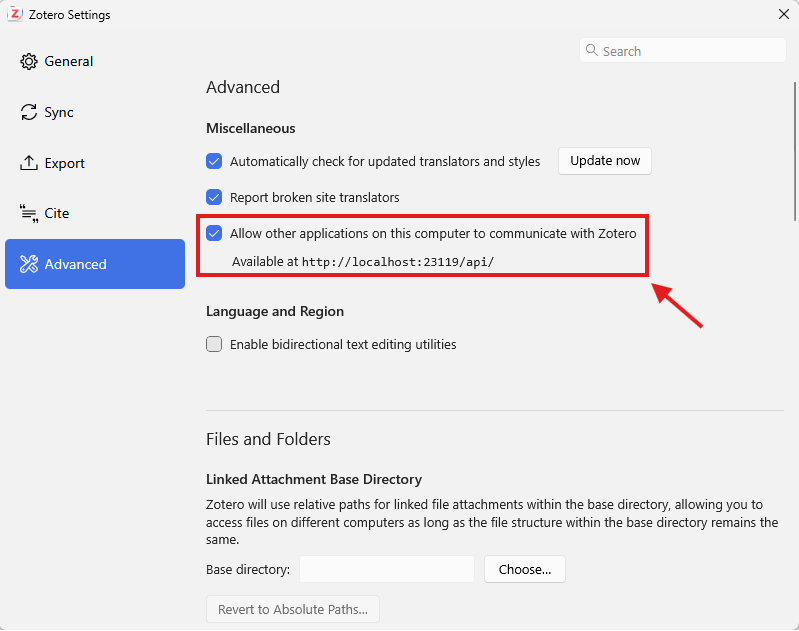
The Zotero local API must be enabled for the MCP server to work.
In Zotero 9, the local API toggle is under Settings → Advanced → 'Allow other applications on this computer to communicate with Zotero'.
Here is a screenshot:
After installation, either:
Auto-configure (recommended):
zotero-mcp setup
Manual configuration:
For Claude Desktop, add this to claude_desktop_config.json.
For Claude Code, add this to ~/.claude.json:
{
  "mcpServers": {
    "zotero": {
      "command": "zotero-mcp",
      "env": {
        "ZOTERO_LOCAL": "true",
        "ZOTERO_API_KEY": "YOUR_API_KEY",
        "ZOTERO_LIBRARY_ID": "YOUR_LIBRARY_ID"
      }
    }
  }
}
For local read-only use, ZOTERO_LOCAL: "true" is all you need — drop the ZOTERO_API_KEY and ZOTERO_LIBRARY_ID lines entirely.
The local API is fast but read-only, so the MCP server uses the Zotero web API for write operations.
To enable write mode:
ZOTERO_LOCAL: "true" — with API credentials set, the server runs in hybrid mode (fast local reads, web API writes)YOUR_API_KEY with itZOTERO_LIBRARY_ID is your numeric userID, shown on that same page (for a group library, use the group's ID and also set ZOTERO_LIBRARY_TYPE: "group").Important Note: Environmental variables set in the shell you run
claudein will override these values.
Tip: If Claude Desktop reports it can't find the
zotero-mcpcommand, use the absolute path instead (runzotero-mcp setup-infoorwhich zotero-mcpto find it) — GUI apps don't always inherit your shellPATH.
/mcp command, and make sure the Zotero MCP server is connected.Example prompts:
After installing Zotero MCP, add a local read-only server with:
autohand mcp add zotero env ZOTERO_LOCAL=true zotero-mcp
Add --scope project after add to keep the server configuration in the current project. For hybrid or web API access, add the credentials described above to the env command. See Autohand Code for current installation and CLI details.
Go to Settings -> MCP Servers -> Edit MCP Configuration, and add the following:
{
  "mcpServers": {
    "zotero": {
      "name": "zotero",
      "type": "stdio",
      "isActive": true,
      "command": "zotero-mcp",
      "args": [],
      "env": {
        "ZOTERO_LOCAL": "true"
      }
    }
  }
}
Then click "Save".
Cherry Studio also provides a visual configuration method for general settings and tools selection.
For accessing your Zotero library via the web API (useful for remote setups):
zotero-mcp setup --no-local --api-key YOUR_API_KEY --library-id YOUR_LIBRARY_ID
Zotero Connection:
ZOTERO_LOCAL=true: Use the local Zotero API (default: false)ZOTERO_API_KEY: Your Zotero API key (for web API)ZOTERO_LIBRARY_ID: Your Zotero library ID (for web API)ZOTERO_LIBRARY_TYPE: The type of library (user or group, default: user)ZOTERO_WEBDAV_URL: Optional WebDAV folder URL for direct attachment downloads in remote modeZOTERO_WEBDAV_USERNAME: Optional WebDAV usernameZOTERO_WEBDAV_PASSWORD: Optional WebDAV passwordSemantic Search:
ZOTERO_EMBEDDING_MODEL: Embedding model to use (default, openai, gemini, ollama)OPENAI_API_KEY: Your OpenAI API key (for OpenAI embeddings)OPENAI_EMBEDDING_MODEL: OpenAI model name (text-embedding-3-small, text-embedding-3-large)OPENAI_BASE_URL: Custom OpenAI endpoint URL (optional, for use with compatible APIs)zotero-mcp setup and can be overridden with
zotero-mcp update-db --openai-batch or --no-openai-batchGEMINI_API_KEY: Your Gemini API key (for Gemini embeddings)GEMINI_EMBEDDING_MODEL: Gemini model name (gemini-embedding-001)GEMINI_BASE_URL: Custom Gemini endpoint URL (optional, for use with compatible APIs)OLLAMA_EMBEDDING_MODEL: Ollama embedding model name (qwen3-embedding by default)OLLAMA_BASE_URL: Ollama server URL (default: http://localhost:11434)ZOTERO_DB_PATH: Custom zotero.sqlite path (optional). When unset, the
database is located automatically: a data directory configured in Zotero's
preferences (read from the profile's prefs.js) is tried first, then the
default ~/Zotero location.Search backend:
ZOTERO_SEARCH_BACKEND=sqlite: Route zotero_search_items and
zotero_advanced_search through direct SQL against zotero.sqlite instead of
fetching over the API and filtering in Python (default: api). Requires
ZOTERO_LOCAL=true, since it reads the database off disk. Substantially
faster on large libraries — an advanced_search that pages the whole library
over the API drops from minutes to well under a second. Any query the backend
doesn't cover falls back to the API path automatically, so the results are
either the same or better, never worse.Global search across libraries:
With the SQLite backend enabled, zotero_search_items, zotero_advanced_search
and zotero_semantic_search accept search_all_libraries=True (--all-libraries
on the CLI). One query then covers your personal library and every group library
at once, and each result is labelled with the library it came from:
**Library:** AI in entrepreneurship (groupID=6015547)
This is deliberately gated on ZOTERO_SEARCH_BACKEND=sqlite. The Zotero API can
only search one library per request, so without direct SQL the best anyone could
do is replay a single-library search against each library in turn — a different
and far slower operation. Rather than emulate global search badly, the tools
refuse and say so.
Two limits follow from how Zotero stores things. Collections are per-library
(collections.libraryID is NOT NULL), so collection_key and collection
conditions cannot be combined with a global search. Tags are not — Zotero
keeps one database-wide tags table shared by every library — so tag filters and
tag conditions work globally and are the recommended way to slice a global
search.
Duplicates across libraries are returned as-is: the same paper filed in two libraries is two items, and collapsing them would hide where each copy lives.
Tool surface:
ZOTERO_MCP_TOOLSETS: Which optional tool groups to expose. Every tool the
server registers is sent to the model on every request, so the tool list is
a fixed cost on your context window. Groups that need an external service,
serve maintenance rather than research, or apply only to some users are off
by default. See Tool Groups below.Item schema:
ZOTERO_MCP_SCHEMA_REFRESH=0: Disable the weekly background refresh of
Zotero's item-type schema from api.zotero.org. The schema is what routes a
generic title= update to the field a type actually stores it under (a
statute's nameOfAct, a case's caseName). A copy ships with the package, so
disabling the refresh only means new item types added by Zotero after this
release won't be picked up until you upgrade. zotero-mcp schema-refresh
still refreshes on demand.ZOTERO_MCP_SCHEMA_CACHE: Custom path for the refreshed schema cache
(default: ~/.cache/zotero-mcp/schema.json).# Run the server directly
zotero-mcp serve
# Specify transport method
zotero-mcp serve --transport stdio|streamable-http|sse
# Setup and configuration
zotero-mcp setup --help # Get help on setup options
zotero-mcp setup --semantic-config-only # Configure only semantic search
zotero-mcp setup-info # Show installation path and config info for MCP clients
# Updates and maintenance
zotero-mcp update # Update to latest version
zotero-mcp update --check-only # Check for updates without installing
zotero-mcp update --force # Force update even if up to date
# Semantic search database management
zotero-mcp update-db # Update semantic search database (fast, metadata-only)
zotero-mcp update-db --openai-batch # Submit OpenAI embeddings through Batch API
zotero-mcp update-db --no-openai-batch # Force realtime OpenAI embeddings for this run
zotero-mcp openai-batch-status # Check latest OpenAI embedding batch status
zotero-mcp openai-batch-import # Import completed OpenAI batch embeddings
zotero-mcp update-db --fulltext # Update with full-text extraction (comprehensive but slower)
zotero-mcp update-db --force-rebuild # Force complete database rebuild
zotero-mcp update-db --fulltext --force-rebuild # Rebuild with full-text extraction
zotero-mcp update-db --fulltext --db-path "your_path_to/zotero.sqlite" # Customize your zotero database path
zotero-mcp db-status # Show database status and info
# General
zotero-mcp versi
Sign in to join the discussion.
No comments yet. Be the first to say what this is good for.
Real-time global intelligence dashboard. AI-powered news aggregation, geopolitical monitoring, and infrastructure tracking in a unified situational awareness interface
High-performance code intelligence MCP server. Indexes codebases into a persistent knowledge graph — average repo in milliseconds. 158 languages, sub-ms queries, 99% fewer tokens. Single static binary, zero dependencies.

Universal provider proxy for OpenAI Codex & Claude Code — use any LLM (Claude, Gemini, Grok, DeepSeek, Ollama…) with Codex CLI, App, SDK, and Claude Code

Git-native persistent memory for AI coding agents. Implements Google OKF v0.2 with sub-300µs in-memory BM25 search, embedded MCP server, and progressive disclosure. Slashes token bloat by 80% with zero external databases or dependencies. Built in pure Go.

Local-first code intelligence graph for MCP and CLI. Builds a persistent map of your codebase so AI coding tools read only what matters, with benchmarked context reductions on reviews and large-repo workflows.

Stop your AI from making things up — it proposes, deterministic tools decide, every claim checked against ground truth with evidence. Grounded facts and context survive resets. Reverse engineering is the proving ground. MCP server + CLI.