



farion1231/cc-switchTools
A cross-platform desktop All-in-One assistant for Claude Code, Codex, OpenCode, OpenClaw, Grok Build & Hermes Agent. Only official website: ccswitch.io
132k
AstronRPA is a visual RPA system for automating desktop apps and web pages. It combines a desktop client, backend services, and a Python engine, and it can connect to Astron Agent so agent workflows can call RPA nodes and RPA workflows can use agent steps.
Builders who want to run repeatable desktop and web automation from a visual RPA app with agent integration.
You can turn manual cross-app work into workflows you build, run, schedule, and connect to agent steps.
Build automations with drag-and-drop nodes instead of writing everything by hand.
Automate Windows apps, browsers, office tools, ERP systems, and common UI actions.
Connect Astron Agent with RPA workflow nodes for two-way workflow and agent collaboration.
Run automations through direct execution, schedules, API calls, and MCP services.
Use team sharing, monitoring, scheduling modes, permission control, and marketplace features.
# Prepare a Python 3.13.x installation directory (can be a local folder or system installation path)
# The script will copy this directory to create python_core
# Full build (engine + frontend + desktop app) from project root directory
./build.bat --python-exe "C:\Program Files\Python313\python.exe"

# Or use default configuration (if Python is in default path)
./build.bat

# Wait for completion
# Build successful when console displays "Full Build Complete!"
```yaml
# 32742 is the default port; change it if you modified the configuration
remote_addr: http://YOUR_SERVER_ADDRESS:32742/
skip_engine_start: false
```

🤖 Pioneering Open-Source Enterprise RPA Desktop Application
Astron RPA Official Site · Deployment Guide · User Documentation · FAQ



English | 简体中文
AstronRPA is an enterprise-grade Robotic Process Automation (RPA) desktop application. Through a visual designer, it supports low-code/no-code development, enabling users to rapidly build workflows and automate desktop software and web pages.
Astron Agent is the native Agent platform supported by this project. Users can directly call RPA workflow nodes in Astron Agent, and also use Agent workflows in AstronRPA, achieving efficient collaboration between automation processes and intelligent agent systems, empowering broader business automation scenarios.
Recommended for quick deployment:
# Clone the repository
git clone https://github.com/iflytek/astron-rpa.git
cd astron-rpa

# Enter docker directory
cd docker

# Copy .env
cp .env.example .env

# Modify casdoor service configuration in .env (8000 is the default port)
CASDOOR_EXTERNAL_ENDPOINT="http://{YOUR_SERVER_IP}:8000"

# 🚀 Start all services
docker compose up -d

# 📊 Check service status
docker compose ps
http://{YOUR_SERVER_IP}:32742/api/rpa-auth/user/login-check (32742 is the default port; change it if you modified the configuration).{"code":"900001","data":null,"message":"unauthorized"}, it means the deployment is correct and the connection is working properly.http://{YOUR_SERVER_IP}:8000 (8000 is the default port; change it if you modified the configuration).| Tool | Version | Description |
|---|---|---|
| Node.js | >= 22 | JavaScript runtime |
| Python | 3.13.x | RPA engine core |
| Java | JDK 8+ | Backend runtime |
| pnpm | >= 9 | Node.js package manager |
| UV | 0.8+ | Python package management tool |
| 7-Zip | - | Create deployment archives |
| SWIG | - | Connect Python with C/C++ |
For specific installation instructions and common issues, refer to Build Guide.
Download the latest Release Package
Prepare Python Environment
# Prepare a Python 3.13.x installation directory (can be a local folder or system installation path)
# The script will copy this directory to create python_core
Run Build Script
# Full build (engine + frontend + desktop app) from project root directory
./build.bat --python-exe "C:\Program Files\Python313\python.exe"

# Or use default configuration (if Python is in default path)
./build.bat

# Wait for completion
# Build successful when console displays "Full Build Complete!"
Note: Please ensure the specified Python interpreter is a clean installation without additional third-party packages to minimize package size.
Build process includes:
build/python_coreresources/python_core.7z📦 Install the packaged client
resources/conf.yaml in the installation directory:```yaml
# 32742 is the default port; change it if you modified the configuration
remote_addr: http://YOUR_SERVER_ADDRESS:32742/
skip_engine_start: false
```
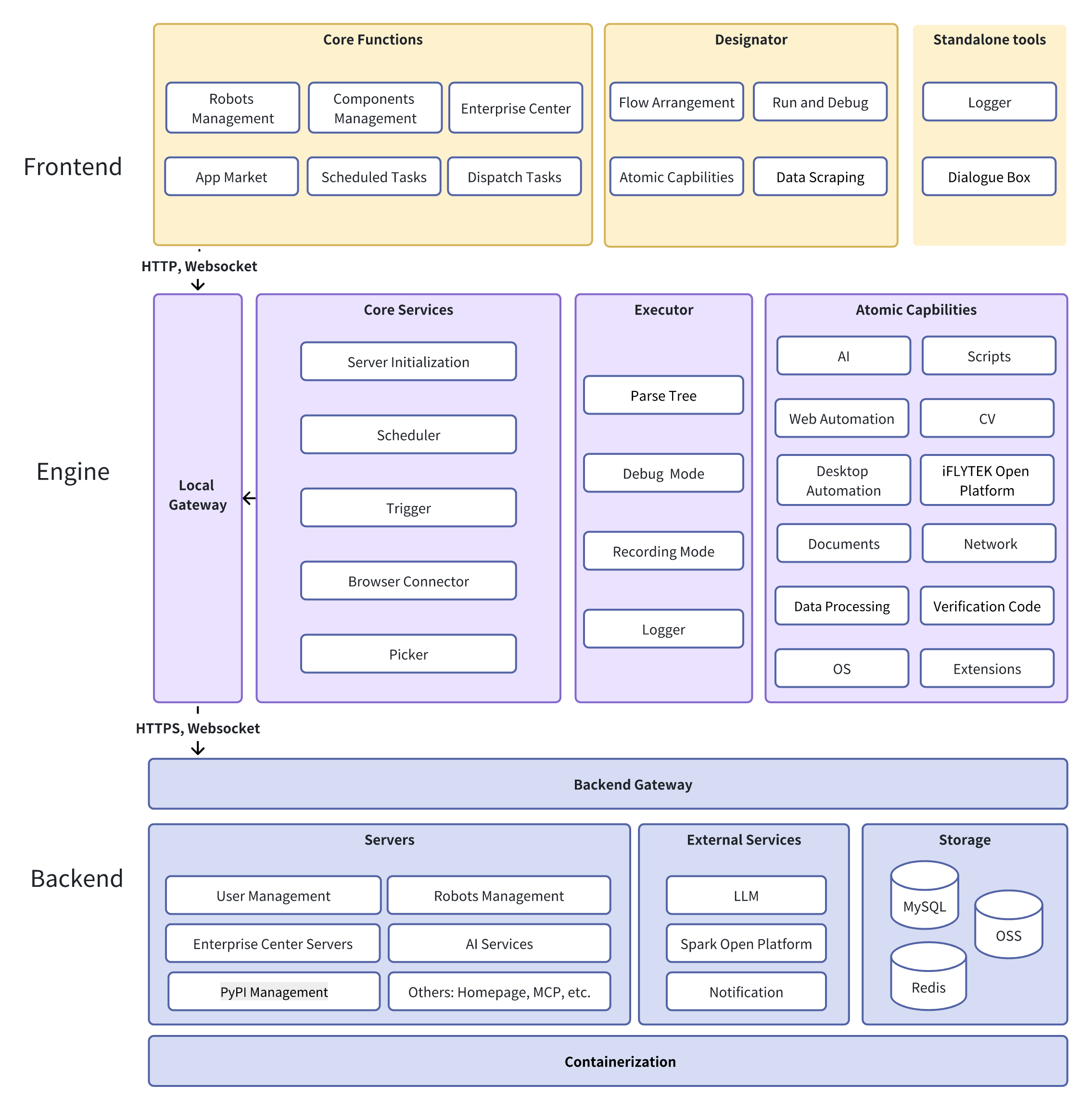
The project adopts a frontend-backend separation architecture. The frontend is built with Vue 3 + TypeScript and Electron for desktop applications; the backend uses Java Spring Boot and Python FastAPI to build microservices supporting business and AI capabilities. The engine layer is based on Python, integrating 20+ RPA components with support for image recognition and UI automation. The entire system is deployed via Docker with high observability and scalability, designed for complex RPA scenarios.
We welcome any form of contribution! Please check Contributing Guide
git checkout -b feature/AmazingFeature)git commit -m 'Add some AmazingFeature')git push origin feature/AmazingFeature)If AstronRPA saves you time, consider giving it a ⭐ — it is the simplest way to support the project and helps other automation builders discover it.


This project is open source under the Open Source License.
Developed and maintained by iFlytek


AstronRPA - Making RPA development simple and powerful!
If you find this project helpful, please give us a ⭐ Star!
Sign in to join the discussion.
No comments yet. Be the first to say what this is good for.
A cross-platform desktop All-in-One assistant for Claude Code, Codex, OpenCode, OpenClaw, Grok Build & Hermes Agent. Only official website: ccswitch.io

Never stop coding. Free MIT AI gateway: one endpoint, 352 providers (150+ free), 1200+ models Kimi, Claude, GPT, Gemini, GLM, DeepSeek, MiniMax. Works with Claude Code, Codex, Cursor, OpenCode, Cline & Copilot. Quota-aware auto-fallback, RTK+Caveman compression saves 15-95% tokens, MCP/A2A, Desktop/PWA. Built by 550+ contributors

the runtime your coding agents live on

Google Workspace CLI — one command-line tool for Drive, Gmail, Calendar, Sheets, Docs, Chat, Admin, and more. Dynamically built from Google Discovery Service. Includes AI agent skills.

Open source Ghostty-based macOS terminal with vertical tabs and notifications for AI coding agents. Built for multitasking, organization, and programmability.

Desktop app that records your on-screen work session and uses the GitHub Copilot CLI to reconstruct it as an intent + ordered steps, then builds a reusable Skill or Automation for Microsoft Scout, Microsoft Copilot Cowork, or Copilot Studio.