
koala73/worldmonitorConnectors
Real-time global intelligence dashboard. AI-powered news aggregation, geopolitical monitoring, and infrastructure tracking in a unified situational awareness interface
86k
MCP Mermaid adds a diagram generation service to MCP-capable agents. It accepts Mermaid input, validates it, and can output Mermaid text, SVG, PNG, base64, or saved files for sharing and review.

Builders who use Claude, VS Code, Cline, Cherry Studio, or other MCP-compatible agents and want diagram output.
You can ask your agent to generate diagrams and charts without leaving your chat or editor.
Supports Mermaid features and syntax so the agent can produce standard diagrams.
Accepts `backgroundColor` and `theme` settings for richer visual output.
Can return `base64`, `svg`, `mermaid`, `file`, `svg_url`, and `png_url` outputs.
Validates Mermaid content so agents can correct syntax across multiple turns.
Runs over stdio, SSE, or streamable HTTP for different agent clients.
Provides Docker images and endpoint options for local or remote use.
npm install -g mcp-mermaid
# For SSE transport (default endpoint: /sse)
mcp-mermaid -t sse

# For Streamable transport with custom endpoint
mcp-mermaid -t streamable
# Pull the image
docker pull susuperli/mcp-mermaid:latest

# Run with SSE transport (default)
docker run -p 3033:3033 susuperli/mcp-mermaid:latest --transport sse

# Run with streamable transport
docker run -p 1122:1122 susuperli/mcp-mermaid:latest --transport streamable --port 1122
 MCP Mermaid


Generate mermaid diagram and chart with AI MCP dynamically. Also you can use:
mcp-server-chart to generate chart, graph, map. Infographic to generate infographic, such as
 Timeline, Comparison, List, Process and so on.Fully support all features and syntax of Mermaid.
Support configuration of backgroundColor and theme, enabling large AI models to output rich style configurations.
Support exporting to base64, svg, mermaid, file, and remote-friendly svg_url, png_url formats, with validation for Mermaid to facilitate the model's multi-round output of correct syntax and graphics. Use outputType: "file" to automatically save PNG diagrams to disk for AI agents, or the URL modes to share diagrams through public mermaid.ink links.
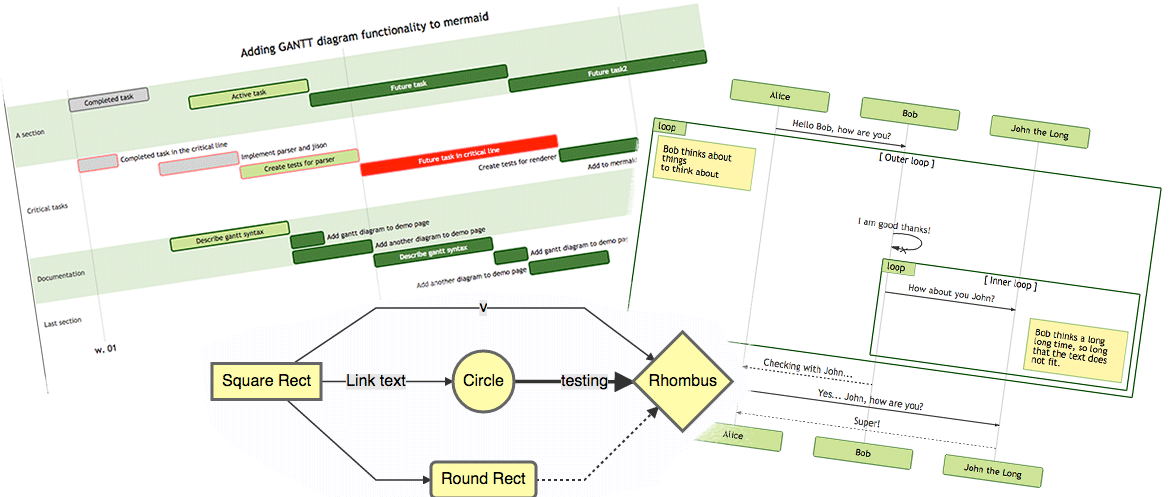
To use with Desktop APP, such as Claude, VSCode, Cline, Cherry Studio, and so on, add the MCP server config below. On Mac system:
{
  "mcpServers": {
    "mcp-mermaid": {
      "command": "npx",
      "args": [
        "-y",
        "mcp-mermaid"
      ]
    }
  }
}
On Window system:
{
  "mcpServers": {
    "mcp-mermaid": {
      "command": "cmd",
      "args": [
        "/c",
        "npx",
        "-y",
        "mcp-mermaid"
      ]
    }
  }
}
Also, you can use it on aliyun, modelscope, glama.ai, smithery.ai or others with HTTP, SSE Protocol.
Access Points:
http://localhost:3033/ssehttp://localhost:1122/mcpAvailable Docker Tags:
susuperli/mcp-mermaid:latest - Latest stable versionInstall the package globally:
npm install -g mcp-mermaid
Run the server with your preferred transport option:
# For SSE transport (default endpoint: /sse)
mcp-mermaid -t sse

# For Streamable transport with custom endpoint
mcp-mermaid -t streamable
If you're working with the source code locally:
# Clone and setup
git clone https://github.com/hustcc/mcp-mermaid.git
cd mcp-mermaid
npm install
npm run build

# Run with npm scripts
npm run start:sse        # SSE transport on port 3033
npm run start:streamable # Streamable transport on port 1122
Then you can access the server at:
http://localhost:3033/ssehttp://localhost:1122/mcp (local) or http://localhost:3033/mcp (global)You can also use the following CLI options when running the MCP server. Command options by run cli with -h.
MCP Mermaid CLI

Options:
  --transport, -t  Specify the transport protocol: "stdio", "sse", or "streamable" (default: "stdio")
  --port, -p       Specify the port for SSE or streamable transport (default: 3033)
  --endpoint, -e   Specify the endpoint for the transport:
                    - For SSE: default is "/sse"
                    - For streamable: default is "/mcp"
  --help, -h       Show this help message
Install dependencies:
npm install
Build the server:
npm run build
Using MCP Inspector (for debugging):
npm run start
Using different transport protocols:
# SSE transport (Server-Sent Events)
npm run start:sse

# Streamable HTTP transport
npm run start:streamable
Direct node commands:
# SSE transport on port 3033
node build/index.js --transport sse --port 3033

# Streamable HTTP transport on port 1122
node build/index.js --transport streamable --port 1122

# STDIO transport (for MCP client integration)
node build/index.js --transport stdio
Run MCP Mermaid with Docker:
# Pull the image
docker pull susuperli/mcp-mermaid:latest

# Run with SSE transport (default)
docker run -p 3033:3033 susuperli/mcp-mermaid:latest --transport sse

# Run with streamable transport
docker run -p 1122:1122 susuperli/mcp-mermaid:latest --transport streamable --port 1122
MIT@hustcc.
Sign in to join the discussion.
No comments yet. Be the first to say what this is good for.
Real-time global intelligence dashboard. AI-powered news aggregation, geopolitical monitoring, and infrastructure tracking in a unified situational awareness interface

Universal provider proxy for OpenAI Codex & Claude Code — use any LLM (Claude, Gemini, Grok, DeepSeek, Ollama…) with Codex CLI, App, SDK, and Claude Code

Git-native persistent memory for AI coding agents. Implements Google OKF v0.2 with sub-300µs in-memory BM25 search, embedded MCP server, and progressive disclosure. Slashes token bloat by 80% with zero external databases or dependencies. Built in pure Go.

Context7 Platform -- Up-to-date code documentation for LLMs and AI code editors
Open-source auth gateway connecting 1400+ SaaS providers to AI agents through SDK, CLI, MCP, HTTP, and OpenAPI.
Open-source 3D architectural editor with a local CLI, MCP tools, and practical workflows for humans and AI agents.