

koala73/worldmonitorConnectors
Real-time global intelligence dashboard. AI-powered news aggregation, geopolitical monitoring, and infrastructure tracking in a unified situational awareness interface
86k
This extension connects a TYPO3 site to MCP clients so an assistant can inspect pages, records, and files and then stage changes in workspaces. It supports safe content editing, file upload, multilingual content tasks, and record updates through TYPO3’s own permissions and publishing flow.
Builders who want their AI assistant to work inside TYPO3 without touching live content first.
You can let an agent update TYPO3 content and review the result in a workspace before publishing.
Pages and records are created or updated in TYPO3 workspaces instead of going live immediately.
The server exposes TYPO3 through MCP so clients like Claude, Cursor, and other MCP tools can connect to it.
Files can come from a URL, a local upload link, raw text, or YouTube and Vimeo sources.
The server can read page trees, content elements, and workspace-capable tables with schema awareness.
It supports OAuth for backend users as well as a local command-line connection.
composer require hn/typo3-mcp-server
This extension provides a Model Context Protocol (MCP) server implementation for TYPO3 that allows AI assistants to safely view and manipulate TYPO3 pages and records through TYPO3's workspace system.
All content changes are automatically queued in TYPO3 workspaces, making it completely safe for AI assistants to create, update, and modify content without immediately affecting your live website. Changes require explicit publishing to become visible to site visitors.
Every push to main runs a benchmark that has the latest models from Anthropic, OpenAI, Mistral, and Google actually use this MCP to perform real TYPO3 tasks. That's how we stay vendor-independent and prove the tool descriptions convey what they claim across very different prompting styles — your AI assistant of choice should just work, not only ours. Click any badge for the full run-by-run history.


With the TYPO3 MCP Server, your AI assistant can help you:
All these operations happen safely in workspaces, giving you full control to review before publishing!
💡 Want to know how it works? Check out our Technical Overview for detailed information about the implementation, available tools, and real-world examples with actual tool calls.
| Feature | Status | Notes |
|---|---|---|
| MCP Connection | ✅ Ready | HTTP and stdin/stdout protocols (thanks to logiscape/mcp-sdk-php) |
| Authentication | ✅ Ready | OAuth for Backend Users |
| Page Tree Navigation | ✅ Ready | Page tree view similar to the TYPO3 backend |
| Page Content Discovery | ✅ Ready | Similar to the List or Page module with backend layout support |
| Record Reading/Writing | ✅ Ready | Read and write any workspace-capable TYPO3 table (core & extensions) with full schema inspection |
| Content Translation | ⚠️ Experimental | Implemented, needs real-world testing |
| File Upload | ✅ Ready | From a URL, a YouTube/Vimeo link, raw text content, or a local file via single-use upload URL. Create-only: never overwrites or deletes, identical content is detected, executable files are refused |
| File Discovery & References | ⚠️ Partial | Browse sys_file and metadata within the user's file mounts (incl. public URLs), edit metadata, create file references. No visual or semantic image search yet |
| Workspace Selection | ❌ Missing | Currently uses the first writable workspace of the user |
While there are a lot of automated tests, TYPO3 instances are widely different and Language Models are also widely different. Feel free to create issues here on GitHub or share experiences in the typo3-core-ai channel.
Your assistant can bring new files into TYPO3, and it picks the right of these four ways on its own:
Uploading is deliberately create-only — nothing you already have can be overwritten or deleted. A name that is already taken is resolved by renaming (image.jpg becomes image_01.jpg), and uploading content that already exists returns the existing file instead of creating a duplicate. Files that could be executed, by the server or by a visitor's browser, are refused, as are files that reconfigure the web server. Downloads only work from public http(s) addresses, and your backend user's file mounts and file permissions apply throughout.
Unlike records, files are not workspace-versioned in TYPO3, so an uploaded file lands in your file storage right away. It only becomes visible on the website once a record references it — and that reference is workspace-staged, so the usual review before publishing still applies.
💡 See Put this image on the homepage in the Technical Overview for the actual tool calls, and Image/File Handling for the upload-token flow and the current limits.
composer require hn/typo3-mcp-server
Requirements:
The defaults work out of the box. All settings live in the extension configuration (Admin Tools → Settings → Extension Configuration → mcp_server):
| Setting | Default | Purpose |
|---|---|---|
maxFileSizeMb | 500 | Upper limit in MiB for files fetched from a URL or received through an upload link |
additionalReadOnlyTables | sys_file | Non-workspace-capable tables exposed read-only — this is what lets the AI browse your files |
additionalStandaloneTables | sys_file_metadata | hideTable tables exposed as independent tables — this is what makes file metadata such as titles and alt texts editable |
There are two ways to connect AI assistants like Claude Desktop to your TYPO3 installation:
For secure remote access with proper authentication:
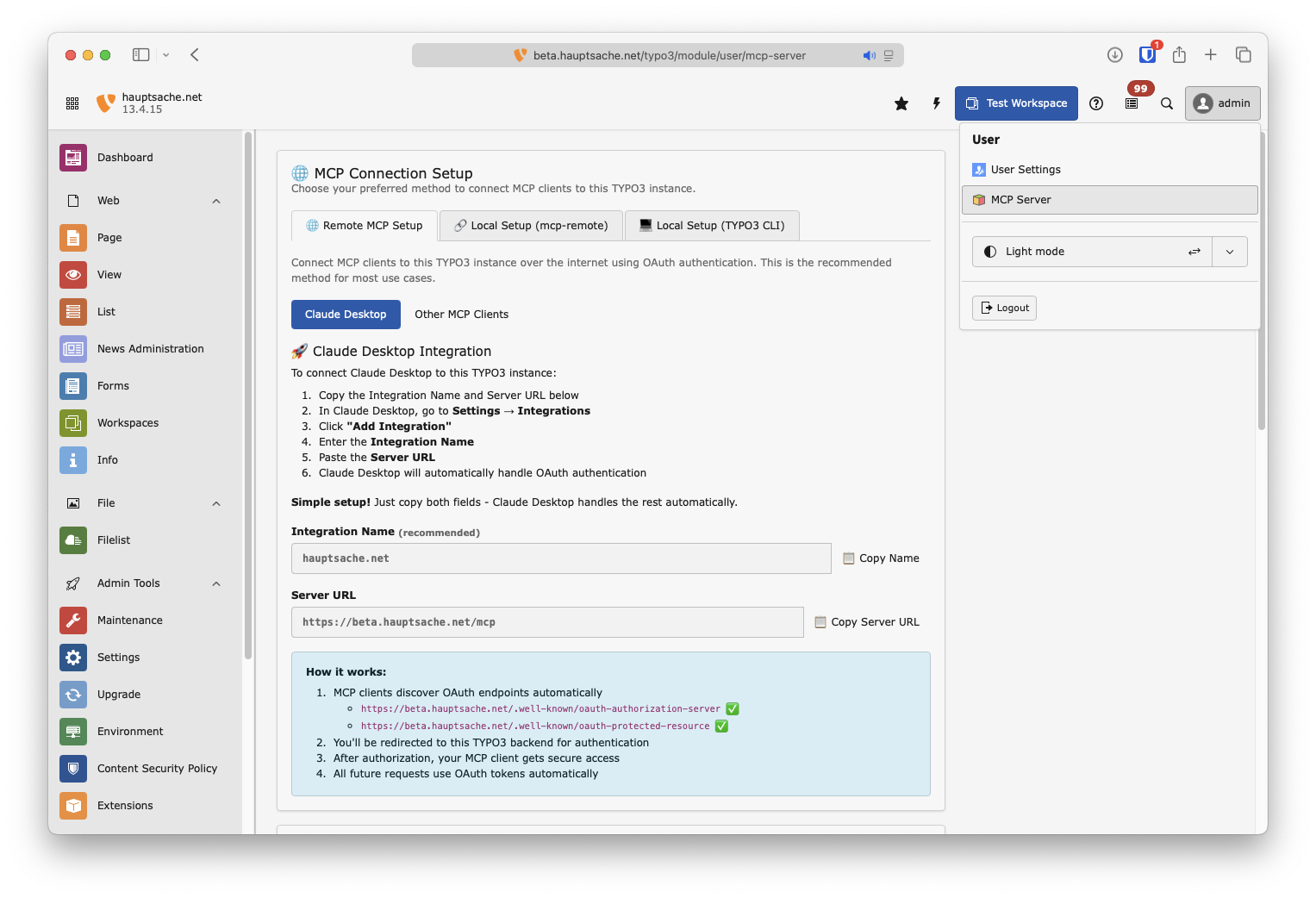
This method gives you admin privileges by default. Add this to your mcp config file of Claude Desktop or whatever client you are using.
{
   "mcpServers": {
      "[your-typo3-name]": {
         "command": "php",
         "args": [
            "vendor/bin/typo3",
            "mcp:server"
         ]
      }
   }
}
# Functional tests (PHPUnit)
composer test

# E2E tests — spins up MySQL, TYPO3, and Playwright in Docker
Build/runTests.sh -s e2e

# E2E without Docker (host PHP + SQLite + local Playwright).
# Auto-selected when Docker is unavailable.
Build/runTests.sh -s e2e --no-docker

# E2E against an existing TYPO3 instance
TYPO3_BASE_URL=https://my.ddev.site Build/runTests.sh -s e2e

# See all options
Build/runTests.sh -h
Tools are defined in the Classes/MCP/Tool directory. Each tool follows the MCP tool specification and maps to specific TYPO3 functionality.
GPL-2.0-or-later
Sign in to join the discussion.
No comments yet. Be the first to say what this is good for.
Real-time global intelligence dashboard. AI-powered news aggregation, geopolitical monitoring, and infrastructure tracking in a unified situational awareness interface

Universal provider proxy for OpenAI Codex & Claude Code — use any LLM (Claude, Gemini, Grok, DeepSeek, Ollama…) with Codex CLI, App, SDK, and Claude Code

Git-native persistent memory for AI coding agents. Implements Google OKF v0.2 with sub-300µs in-memory BM25 search, embedded MCP server, and progressive disclosure. Slashes token bloat by 80% with zero external databases or dependencies. Built in pure Go.

Context7 Platform -- Up-to-date code documentation for LLMs and AI code editors
Open-source auth gateway connecting 1400+ SaaS providers to AI agents through SDK, CLI, MCP, HTTP, and OpenAPI.
Open-source 3D architectural editor with a local CLI, MCP tools, and practical workflows for humans and AI agents.