

MemPalace/
mempalace

MemPalace/mempalaceTools
The best-benchmarked open-source AI memory system. And it's free.
59k
This repo turns a JSON list of contract edits into the files people actually send: tracked-changes `.docx`, redline PDFs, summary PDFs, internal memos, and markdown. It works as a CLI, a Python library, and a Claude Code skill, so an agent can do the review while this tool handles the deliverables.
Builders who want their agent to turn contract review into Word redlines and review PDFs.
You can move from contract analysis to counterparty-ready markup without manually recreating changes in Word.
Writes a `.docx` with real accept/reject tracked changes.
Renders the full document with inline deletions, insertions, change bars, and a summary page.
Creates a clean summary PDF for the other side and an internal memo with tiers, rationale, and walkaway positions.
Produces structured markdown for documentation or downstream agent workflows.
Compares two `.docx` files, generates redlines from differences, and remaps section references between versions.
Finds blank fields, `$X`, `TBD`, and missing exhibit references in a contract.
git clone https://github.com/evolsb/legal-redline-tools.git
cd legal-redline-tools
pip install -e .
pip install git+https://github.com/evolsb/legal-redline-tools.git


Generate tracked-changes Word docs and redline PDFs from a contract review — the same deliverables lawyers actually send.
Define your proposed changes as JSON. Get a tracked-changes .docx with real accept/reject markup, full-document redline PDFs, internal negotiation memos, and structured markdown. Pairs with claude-legal-skill for end-to-end AI contract review, or works with any agent or manual workflow.
AI contract review is everywhere now. But every tool stops at analysis — a list of issues in a chat window. The lawyer on the other side doesn't want your AI's opinion. They want a marked-up Word file with tracked changes they can accept or reject, and a redline PDF they can print and read.
python-docx has refused to add tracked changes for 9 years. So AI tools are stuck behind a manual copy-paste wall: the agent finds the issues, then a human spends an hour transcribing them into Word's track changes by hand.
This tool eliminates that wall. Give it a .docx and a list of changes as JSON, and it produces everything — from the tracked-changes Word file your counterparty will review, to the internal negotiation memo your team will use to prepare.
flowchart LR
    A["<b>AI Agent</b><br/>reviews contract<br/><i>(claude-legal-skill<br/>or any review agent)</i>"] -->|JSON redlines| B["<b>legal-redline-tools</b>"]
    B --> C["Tracked-changes .docx"]
    B --> D["Full-document redline PDF"]
    B --> E["Summary PDF"]
    B --> F["Internal negotiation memo"]
    B --> G["Structured markdown"]
| Full-Document Redline PDF | Summary of Changes | Internal Negotiation Memo |
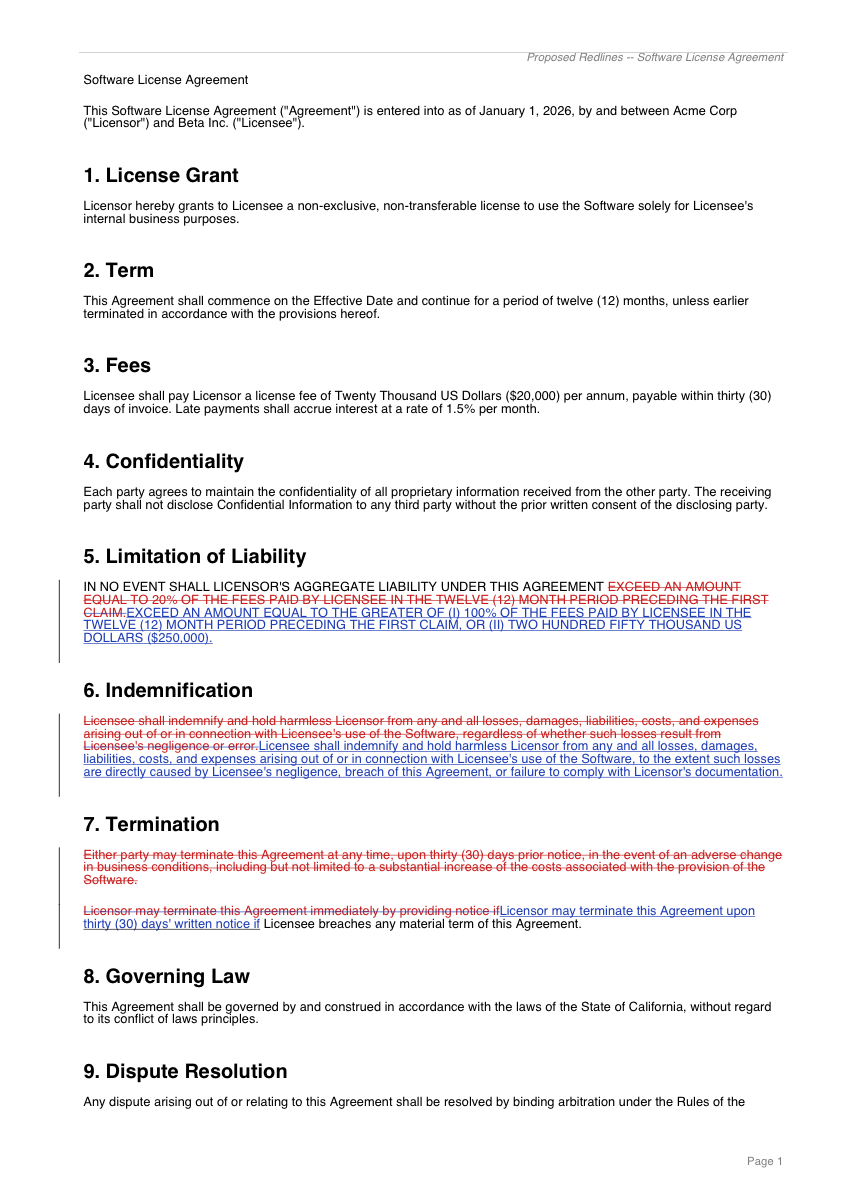 | 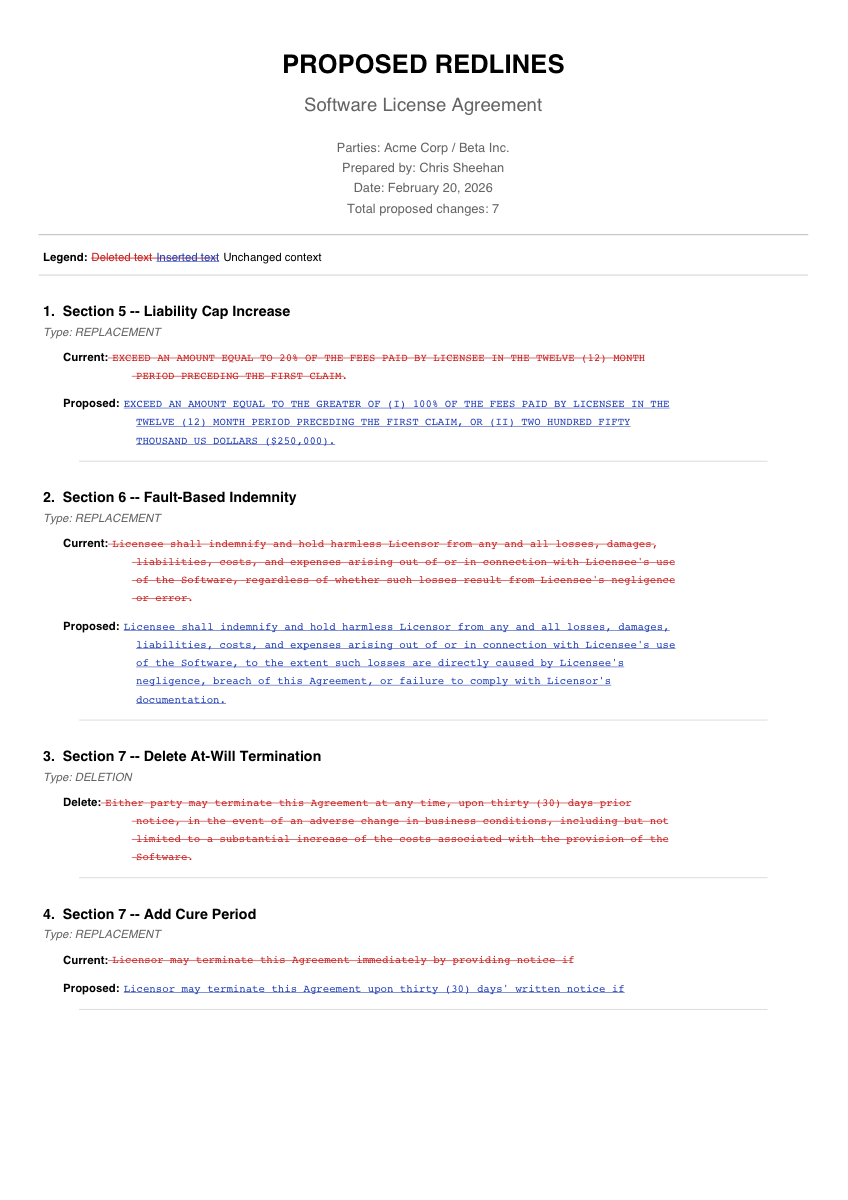 | 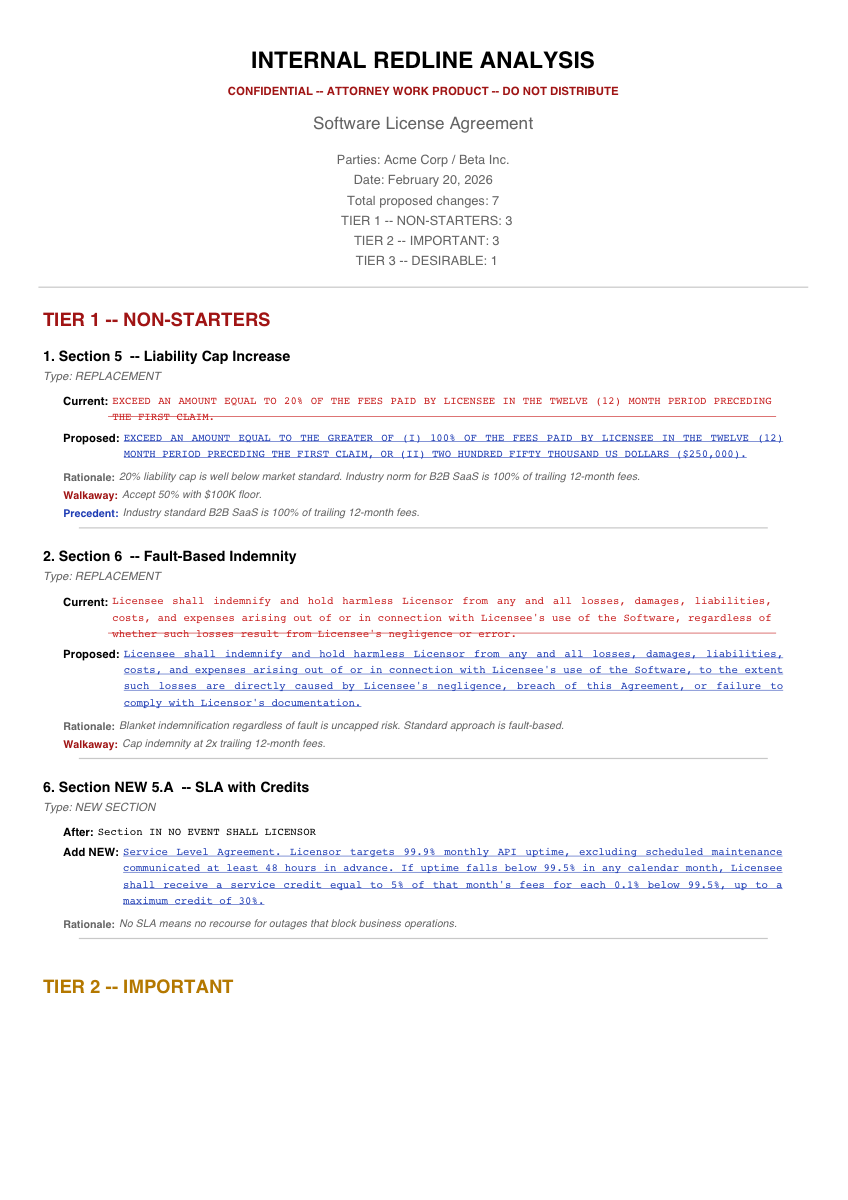 |
| Entire contract with inline red strikethrough, blue underline, and change bars | Clean schedule of proposed changes for the counterparty | Tier-grouped analysis with rationale, walkaway positions, and precedent |
Plus: tracked-changes .docx (real Word accept/reject) and structured markdown for AI pipeline chaining.
| # | Feature | Description |
|---|---|---|
| 1 | Tracked-changes .docx | Real Word tracked changes (strikethrough + insertion) that recipients can accept/reject |
| 2 | Full-document redline PDF | Entire contract with inline markups, change bars, and summary page |
| 3 | Summary PDF | Schedule of proposed changes (external for counterparty, internal with rationale) |
| 4 | Internal memo PDF | Tier-grouped analysis with rationale, walkaway positions, and precedent |
| 5 | Markdown | Structured output for PRs, documentation, or AI pipeline chaining |
| 6 | Document diff | Compare two .docx files and auto-generate redlines from differences |
| 7 | Section remapping | Remap redline section references when switching document versions |
| 8 | Cross-agreement comparison | Compare redline sets across related agreements for consistency |
| 9 | Placeholder scanner | Find blank fields, $X, TBD, and missing exhibit references |
From source:
git clone https://github.com/evolsb/legal-redline-tools.git
cd legal-redline-tools
pip install -e .
Or directly from GitHub:
pip install git+https://github.com/evolsb/legal-redline-tools.git
# Apply redlines from JSON and generate all outputs
legal-redline apply original.docx output.docx \
    --from-json redlines.json \
    --pdf full-redline.pdf \
    --summary-pdf summary.pdf \
    --memo-pdf internal-memo.pdf \
    --markdown redlines.md \
    --header "Proposed Redlines — Feb 2026"

# Inline changes (no JSON file needed)
legal-redline apply original.docx output.docx \
    --replace "old text" "new text" \
    --delete "text to remove" \
    --insert-after "anchor text" "new text"

# Compare two document versions
legal-redline diff original.docx revised.docx -o changes.json

# Scan for blank fields and placeholders
legal-redline scan contract.docx

# Remap section references to a new document
legal-redline remap old-agreement.docx new-agreement.docx \
    --redlines redlines.json -o remapped.json

# Compare redlines across agreements
legal-redline compare \
    --agreements msa=msa-redlines.json tri-party=triparty-redlines.json \
    -o comparison.md
from legal_redline import (
    apply_redlines, render_redline_pdf, generate_summary_pdf,
    generate_memo_pdf, generate_markdown, diff_documents,
    remap_redlines, compare_agreements, format_comparison_report,
    scan_document,
)

redlines = [
    {"type": "replace", "old": "20% of fees", "new": "100% of fees or $250K",
     "section": "7.2", "title": "Liability Cap", "tier": 1,
     "rationale": "20% is below market standard"},
    {"type": "delete", "text": "shall terminate without liability"},
    {"type": "insert_after", "anchor": "Effective Date",
     "text": ". 90-day termination right"},
    {"type": "add_section", "after_section": "Section 12",
     "text": "New audit rights clause...", "new_section_number": "12A"},
]

# Tracked-changes .docx
apply_redlines("original.docx", "output.docx", redlines)

# Full-document redline PDF
render_redline_pdf("original.docx", redlines, "redline.pdf",
                   header_text="Proposed Redlines")

# Summary PDF (external — clean, no rationale)
generate_summary_pdf(redlines, "summary.pdf",
                     doc_title="Merchant Agreement v3", mode="external")

# Internal memo PDF (tier-grouped analysis)
generate_memo_pdf(redlines, "memo.pdf", doc_title="Merchant Agreement v3")

# Markdown output
md = generate_markdown(redlines, doc_title="Agreement", mode="internal")

# Diff two documents → redlines JSON
changes = diff_documents("v1.docx", "v2.docx")

# Remap sections between document versions
updated, report = remap_redlines("old.docx", "new.docx", redlines)

# Cross-agreement comparison
result = compare_agreements({"msa": msa_redlines, "sow": sow_redlines})
print(format_comparison_report(result))

# Scan for placeholders
report = scan_document("contract.docx")
Redlines are a JSON array. Each entry has a type and type-specific fields, plus optional metadata for internal analysis.
| Type | Required Fields | Description |
|---|---|---|
replace | old, new | Find and replace text with tracked change |
delete | text | Delete text as tracked deletion |
insert_after | anchor, text | Insert new text after anchor |
add_section | text, after_section | Insert new paragraph/section |
| Field | Used In | Description |
|---|---|---|
section | All outputs | Contract section reference (e.g. "7.2") |
title | All outputs | Human-readable title |
tier | Internal only | Priority 1-3 (1=non-starter, 2=important, 3=desirable) |
rationale | Internal only | Why the change is proposed |
walkaway | Internal only | Fall-back position |
precedent | Internal only | Market standard reference |
See examples/sample-redlines.json for a complete example with all 4 types.
External (counterparty-facing) — Clean outputs with only the proposed changes. No rationale, tiers, or walkaway positions. This is what you send to the other side.
Internal (team-facing) — Full analysis with strategy context. Tier-grouped memos with rationale, walkaway positions, and precedent citations. Never send these to the counterparty.
Redline text fields (old, text, anchor) must match text in the document. The matching engine handles common mismatches automatically:
claude-legal-skill handles the review side — risk detection, market benchmarks, position-aware analysis. This tool handles the output. Together:
# 1. Install the review skill
git clone https://github.com/evolsb/claude-legal-skill ~/.claude/skills/contract-review

# 2. Install this tool
pip install git+https://github.com/evolsb/legal-redline-tools.git

# 3. Review a contract (skill analyzes and outputs JSON redlines)
#    "Review this MSA - I'm the vendor"

# 4. Generate all deliverables from the redlines
legal-redline apply original.docx redlined.docx \
    --from-json redlines.json \
    --pdf full-redline.pdf \
    --summary-pdf summary.pdf \
    --memo-pdf internal-memo.pdf
Or use this tool standalone — it works with any AI agent or manual workflow. Just produce the JSON format above.
To use the included redline-generation skill with Claude Code:
mkdir -p ~/.claude/skills/contract-redline
cp skill.md ~/.claude/skills/contract-redline/skill.md
? in PDFs (.docx output is unaffected)Built by Chris Sheehan.
Sign in to join the discussion.
No comments yet. Be the first to say what this is good for.
The best-benchmarked open-source AI memory system. And it's free.

Turn any technical book PDF into a Claude Code skill — ready to study, reference, and use while you work.

AAS Core is the local, agent-first control plane for complete catalog discovery, agent-owned selection, stack validation, and planning, backed by 2,115+ agentic skills. Includes CLI, local MCP, catalog, plugins, and Workbench.

OfficeCLI is the first and best Office suite purpose-built for AI agents to read, edit, and automate Word, Excel, and PowerPoint files. Free, open-source, single binary, no Office installation required.

Google Workspace CLI — one command-line tool for Drive, Gmail, Calendar, Sheets, Docs, Chat, Admin, and more. Dynamically built from Google Discovery Service. Includes AI agent skills.
Build Agentic workflows, RAG pipelines, with rich AI model and tool support on one collaborative workspace. Deploy on cloud, VPC, or self-hosted, so teams move from prototype to production without rebuilding the stack.