
rohitg00/ai-engineering-from-scratchTutorials & Guides
Learn it. Build it. Ship it for others.
54k
This repo teaches how skills work in Claude Code, from the frontmatter in `SKILL.md` to when a skill is selected and loaded. It also shows where skills live, how they differ from `CLAUDE.md` and slash commands, and what good skill descriptions and output formats look like.
Builders who want their Claude Code setup to apply reusable task instructions without repeating prompts.
You can turn repeated instructions into reusable skills that activate only when relevant.
Explains what a skill is, how Claude Code finds it, and why it loads only the matching skill content.
Shows the `SKILL.md` frontmatter fields and the instruction body that follows it.
Covers personal skills in `~/.claude/skills` and project skills in `.claude/skills`.
Compares skills with `CLAUDE.md` and slash commands so you know when to use each one.
Includes examples like code review, commit messages, documentation, debugging, data work, and anonymization.
Provides `templates/skill-template.md` as a starting point for new skills.
Contains example skill folders under `examples/` to study or adapt.
mkdir -p ~/.claude/skills/my-skill
🌍 Language: English | Português | Español
From prompts to systems — learn how to build reusable AI skills.
Skills are one of the core building blocks of modern AI systems. They allow you to define reusable, task-specific capabilities that an AI system can automatically apply when relevant — without repeating instructions every time.
⭐ If this project helped you, please consider giving it a star — it helps others discover it and supports the work!
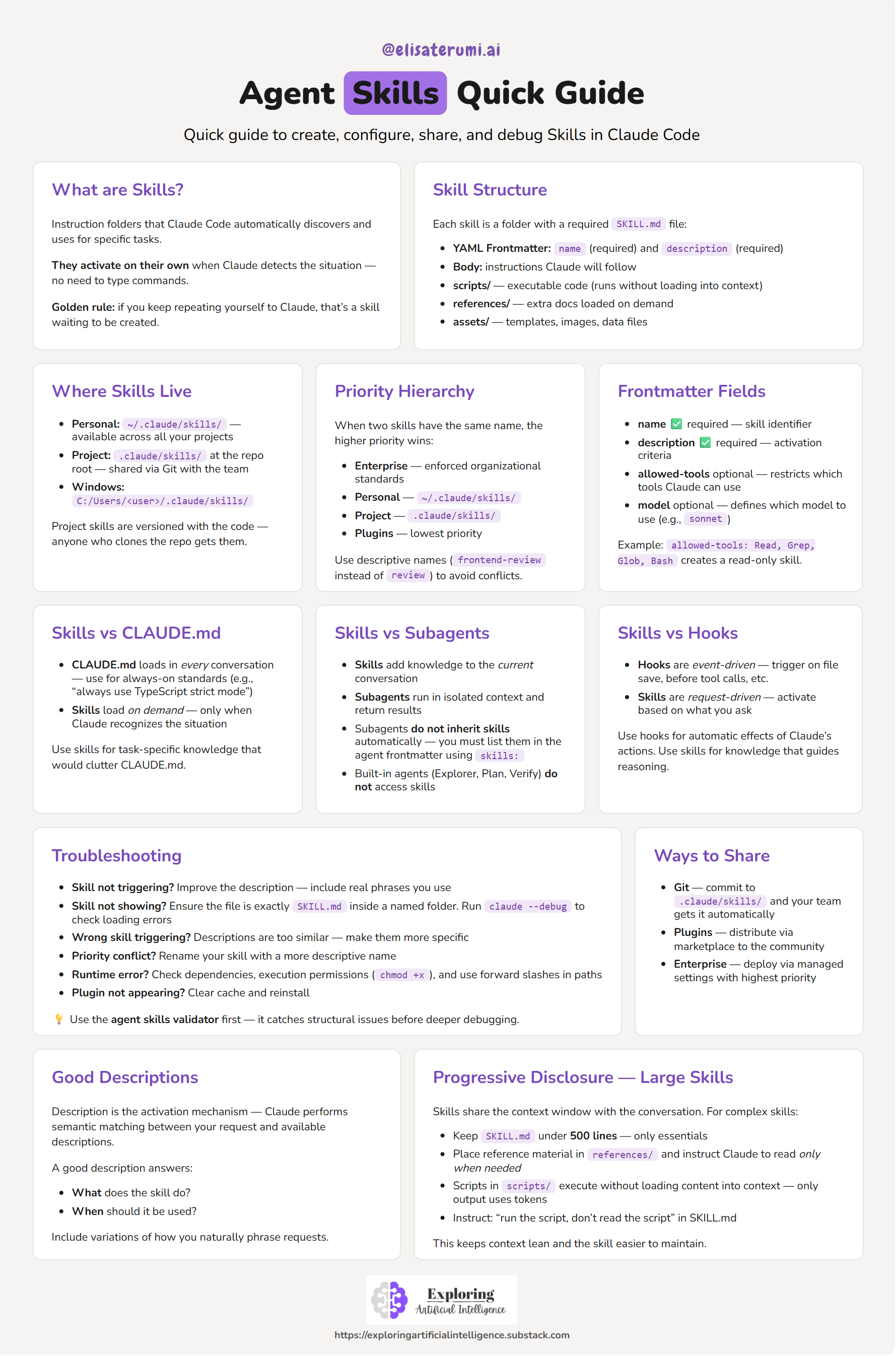
A quick visual reference to understand how skills work — from structure to activation.
💡 Use this as a quick reference while building your own skills.
A skill is a structured set of instructions that teaches an AI system how to perform a specific task.
In Claude Code, a skill is:
SKILL.md fileOnce defined, the system can discover and use the skill automatically.
Instead of repeating prompts, you encode behavior once — and reuse it.
Skills follow a semantic matching workflow:
This means:
Each skill lives inside a directory and must contain a SKILL.md file.
---
name: pr-review
description: Reviews pull requests for code quality. Use when reviewing PRs or checking code changes.
---
Below the frontmatter, you define the instructions:
When reviewing a PR:

1. Analyze code changes
2. Check for best practices
3. Suggest improvements
4. Format output as structured feedback
Skills can be scoped at different levels:
~/.claude/skills.claude/skills (inside a repository)| Feature | Behavior | Use Case |
|---|---|---|
| Skills | Load on demand | Task-specific expertise |
| CLAUDE.md | Always loaded | Global project rules |
| Slash Commands | Manual invocation | Explicit actions |
👉 Skills are automatic and contextual
Use a skill when:
Rule of thumb:
If you explain the same thing more than once, it should be a skill.
👉 Explore ready-to-use skills: examples
Some examples are inspired by existing open-source skill repositories.
mkdir -p ~/.claude/skills/my-skill
SKILL.md (or use the template)Create a SKILL.md file inside your skill directory, or copy from the provided template.
---
name: my-skill
description: Describe what the skill does and when to use it.
---
Define:
SKILL.md concise (use references if needed)name (required)description (required)allowed-tools (optional)model (optional)SKILL.mdreferences/scripts/assets/Skills transform how we build with AI:
They are a key building block for:
Curated links, documentation, and example repositories:
Skills shift the mindset from:
“What should I ask the model?”
To:
“What capability should this system have?”
Contributions are welcome!
Ways to contribute:
Feel free to open an issue or submit a pull request 🚀
I share practical insights about AI, agents, and real-world applications:
Sign in to join the discussion.
No comments yet. Be the first to say what this is good for.
Learn it. Build it. Ship it for others.

Bash is all you need - A nano claude code–like 「agent harness」, built from 0 to 1

A visual, example-driven guide to Claude Code — from basic concepts to advanced agents, with copy-paste templates that bring immediate value.

Specification and documentation for Agent Skills
💻 vibe coding 101|The first course for AI-native product builders.

End-to-end, code-first tutorials for building production-grade GenAI agents. From prototype to enterprise deployment.