


CopilotKit/
OpenBot

CopilotKit/OpenBotTemplates
Open-source AI coworkers that each get a computer of their own: a browser, files and tools, with every action decided before it happens and recorded after. Bring any AG-UI agent.
4.6k
This repo is a starter template for building Databricks ETL pipelines in Python. It combines medallion architecture, Databricks Asset Bundles, Databricks SDK scripts, tests, and data quality checks so you can ship a project with a working workflow instead of starting from scratch. It also includes Claude Code files, a `CLAUDE.md`, and `specs/` docs that describe how the project is meant to be built and deployed. The result is a reusable scaffold for local development, CI/CD, and Databricks deployment.
Builders who are starting a Databricks ETL project and want a ready-made scaffold for Claude Code and CI/CD.
You can start a Databricks pipeline with the project structure, deployment flow, and test setup already in place.
Organizes the project around bronze, silver, and gold layers for Databricks ETL.
Uses `databricks.yml` and bundle-based deployment for dev, staging, and prod.
Ships `CLAUDE.md` and `.claude/` settings, skills, and hooks for agent-led development.
Includes `tests/` for unit, integration, and load tests with pytest.
Uses Databricks DQX rules and quarantine handling for bad data.
Provides `scripts/` helpers for workspace, account, job, and SQL tasks.
Includes GitHub Actions, pre-commit, Makefile tasks, and production deploy safeguards.
Adds a gold-layer dashboard definition in `resources/orders_dashboard.lvdash.json`.
make sync && make unit-test
make init
make deploy env=dev





Stop spending weeks on boilerplate. This PySpark project template for Databricks gives you medallion architecture, Python packaging, unit + integration + load tests, CI/CD, DQX data quality, service-principal-based production deploys, and much more — all wired together and ready to ship. Whether you're starting a new Databricks ETL project or looking for a reference implementation of production-ready PySpark pipelines, fork this and go.
If this saves you time, a star helps others find it. Let's connect on LinkedIn.
This project template demonstrates how to:
CLAUDE.md and a specs/ folder documenting the project's conventions.scripts folder for examples.Deep technical detail lives in specs/ (the README stays a landing page):
Agentic development:
Debates on the use of notebooks vs. Python packaging:
Sessions on Databricks Declarative Automation Bundles, CI/CD, and Software Development Life Cycle at Data + AI Summit 2025:
Other resources:
(Optional) Install Databricks AI Dev Kit and Claude Code.
Create a Databricks Free Edition workspace.
Install and configure the Databricks CLI on your local machine. Check the current version in databricks.yml. Follow the instructions here.
Set up the Python environment and run unit tests on your local machine.
make sync && make unit-test
Initialize the workspace. Create an external location in Databricks and update the storage-root parameter in the Makefile. This step will create the catalogs, schemas, service principal, and the required grants. For more details, see Overview of external locations. Then
run:
make init
Generate a secret for the service principal. In Databricks, go to: Workspace -> Settings -> Identity and access -> Service principals -> Secrets. Generate a new secret for your service principal and update the corresponding profiles in your .databrickscfg file. Your configuration should look similar to this:
 [dev]
 host          = https://xxxx.cloud.databricks.com/
 token         = bbbbbbbbbbbbbbbbbbbbbbbbbbbbbbbbbbbb

 [staging]
 host          = https://xxxx.cloud.databricks.com/
 client_id     = yyyyyyyy-yyyy-yyyy-yyyy-yyyyyyyyyyyy
 client_secret = aaaaaaaaaaaaaaaaaaaaaaaaaaaaaaaaaaaa

 [prod]
 host          = https://xxxx.cloud.databricks.com/
 client_id     = yyyyyyyy-yyyy-yyyy-yyyy-yyyyyyyyyyyy
 client_secret = aaaaaaaaaaaaaaaaaaaaaaaaaaaaaaaaaaaa
Deploy and execute on the dev workspace.
make deploy env=dev
Configure CI/CD automation with the service principal ID and secret. Configure GitHub Actions repository secrets: DATABRICKS_HOST, DATABRICKS_CLIENT_ID, DATABRICKS_CLIENT_SECRET, and TEMPLATE_ALERT_EMAILS (comma-separated on-call addresses).
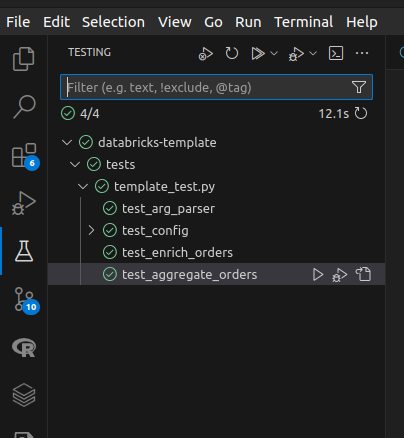
(Optional) You can also execute unit tests from your preferred IDE. Here's a screenshot from VS Code with Microsoft's Python extension installed.
Licensed under the Apache License 2.0. See LICENSE and NOTICE.
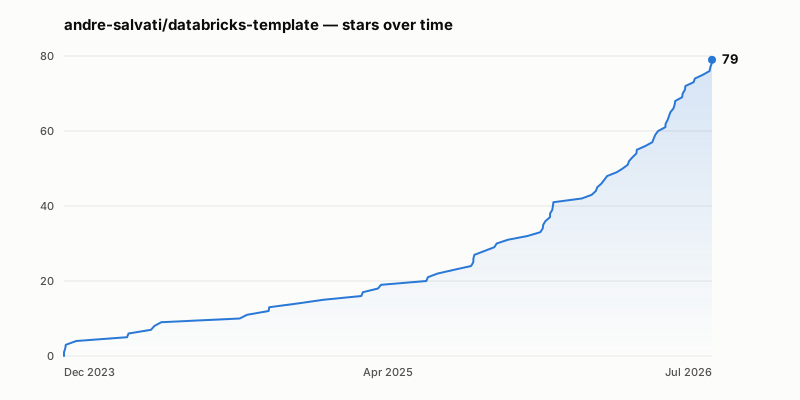
Generated from the GitHub API by make star-history — see scripts/star_history.py.
Sign in to join the discussion.
No comments yet. Be the first to say what this is good for.
Open-source AI coworkers that each get a computer of their own: a browser, files and tools, with every action decided before it happens and recorded after. Bring any AG-UI agent.

Turn Claude Code into a full game dev studio — 49 AI agents, 72 workflow skills, and a complete coordination system mirroring real studio hierarchy.
A self-organizing Obsidian vault that gives AI coding agents persistent memory. Claude Code, Codex CLI, Gemini CLI.

Production-grade Playwright + TypeScript Scaffold for Agentic Testing. Harness for all major AI coding agents baked in.

Omnia Vault - the all-in-one project brain: an Obsidian LLM wiki, Graphify code graphs, a living plan that triages new videos against itself, and a Claude Code ⇄ Codex relay. Everything your project knows, in one clonable vault.
🎬 Tạo video "so sánh kiến thức" ngắn tự động — HyperFrames + AI voice, 1 template nhiều chủ đề.