
sindresorhus/awesomeOther
😎 Awesome lists about all kinds of interesting topics [NOTE: Pull requests are temporarily disabled until I have a chance to catch up with the existing ones]
505k
Nacos provides service discovery, health checks, dynamic configuration management, dynamic DNS, and service and metadata management. It runs as a server and comes with console modules for browsing services, configs, health, and metrics. The repo also includes integration code for Kubernetes, Istio, and other ecosystem tools, but the main product is the Nacos platform itself.

Builders who run microservices and need shared service discovery and configuration.
You can register services, change config centrally, and manage service health without redeploying everything.
Services can register themselves and discover other services over DNS or HTTP, with real-time health checks to avoid unhealthy instances.
Configuration is stored centrally and updated without redeploying applications or services.
Weighted routing and DNS-based service discovery help with load balancing and routing policies.
The dashboard shows service metadata, configuration, Kubernetes DNS, service health, and metric statistics.
Modules such as `k8s-sync`, `istio`, `ai-registry-adaptor`, and `copilot` support nearby cloud-native and AI registry workflows.
unzip nacos-server-1.0.0.zip
cd nacos/bin
sh startup.sh -m standalone
startup.cmd -m standalone







Nacos (official site: nacos.io) is an easy-to-use platform designed for dynamic service discovery and configuration and service management. It helps you to build cloud native applications and microservices platform easily.
Service is a first-class citizen in Nacos. Nacos supports almost all type of services,for example,Dubbo/gRPC service, Spring Cloud RESTFul service or Kubernetes service.
Nacos provides four major functions.
Service Discovery and Service Health Check
Nacos makes it simple for services to register themselves and to discover other services via a DNS or HTTP interface. Nacos also provides real-time health checks of services to prevent sending requests to unhealthy hosts or service instances.
Dynamic Configuration Management
Dynamic Configuration Service allows you to manage configurations of all services in a centralized and dynamic manner across all environments. Nacos eliminates the need to redeploy applications and services when configurations are updated, which makes configuration changes more efficient and agile.
Dynamic DNS Service
Nacos supports weighted routing, making it easier for you to implement mid-tier load balancing, flexible routing policies, flow control, and simple DNS resolution services in the production environment within your data center. It helps you to implement DNS-based service discovery easily and prevent applications from coupling to vendor-specific service discovery APIs.
Service and MetaData Management
Nacos provides an easy-to-use service dashboard to help you manage your services metadata, configuration, kubernetes DNS, service health and metrics statistics.
It is super easy to get started with your first project.
You can deploy Nacos on cloud, which is the easiest and most convenient way to start Nacos.
Use the following Nacos deployment guide to see more information and deploy a stable and out-of-the-box Nacos server.
You can download the package from the latest stable release.
Take release nacos-server-1.0.0.zip for example:
unzip nacos-server-1.0.0.zip
cd nacos/bin
On the Linux/Unix/Mac platform, run the following command to start server with standalone mode:
sh startup.sh -m standalone
On the Windows platform, run the following command to start server with standalone mode. Alternatively, you can also double-click the startup.cmd to run NacosServer.
startup.cmd -m standalone
For more details, see quick-start.
You can view the full documentation from the Nacos website.
You can also read this online eBook from the NACOS ARCHITECTURE & PRINCIPLES.
All the latest and long-term notice can also be found here from GitHub notice issue.
Contributors are welcomed to join Nacos project. Please check CONTRIBUTING about how to contribute to this project.
good first issue or contribution welcome.


If you need Nacos enterprise service support, or purchase cloud product services, you can join the discussion by scanning the following DingTalk group. It can also be directly activated and used through the microservice engine (MSE) provided by Alibaba Cloud. https://cn.aliyun.com/product/aliware/mse?spm=nacos-website.topbar.0.0.0

These are only part of the companies using Nacos, for reference only. If you are using Nacos, please add your company here to tell us your scenario to make Nacos better.
 |  |  |  |
 |  |  |  |
 |  |  |  |
 |  |  |  |
 |  |  |  |
 |  |  |  |
 |  |  |  |
 |  |  |  |
 |  |  |  |
 |  |  |  |
 |  |  |  |
 |  |  |  |
 |  |  |  |
 |  |  |  |
 |  |  |  |
 |  |  | |
| 郑州山水 | 知氏教育 |
Sign in to join the discussion.
No comments yet. Be the first to say what this is good for.
😎 Awesome lists about all kinds of interesting topics [NOTE: Pull requests are temporarily disabled until I have a chance to catch up with the existing ones]

Open-source backend-as-a-service. Postgres, auth, storage, functions, AI gateway, MCP.
Enhanced ChatGPT Clone: Features Agents, MCP, Skills, DeepSeek, Anthropic, AWS, OpenAI, Responses API, Azure, Groq, o1, GPT-5, Mistral, OpenRouter, Vertex AI, Gemini, Artifacts, AI model switching, message search, Code Interpreter, langchain, DALL-E-3, OpenAPI Actions, Functions, Secure Multi-User Auth, Presets, open-source for self-hosting. Active
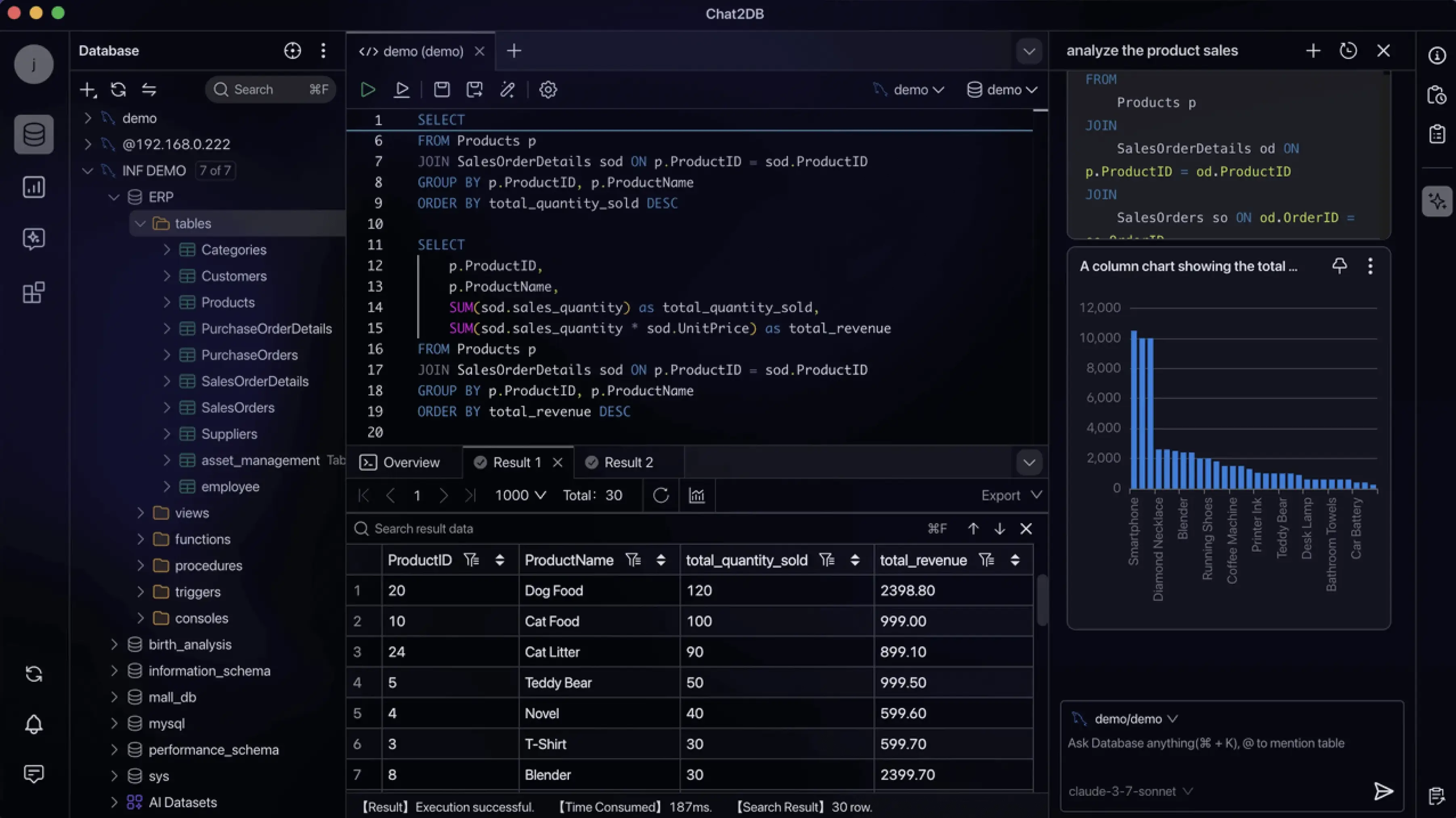
Chat2DB is a free, cross-platform, local-first database client and SQL workspace for developers, DBAs, analysts, and data teams. Connect to 40+ databases, manage data, edit and run SQL, and use your own AI model to generate, explain, and optimize queries. Available on desktop, web, Docker, and CLI, with MCP support.

Open Source version of Claude Cowork with 500+ SaaS app integrations
AI Agents & MCPs & AI Workflow Automation • (~400 MCP servers for AI agents) • AI Automation / AI Agent with MCPs • AI Workflows & AI Agents • MCPs for AI Agents