Attention Control
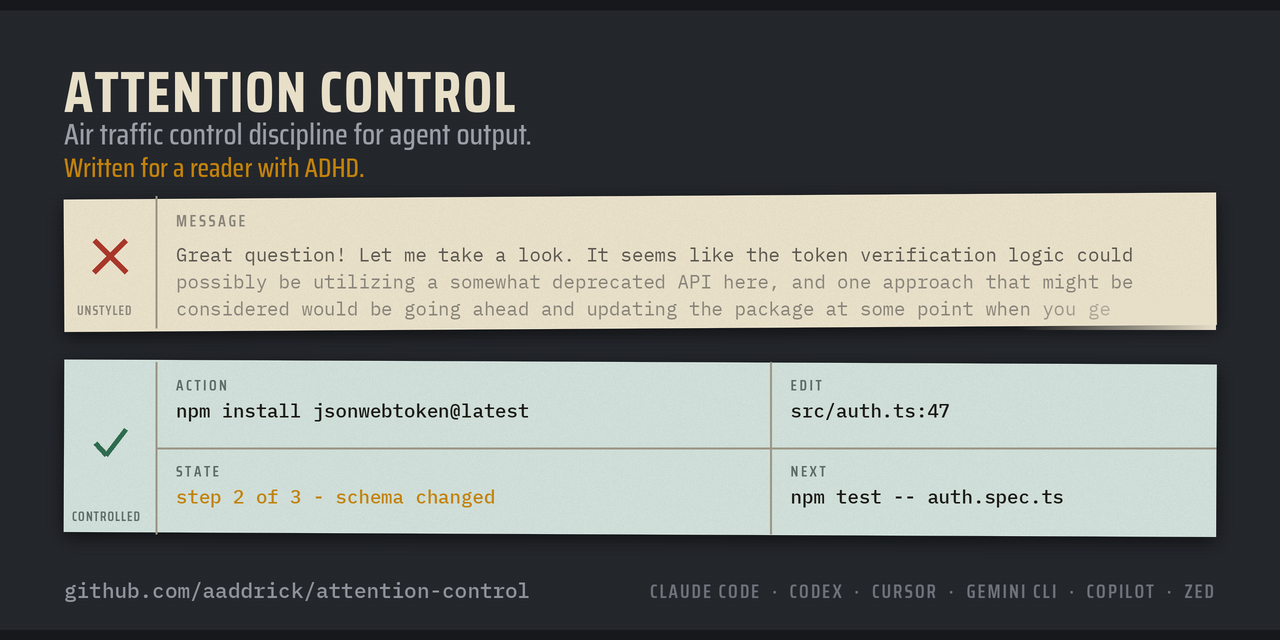
Air traffic control discipline for agent output.
Written for a reader with ADHD.


Connect on LinkedIn!
English ·
简体中文 ·
日本語 ·
한국어 ·
Tiếng Việt ·
Português (BR)
Install
Claude Code
Claude Code is the only agent here with a native output style slot. Run these
two commands in your terminal:
claude plugin marketplace add aaddrick/attention-control
claude plugin install attention-control@attention-control
Then run /config, select Output style, and pick Attention Control. It
takes effect after /clear or the next session.
To skip the picker, add outputStyle to ~/.claude/settings.json. It is a
top-level key. It does not go inside env, permissions, or any other block:
{
  "model": "opus",
  "env": { "EXAMPLE_VAR": "1" },
  "outputStyle": "Attention Control"
}
model and env stand in for keys you may already have. Keep them. Add the
outputStyle line beside them.
For one session instead of every session, use the skill the plugin also ships:
/attention-control:attention-control
Say "stop attention control" to turn it off.
Codex
Codex has no output style slot, so the rules ship as a skill.
codex plugin marketplace add aaddrick/attention-control --ref main
codex plugin add attention-control@attention-control
Inside Codex, /plugins opens the plugin browser instead.
Start a new thread, then type the skill:
$attention-control:attention-control
Codex prefixes a plugin skill with the plugin name. Say "stop attention control"
to turn it off. For every turn instead, put the always-on snippet from
INSTALL.md in ~/.codex/AGENTS.md.
Cursor, Gemini CLI, Copilot, Zed, and manual install
See INSTALL.md. None of them has an output style slot, so the
rules ship as a skill, a rules file, or an AGENTS.md block. On a skill route,
type /attention-control and say "stop attention control" to turn it off.
What it does
Air traffic control phraseology exists for one reason: a distracted human under
load will mishear an instruction. Aviation solved this with two disciplines.
Controlled vocabulary makes each word mean one thing. Fixed message shape puts
the instruction first and the background last.
This style applies both disciplines to your coding agent. The agent leads with
the action you can run, and writes each sentence so one word means one thing.
The style targets one reader: a reader with ADHD. That reader is where the shape
rules come from. See Why the shape rules exist.
What changes
Before
Great question! Let me take a look. It seems like the auth flow has a few
moving pieces here. Looking at src/auth.ts, the token verification logic
could possibly be utilizing a deprecated API — the verifyToken function
around lines 42-58 has been implemented against an older jsonwebtoken
signature. One approach that might be considered would be updating the
package and refactoring that function. By the way, your dependency versions
in general could probably use a review at some point. Hope this helps! Let me
know if you'd like me to dig deeper into any of this.
|
After
Run npm install jsonwebtoken@latest.
I changed src/auth.ts:47. verifyToken now names the algorithm:
jwt.verify(token, secret, { algorithms: ["HS256"] }, callback);
Run npm test -- auth.spec.ts. It takes about 10 seconds.
The old call named no algorithm. jsonwebtoken v9 rejects an unsigned token
unless you pass algorithms: ["none"].
Next: paste the first failing line if a test fails.
|
The two layers
Shape decides what you say and in what order. 11 rules:
- Lead with the next action.
- Do the work you own.
- Number multi-step work.
- End with one concrete next action.
- Suppress tangents.
- Restate state every turn.
- Give time estimates in concrete units.
- Show what now works.
- State errors flat.
- Cap lists at 5 items.
- No preamble, no recap, no closer.
Language decides how each sentence reads. The short version:
- One word, one meaning. One action, one verb. No rotating synonyms.
- Standard verbs: "check", "make sure", "start", "stop", "use", "show", "find", "change", "remove", "need".
- Active voice. Name the actor.
- Simple tenses only. No perfect tense, no auxiliary stacks.
- 20 words per instruction, 25 per explanation. Noun clusters capped at 3 words.
Full text: output-styles/attention-control.md.
Why the shape rules exist
Five facts about ADHD reading drive all 11 shape rules. Each fact below names
the rules it produces.
| The fact | What the agent does |
|---|
| Working memory is small. Anything not on screen is gone. | It never writes "keep in mind X". It restates the state every turn: "Step 3 of 5 done: I changed the schema. Next: run scripts/backfill.py." (rules 6, 10) |
| Knowing the answer is not doing the answer. Work dies in the gap between the two. | It does the work it owns instead of handing it back. It gives the command, not the label. "Add the missing header" is a label. Authorization: Bearer ${token} is a fix. (rules 1, 2, 3) |
| Starting is the hardest step. | The first line is small, obvious, and doable now. The last line names one action that takes under two minutes. "Open the file" counts. (rules 1, 4) |
| Time estimates feel uniform. "A bit of work" and "a few hours" register the same. | It writes "about 15 minutes if tests cover this, an afternoon if not". It never writes "some work". (rule 7) |
| Dopamine is scarce. A buried win does not register. | After a change, it names the result in concrete terms: "Login works with magic links. Run npm run dev and open /login." (rule 8) |
Two more rules protect attention itself. Rule 5 suppresses tangents, so one open
thread stays one open thread. Rule 11 removes the preamble and the closer, so
the answer starts on line 1.
This is why the style is not "be terse". Terseness that drops the command, the
number, or the condition costs the reader a round trip, and a round trip costs
the thread. Rule 9 follows from the same logic: an error gets a location, a
cause, and a fix, with no "Uh oh" in front of it. Alarm is not information, and
it competes with the information for the same attention.
You need no ADHD diagnosis for this to help. A tired reader, a reader on a
phone, and a reader with 40 open tabs all read the same way.
What it leaves alone
Four targets, one rule each. Code, commands, file paths, identifiers, and error
messages stay verbatim. Quoted text stays verbatim. Code comments and commit
messages match the style of the repository around them. Only the prose the agent
writes itself follows this style.
Those are instructions, not a lock. An output style is system prompt text, and
nothing outside the model enforces it. Treat the boundary as a strong default,
and check the output when it matters.
Accuracy beats brevity. A rule never removes a fact, a number, a condition, or a
scope qualifier. A hedge that carries real uncertainty stays.
Evals
The harness compares response quality against an unstyled baseline. It does not
measure length.
python3 scripts/run_evals.py validate
python3 scripts/run_evals.py plan --trials 3
24 cases, 6 scored dimensions, and a release gate that blocks a candidate that
regresses correctness or safety.
The judge is the weak point, so the harness targets it. blind hides the
condition and balances the positions. The judge scores every group twice with
the order reversed, then reports how often the two passes disagree. The runner
runs in an empty directory and reads none of your config. Design notes and the
measurements behind them: evals/README.md.
Tune it
Fork, edit output-styles/attention-control.md, then regenerate every
agent-specific copy:
python3 scripts/sync_style.py
Swap your copy in, one command at a time:
claude plugin uninstall attention-control
claude plugin marketplace remove attention-control
claude plugin marketplace add <your-username>/attention-control
claude plugin install attention-control@attention-control
Credits
This style combines two existing works. Neither author takes part in this
project.
Shape layer: i-have-adhd by
Ayoub G. (MIT). The eval harness derives from the same project.
Language layer: the
asd-ste100 output style
by L1nefeed, itself a condensation of
ASD-STE100 Simplified Technical English, Issue 9.
This project reproduces no text from the ASD specification. The ASD does not
certify, endorse, or sponsor it. Details in NOTICE.md.
License
MIT. See LICENSE.