Brightspace MCP Server
By Rohan Muppa, ECE @ Purdue
Talk to your Brightspace courses with AI. Ask about grades, due dates, quizzes, announcements, and more. Works with Claude Desktop, Claude Code, Cursor, ChatGPT Desktop, Windsurf, and any MCP client.
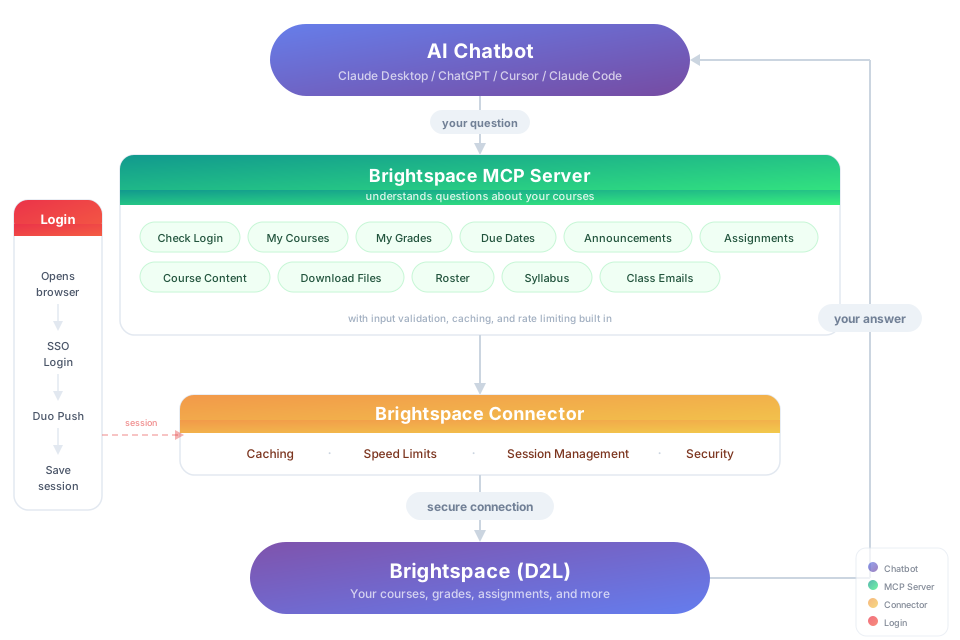
This is an MCP (Model Context Protocol) server that connects your AI to D2L Brightspace so it can pull your grades, assignments, syllabus, and course content on demand.
Connects to D2L Brightspace. Automatic login supports Purdue's Microsoft Entra flow and SUNY campus selection. Other schools need a compatible automated sign-in flow; unsupported login pages return an actionable error.
Try It
"Download my lecture slides and turn them into interactive flashcards"
"Grab every assignment rubric and build me a visual dashboard of what I need to hit for an A"
Install
You need: Node.js 20+ and an available native credential store: macOS Keychain, Windows Credential Manager, or Linux Secret Service. Linux requires secret-tool and an unlocked desktop keyring. Install libsecret-tools on Debian/Ubuntu, or the package providing secret-tool on your distribution. A container or SSH session without Secret Service cannot persist authentication in v2.
Option 1: Let your AI do it
Paste this into Claude Code, Cursor, Windsurf, Copilot, Codex, or any AI coding assistant:
Install brightspace-mcp-server for me by following
https://github.com/RohanMuppa/brightspace-mcp-server/blob/main/LLMs.md
(use --purdue if I'm at Purdue, or --suny if I'm at a SUNY campus).
Option 2: Run it yourself
npx brightspace-mcp-server setup
Purdue students can add --purdue to skip entering the school URL:
npx brightspace-mcp-server setup --purdue
SUNY campuses share one Brightspace site, so --suny also asks which campus
you're at and skips SUNY's campus picker when you sign in:
npx brightspace-mcp-server setup --suny
The wizard saves your password in the native credential store and runs login in a headless browser. At Purdue, approve Microsoft Authenticator using the number printed in the terminal. No browser window opens. The wizard can configure Claude Desktop and Cursor. Restart your AI client when it finishes.
Any other D2L school: run setup without a flag and paste your Brightspace URL (for example https://yourschool.brightspace.com).
Using a different client? Configure it manually.
Search your client's docs for how to add an MCP server. The server command to register is:
npx -y brightspace-mcp-server@latest
On Windows, npx must be wrapped: cmd /c npx -y brightspace-mcp-server@latest
You still need to run npx brightspace-mcp-server setup first to save your credentials.
Session Expired?
Returning the next day normally requires no action. The server renews short-lived API tokens over HTTPS using the saved Brightspace session. If that session ends, a headless browser restores your saved Microsoft session and tries silent SSO. If Microsoft requires sign-in, your saved credentials are entered automatically and you complete MFA on your phone.
Your school's policy controls when MFA is required. There is no local 24-hour cutoff, and the server no longer discards browser state after one hour. A network outage preserves the saved session and returns a temporary error.
If you miss an MFA request, automatic browser authentication waits four hours before trying again. Existing tokens and HTTP token renewal still work. Browser-based SSO also pauses because Microsoft can send another phone prompt during a redirect, even without a password submission. Run this command in a terminal to retry immediately and see the MFA number:
npx brightspace-mcp-server auth
MFA at Purdue is Microsoft Authenticator number matching: enter the terminal-displayed number on your phone. The MCP also sends authentication progress as logging notifications to clients that display them. Some desktop clients hide server logs, so use the terminal command above if the number is not visible. Unsupported identity-provider pages require a supported sign-in handler; the server does not silently open a visible browser.
What You Can Ask About
| Topic | Examples |
|---|
| Grades | "Am I passing all my classes?" · "Compare my grades across all courses" |
| Assignments | "What's due in the next 48 hours?" · "Summarize every assignment I haven't turned in yet" · "Give me the link to submit HW 4" |
| Quizzes | "Which quizzes close this week?" · "Is Quiz 3 timed, and does it have a grace period?" |
| Assignment files | "What does the lab 4 spec actually ask for?" · "Summarize the rubric attached to the project" |
| Exams | "Is there a midterm in the gradebook that isn't on my assignments list?" |
| Announcements | "Did any professor post something important today?" · "What did my CS prof announce this week?" |
| Course content | "Find the midterm review slides" · "Download every PDF from Module 5" |
| Roster | "Who are the TAs for ECE 264?" · "Get me my instructor's email" |
| Discussions | "What are people saying in the final project thread?" · "Summarize the latest discussion posts" |
| Planning | "Build me a study schedule based on my upcoming due dates" · "Which class needs the most attention right now?" |
Security
- Your school URL and username live in
~/.brightspace-mcp/config.json. Your password lives in the native credential store. macOS and Windows use @napi-rs/keyring; Linux uses secret-tool directly to require Secret Service without a temporary kernel-key fallback. Linux secrets travel through stdin, never command-line arguments.
- Each account directory stores
session.json for access tokens and storage-state.encrypted.json for cookies and browser storage. Both use AES-256-GCM with a random key held in the native credential store. The application never writes new plaintext password or browser-state snapshots. D2L_SESSION_DIR changes the local root of these account directories.
- On Unix, session files are mode 0600 and their directory is mode 0700. Security also depends on your operating-system account: software running as you may be able to access the same credential store. Runtime memory and recoverable v1 files in Trash are outside the encrypted-file guarantee.
- All traffic to Brightspace is HTTPS.
- On startup the server asks the npm registry whether a newer version exists. When running through
npx, it clears this package's own stale npx cache directories so the next start downloads the new version. It never installs anything itself. Set D2L_NO_UPDATE_CHECK=1 to turn the check off.
- Read only: this server never submits, posts, or changes anything in Brightspace.
Contributing & Forking
Want to add your school, build a new tool, or fix something? Fork the repo, make your changes, and open a pull request. If it gets merged, it ships to every user automatically.
git clone https://github.com/RohanMuppa/brightspace-mcp-server.git
cd brightspace-mcp-server
npm install
npm run dev       # tsc in watch mode
npm test          # vitest, must be green before you open a PR
Add your school: Add a preset to SCHOOL_PRESETS in src/setup.ts. If your school's login flow is different, add a handler in src/auth/.
Add a new tool: Create a file in src/tools/, add the schema in schemas.ts, export it in src/tools/index.ts, and register it in src/index.ts. Use any existing tool as a template.
Run your own version: You can also fork and run it independently. Clone it, build it, and point your AI client to the local build/index.js instead of using npx. No npm needed. Just know that forks don't receive updates from this repo automatically. If your changes could help others, consider opening a PR.
Licensed under the MIT License.
Updates
Automatic. Every time your AI client starts a session, it runs commands which pull the newest version from npm. No action needed.
However, mistakes do occur, so regularly, especially if you suspect you're on an old version, clear the npx cache and restart your client:
npx clear-npx-cache
What's new in 2.0.0
- Headless saved-credential login and terminal MFA, with silent session reuse across restarts.
- Native secure credential storage and encrypted browser-state migration from v1.
- Removed the one-hour browser-state cutoff and destructive profile recovery.
- Process-level authentication coordination, failed-MFA cooldown, and transport errors that preserve your session.
- Publishing waits for the test matrix on macOS, Windows, and Linux.
Report a bug · MIT · Copyright 2026 Rohan Muppa