
CopilotKit/
OpenBot

CopilotKit/OpenBotTemplates
Open-source AI coworkers that each get a computer of their own: a browser, files and tools, with every action decided before it happens and recorded after. Bring any AG-UI agent.
4.6k
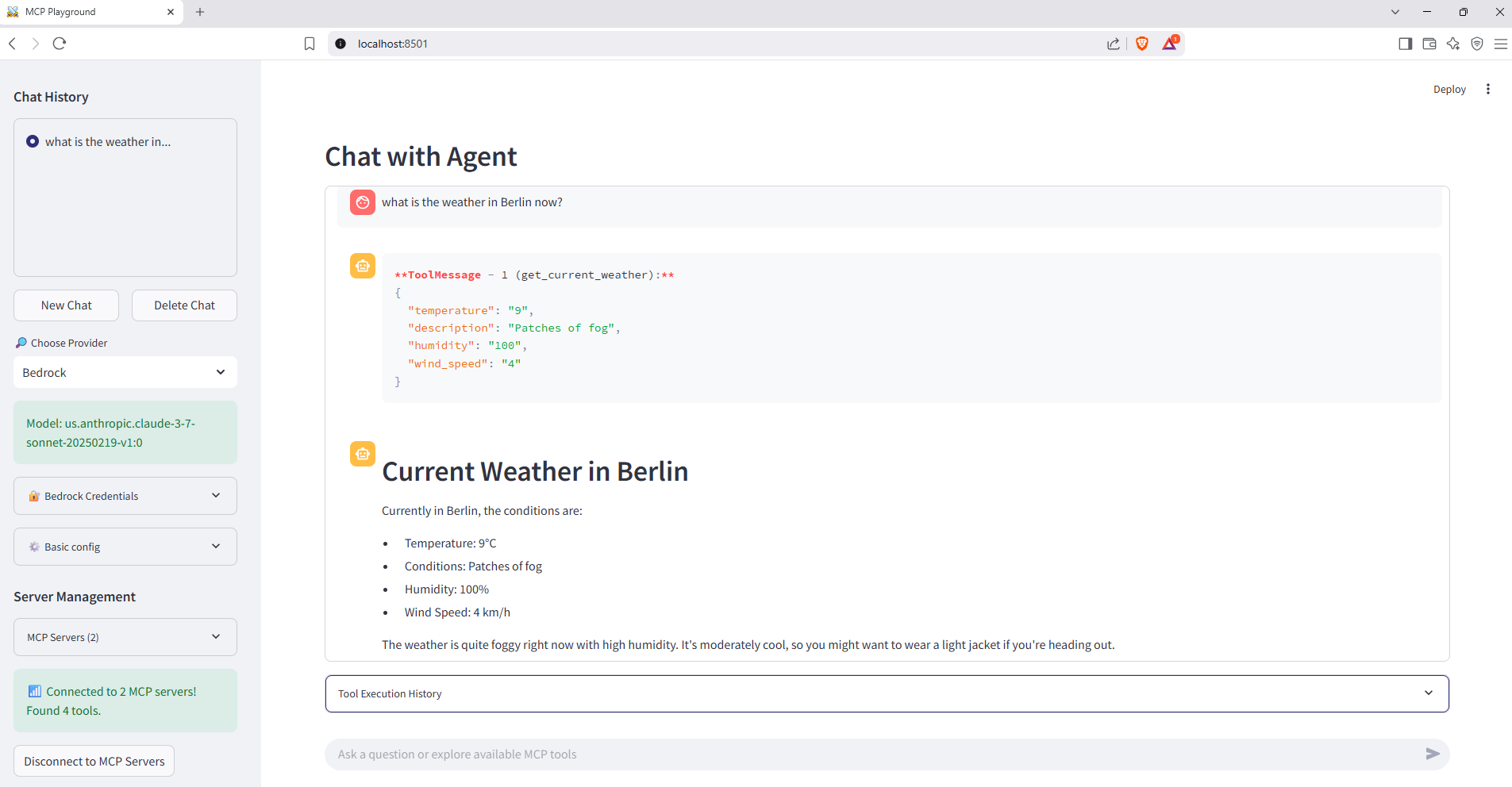
This repo gives you a working chat UI for talking to LLMs and calling MCP tools from the same interface. The client can connect to multiple MCP servers, show available tools in the sidebar, and stream tool calls back into the chat.
Builders who want to prototype an MCP-enabled chat app with a visual interface.
You can spin up a chat app that routes requests to MCP tools instead of wiring that plumbing yourself.
Registers multiple MCP servers and auto-detects their available tools.
Provides chat history, sidebar controls, and live tool execution output.
Works with OpenAI, Bedrock, Anthropic, Google Gemini, and Groq through one LangChain interface.
Lets you swap the default model ID from the UI without changing code.
Lets you add and remove MCP servers from the sidebar during a session.
Uses `create_react_agent` to decide when to call tools and how to reason across them.
Ships separate Dockerfiles for the client and servers plus one `docker-compose.yaml`.
git clone https://github.com/your-org/mcp-playground.git
cd mcp-playground
docker compose up --build
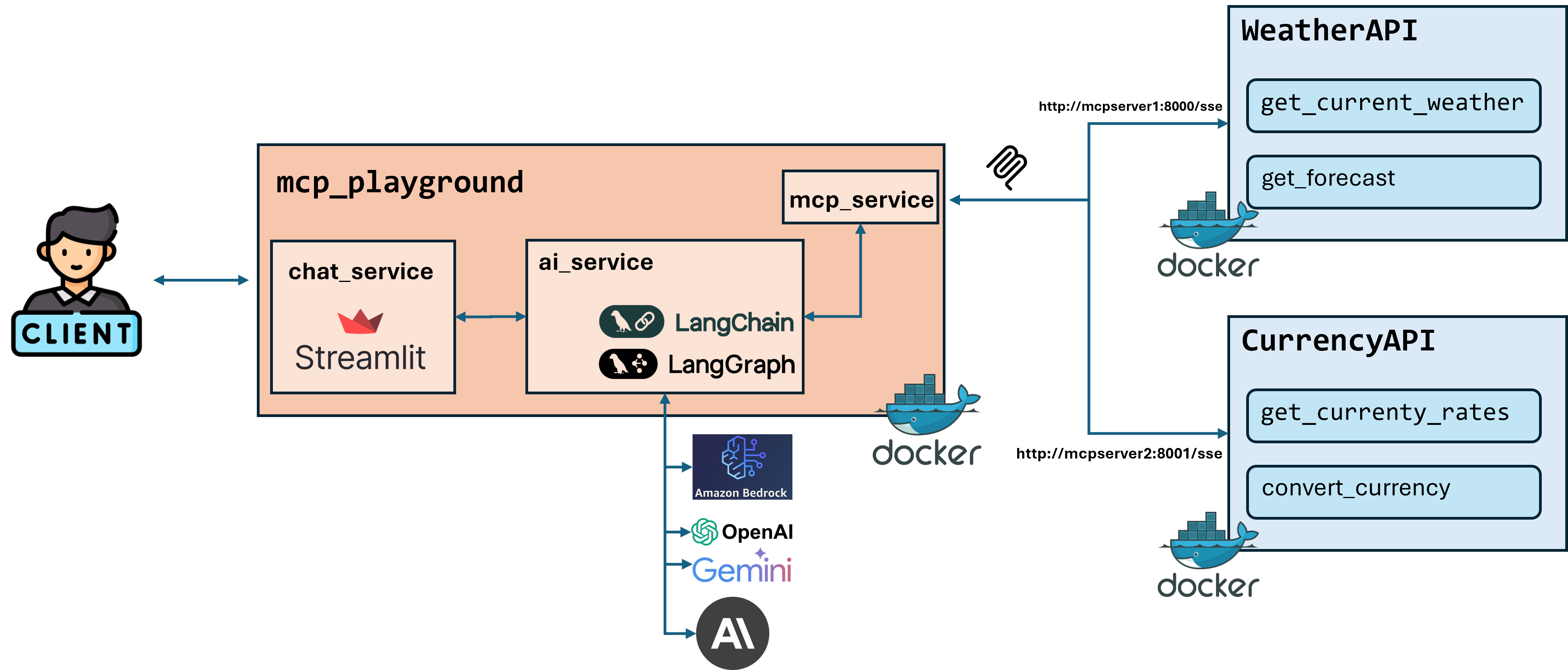
A Streamlit-based playground that lets you chat with large language models and seamlessly plug in external Multi-Server Command Protocol (MCP) tools. Spin up multiple FastMCP servers (Weather & Currency) alongside a Streamlit client, all orchestrated with Docker Compose. The client is provider-agnostic (OpenAI • Amazon Bedrock • Anthropic • Google Gemini • Groq) thanks to LangChain + LangGraph. Built with uv for lightning-fast dependency installation.
Want a deep dive into how it all works? Check out the detailed walkthrough in this Medium article: https://medium.com/@elkhan.alizada/your-own-ai-agent-playground-build-it-with-streamlit-langgraph-and-docker-4caeb6fe0ac4
| Feature | Description |
|---|---|
| 🔌 Multi-Server MCP | Register any number of MCP servers; the agent auto-detects available tools & routes calls. |
| 🖥️ Streamlit Chat UI | Rich chat experience with history, sidebar controls and live tool execution output. |
| 🧩 Provider-Agnostic | One LangChain interface for OpenAI, Bedrock, Anthropic, Google, Groq. Switch on the fly. |
| 🎯 Dynamic Model Selection | Override default models with custom model IDs directly from the UI. |
| ➕ Dynamic MCP Server Management | Add/remove MCP servers on-the-fly through the UI without editing config files. |
| 🤖 React Agent via LangGraph | create_react_agent enables dynamic tool selection and reasoning. |
| 🐳 Docker-First | Separate Dockerfiles for client & each server + a single docker-compose.yaml. |
| 📦 Extensible | Drop-in new MCP servers or providers without touching UI code. |
mcp-playground/
├─ docker-compose.yaml          # One-command orchestration
├─ client/                      # Streamlit UI
│  ├─ app.py                    # Main entry-point
│  ├─ config.py                 # Typed settings & defaults
│  ├─ servers_config.json       # MCP endpoint catalogue
│  ├─ ui_components/            # Streamlit widgets
│  └─ ...
└─ servers/
   ├─ server1/                  # Weather Service MCP
   │  └─ main.py
   └─ server2/                  # Currency Exchange MCP
      └─ main.py
OPENAI_API_KEY) or AWS creds for Bedrock.git clone https://github.com/your-org/mcp-playground.git
cd mcp-playground
docker compose up --build
⚡ Fast Builds with uv: All services use uv for dependency management, providing significantly faster Docker builds compared to traditional pip. Dependencies are cached and only reinstalled when pyproject.toml changes.
| Service | URL | Default Port |
|---|---|---|
| Streamlit Client | http://localhost:8501 | 8501 |
| Weather MCP | http://localhost:8000 | 8000 |
| Currency MCP | http://localhost:8001 | 8001 |
All runtime settings are concentrated in client/config.py and environment variables.
| Variable | Purpose |
|---|---|
MODEL_ID | Provider selector (OpenAI, Bedrock, Anthropic, Google, Groq). |
TEMPERATURE | Sampling temperature (sidebar slider). |
MAX_TOKENS | Token limit (sidebar). |
Default Model IDs:
MODEL_OPTIONS = {
    'OpenAI': 'gpt-4o',
    'Antropic': 'claude-3-5-sonnet-20240620',
    'Google': 'gemini-2.0-flash-001',
    'Bedrock': 'us.anthropic.claude-sonnet-4-5-20250929-v1:0',
    'Groq': 'meta-llama/llama-4-scout-17b-16e-instruct'
}
You can override the default model for any provider directly in the UI:
Examples:
gpt-4o with o1 for reasoning tasks or gpt-4o-mini for cost efficiencyclaude-opus-4.6 or claude-sonnet-4.6 for latest modelsgemini-2.0-flash-exp or gemini-exp-1206 for experimental featuresus.anthropic.claude-opus-4-6-v1 for Opus 4.6 or us.anthropic.claude-sonnet-4-6 for Sonnet 4.6llama-3.3-70b-versatileAdd custom MCP servers without editing servers_config.json:
MyCustomServer)http://localhost:8002/sse)sse or http{"Authorization": "Bearer token"}
Server Sources:
servers_config.json (cannot be removed via UI)MCP endpoints can also be statically defined in servers_config.json for persistent configuration.
Try:
"What will the weather be in Baku tomorrow and how much is 100 USD in AZN?"
:8000mcp = FastMCP("Weather Service", host="0.0.0.0", port=8000)
@mcp.tool()
async def get_current_weather(location: str) -> dict: ...
@mcp.tool()
async def get_forecast(location: str, days: int = 3) -> dict: ...
:8001mcp = FastMCP("Currency Exchange", host="0.0.0.0", port=8001)
@mcp.tool()
async def get_currency_rates(date: str = None) -> dict: ...
@mcp.tool()
async def convert_currency(amount: float, from_currency: str, to_currency: str, date: str = None) -> dict: ...
Sign in to join the discussion.
No comments yet. Be the first to say what this is good for.
Open-source AI coworkers that each get a computer of their own: a browser, files and tools, with every action decided before it happens and recorded after. Bring any AG-UI agent.

Turn Claude Code into a full game dev studio — 49 AI agents, 72 workflow skills, and a complete coordination system mirroring real studio hierarchy.
A self-organizing Obsidian vault that gives AI coding agents persistent memory. Claude Code, Codex CLI, Gemini CLI.

Production-grade Playwright + TypeScript Scaffold for Agentic Testing. Harness for all major AI coding agents baked in.

Omnia Vault - the all-in-one project brain: an Obsidian LLM wiki, Graphify code graphs, a living plan that triages new videos against itself, and a Claude Code ⇄ Codex relay. Everything your project knows, in one clonable vault.
🎬 Tạo video "so sánh kiến thức" ngắn tự động — HyperFrames + AI voice, 1 template nhiều chủ đề.