
obra/
superpowers

obra/superpowersSkills
An agentic skills framework & software development methodology that works.
285k
1 add
This repository packages Douyin actions as reusable Agent Skills backed by a local browser runtime. It uses a Python JSON CLI, a Node CDP bridge, and Chrome profiles on your machine so the agent can act with explicit checks and human confirmation where needed.
Builders who want a local, reusable way for their agent to log in, search, prepare posts, and interact on Douyin.
You can let an agent handle Douyin tasks with clearer state, safer publishing, and fewer repeated instructions.
Covers `douyin-auth`, `douyin-explore`, `douyin-publish`, `douyin-interact`, and `douyin-env` for separate workflows.
Exposes browser and workflow actions through `scripts/cli.py` with machine-readable results.
Keeps Chrome profiles and session state on your computer and uses loopback-only debugging.
Stops for manual review on captcha, identity checks, uncertain page state, and publish confirmation.
Uses synthetic page-state fixtures, regression tests, and smoke checks to detect drift without storing account data.
git clone https://github.com/zJay26/douyin-skills.git
cd douyin-skills
npm install
python scripts/cli.py doctor
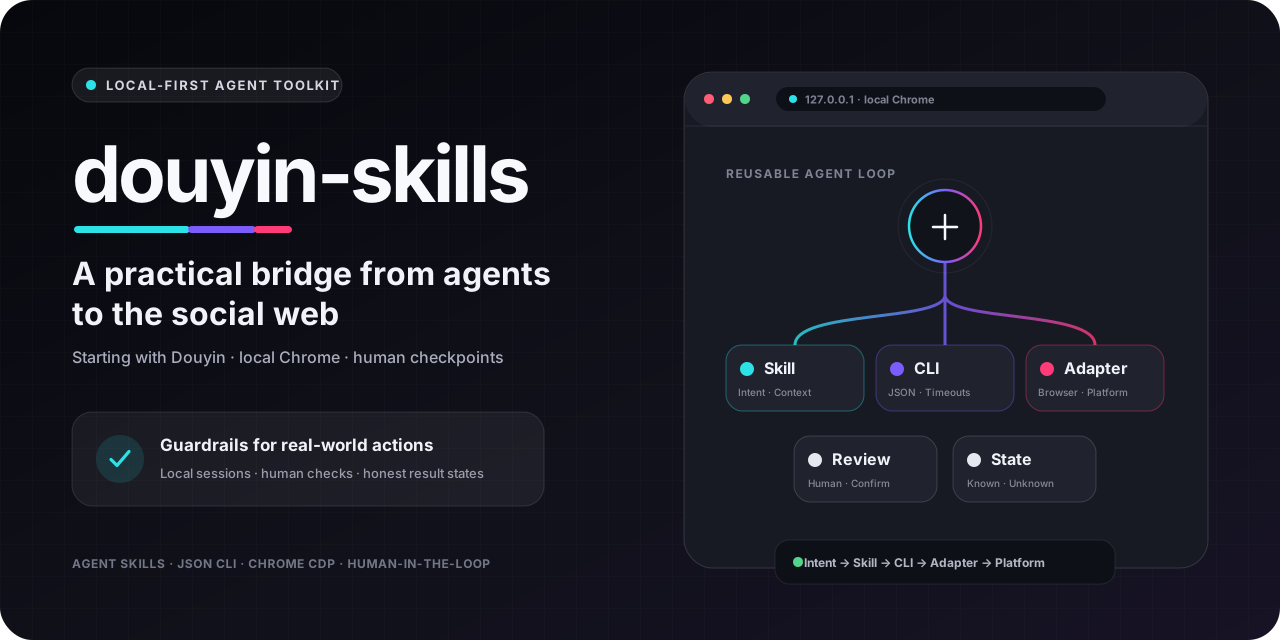
Local-first agent workflows for the social web—starting with Douyin.





[!IMPORTANT] This repository implements Douyin workflows today. Support for other Agent clients and social platforms is a direction, not a shipped compatibility claim. It is not an official Douyin product, and it does not provide bulk engagement or platform-control bypasses.
Agents can plan a multi-step task, but the social web is where plans meet stateful logins, changing pages, risk checks, and buttons with real consequences. A publishing click cannot be treated like a harmless text-generation step, and an uncertain result should not be reported as success.
douyin-skills is a concrete attempt to make that boundary easier to inspect and reuse. It packages intent as versioned Skills, exposes browser actions through a structured JSON CLI, keeps account sessions in local Chrome, and stops for human review when the page or outcome is uncertain.
Douyin is the current proving ground: a major social platform with real creator workflows and enough operational friction to test whether an agent integration is actually dependable. The project is intentionally narrower than a social-media management suite; it focuses on small, verifiable actions that can become reliable building blocks.
Everyday Douyin web tasks are not inherently complicated, but browser startup, login state, page transitions, and publish review can interrupt your flow. douyin-skills turns those steps into five composable Skills: your agent understands the intent, then acts through Chrome on your computer.
| What you can say | Capability | Guardrail |
|---|---|---|
| “Check login and show me the QR code if needed” | QR, SMS verification, multiple accounts | The user completes verification |
| “Find five weekend camping posts” | Keyword search, video/photo details | Up to 20 public posts per search |
| “Show me the current Douyin hot topics” | Read public trending topics | Up to 20; page drift is reported explicitly |
| “Fill in these photos or this video, but do not publish” | Uploads, copy, cover/music, page validation | Review first; no publish click |
| “Everything looks right—publish it” | Explicit publish confirmation | Never retry an unknown result |
| “Comment ‘学到了!!’ on this post” | One bounded public comment attempt | Confirmed, unconfirmed, and unavailable states are distinct |
| “Favorite this post and send me its link” | Like, favorite, share URL | No bulk actions or inflated claims |
| “Check the runtime and list available commands” | Offline command discovery and attach-only browser diagnostics | Tab titles and URLs are omitted by default |
What makes it different:
127.0.0.1.
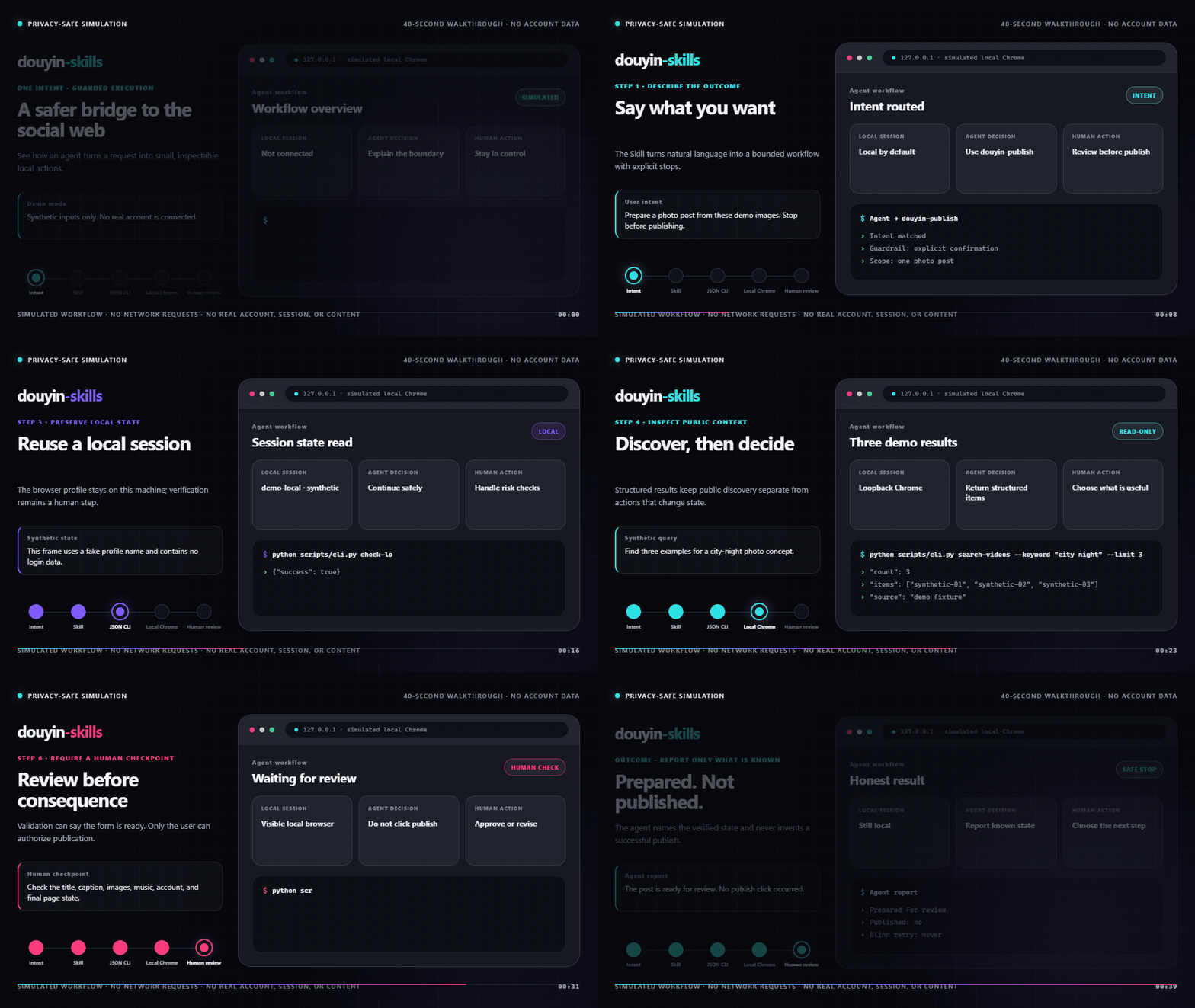
This 40-second walkthrough is entirely synthetic: it makes no network requests and contains no real Douyin page, account, cookie, QR code, phone number, profile path, or user content. It demonstrates the control flow and deliberately ends at Prepared · not published. It is not evidence that a live page version or account passed end-to-end validation.
The source is assets/demo/index.html. Maintainers with Chrome and FFmpeg can reproduce the GIF with npm run render:demo.
openclaw skills install git:zJay26/douyin-skills@main
Then tell your agent:
Use
douyin-envto install dependencies and run the environment checks.
This installation command and nested Skill discovery model follow the official OpenClaw documentation.
git clone https://github.com/zJay26/douyin-skills.git
cd douyin-skills
npm install
python scripts/cli.py doctor
You can also choose Code → Download ZIP on GitHub, extract the complete directory, and run the same npm install and doctor commands. Replace python with python3 if needed.
The environment is ready when the JSON from doctor contains "success": true and an empty required_failures list.
For a versioned, checksum-verifiable install, download douyin-skills-v1.6.0.zip and SHA256SUMS from the v1.6.0 Release. Verify the ZIP before extracting it:
# Linux / macOS
sha256sum -c SHA256SUMS

# Windows PowerShell: compare this value with the matching SHA256SUMS line
Get-FileHash .\douyin-skills-v1.6.0.zip -Algorithm SHA256
The named ZIP contains the complete repository under one versioned directory, including the privacy-safe Demo. GitHub's automatic source archives are separate and are not covered by the published checksum.
From v1.6.0, doctor and browser commands start a hidden worker that checks
stable releases every 6 hours by default. A new version is offered through
a JSON notice; it never downloads or installs automatically. You can keep
using the current version, disable checking or choose a download directory:
python scripts/cli.py check-update
python scripts/cli.py update-config --auto-check off
python scripts/cli.py update-config --download-dir "D:/Downloads/Douyin Updates"
For the selected version, use download-update --version vX.Y.Z to download
only, or install-update --version vX.Y.Z --confirm to update an official
portable install with a retained backup. Git/Skill-manager installs update
through their original manager. See the update guide.
Check the environment
Use
douyin-envto configure and verify this Skill.
Sign in
Check Douyin login with the default account. If I am signed out, show me the QR code.
Describe the task
Search for “city night photography” and return five titles, authors, content types, and links.
With my work account, fill the photo-publishing form with these three images and this caption. Pick suitable music, but stop before publishing.
Confirm publishing separately
I reviewed the page. Publish once, and do not retry if the result is not explicitly confirmed.
The first login creates an isolated local Chrome profile. Later commands reuse an available local Chrome debugging instance instead of restarting an already signed-in headed browser just to satisfy the default headless preference. If Douyin presents a captcha, identity check, or risk page, the CLI switches to a visible browser when a safe, tracked mode transition is needed and waits for you to complete it manually.
Commands reuse their saved page. When that session is missing, discovery and login create a dedicated tab; publishing steps require an existing form. To resume a tab after upgrading, use browser-status --include-tabs and select it with the global --target-id option. See runtime diagnostics and migration.
The larger contribution is not a claim that one repository has solved every social platform. It is a working separation between what an agent decides and what a real browser is allowed to do.
| Layer | What this repository demonstrates | What may transfer |
|---|---|---|
| Skill contract | Versioned intent, steps, guardrails, and failure handling in SKILL.md | Any client that understands the open Agent Skills format |
| Execution contract | Explicit arguments and structured JSON results | Other agent or tool surfaces can wrap the same stable CLI boundary |
| Local session | Isolated Chrome profiles and loopback-only CDP | Workflows where users must stay signed in without exporting sessions |
| Human checkpoint | Visible-browser verification and explicit publish confirmation | Other risk-sensitive or irreversible web actions |
| Result semantics | Confirmed, failed, and clicked-but-unconfirmed are different states | Agents can avoid confident but false completion reports |
| Platform adapter | Douyin URLs, selectors, and creator flows live behind shared runtime pieces | A future platform can replace its adapter without discarding every guardrail |
The root SKILL.md follows the open Agent Skills specification, which is designed for portable, version-controlled agent knowledge. OpenClaw follows that specification and currently provides the documented installation path for this repository. Execution on other Agent Skills clients is not part of CI yet, so treat cross-client use as integration work rather than plug-and-play support.
This distinction matters: the repository offers a reusable pattern today, not a universal compatibility badge.
The current implementation is specific to Douyin. Its URLs, selectors, login pages, creator forms, and content types must not be presented as portable code. The surrounding architecture is more general:
flowchart LR
    A["User intent"] --> B["Agent Skill"]
    B --> C["Structured JSON CLI"]
    C --> D["Local browser runtime"]
    D --> E["Human checkpoint"]
    D --> F["Platform adapter"]
    F --> G["Douyin · implemented today"]
    F -. "future adapter work" .-> H["Other social / creator platforms"]
A future adapter for another social or creator platform could reuse the Skill-to-CLI boundary, browser lifecycle, local profiles, timeouts, validation states, and human-review policy. It would still need its own authorized login flow, URLs, selectors, domain rules, tests, and platform-policy review.
No other platform adapter ships in this repository today. See the Agent ecosystem design note for the portability boundary, the Adapter authoring guide for the maintainer checklist, and ROADMAP.md for the staged plan.
| Skill | Responsibility | Example intent |
|---|---|---|
douyin-auth | Login state, QR, SMS verification, multiple accounts | “Switch to my work account and check login” |
douyin-explore | Search public posts, read video/note details, and inspect trending topics | “Find seven camping posts” |
douyin-publish | Fill photo/video posts, set cover or music, validate, confirm | “Prepare this post for my review” |
douyin-interact | One like/favorite/comment attempt or a public share URL | “Comment this and return the result” |
douyin-env | Installation, diagnostics, migration | “Check Chrome and dependencies” |
The root SKILL.md routes multi-step requests. Child Skills address scripts with OpenClaw's recommended {baseDir} convention, so execution does not depend on the agent's current working directory.
[!WARNING] Web interfaces change and automation may be restricted by the platform. Use a reasonable frequency and verify important actions on the actual page. You remain responsible for applicable law, platform rules, and content permissions.
flowchart LR
    A["User intent"] --> B["Agent"]
    B --> C["5 Skills"]
    C --> D["Python JSON CLI"]
    D --> E["Node.js CDP bridge"]
    E --> F["Chrome · 127.0.0.1"]
    F --> G["Douyin Web"]
    D -. "config and profiles" .-> H["~/.douyin-skills/"]
scripts/cli.py is the only public command entry point and always produces JSON.ws package.| Component | Minimum / requirement |
|---|---|
| Python | 3.9+, standard library only |
| Node.js | 18+ |
| npm | Used by npm install / npm ci |
| Chrome / Chromium | Must support remote debugging |
| Graphical display | Only needed for human captcha, identity, or risk checks |
The CLI searches PATH and common browser locations on Windows, macOS, Linux, and WSL. You can also specify an executable explicitly:
CHROME_BIN=/absolute/path/to/chrome python scripts/cli.py doctor
When a Linux container runs as root, the launcher adds Chrome's required --no-sandbox flag. It does not disable the browser sandbox for regular users.
Every command returns JSON. Put global account options before the subcommand:
python scripts/cli.py --account work check-login
Discover the installed runtime and result-contract versions without launching Chrome:
python scripts/cli.py version
Agent integrations should follow the stable minimum fields and certainty rules in the JSON result contract.
| Area | Command | Purpose |
|---|---|---|
| Runtime | version / capabilities | Return versions or machine-readable command arguments and effects without Chrome |
| Environment | browser-status | Inspect an existing endpoint without launching Chrome or changing tabs |
| Environment | doctor | Check Python, Node.js, ws, Chrome, and display availability |
| Auth | check-login | Inspect login, risk, and human-verification state |
| Auth | get-qrcode / wait-login | Retrieve a QR image and wait once for scanning |
| Auth | send-code / verify-code | Send and verify an SMS code |
| Accounts | list-accounts | List named accounts and the current default |
| Accounts | add-account / remove-account | Register or remove a named account |
| Accounts | set-default-account | Select the default named account |
| Accounts | update-account | Update the description while preserving the account port and profile |
| Discovery | search-videos | Keyword search; seven by default, twenty maximum |
| Discovery | get-trending-topics | Read public trending topics; twenty maximum |
| Discovery | get-video-detail | Read a numeric ID or public video/note URL |
| Publishing | fill-publish-image | Validate absolute image paths and fill the photo form |
| Publishing | select-music | Select the first available candidate by name |
| Publishing | validate-publish | Inspect fields and button state without publishing |
| Publishing | click-publish --confirm | Explicitly confirm one publish click |
| Publishing | fill-publish-video | Upload one local video, fill exact copy, and optionally set a custom cover |
| Publishing | set-video-cover | Set a custom cover on the current video form |
| Publishing | validate-publish-video | Inspect video upload, copy, cover, topic, and button state without publishing |
| Publishing | click-publish-video --confirm | Explicitly confirm one video publish click |
| Interaction | like-video / favorite-video | Ensure one explicit post is liked/favorited, confirming state when the page exposes it |
| Interaction | comment-video | Attempt one public comment when input and send controls are visible |
| Interaction | get-interaction-state | Read current like/favorite state without clicking |
| Interaction | share-video | Return a public URL and attempt to copy it |
Run python scripts/cli.py --help or a subcommand's --help for every option.
check-login performs a bounded recheck when navigation briefly exposes a verification interstitial. If switching to the visible browser clears that state, it returns action: risk_recovered_after_headed_switch, risk_recovered: true, and the newly confirmed login result. Agents should pause only for needs_user_verification: true, not for a stale title or a superseded risk snapshot.
| State | Meaning | Next step |
|---|---|---|
publish_confirmed | The page exposed an explicit success signal | Report confirmed publication |
publish_clicked_unconfirmed | The button was clicked, but the result is not reliable | Check Creator Center and do not retry |
publish_outcome_unknown | The click command lost its result; whether a click occurred is unknown | Check Creator Center and do not retry |
success: false | Validation or execution failed; inspect status, clicked, and retry_safe | Repair validation errors only when no click occurred |
Likes and favorites inspect the control before and after an action, including adapter-declared data-e2e-state values, ARIA state, labels, and active styles. state: already_active means no second click was issued. If the pre-action state remains unknown, the command returns clicked: false and stops instead of probing a toggle; if a click occurred but the final state is unverified, the agent must report that uncertainty and never retry. Use get-interaction-state for a read-only check.
The default data directory is ~/.douyin-skills/; set DOUYIN_SKILLS_HOME to use another local path. It may contain named-account configuration, runtime state, and Chrome profiles:
remove-account unregisters the account but does not promise to delete profile data..
├── SKILL.md # Multi-step entry point and shared guardrails
├── skills/ # Five composable child Skills
├── scripts/
│ ├── cli.py # Unified JSON CLI
│ ├── browser_runtime.py # Platform-neutral Python CDP client
│ ├── cli_contract.py # JSON argument errors and command discovery
│ ├── doctor.py # Environment diagnostics
│ ├── chrome_launcher.py # Chrome lifecycle and profiles
│ ├── cdp_client.mjs # Node.js CDP bridge
│ └── douyin/ # Auth, discovery, publish, interaction modules
├── tests/ # Python unit tests and Node.js bridge test
├── fixtures/page_states/ # Synthetic state-contract regression fixtures
├── assets/ # README and social-preview artwork
├── docs/ # Agent ecosystem, adapter design, and authoring notes
├── ROADMAP.md # Evidence-led project direction
└── .github/ # CI, dependency updates, collaboration templates
python scripts/smoke_browser.py runs real Chrome on a synthetic local page in a temporary profile. python scripts/validate_release.py requires committed tracked files, builds twice, compares bytes and checksums, and runs offline commands from the extracted package. Both checks run in CI; neither authenticates to Douyin.
npm ci
python -m compileall -q scripts tests/python
python -m unittest discover -s tests/python -v
python scripts/validate_fixtures.py
python scripts/validate_repository.py
npm run check
npm test

python -m pip install ruff==0.16.2
ruff check scripts tests/python
ruff format --check scripts tests/python
When investigating a page-drift report, rerun only the relevant synthetic states with python scripts/validate_fixtures.py --flow detail or python scripts/validate_fixtures.py --fixture-id detail-page-drift.
CI tests Windows (Python 3.13 / Node.js 24) and Ubuntu (Python 3.9 / Node.js 18), with a separate Ruff check. It also validates the synthetic page-state fixtures, including their expected certainty semantics and privacy rules. CI doe
Sign in to join the discussion.
No comments yet. Be the first to say what this is good for.
An agentic skills framework & software development methodology that works.

Turn any codebase, with its docs, SQL schemas, configs, and PDFs, into a queryable knowledge graph. A /graphify skill for Claude Code, Cursor, Codex, and Gemini CLI: local deterministic AST parsing, every edge explained, no vector store.

Topic in, narrated explainer video out. A Claude Code / Codex skill that turns any topic into a black-canvas motion-graphics explainer video with TTS voiceover, subtitles and a chapter progress bar. Chinese or English; every frame drawn in code with Remotion.
Public repository for Agent Skills
Open-source AI job search: scan job portals, evaluate listings into a structured A-H report with a global 1-5 score, tailor your CV, track applications — runs locally in your AI coding CLI (Claude Code, Codex, OpenCode, Antigravity…)

Production-grade engineering skills for AI coding agents.