
JuliusBrussee/
caveman

🪨 why use many token when few token do trick — Claude Code skill that cuts 65% of tokens by talking like caveman
105k
1 add
SafeClaw runs Claude Code inside separate Docker containers so each session is isolated and starts fast. A browser terminal and a dashboard let you create, view, stop, and delete sessions, while host-mounted volumes keep conversation history and memory across restarts.
Builders who want to run Claude Code in isolated sessions and manage them from one local dashboard.
You can keep several Claude Code sessions running side by side, with shared defaults and saved context, instead of juggling one brittle terminal at a time.
Each Claude Code session runs in its own Docker container so sessions do not interfere with one another.
`dashboard/server.js` serves a local dashboard with create, start, stop, delete, and live iframe views.
Session data is stored under `~/.config/safeclaw/sessions/<session-name>/` and mapped into the container so history survives restarts.
The setup pins Claude Code, disables auto compacting and prompt suggestions, and runs with `--dangerously-skip-permissions` inside the container.
`./scripts/setup-slack.sh` adds read-only Slack support when you provide a token.
The `setup/skills/` and `setup/tools/` folders ship reusable skills such as Slack, yt-dlp, and gdoc support.
node dashboard/server.js
~/.config/safeclaw/sessions/<session-name>/
The easiest way to run multiple Claude Code sessions, each in its own container, with a dashboard to manage them all. Quick setup with battle-tested sensible defaults and skills.
https://github.com/user-attachments/assets/e282ed8f-3ec9-4a9e-aa9e-4bc84f9281e9
See architecture.md for design details.
This lets you run Claude Code with --dangerously-skip-permissions safely and fast.
Each Claude Code session runs in its own container. Spin up as many as you need - they're isolated from each other and start in seconds. Run different research tasks, projects, or experiments in parallel without interference. Conversation history is automatically stored on your host machine via a volume mount.
# Build image (once, or after changes)
./scripts/build.sh

# Start container and web terminal
./scripts/run.sh

# To mount a local project (host_path:container_path)
./scripts/run.sh -v ~/myproject:/home/sclaw/myproject

# Run multiple sessions with -s
./scripts/run.sh -s work        # safeclaw-work on next available port
./scripts/run.sh -s research    # safeclaw-research on next available port
On first run, run.sh will prompt you to set up authentication tokens. It then starts a web terminal at http://localhost:7681 and opens it in your browser.
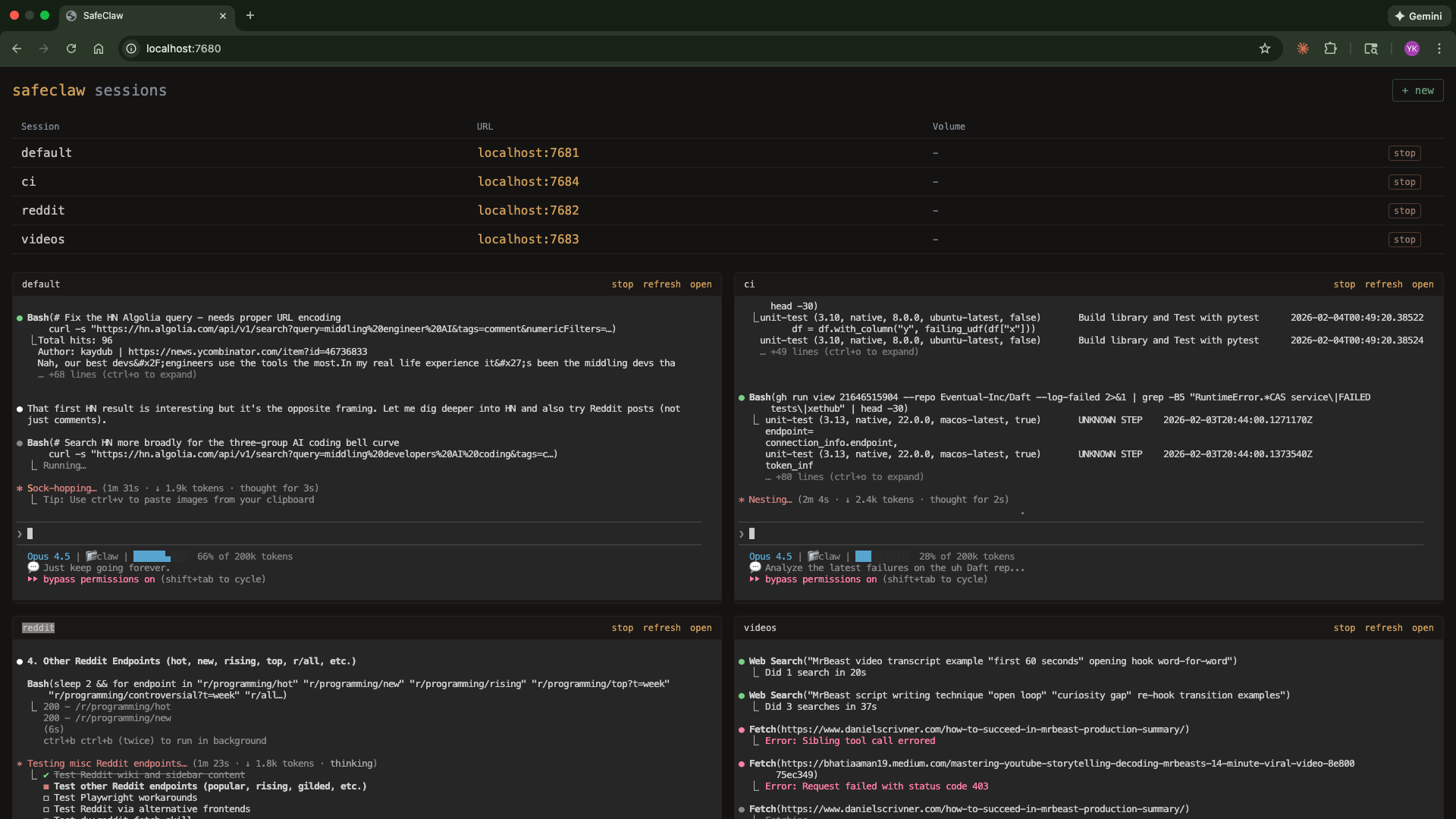
Manage all sessions from a web dashboard:
node dashboard/server.js
Opens at http://localhost:7680 with:
./scripts/setup-slack.sh - Add Slack read accessautoCompactEnabled: false - prevents automatic context compactionpromptSuggestionEnabled: false - disables prompt suggestions--dangerously-skip-permissions enabled (because it's containerized)Each session's data persists locally at:
~/.config/safeclaw/sessions/<session-name>/
This maps to /home/sclaw/.claude/projects/ inside the container and includes:
-home-sclaw/memory/MEMORY.md, loaded into the system prompt each conversationRebuilding containers or restarting sessions won't affect your history or memory.
Tokens are stored in ~/.config/safeclaw/.secrets/ and injected as env vars on each run. The filename becomes the env var name.
| File | How to generate |
|---|---|
CLAUDE_CODE_OAUTH_TOKEN | claude setup-token (valid 1 year) |
GH_TOKEN | gh auth token or create a PAT at github.com/settings/tokens |
SLACK_TOKEN | Optional - ./scripts/setup-slack.sh |
You can add any additional secrets by creating files in the .secrets/ directory.
| Script | Description |
|---|---|
scripts/build.sh | Build the Docker image and remove old container |
scripts/run.sh | Start/reuse container, inject auth, start ttyd. Use -s name for named sessions, -v for volumes, -n to skip opening browser, -q "question" to start with a query. |
scripts/setup-slack.sh | Set up Slack integration (optional) |
scripts/manage-env.js | Manage environment variables (list, add, delete) |
dashboard/server.js | Web dashboard for managing multiple sessions |
Inside each container, these aliases are available:
| Alias | Command |
|---|---|
c | claude |
cs | claude --dangerously-skip-permissions |
| Command | Runs |
|---|---|
npm run build | ./scripts/build.sh |
npm start | ./scripts/run.sh |
npm run dashboard | node dashboard/server.js |
npm run dashboard:dev | nodemon dashboard/server.js |
npm run setup-slack | ./scripts/setup-slack.sh |
npm run manage-env | node scripts/manage-env.js |
Defined in setup/skills/.
| Skill | Description | Requires |
|---|---|---|
| slack | Read Slack messages, channels, DMs, and search (read-only) | SLACK_TOKEN |
| yt-dlp | Download YouTube videos, audio, and subtitles/transcripts | - |
| gdoc | Read publicly shared Google Docs | - |
Sign in to join the discussion.
No comments yet. Be the first to say what this is good for.
🪨 why use many token when few token do trick — Claude Code skill that cuts 65% of tokens by talking like caveman

The best-benchmarked open-source AI memory system. And it's free.

Orca is the ADE for working with a fleet of parallel agents. Run any coding agent with your own subscription. Available on desktop, mobile and remote runtime.

A cross-platform desktop All-in-One assistant for Claude Code, Codex, OpenCode, OpenClaw, Grok Build & Hermes Agent. Only official website: ccswitch.io

Never stop coding. Free MIT AI gateway: one endpoint, 352 providers (150+ free), 1200+ models Kimi, Claude, GPT, Gemini, GLM, DeepSeek, MiniMax. Works with Claude Code, Codex, Cursor, OpenCode, Cline & Copilot. Quota-aware auto-fallback, RTK+Caveman compression saves 15-95% tokens, MCP/A2A, Desktop/PWA. Built by 550+ contributors

Compress tool outputs, logs, files, and RAG chunks before they reach the LLM. 20% fewer tokens for coding agents, 60-95% fewer tokens for JSON, same answers. Library, proxy, MCP server.