
JuliusBrussee/
caveman

🪨 why use many token when few token do trick — Claude Code skill that cuts 65% of tokens by talking like caveman
105k
1 add
Skills Manager gives you a local skill library, collections, and mounts so you can reuse the same skills across multiple agents. It discovers skills from skills.sh and other sources, installs them to chosen agents, and keeps agent-specific state visible when copies diverge or go missing.
Builders who want to keep shared skills organized across several coding agents instead of copying them by hand.
You can manage one skill library and mount it into different agents without duplicating or losing track of the originals.
Loads skills from skills.sh and community sources, with cached browsing, full-site search, and translated summaries.
Installs a skill to one or more detected agents in a single flow, including Claude Code, Cursor, Codex, Gemini CLI, and Copilot.
Organizes skills into reusable collections and mounts them into agents on demand while leaving the library copy in place.
Shows missing, shared, partially applied, and diverged skill states, plus conflicts across agents.
Updates or removes skills through their detected provider and preserves ownership and recovery paths.
Includes a Blessed-based TUI with discover, install, star, refresh, diff, and rollback flows.
git clone https://github.com/yibie/skills-manager.git
cd skills-manager
open SkillsManager.xcodeproj
A native macOS app to manage skills across all your coding agents — Claude Code, Cursor, Codex, Gemini CLI, Qwen Code, Roo Code, Continue, OpenHands, OpenClaw, and more.
Current source version: 2.0.0 (build 200).
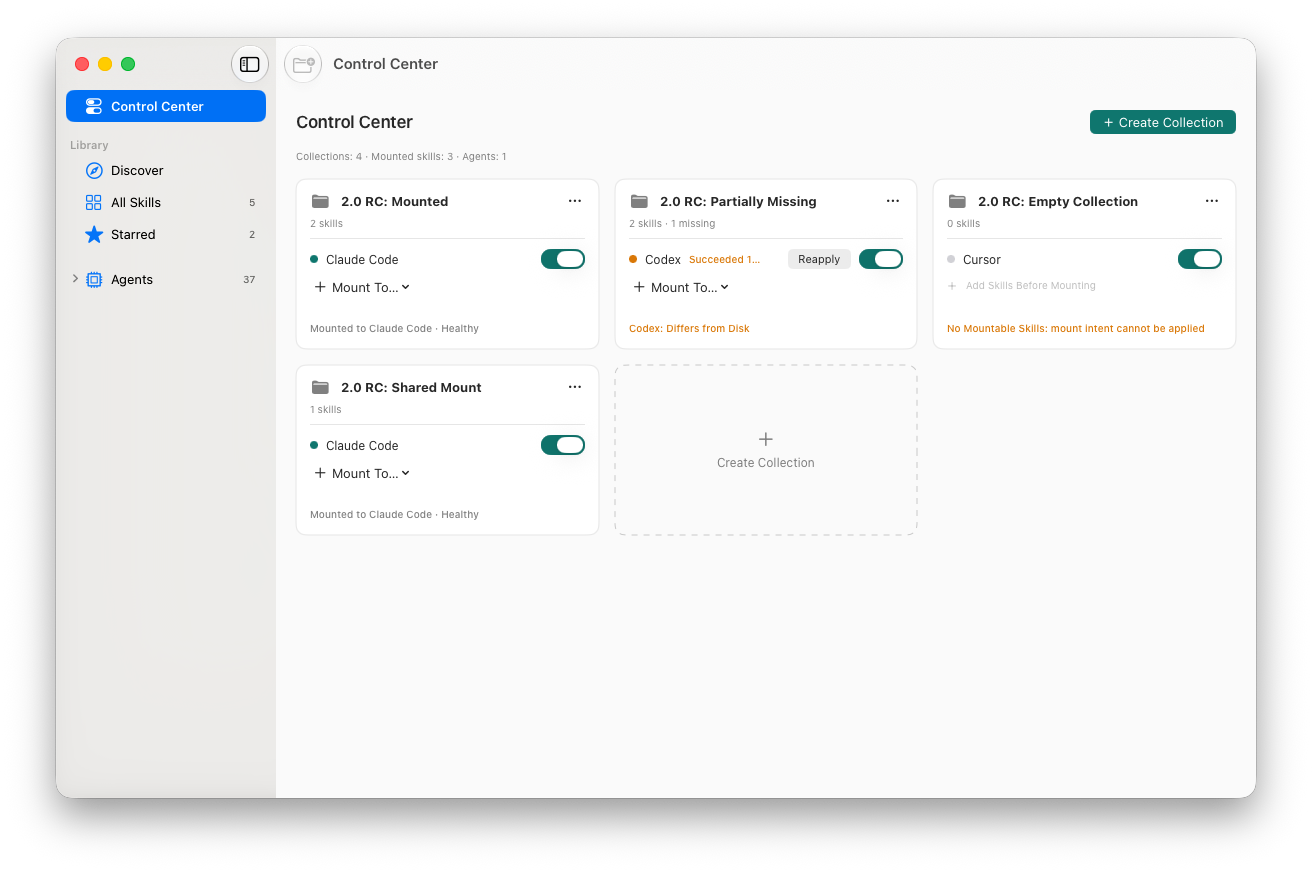 Organize Library skills into Collections, then mount them into agents without moving or duplicating the originals
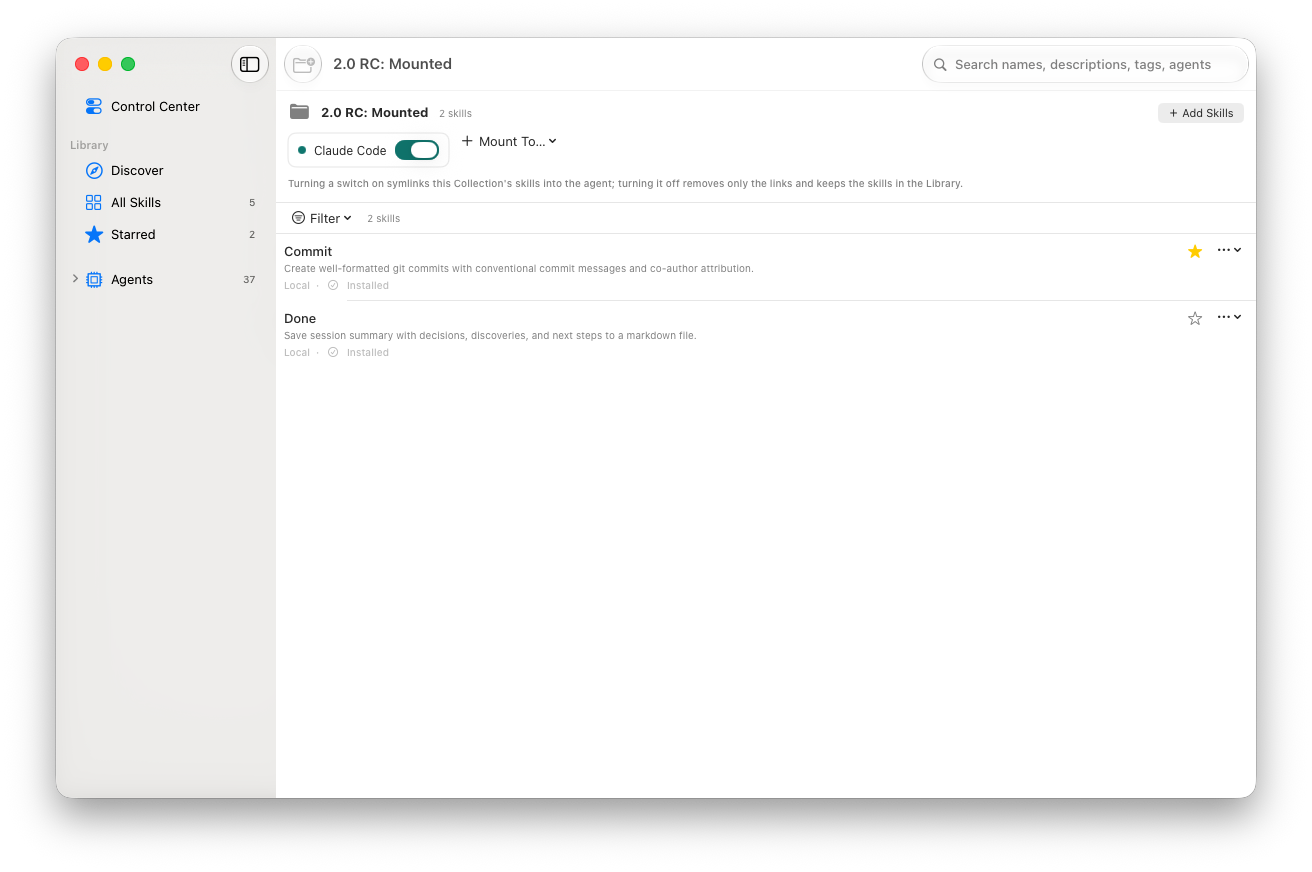 Inspect Collection membership and mounted agents while keeping missing or diverged state visible
Version 2.0 turns Skills Manager from a directory browser into a local skill lifecycle control plane built around Library → Collection → Mount.
Library      trusted, managed skill sources
   ↓
Collection   reusable groups for a project or workflow
   ↓
Mount        links a Collection into one or more agents on demand
| Area | 1.x | 2.0 |
|---|---|---|
| Product model | Browse and manage agent skill directories | Manage the complete local skill lifecycle |
| Organization | Skills live primarily inside each agent directory | A managed Library supplies reusable Collections |
| Multi-agent use | Install and maintain skills for each agent separately | Mount or unmount a Collection without moving or duplicating its Library skills |
| State | Primarily installed or not installed | Missing, shared, partially applied, and diverged states remain visible and can be reapplied explicitly |
| Identity | Names and paths do most of the matching | Durable skill IDs connect upgrades, Collections, stars, the macOS app, and the TUI |
| Ownership and recovery | Basic provider install and removal flows | Provider ownership is preserved; takeover keeps recoverable backups and refuses ambiguous destructive repairs |
| Navigation | Directory-oriented agent views | Agent home pages, conflict diagnosis, full-site Discover search, Copy ID, Copy Path, and Show in Finder |
| Agent support | Core agent scanning and installation | A broader registry, including first-class XDG-aware OpenCode support and correctly classified neutral shared roots |
| Localization | UI strings did not have a consistent English fallback | English is the source and fallback language; macOS can select the bundled Simplified Chinese localization |
The architecture remains local-first: there is no Skills Manager backend, unmounting never deletes the Library copy, and network access is limited to features such as Discover, translation fallback, and LLM Try calls.
Coding agent skills are scattered everywhere. Each agent has its own format, install path, and management story. Skills Manager brings them together in one place.
Download Skills Manager 2.0.0 and drag it to Applications. The universal app is Developer ID signed, Apple-notarized, and accepted by Gatekeeper. SHA-256: 8da1f38838119864e593e9e591355dd53b5d407e4a7383aac68f095efdac1ad5.
Upgrading from 1.x? Read the 2.0.0 upgrade and rollback guide first. All releases remain available on the Releases page.
Or build from source:
git clone https://github.com/yibie/skills-manager.git
cd skills-manager
open SkillsManager.xcodeproj
Skills Manager detects and scans every agent below through AgentRegistry. The Install target column marks agents that are available in the current multi-install picker; the remaining agents are still detected and scanned from their registered skills directory when installed locally.
| Agent | Registry ID | Install target |
|---|---|---|
| Claude Code | claude-code | Yes |
| Amp | amp | Scan |
| Cline | cline | Scan |
| Codex | codex | Yes |
| Cursor | cursor | Yes |
| Deep Agents | deepagents | Scan |
| Firebender | firebender | Scan |
| Gemini CLI | gemini-cli | Yes |
| GitHub Copilot | github-copilot | Yes |
| Kimi Code CLI | kimi-cli | Scan |
| Replit | replit | Scan |
| Warp | warp | Scan |
| Antigravity | antigravity | Scan |
| Augment | augment | Yes |
| IBM Bob | bob | Scan |
| CodeBuddy | codebuddy | Scan |
| Command Code | command-code | Yes |
| Continue | continue | Yes |
| Cortex Code | cortex | Scan |
| Crush | crush | Scan |
| Droid | droid | Scan |
| Goose | goose | Scan |
| iFlow CLI | iflow-cli | Yes |
| Junie | junie | Scan |
| Kilo Code | kilo | Yes |
| Kiro CLI | kiro-cli | Yes |
| Kode | kode | Scan |
| MCPJam | mcpjam | Yes |
| Mistral Vibe | mistral-vibe | Scan |
| Mux | mux | Yes |
| Neovate | neovate | Yes |
| OpenCode | opencode | Yes |
| OpenHands | openhands | Yes |
| Pi | pi | Yes |
| Pochi | pochi | Scan |
| Qoder | qoder | Scan |
| Qwen Code | qwen-code | Yes |
| Roo Code | roo | Yes |
| Trae | trae | Scan |
| Trae CN | trae-cn | Scan |
| Windsurf | windsurf | Scan |
| Zencoder | zencoder | Scan |
| AdaL | adal | Scan |
| OpenClaw | openclaw | Scan |
OpenCode uses $XDG_CONFIG_HOME/opencode/skills (or ~/.config/opencode/skills when XDG_CONFIG_HOME is unset). Import Folder expects the agent's exact skills directory and uses it for both scanning and future installs.
$XDG_CONFIG_HOME/agents/skills and ~/.agents/skills are neutral shared roots. OpenClaw-specific discovery is limited to its clawd, npm-global, and workspace-main roots so shared skills are not mislabeled as OpenClaw.
Discover starts fast from a local cache at ~/.skills-manager/cache/discover-directory.json, then refreshes from skills.sh in the background. Search uses the skills.sh full-site API when online and falls back to cached query snapshots when offline.
The app bundles a generated description translation catalog covering 8 languages (English, Simplified/Traditional Chinese, Japanese, Korean, French, German, Spanish) and still keeps an on-demand translation button as a temporary fallback for newly loaded or uncached descriptions. Local Ollama and LM Studio endpoints are normalized to IPv4 loopback (127.0.0.1) at runtime to avoid macOS localhost resolving to IPv6 ::1.
Pure local architecture — no backend, works offline except for network-backed features like Discover refresh/search, detail loading, translation fallback, and LLM Try calls. Reads and writes agent config files directly. The terminal UI additionally keeps a local Git history of skill installs for version management (diff and rollback).
The macOS app owns the lifecycle:
skills.sh supplies discovery data only. Installing from Discover downloads the GitHub skill package directly, preserves its scripts/assets, writes it to the managed Library, and creates agent links without requiring Node or npx.npx is available.Built with SwiftUI + Swift 6, SwiftData, macOS 14+.
The repository also includes a terminal UI in tui/.
Current status:
Official CLI command:
cd tui
npm exec skills-manager
For a global command, run once inside tui/:
npm link
Then launch from anywhere with:
skills-manager
The Blessed TUI currently supports:
~/.skills-manager/tui-state.json)H)Issues and PRs welcome. See CONTRIBUTING.md for guidelines.
MIT — see LICENSE.
Sign in to join the discussion.
No comments yet. Be the first to say what this is good for.
🪨 why use many token when few token do trick — Claude Code skill that cuts 65% of tokens by talking like caveman

The best-benchmarked open-source AI memory system. And it's free.

Orca is the ADE for working with a fleet of parallel agents. Run any coding agent with your own subscription. Available on desktop, mobile and remote runtime.

A cross-platform desktop All-in-One assistant for Claude Code, Codex, OpenCode, OpenClaw, Grok Build & Hermes Agent. Only official website: ccswitch.io

Never stop coding. Free MIT AI gateway: one endpoint, 352 providers (150+ free), 1200+ models Kimi, Claude, GPT, Gemini, GLM, DeepSeek, MiniMax. Works with Claude Code, Codex, Cursor, OpenCode, Cline & Copilot. Quota-aware auto-fallback, RTK+Caveman compression saves 15-95% tokens, MCP/A2A, Desktop/PWA. Built by 550+ contributors

Compress tool outputs, logs, files, and RAG chunks before they reach the LLM. 20% fewer tokens for coding agents, 60-95% fewer tokens for JSON, same answers. Library, proxy, MCP server.