
noskillish/
bankmcp

noskillish/bankmcpConnectors
BankMCP™: your AI can now read your bank. Self-hosted, read-only MCP server for your own bank accounts via open banking (Enable Banking). Standard MCP; tested with Claude and Ollama.
177
This repo exposes Ableton Live through Model Context Protocol so an agent can manage songs, tracks, clips, notes, devices, and recording. It uses ableton-js under the hood and includes a CLI plus local storage for logs, history, and state snapshots.
Builders who want their MCP client to control Ableton Live during music production.
You can ask an agent to handle Ableton Live editing work like track setup, MIDI changes, and recording without doing each step by hand.
Gets song info, lists tracks, creates MIDI, audio, and return tracks, and deletes or duplicates tracks.
Reads clips in a track, creates empty MIDI clips, creates audio clips from sample paths, and changes track properties like mute, color, name, arm, and solo.
Reads notes in piano roll clips, adds, deletes, and replaces notes, and changes clip properties such as name, color, and looping.
Records track content over a chosen time range.
Loads devices and plugins, changes device parameters, and browses the device library.
Stores operation history, logs actions, and supports rollback for note operations and restoring previous states.
npx @xiaolaa2/ableton-copilot-mcp --install-scripts
# or use the short form
npx @xiaolaa2/ableton-copilot-mcp -is




An MCP (Model Context Protocol) server built on ableton-js for real-time interaction and control with Ableton Live's Arrangement View, dedicated to assisting music producers in their music production.
As a music producer, I have some understanding of using Ableton for music creation. During the creative process, we often need to handle various tedious operations, such as humanizing note properties, merging notes, recording one track to another audio track, etc. Previously, we could only rely on the functions provided by the host DAW for these operations. However, with the emergence of large language models and MCP, we now have the possibility to let AI help us with automation. Although it's still not realistic for AI to directly generate notes or create a complete song (it can't generate a good-sounding song), having AI assist us with auxiliary operations presents a new possibility.
This is a simple demonstration video of MIDI operations.
https://github.com/user-attachments/assets/8d635c4c-a1f2-44be-93ae-062038d14c71
npx command is available
🔗 Download: Node.js official website
Choose ONE of the following three methods to install MIDI Remote Scripts:
Method 1: One-line installation (Recommended)
npx @xiaolaa2/ableton-copilot-mcp --install-scripts
# or use the short form
npx @xiaolaa2/ableton-copilot-mcp -is
Method 2: Tool-assisted installation
init_ableton_js to complete the installation automaticallyMethod 3: Manual installation
C:\Users\[username]\Documents\Ableton\User Library\Remote Scripts/Users/[username]/Music/Ableton/User Library/Remote Scriptsmidi-script folder to the location aboveAbletonJSLaunch Ableton Live
Enable AbletonJS Control Surface
Preferences → Link/MIDIMIDI tab, locate the Control Surface sectionAbletonJS from the dropdown menu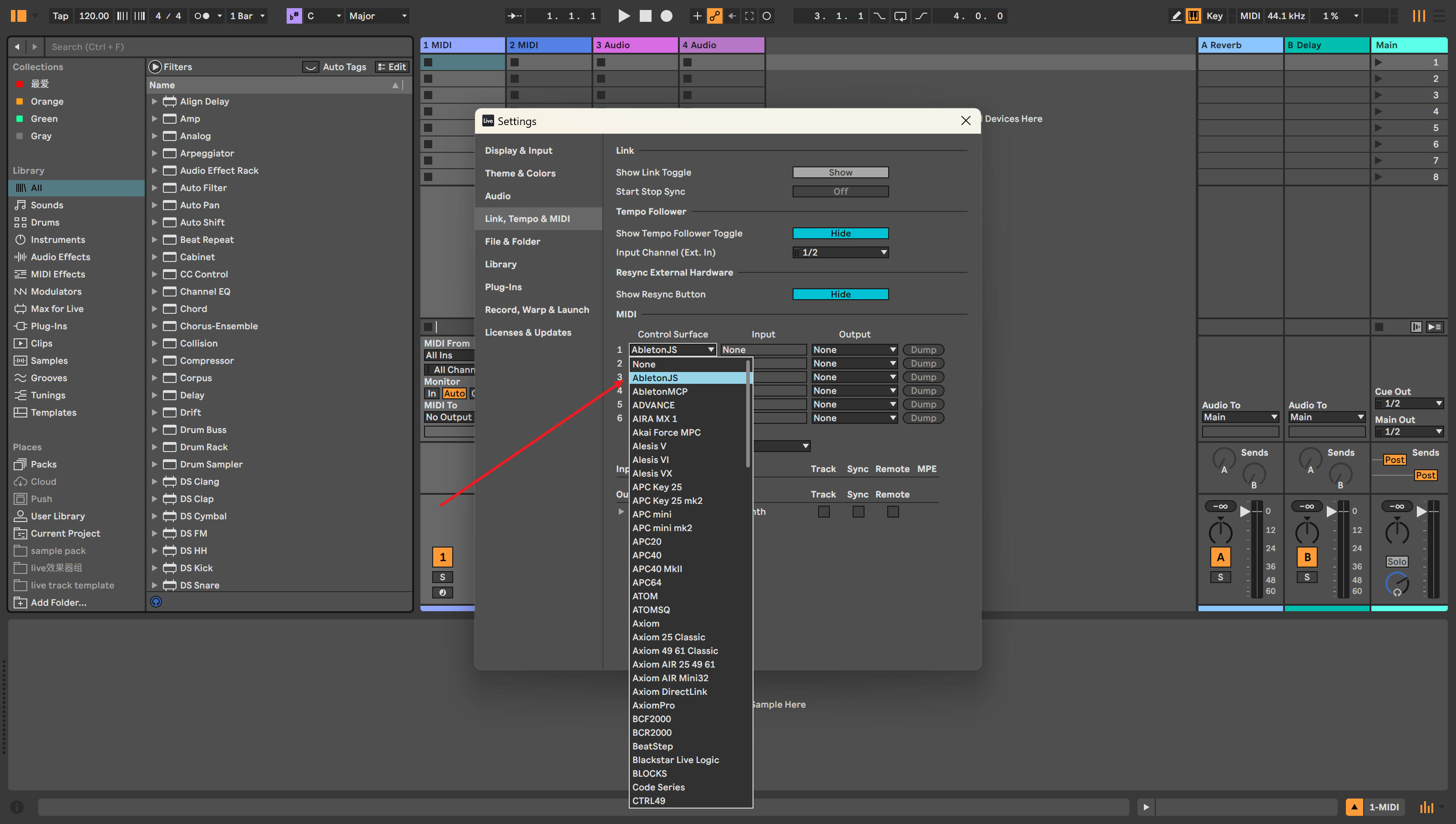
Figure 1: Enabling AbletonJS Control Surface in Ableton Live Configuration
Connect using an MCP client
The following clients can be used as MCP endpoints:
Add the following configuration to your Cursor settings:
"ableton-js-mcp": {
    "command": "npx",
    "args": [
        "-y",
        "@xiaolaa2/ableton-copilot-mcp"
    ]
}
For the latest version:
"ableton-js-mcp": {
    "command": "npx",
    "args": [
        "-y",
        "@xiaolaa2/ableton-copilot-mcp@latest"
    ]
}
You can specify a custom data storage location using the BASE_PATH environment variable:
"ableton-js-mcp": {
    "command": "npx",
    "args": [
        "-y",
        "@xiaolaa2/ableton-copilot-mcp"
    ],
    "env": {
        "BASE_PATH": "D:\\ableton_copilot_mcp"
    }
}
💡 Tip: The storage path is used to save log files, operation history, and state snapshots
Compatibility primarily depends on the version support of the ableton-js library.
| Ableton Live Version | Test Status |
|---|---|
| 12.1.10 | ✅ Tested and working |
| 11.x | ⚠️ Not tested yet |
| 10.x | ⚠️ Not tested yet |
Issues and contributions are welcome. Please submit issues or suggestions through GitHub Issues.
This project is licensed under the MIT License.
This is a third-party integration and not made by Ableton.
Sign in to join the discussion.
No comments yet. Be the first to say what this is good for.
BankMCP™: your AI can now read your bank. Self-hosted, read-only MCP server for your own bank accounts via open banking (Enable Banking). Standard MCP; tested with Claude and Ollama.

A memory plugin for AI coding that turns engineering experience, repository knowledge, and your way of working into memory that remains useful in future tasks.

Encrypted, fully offline agentic memory. One click install, GUI w/ memory map, all OS and agents. Superior memory creation, storage and retrieval.
Agent-native flight & hotel search and booking — MCP server, CLI, and Python/JS SDKs. Hundreds of airlines plus the major booking sites, with per-flight reliability history. Free-cancellation hotel rates: hold the room with a small upfront charge, then pay the balance later by link, up to the hotel's own deadline.

Control Ableton Live with any LLM: create tracks, arrange clips & compose music via MCP
Calendar sync tool & universal calendar MCP server. Aggregate, sync and control calendars on Google, Outlook, Office 365, iCloud, CalDAV or ICS.