
JuliusBrussee/
caveman

🪨 why use many token when few token do trick — Claude Code skill that cuts 65% of tokens by talking like caveman
105k
1 add
CodeIsland is a macOS status panel that lives in the notch and listens for events from AI coding tools. It uses hooks and a small bridge to send session updates over a Unix socket, then renders approvals, replies, and tool activity in real time.
Builders who use agentic coding tools and want a live view of sessions, approvals, and replies while they work.
You can monitor and approve agent actions from the notch instead of jumping between terminals and editor windows.
Shows active sessions, tool calls, approvals, and agent replies as they happen.
Expands from the MacBook notch and collapses when idle, with support for external displays.
Lets you approve or deny permission requests from the panel and via keyboard shortcuts.
Supports Claude Code, Codex, Cursor, Gemini CLI, Copilot, Cline, OpenCode, and other tools listed in the README.
Mirrors session snapshots to iPhone, Apple Watch, Live Activities, StandBy, and a desk display.
Installs and repairs hooks for detected CLI tools and tracks their versions.
brew tap wxtsky/tap
brew install --cask codeisland
 CodeIsland
Real-time AI coding agent status panel for macOS Dynamic Island (Notch)
Install •
Features •
Supported Tools •
Build
English | 简体中文
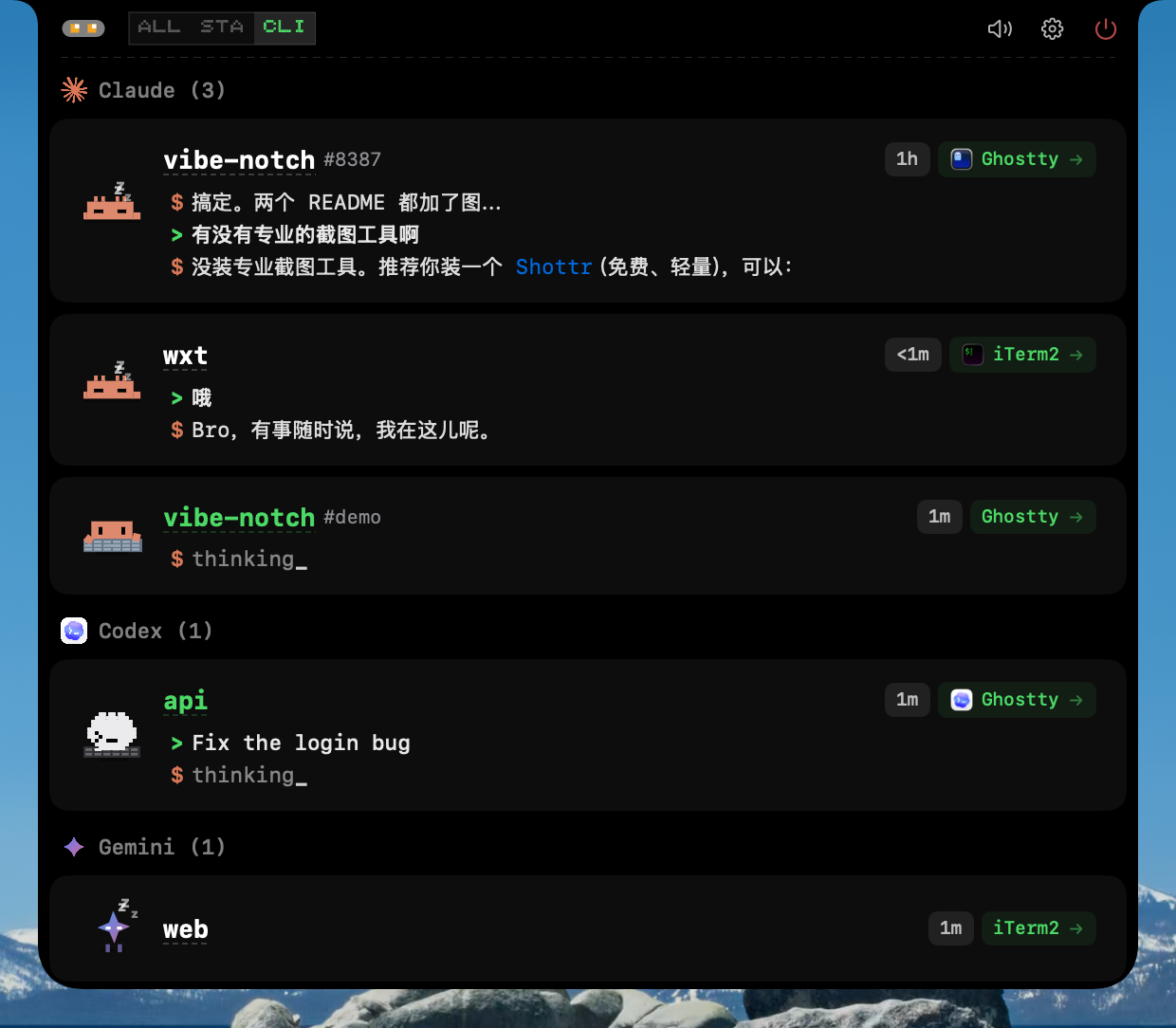
CodeIsland lives in your MacBook's notch area and shows you what your AI coding agents are doing — in real time. No more switching windows to check if Claude is waiting for approval or if Codex finished its task.
It connects to 14 AI coding tools via Unix socket IPC, displaying session status, tool calls, permission requests, and more — all in a compact, pixel-art styled panel.
| Tool | Events | Jump | Status | |
|---|---|---|---|---|
 |  Claude Code Claude Code | 13 | Terminal tab | Full |
 |  Codex Codex | 3 | Terminal | Basic |
 Grok CLI Grok CLI | 14 | Terminal | Basic | |
 |  Gemini CLI Gemini CLI | 6 | Terminal | Full |
 |  Cursor Cursor | 10 | IDE | Full |
 |  TraeCli TraeCli | 10 | Terminal | Full |
 |  Qoder Qoder | 10 | IDE | Full |
 Copilot Copilot | 6 | Terminal | Full | |
 |  Factory Factory | 10 | IDE | Full |
 |  CodeBuddy CodeBuddy | 10 | APP/Terminal | Full |
 Kimi Code CLI Kimi Code CLI | 10 | Terminal | Full | |
 |  OpenCode OpenCode | All | APP/Terminal | Full |
 |  Cline Cline | 5 | VSCode | Full |
 Pi / Oh My Pi Pi / Oh My Pi | 8 | Terminal | Full | |
 DeepSeek Harness DeepSeek Harness | 9 | Terminal | Full |
brew tap wxtsky/tap
brew install --cask codeisland
CodeIsland.dmgCodeIsland.app to your Applications folderNote: On first launch, macOS may show a security warning. Go to System Settings → Privacy & Security and click Open Anyway.
Code Island Buddy is available on the App Store:
The iPhone app mirrors your Mac sessions to Dynamic Island, Lock Screen, StandBy, and Apple Watch. The Mac app publishes lightweight session snapshots over your local network while the iPhone app is open, and sends compact Bluetooth summaries for background refreshes such as Live Activities and Watch updates.
Code Island Buddy is completely free and open source. It does not require an account or an external server; the companion source code lives in this repository under ios/CodeIslandCompanion and apple-companion.
Getting started: on the Mac, open Settings → Buddy → iPhone Buddy and turn on Allow iPhone Buddy to discover this Mac. Open the iPhone app on the same Wi-Fi to pair; connected devices are listed right below the toggle. macOS asks for Local Network and Bluetooth permission on first connect — grant both: Local Network carries the full snapshots while the app is in front, Bluetooth carries the summaries that refresh the Live Activity and the Watch once it is backgrounded. Sync interval in the same section controls how often those go out.
Beyond the phone, CodeIsland drives a small ESP32 screen on your desk over BLE, playing the pixel mascot animation for the current agent state — asleep when idle, typing while it works, calling you when it needs an approval or an answer.
Parts list, firmware flashing, and pairing steps are in hardware/README.md (written in Chinese, including the exact dev board and where to buy it). The Mac-side switch is in the hardware Buddy section of Settings → Buddy.
Requires macOS 14+ and Swift 5.9+.
git clone https://github.com/wxtsky/CodeIsland.git
cd CodeIsland

# Development (debug build + launch; Buddy Bluetooth needs the .app below)
swift build && ./.build/debug/CodeIsland

# Release (universal binary: Apple Silicon + Intel)
./build.sh
open .build/release/CodeIsland.app
AI Tool (Claude/Codex/Gemini/Cursor/...)
  → Hook event triggered
    → codeisland-bridge (native Swift binary, ~86KB)
      → Unix socket → /tmp/codeisland-<uid>.sock
        → CodeIsland app receives event
          → Updates UI in real time
          → Optional local Buddy sync to iPhone / Apple Watch
CodeIsland installs lightweight hooks into each AI tool's config. When the tool triggers an event (session start, tool call, permission request, etc.), the hook sends a JSON message through a Unix socket. CodeIsland listens on this socket and updates the notch panel instantly.
For OpenCode, a JS plugin connects directly to the socket — no bridge binary needed.
For Codex, one extra step is yours and not something CodeIsland can do for you: Codex will not run a hook it has not been shown. After installing, start Codex and it reports 1 hook needs review before it can run. — run /hooks, review the CodeIsland entries and trust them. Until then Codex simply does nothing with them, with no error, which looks exactly like CodeIsland not supporting Codex. Codex records a content hash per trusted hook in ~/.codex/config.toml under [hooks.state], so if a CodeIsland update rewrites ~/.codex/hooks.json, the review is needed once more.
For DeepSeek Harness (DSH), the dsh-island cordis plugin listens to DSH's built-in events (session/created, tools/pre-execute, approval/request, …) and writes the same JSON over the Unix socket. Install it inside DSH:
dsh plugin --profile <profile> add github:cdxiaodong/dsh-island
DSH is plugin-native, so no hook configuration is installed — CodeIsland only needs to know the dsh source name to render its session card.
CodeIsland provides a 7-tab settings panel:
| Shortcut | Action | Default |
|---|---|---|
| ⌘⇧I | Toggle the island panel open/closed | On |
| ⌘⇧A | Approve the current permission request | Off |
| ⌘⇧D | Deny the current permission request | Off |
All shortcuts are configurable — and more actions (always-allow, skip question, jump to terminal) can be bound — under Settings → Shortcuts. When an approve/deny shortcut is enabled, its binding shows as a badge right on the approval card.
This project was inspired by claude-island by @farouqaldori. Thanks for the original idea of bringing AI agent status into the macOS notch.
MIT License — see LICENSE for details.
Sign in to join the discussion.
No comments yet. Be the first to say what this is good for.
🪨 why use many token when few token do trick — Claude Code skill that cuts 65% of tokens by talking like caveman

The best-benchmarked open-source AI memory system. And it's free.

Orca is the ADE for working with a fleet of parallel agents. Run any coding agent with your own subscription. Available on desktop, mobile and remote runtime.

A cross-platform desktop All-in-One assistant for Claude Code, Codex, OpenCode, OpenClaw, Grok Build & Hermes Agent. Only official website: ccswitch.io

Never stop coding. Free MIT AI gateway: one endpoint, 352 providers (150+ free), 1200+ models Kimi, Claude, GPT, Gemini, GLM, DeepSeek, MiniMax. Works with Claude Code, Codex, Cursor, OpenCode, Cline & Copilot. Quota-aware auto-fallback, RTK+Caveman compression saves 15-95% tokens, MCP/A2A, Desktop/PWA. Built by 550+ contributors

Compress tool outputs, logs, files, and RAG chunks before they reach the LLM. 20% fewer tokens for coding agents, 60-95% fewer tokens for JSON, same answers. Library, proxy, MCP server.