
obra/
superpowers

obra/superpowersSkills
An agentic skills framework & software development methodology that works.
285k
1 add
This repo packages agent skills that make a coding assistant behave like a SAST scanner. `CLAUDE.md` or `AGENTS.md` runs the workflow: it maps the app, checks vulnerabilities in parallel, and builds a final report in `sast/`. It does not need third-party tools; the skills do the analysis and write findings as markdown files. The scan can be rerun after fixes because it skips outputs that already exist.
Builders who want their assistant to inspect a web or mobile codebase for security issues.
You can run a structured vulnerability scan and get findings with remediation notes in your repo.
The `sast-analysis` skill identifies the stack, entry points, data flows, and trust boundaries, then writes `sast/architecture.md`.
Thirteen skills run as subagents to look for SQL injection, XSS, SSRF, IDOR, XXE, JWT flaws, missing auth, path traversal, file upload issues, GraphQL injection, SSTI, RCE, and business logic flaws.
Each detection skill first looks for candidate code, then verifies exploitability before writing results to `sast/*-results.md`.
The `sast-report` skill combines all findings into `sast/final-report.md` ranked by severity with remediation guidance and test instructions.
`CLAUDE.md` and `AGENTS.md` orchestrate the full assessment and skip steps whose output files already exist.
cp -r /path/to/your/project sast-files/
A collection of agent skills that turn your LLM coding assistant into a fully functional SAST scanner to find vulnerabilities in your codebase. Works natively with Claude Code, Codex, Opencode, Cursor and any other assistant that supports agent skills. No third-party tools required.
Claude Code with Opus model is recommended. But if the cost is a concern, use any IDE and model you trust.
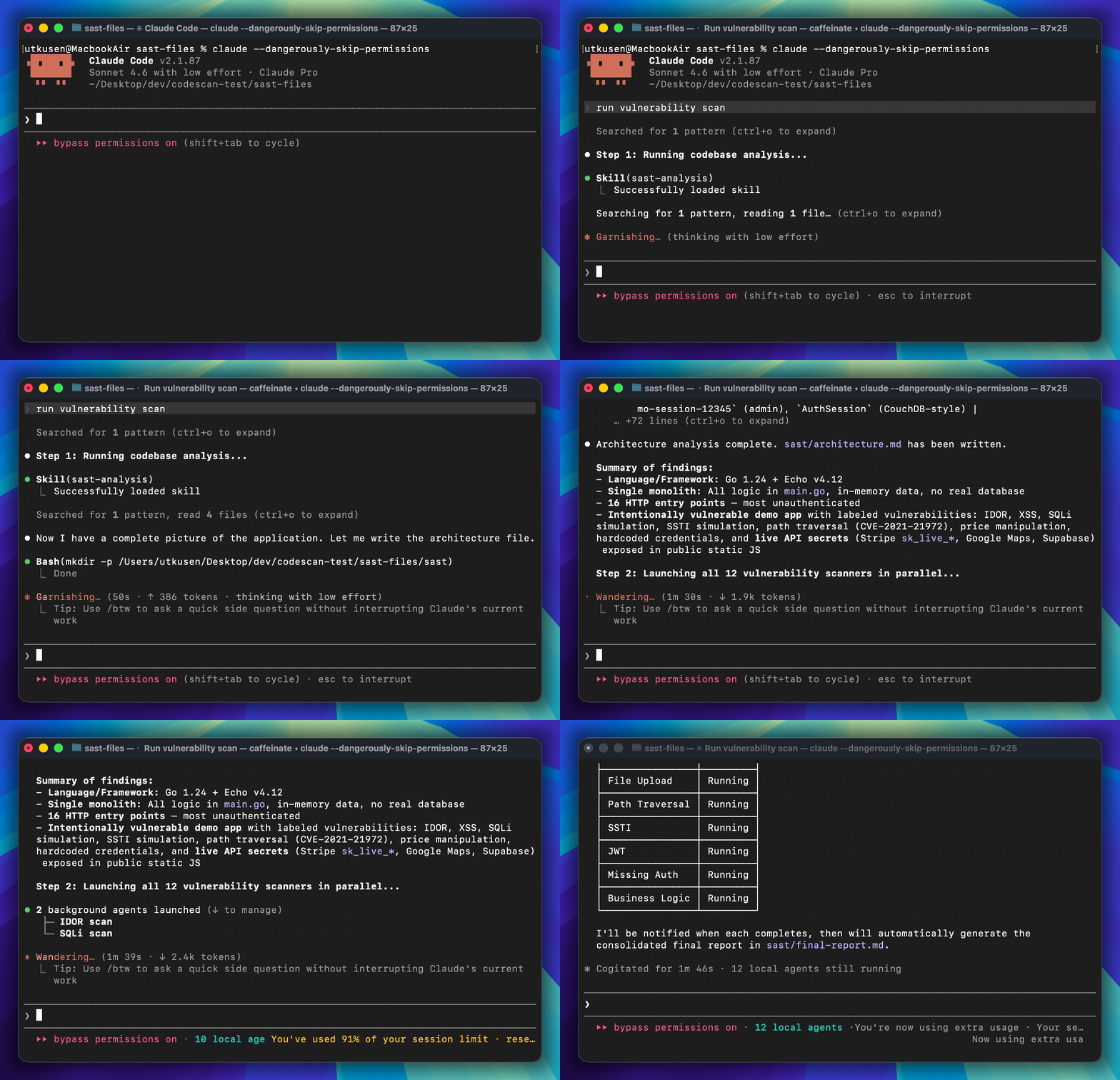
CLAUDE.md (for Claude Code) or AGENTS.md (for Opencode and other IDEs) orchestrates the entire assessment workflow automatically. The assessment runs in three steps:
Codebase Analysis -- The sast-analysis skill maps the technology stack, architecture, entry points, data flows, and trust boundaries. It writes its findings to sast/architecture.md.
Vulnerability Detection (parallel) -- All 13 vulnerability detection skills run in parallel as subagents. Each skill follows a two-phase approach: first a recon/discovery phase to find candidate sections, then a verification phase to confirm exploitability. Results are written to sast/*-results.md.
Report Generation -- The sast-report skill consolidates all findings into a single sast/final-report.md, ranked by severity with full remediation guidance and dynamic test instructions.
| Skill | Vulnerability Class |
|---|---|
| sast-analysis | Codebase reconnaissance, architecture mapping, threat modeling |
| sast-sqli | SQL Injection |
| sast-graphql | GraphQL injection |
| sast-xss | Cross-Site Scripting (XSS) |
| sast-rce | Remote Code Execution (command injection, eval, unsafe deserialization) |
| sast-ssrf | Server-Side Request Forgery |
| sast-idor | Insecure Direct Object Reference |
| sast-xxe | XML External Entity |
| sast-ssti | Server-Side Template Injection |
| sast-jwt | Insecure JWT implementations |
| sast-missingauth | Missing authentication and broken function-level authorization |
| sast-pathtraversal | Path / directory traversal |
| sast-fileupload | Insecure file upload |
| sast-businesslogic | Business logic flaws (price manipulation, workflow bypass, race conditions, etc.) |
| sast-report | Consolidated final report ranked by severity |
Copy your project into the sast-files folder, then open sast-files as your workspace in your AI coding assistant.
cp -r /path/to/your/project sast-files/
Note: If your project already contains a
CLAUDE.mdorAGENTS.mdfile, remove it before running the assessment — otherwise it will conflict with the orchestration file provided by this toolkit.
After copying the files, open your project in your AI coding assistant and ask:
Run vulnerability scan
or
Find vulnerabilities in this codebase
The entry point file (CLAUDE.md or AGENTS.md) orchestrates the full workflow automatically. It will skip any steps whose output files already exist, so you can safely re-run it after fixing issues.
All output is written to a sast/ folder in your project root:
| File | Description |
|---|---|
sast/architecture.md | Technology stack, architecture, entry points, data flows |
sast/*-results.md | Per-vulnerability-class findings with proof and remediation |
sast/final-report.md | Consolidated report ranked by severity |
Sign in to join the discussion.
No comments yet. Be the first to say what this is good for.
An agentic skills framework & software development methodology that works.

Turn any codebase, with its docs, SQL schemas, configs, and PDFs, into a queryable knowledge graph. A /graphify skill for Claude Code, Cursor, Codex, and Gemini CLI: local deterministic AST parsing, every edge explained, no vector store.

Topic in, narrated explainer video out. A Claude Code / Codex skill that turns any topic into a black-canvas motion-graphics explainer video with TTS voiceover, subtitles and a chapter progress bar. Chinese or English; every frame drawn in code with Remotion.
Public repository for Agent Skills
Open-source AI job search: scan job portals, evaluate listings into a structured A-H report with a global 1-5 score, tailor your CV, track applications — runs locally in your AI coding CLI (Claude Code, Codex, OpenCode, Antigravity…)

Production-grade engineering skills for AI coding agents.