
JuliusBrussee/
caveman

🪨 why use many token when few token do trick — Claude Code skill that cuts 65% of tokens by talking like caveman
105k
1 add
ralphex reads a markdown plan, runs each task in a fresh agent session, and commits progress as it goes. It can also create branches, run validation commands, open a web dashboard, and repeat review passes until the code is clean.
Builders who want Claude Code or Codex to execute a plan file, review the changes, and keep a git trail along the way.
You can hand an implementation plan to your agent and come back to finished, reviewed commits instead of step-by-step supervision.
Runs plan tasks one at a time, retries failures, and marks completed checkboxes in the plan file.
Uses multiple review agents, then an external review tool like Codex, then a final critical review pass.
Creates feature branches from the plan name and can isolate runs in `.ralphex/worktrees/`.
Lets Claude Code or Codex turn a prompt into a plan file with follow-up questions and acceptance steps.
Streams progress with timestamps and offers a browser dashboard with `--serve`.
Runs the whole loop in a container so the agent only sees the mounted project directory.
Can send completion alerts and run a final post-review prompt for cleanup or follow-up actions.
ralphex docs/plans/my-feature.md
brew install umputun/apps/fya
command -v fya
go install github.com/umputun/ralphex/cmd/ralphex@latest
brew install umputun/apps/ralphex
curl -sL https://raw.githubusercontent.com/umputun/ralphex/master/scripts/ralphex-dk.sh -o /usr/local/bin/ralphex
chmod +x /usr/local/bin/ralphex
export RALPHEX_IMAGE=my-ralphex



ralphex is a standalone CLI tool that runs in your terminal from the root of a git repository. It orchestrates Claude Code or codex to execute implementation plans autonomously - no IDE plugins or cloud services required, just a coding agent and a single binary.
Claude Code is powerful but interactive - it requires you to watch, approve, and guide each step. For complex features spanning multiple tasks, this means hours of babysitting. Worse, as context fills up during long sessions, the model's quality degrades - it starts making mistakes, forgetting earlier decisions, and producing worse code.
ralphex solves both problems. Each task executes in a fresh Claude Code session with minimal context, keeping the model sharp throughout the entire plan. Write a plan with tasks and validation commands, start ralphex, and walk away. Come back to find your feature implemented, reviewed, and committed - or check the progress log to see what it's doing.
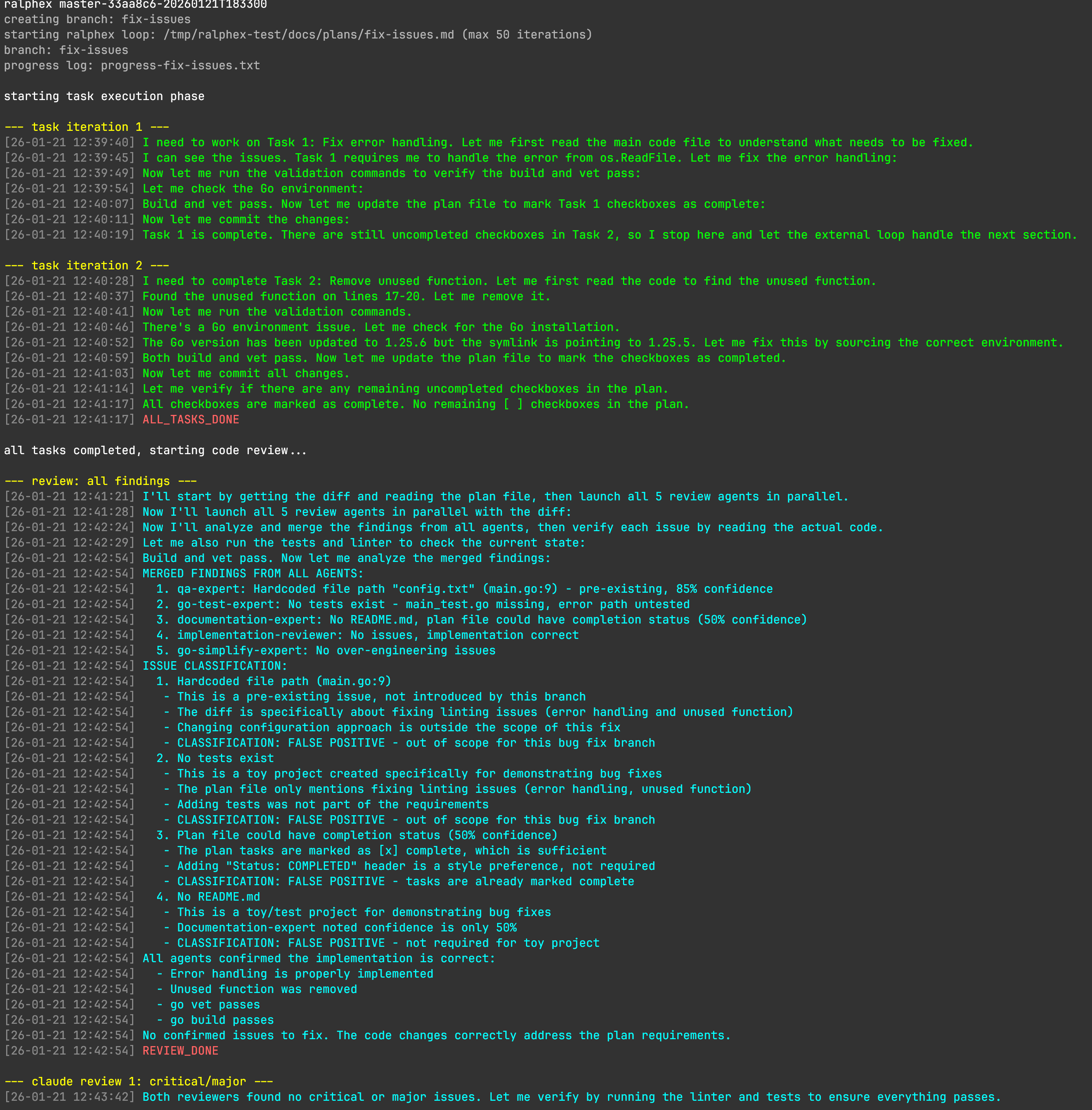
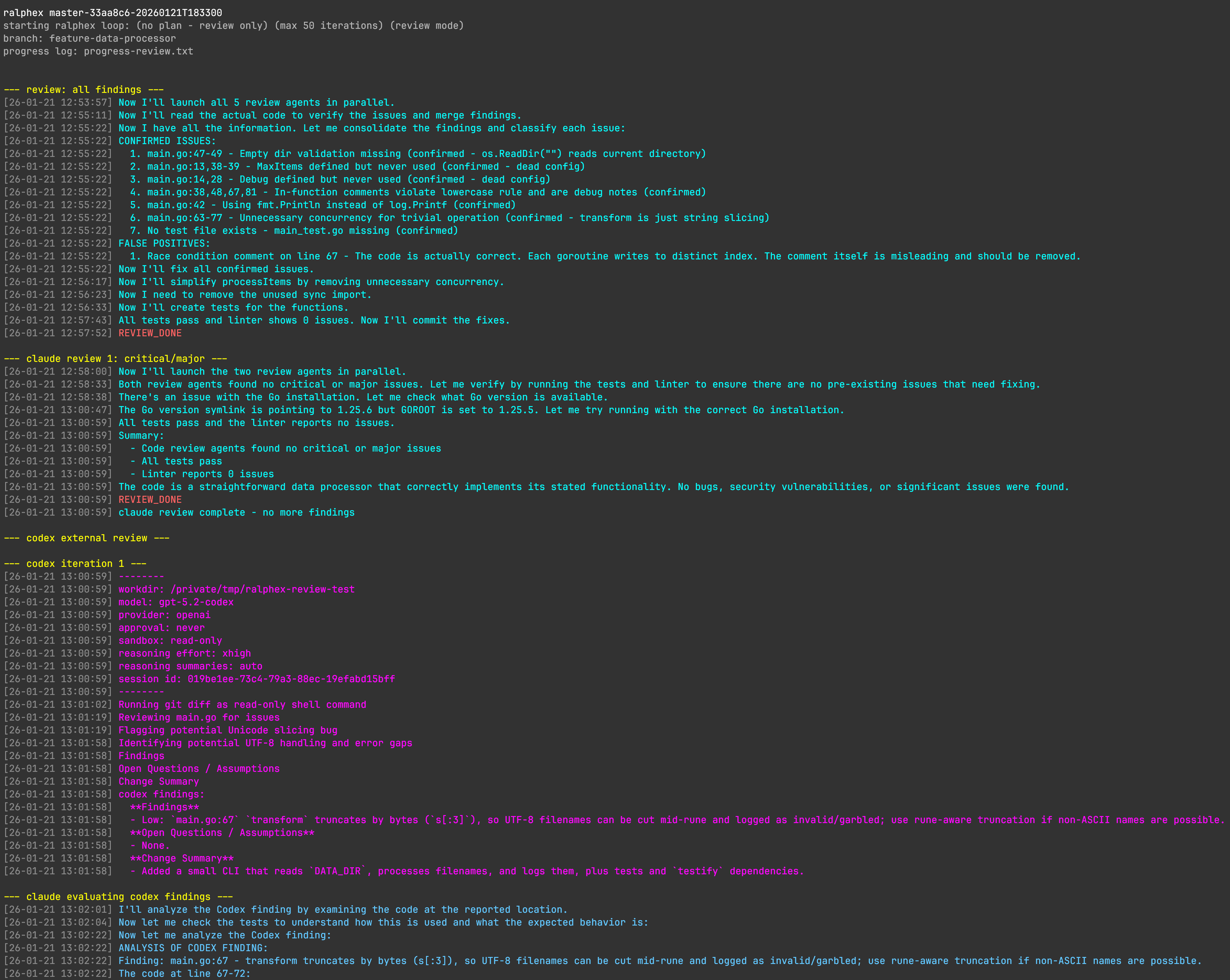
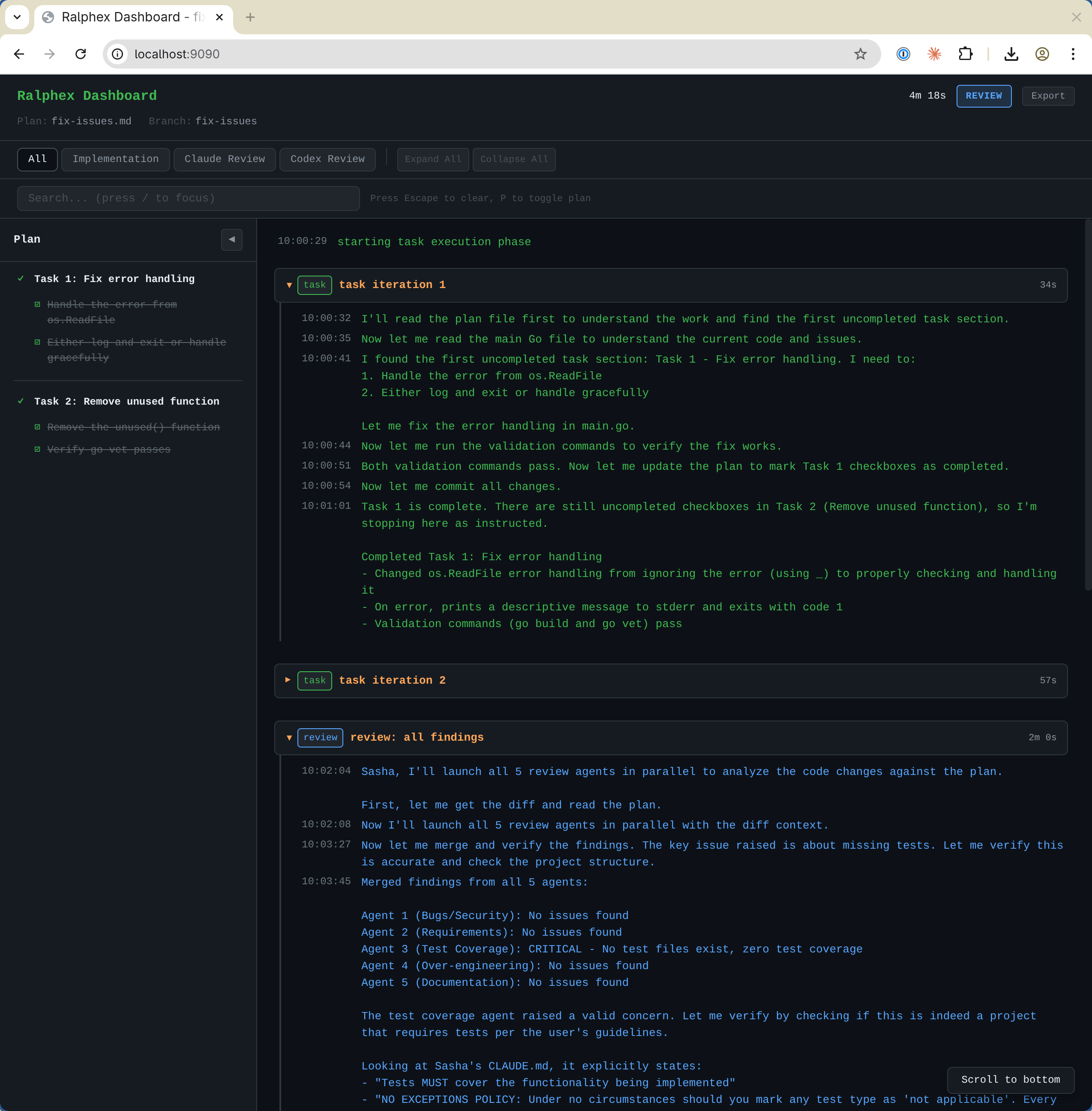
--plan flag{{agent:name}} template system and user defined promptscompleted/ folder--serve flag--worktree flagMake sure ralphex is installed and your project is a git repository. You need a plan file in docs/plans/, for example:
# Plan: My Feature

## Validation Commands
- `go test ./...`

### Task 1: Implement feature
- [ ] Add the new functionality
- [ ] Add tests
Then run:
ralphex docs/plans/my-feature.md
ralphex will create a branch, execute tasks, commit results, run multi-phase reviews, and move the plan to completed/ when done (on the feature branch under --worktree).
[!WARNING] Anthropic Agent SDK billing change on June 15, 2026
Anthropic is moving
claude -p/claude --print, Claude Agent SDK, and Claude Code GitHub Actions usage to a separate monthly Agent SDK credit pool for Claude subscription users. The default Claude mode in ralphex usesclaude --printinternally, so unattended ralphex runs are part of that pool. See Anthropic's Agent SDK credit article for the current billing rules.Practical options:
- Do nothing. Light use may fit inside the included monthly credit. This should also be transparent for users who already run Claude Code through API-key billing, Bedrock, Vertex, Foundry, or another non-subscription provider path.
- Use a skill-based flow in an interactive Claude Code session. The author's
umputun/cc-thingzplugin collection includes theplanningfamily (/planning:makeand/planning:exec). That keeps work inside the normal interactive Claude Code flow instead ofclaude --print.- Switch the ralphex executor to codex. First-class
--codexsupport routes plan creation, task execution, both review phases, and finalize through the codex CLI and skips the external codex review phase.- Use a
claude -pcompatible wrapper that drives an interactive Claude Code session and emits Claude-compatiblestream-json. Examples that match ralphex's invocation shape includeumputun/fya,melonamin/agentrun,Equality-Machine/claude-p, andkcosr/claude-pty-wrapper. These wrappers are unofficial and may break if Anthropic changes or blocks this pattern.
Install fya with Homebrew:
brew install umputun/apps/fya
command -v fya
Use the absolute path printed by command -v fya in ralphex config. On Apple Silicon Homebrew this is normally /opt/homebrew/bin/fya:
# in ~/.config/ralphex/config or .ralphex/config
claude_command = /opt/homebrew/bin/fya
claude_args = --dangerously-skip-permissions --output-format stream-json --verbose
On Intel Homebrew the path is normally /usr/local/bin/fya. If command -v fya prints another path, use that exact path instead.
For agentrun, use its tmux-backed path if the goal is avoiding direct claude --print:
claude_command = /absolute/path/to/agentrun
claude_args = --persist-session --no-session-persistence --dangerously-skip-permissions --output-format stream-json --verbose
These tools depend on interactive Claude Code behavior and local transcript files staying usable. Anthropic may detect or block wrapper-style automation later, so test the exact tool before relying on it.
ralphex executes plans in four phases with automated code reviews, plus an optional finalize step.
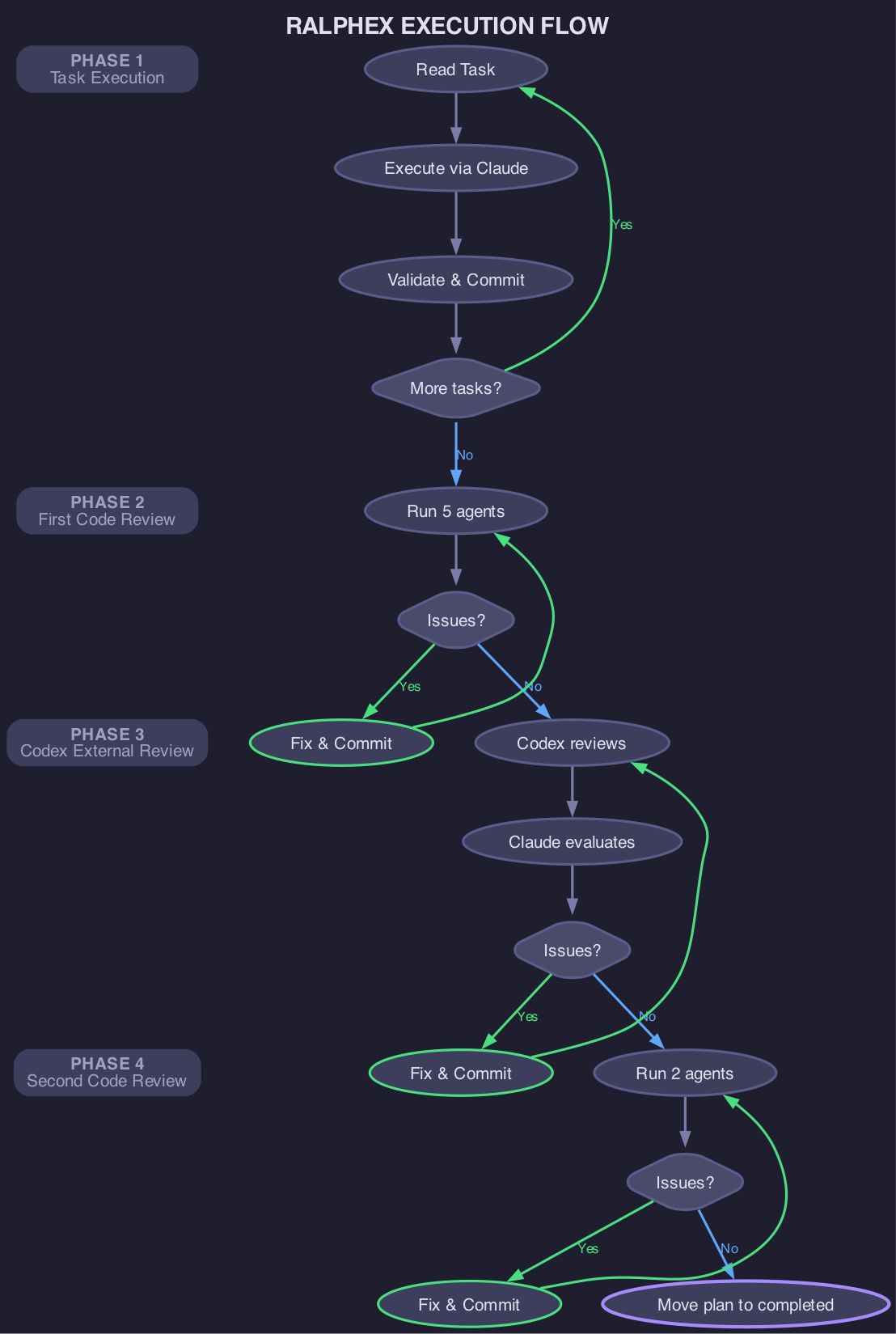
### Task N: with - [ ] checkboxes)[x], commits changesSteering mid-run: Press Ctrl+\ (SIGQUIT) during a task iteration to pause execution. ralphex cancels the current Claude session and prompts "press Enter to continue, Ctrl+C to abort". While paused, you can edit the plan file — on Enter, the same task re-runs with a fresh session that re-reads the plan. Press Ctrl+C to abort cleanly. Not available on Windows.
Launches 5 review agents in parallel via Claude Code Task tool:
| Agent | Purpose |
|---|---|
quality | bugs, security issues, race conditions |
implementation | verifies code achieves stated goals |
testing | test coverage and quality |
simplification | detects over-engineering |
documentation | checks if docs need updates |
Claude verifies findings, fixes confirmed issues, and commits.
Default agents provide common, language-agnostic review steps. They can be customized and tuned for your specific needs, languages, and workflows. See Customization for details.
The loop terminates when: all issues resolved, max iterations reached, stalemate detected (via --review-patience), or manual break via Ctrl+\ (SIGQUIT).
Stalemate detection: When the external tool and Claude can't agree on findings, the loop can waste tokens iterating to the max. Set --review-patience=N (or review_patience in config) to terminate after N consecutive rounds with no commits or working tree changes.
Manual break: Press Ctrl+\ (SIGQUIT) during the external review loop to terminate it immediately. The current executor run is cancelled via context cancellation. During the task phase, Ctrl+\ pauses instead — see Phase 1: Task Execution. Not available on Windows.
Supported tools:
See Custom External Review for details on using custom scripts.
quality + implementation) for final reviewcompleted/ folder on success (on the feature branch under --worktree)Second review agents are configurable via prompts/review_second.txt.
After all review phases complete successfully, ralphex can run an optional finalize step. Disabled by default.
What it does: runs a single Claude Code session with a customizable prompt. The default finalize.txt prompt rebases commits onto the default branch and optionally squashes related commits into logical groups.
How to enable:
Set finalize_enabled = true in ~/.config/ralphex/config or .ralphex/config.
Behavior:
Customization:
Edit ~/.config/ralphex/prompts/finalize.txt (or .ralphex/prompts/finalize.txt) to change what happens after reviews. Examples: push to remote, send notifications, run deployment scripts, or any post-completion automation. Template variables like {{DEFAULT_BRANCH}} are available.
After successful execution, ralphex moves the plan file into docs/plans/completed/. Enabled by default.
Under --worktree the archive is committed on the feature branch, alongside the ticked plan. The copy in your main checkout is left exactly as it was — for a plan you never committed, it stays there unticked even after the branch merges. Delete it yourself if you don't want it.
How to disable:
Set move_plan_on_completion = false in ~/.config/ralphex/config or .ralphex/config. Default is true.
When to disable: workflows that manage plan file lifecycle externally (e.g. spec-driven tooling where the plan lives inside a bundle that a separate archive step consumes) should opt out so ralphex doesn't fight the external tool's file layout.
Review-only mode (--review) runs the full review pipeline (Phase 2 → Phase 3 → Phase 4) on changes already present on the current branch. This is useful when changes were made outside ralphex — via Claude Code's built-in plan mode, manual edits, other AI agents, or any other workflow.
Workflow:
ralphex --reviewralphex compares the branch against the default branch (git diff master...HEAD), launches multi-agent reviews, and iterates fixes until all agents report clean, an iteration makes no commit, or the review iteration limit is reached. No plan file is required — if provided, it gives reviewers additional context about the intended changes.
# switch to feature branch with existing changes
git checkout feature-auth

# run review pipeline on those changes
ralphex --review

# optionally pass a plan file for context
ralphex --review docs/plans/add-auth.md
External-only mode (--external-only, alias -e) skips the task and first review phases and runs the external review pipeline (Phase 3 → Phase 4) on changes already present on the current branch. The flag name follows the same cutoff convention as --review: it marks where execution starts, not which single phase runs. After the external review loop converges (or hits its iteration limit), the post-external critical/major review (Phase 4) runs to catch regressions from fixes applied during the loop.
If the external review loop finds no issues on its first pass, Phase 4 is skipped automatically because there is nothing to regress.
# run external review pipeline on current branch changes
ralphex --external-only

# optionally pass a plan file for context
ralphex --external-only docs/plans/feature.md
The --codex flag routes interactive plan creation (--plan), task execution, both review phases, and the optional finalize step through the codex CLI instead of Claude Code. The external review phase is automatically skipped because codex-reviewing-codex is a same-model self-review with weak signal; the cross-model independence between Claude and codex was the original reason that phase existed.
Why this exists: in June 2026 Anthropic split the Claude Max subscription from the Claude Agent SDK, putting unattended ralphex runs on a separate $200 credit pool rather than the Max plan. Users with an OpenAI/codex plan can switch the entire ralphex pipeline to codex with one flag and stay on their existing OpenAI subscription instead.
# create a plan through codex
ralphex --codex --plan "add user authentication"

# run the full pipeline (task, first review, second review, finalize) through codex
ralphex --codex docs/plans/feature.md

# additionally let codex read project CLAUDE.md as AGENTS.md
ralphex --codex --pass-claude-md docs/plans/feature.md
How it differs from codex-as-claude.sh: the --codex flag is the native codex path. It calls the codex CLI directly and configures multi-agent reviews through additive -c flag overrides on the codex command line. Review prompts are shared with claude. The {{agent:<name>}} expansion produces spawn_agent calls for codex and Task-tool calls for claude at runtime. The scripts/codex-as-claude/codex-as-claude.sh wrapper still exists for backwards compatibility. It translates codex JSONL output into Claude stream-json events, which adds overhead and keeps Claude-flavored prompt vocabulary in front of a codex model.
Project CLAUDE.md passthrough (--pass-claude-md): adds -c project_doc_fallback_filenames=["CLAUDE.md"] to the codex invocation so codex's native AGENTS.md walk picks up the project-level ./CLAUDE.md file. This works for project-level CLAUDE.md only. For user-level ~/.claude/CLAUDE.md, ralphex never modifies the user's ~/.codex/ directory. If ~/.claude/CLAUDE.md exists and ~/.codex/AGENTS.md does not, ralphex prints a one-time hint suggesting ln -s ~/.claude/CLAUDE.md ~/.codex/AGENTS.md and continues; the user opts in by running the command themselves.
Configuration alternative: instead of passing --codex every run, set it in ~/.config/ralphex/config or .ralphex/config:
executor       = codex
pass_claude_md = true
When executor = codex is set in config and the user has also set external_review_tool = codex (or custom), ralphex automatically overrides external_review_tool to none and prints a warning to stderr that the config-file value was overridden. Only CLI-flag conflicts are hard errors; config-only conflicts resolve with a warning.
Mutual exclusion: the codex executor (whether enabled via --codex or executor = codex in config) cannot be combined with --external-only (alias -e), --codex-only (alias -c), or --external-review-tool=<X> where <X> is not none. --pass-claude-md requires the codex executor (CLI --codex or config executor = codex). Each combination fails with a clear error message at startup.
Requirements: --codex requires the codex CLI version 0.130.0 or newer. The mode relies on [features] multi_agent, [agents.<name>] agent registration, and (with --pass-claude-md) project_doc_fallback_filenames, all supported in 0.130.0. Older codex versions silently ignore unknown -c overrides, so a misconfigured run will not error visibly. It will simply behave as if the overrides were absent. There is no runtime version check; verify your codex version with codex --version if behavior is unexpected.
Model selection under --codex: under --codex the --plan-model / --task-model / --review-model flags (and their config equivalents plan_model / task_model / review_model) select the model and effort per phase. --plan-model sets plan creation and falls back to --task-model when unset. --task-model sets the task phase. --review-model sets the review phase and falls back to --task-model when unset. Codex builds a separate review executor when the resolved review model/effort differs from task, so tasks and reviews can run on different codex models. Each model[:effort] spec is resolved against codex_model / codex_reasoning_effort (default gpt-5.6-sol / high): an unset spec inherits those defaults, and each populated half overrides its default (--task-model=:low changes effort only). The max effort level is claude-only. A spec requesting it under --codex is warned about and ignored. So codex model selection is: --plan-model / --task-model / --review-model (CLI or config), then codex_model / codex_reasoning_effort in ralphex config, applied as -c overrides to the codex CLI; set either codex value to empty (e.g. codex_model =) in your user config to inherit that field from ~/.codex/config.toml instead. Commenting the line out keeps the embedded default. The startup banner under --codex shows the resolved plan/task model/effort for the current mode, plus a separate review model / review reasoning effort line when the review phase resolves differently.
The --worktree flag runs plan execution in an isolated git worktree at .ralphex/worktrees/<branch>, enabling parallel execution of multiple plans on the same repo without branch conflicts.
Supported modes: --worktree only applies to full mode and --tasks-only. It is silently ignored for --review, --external-only, and --plan — these modes operate from the current directory.
Source checkout state: Uncommitted files in the source checkout do not have to be stashed first. Ralphex lists them in a warning and does not copy them into the generated worktree. An uncommitted selected plan is copied so it can be committed on the feature branch. A new feature branch starts at the current HEAD; an existing feature branch keeps its own tip. Local .ralphex configuration is loaded before worktree creation and still applies to the run. Commit any repository changes the plan needs before starting. An unfinished Git operation remains a hard error because completion archives the plan in the source checkout. In-place branch mode also requires a clean checkout because it creates the feature branch in that same working tree.
Re-running reviews on a worktree branch: if the task phase completed in a worktree but the review phase needs to be re-run, cd into the worktree directory and run the review from there:
# find the worktree
ls .ralphex/worktrees/

# run review from inside it
cd .ralphex/worktrees/my-feature-branch
ralphex --review
# or
ralphex --external-only
Worktrees are automatically removed on successful completion. Two cases leave one behind: an interrupted run, and a run whose plan archive did not complete — the worktree is kept so anything the archive staged can be recovered. The run still reports success and names the retained worktree; inspect it with git -C <path> status and run git worktree remove <path> before running that plan again, or the next run refuses with worktree already exists.
Plans can be created in several ways:
/ralphex-plan or your own planning workflowsdocs/plans/--plan flag - integrated option that handles the entire flowralphex without arguments on master/main prompts for plan creation if no plans existThe --plan flag provides a simpler integrated experience:
ralphex --plan "add health check endpoint"
Claude explores your codebase, asks clarifying questions via a terminal picker (fzf or numbered fallback), and generates a complete plan file in docs/plans/. When reviewing the draft, you can accept, revise with text feedback, open it in $EDITOR for interactive annotation, or reject it.
Example session:
$ ralphex --plan "add caching for API responses"
[10:30:05] analyzing codebase structure...
[10:30:12] found existing store layer in pkg/store/

QUESTION: Which cache backend?
  > Redis
    In-memory
    File-based
    Other (type your own answer)

[10:30:45] ANSWER: Redis
[10:31:00] continuing plan creation...
[10:32:05] plan written to docs/plans/add-api-caching.md

Continue with plan implementation?
  > Yes, execute plan
    No, exit
After plan creation, you can choose to continue with immediate execution or exit to run ralphex later. Progress is logged to .ralphex/progress/progress-plan-<name>.txt.
go install github.com/umputun/ralphex/cmd/ralphex@latest
brew install umputun/apps/ralphex
Download the appropriate binary from releases.
Download the wrapper script and install to PATH:
curl -sL https://raw.githubusercontent.com/umputun/ralphex/master/scripts/ralphex-dk.sh -o /usr/local/bin/ralphex
chmod +x /usr/local/bin/ralphex
The script defaults to the Go image (ralphex-go). For other languages, build a custom image from the base with your toolchain installed (see Available images for examples), then point the wrapper at it:
export RALPHEX_IMAGE=my-ralphex
Then use ralphex as usual - it runs in a container with Claude Code and Codex pre-installed. The script shows which image it's using at startup.
Why use Docker? ralphex runs Claude Code with --dangerously-skip-permissions, giving it full access to execute commands and modify files. Running in a container provides isolation - Claude can only access the mounted project directory, not your entire system. This makes autonomous execution significantly safer.
Container CAN access (read-write):
/workspace - full access to create, modify, delete filesSign in to join the discussion.
No comments yet. Be the first to say what this is good for.
🪨 why use many token when few token do trick — Claude Code skill that cuts 65% of tokens by talking like caveman

The best-benchmarked open-source AI memory system. And it's free.

Orca is the ADE for working with a fleet of parallel agents. Run any coding agent with your own subscription. Available on desktop, mobile and remote runtime.

A cross-platform desktop All-in-One assistant for Claude Code, Codex, OpenCode, OpenClaw, Grok Build & Hermes Agent. Only official website: ccswitch.io

Never stop coding. Free MIT AI gateway: one endpoint, 352 providers (150+ free), 1200+ models Kimi, Claude, GPT, Gemini, GLM, DeepSeek, MiniMax. Works with Claude Code, Codex, Cursor, OpenCode, Cline & Copilot. Quota-aware auto-fallback, RTK+Caveman compression saves 15-95% tokens, MCP/A2A, Desktop/PWA. Built by 550+ contributors

Compress tool outputs, logs, files, and RAG chunks before they reach the LLM. 20% fewer tokens for coding agents, 60-95% fewer tokens for JSON, same answers. Library, proxy, MCP server.