Appshot
Generate polished App Store preview videos, Google Play preview videos, and website demo videos — from your codebase, not a video editor.
Appshot is a primitives library + AI skill that acts as a creative director: it scans your project, understands your app, and generates custom scene files tailored to your product. No video editing experience required. For mobile apps, it generates store-compliant preview videos. For websites and SaaS products, it generates 1920×1080 product demo videos with browser mockups.
Works with Claude Code, Cursor, Windsurf, Codex, and any AI agent that supports the Agent Skills spec.
Supports React Native / Expo, Flutter, Swift (iOS), and Kotlin/Java (Android) for mobile, plus Next.js, SvelteKit, Nuxt, Astro, Remix, and Vite projects for web.
Used in production: BookStreak: Reading Tracker — App Store preview videos and screenshots generated entirely with Appshot.
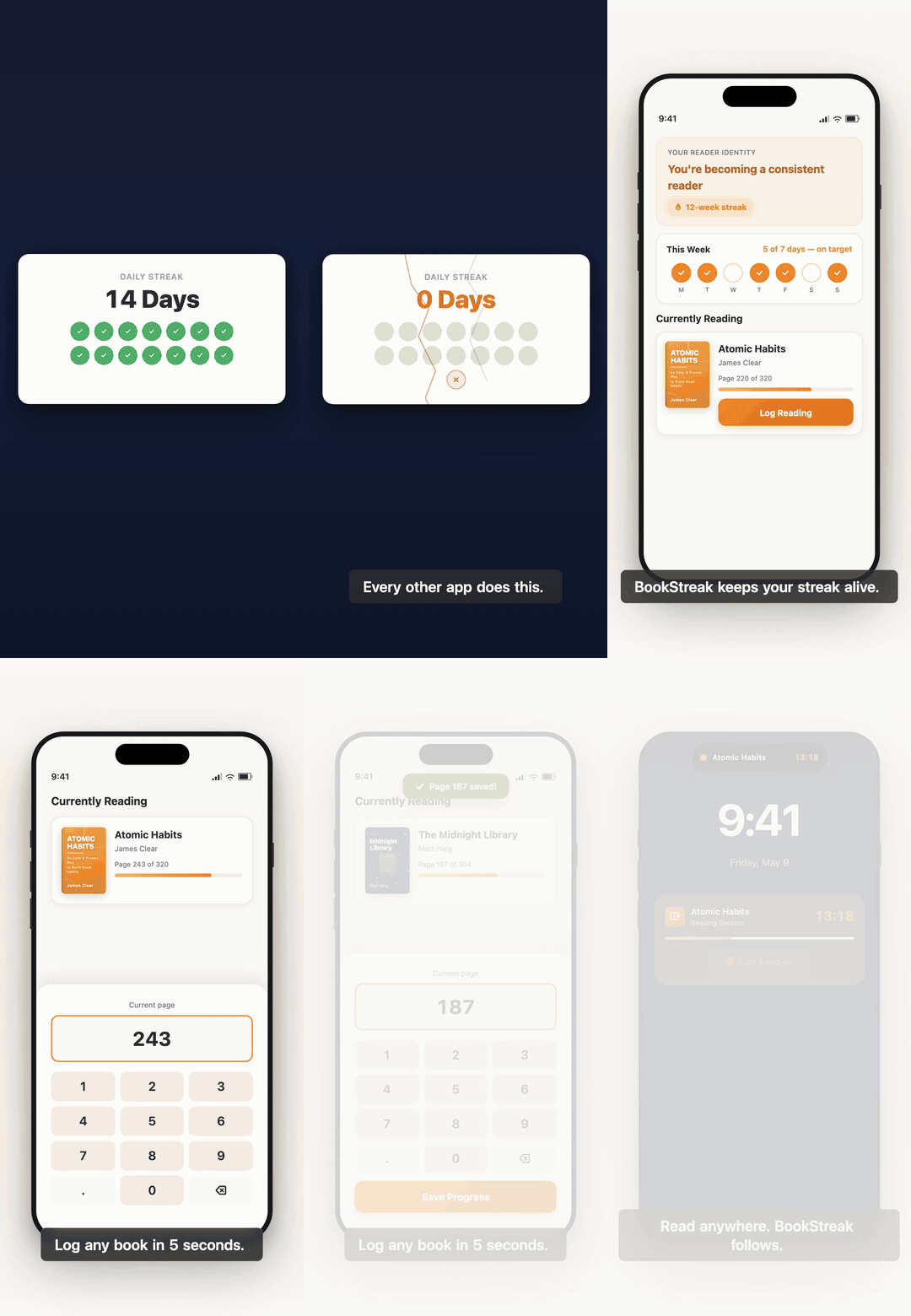
Real-World Example: BookStreak
BookStreak is a reading habit tracker on the App Store. Its preview videos and store screenshots were generated entirely with Appshot — no CapCut, no Canva, no video editing.
See examples/bookstreak/ for the generated config and scene files.
How It Works
The AI skill generates custom .tsx scene files for each project — no fixed scene templates, no one-size-fits-all layouts:
- Install the skills into your mobile app project
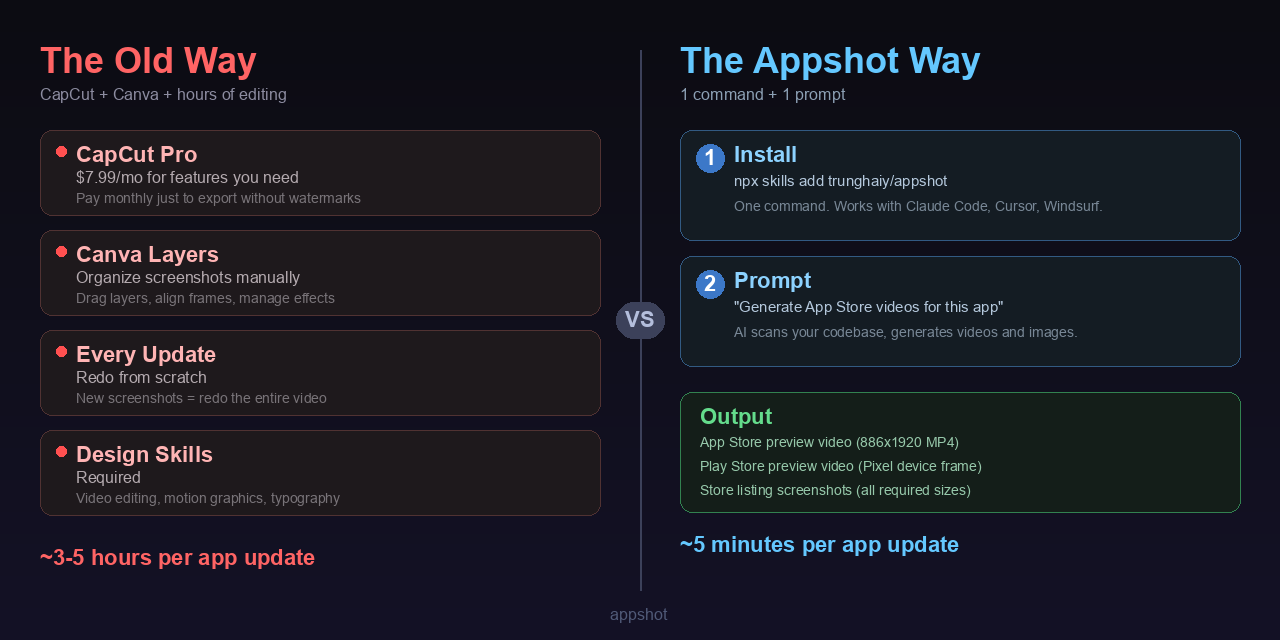
- Ask your AI agent — "Generate App Store and Play Store preview videos for this app"
- The skill scans your codebase — extracts app name, brand colors, icon, features, and store metadata automatically
- You answer a few creative questions — what problem does your app solve? What's the core action? What proof do you have?
- The skill generates custom scenes — writes bespoke
.tsx components using Appshot primitives, wired into a Remotion composition
- Preview and render —
npm run dev to preview in-browser, npm run build to export MP4
Every video is unique to your app. The skill picks the right narrative arc, writes copy, chooses animations, and composes scenes from the primitives library below.
Quick mode
Don't want a conversation? Add --quick and the skill makes all creative decisions from your codebase context alone:
Generate an App Store preview video for this app --quick
Quick mode works for web videos too:
Generate a product demo video for this website --quick
Install
Install the skills into your app project (recommended):
npx skills add trunghaiy/appshot
This installs three skills into your project's .agents/skills/ directory. Your AI agent picks them up automatically on the next session.
Other installation methods
Install specific skills only:
npx skills add trunghaiy/appshot --skill appshot-videos appshot-images
Clone and copy:
git clone https://github.com/trunghaiy/appshot.git
cp -r appshot/skills/* your-project/.agents/skills/
Git submodule:
git submodule add https://github.com/trunghaiy/appshot.git .agents/appshot
Fork and customize — fork this repo and modify the skills, strategies, and templates for your needs.
What You Can Generate
Videos
15-30 second animated preview videos for App Store and Google Play. The skill generates both store versions in one session — same scenes, only the device frame (iPhone vs Pixel) and store badge differ. Each video is unique to your app's story, brand, and features.
Screenshots
Store listing screenshots with device frames, captions, and branded backgrounds. Supports all required App Store and Google Play dimensions.
Web Demo Videos
1920×1080 landscape product demo videos for websites and SaaS products. The skill generates custom scenes with browser mockups (Chrome-style frame), animated cursor interactions, and bespoke UI recreations of your product's actual pages. Perfect for landing page heroes, product tours, and marketing videos.
Skills
| Skill | What it does |
|---|
appshot-core | Foundation — architecture, config schema, component inventory, device presets |
appshot-videos | Creative director for mobile preview videos — scans your app, guides narrative, generates custom scenes |
appshot-web-videos | Creative director for web demo videos — scans your web project, generates browser mockup scenes |
appshot-images | Creative director for screenshots — scans your app, designs layouts, generates custom scenes |
appshot-core is loaded automatically by the other skills. You interact with appshot-videos, appshot-web-videos, or appshot-images directly.
Manual Quick Start
If you prefer full control without AI skills, scaffold a standalone Remotion project:
# 1. Scaffold
npx create-appshot my-video
cd my-video

# 2. Edit src/app-config.ts with your app's info

# 3. Preview in browser
npm run dev

# 4. Render to MP4
npm run build                     # Both stores (if configured)
# npm run build:app-store         # App Store only
# npm run build:play-store        # Play Store only
Components
The primitives library that the AI composes into custom scenes. All components accept brand colors via a brand prop:
| Component | Purpose |
|---|
PhoneFrame | Realistic device with bezel, side buttons, notch/Dynamic Island |
BrowserFrame | Chrome-style browser window with address bar and traffic lights |
AmbientBackground | Animated gradient with floating orbs (light/medium/deep/dark) |
Caption | Bottom caption with word-by-word entrance animation |
FadeIn | Directional fade-in (up/down/left/right) |
SceneWrap | 12-frame fade transitions between scenes |
AnimatedCursor | Keyframe-driven mouse cursor for browser interaction demos |
ProgressBar | Animated horizontal bar (loading, progress, metrics) |
Icon | 30 SVG stroke icons for UI mockups |
HeatMap | GitHub-style contribution grid |
AppIcon | Icon with optional glow effect |
AppStoreBadge | iOS App Store / Google Play badges |
StatCard | Before/after stat with animated counter |
FloatingCard | Glass/solid/dark card with spring entrance |
TypeWriter | Character-by-character text reveal |
Device Presets
| Preset | Screen | Notch | Store |
|---|
iphone-16-pro | 393x852 | Dynamic Island | App Store |
iphone-15 | 375x812 | Dynamic Island | App Store |
ipad-pro-13 | 1024x1366 | None | App Store (iPad) |
pixel-9 | 412x915 | Punch hole | Play Store |
Browser Presets
| Preset | Viewport | Chrome | Use case |
|---|
chrome-desktop | 1440x900 | Light | Default for web demo videos |
chrome-dark | 1440x900 | Dark | Dark-themed web apps, developer tools |
Config Reference
Everything is driven by src/app-config.ts. The skill generates this for you, but here's the schema if you're customizing manually:
export const appConfig: AppConfig = {
  app: {
    name: "MyApp",
    tagline: "Your tagline",
    icon: "app-icon.png",     // in public/
    platform: "ios",          // "ios" | "android" | "both"
  },
  brand: {
    primary: "#007AFF",
    primaryLight: "#E5F1FF",
    background: "#F5F5F7",
    surface: "#FFFFFF",
    textPrimary: "#1D1D1F",
    textSecondary: "#86868B",
    success: "#34C759",
    danger: "#FF3B30",
  },
  video: {
    fps: 30,
    width: 886,       // App Store required: 886x1920
    height: 1920,
    device: "iphone-15",
  },
};
Web video config
export const appConfig: AppConfig = {
  app: {
    name: "MyProduct",
    tagline: "Your tagline",
    icon: "logo.png",
    platform: "web",
    url: "myproduct.com",
  },
  brand: {
    primary: "#2563EB",
    primaryLight: "#DBEAFE",
    background: "#FFFFFF",
    surface: "#F8FAFC",
    textPrimary: "#0F172A",
    textSecondary: "#64748B",
    success: "#22C55E",
    danger: "#EF4444",
  },
  video: {
    fps: 30,
    width: 1920,
    height: 1080,
    browser: "chrome-desktop",
  },
};
Store Requirements
Videos
| Platform | Dimensions | Duration | Format |
|---|
| iPhone 6.7" | 886x1920 | 15-30s | H.264, MP4/MOV |
| iPhone 6.1" | 886x1920 | 15-30s | H.264, MP4/MOV |
| iPad 13" | 1200x1600 | 15-30s | H.264, MP4/MOV |
| Google Play | 886x1920 | 15-30s | H.264, MP4 |
Default output is 886×1920. This canvas works for both App Store (iPhone 6.7″ native) and Google Play.
Web Demo Videos
| Format | Dimensions | Duration | Codec |
|---|
| Landing page hero | 1920x1080 | 20-45s | H.264, MP4 |
| Full product demo | 1920x1080 | 30-60s | H.264, MP4 |
No store-specific constraints. Output is standard 16:9 landscape video suitable for YouTube, landing pages, social media embeds, and product documentation.
Screenshots — iOS App Store
| Device | Dimensions (portrait) | Required |
|---|
| iPhone 6.9" | 1320x2868 | Yes (mandatory primary) |
| iPhone 6.7" | 1290x2796 | Optional |
| iPhone 6.5" | 1242x2688 | Optional (legacy) |
| iPad 13" | 2064x2752 | Required if app supports iPad |
Screenshots — Google Play
| Device | Dimensions (portrait) | Notes |
|---|
| Phone | 1080x1920 | Recommended standard |
| 7" Tablet | 1200x1920 | If app targets 7" tablets |
| 10" Tablet | 1600x2560 | If app targets 10" tablets |
Customization
- Custom components — Build on top of the existing primitives in
src/components/
- Screenshots — Use
staticFile("screenshot.png") inside PhoneFrame
- Audio — Place
.mp3 in public/, set backgroundMusic in config
- Category strategies — The video skill includes strategies for habit tracking, fitness, finance, and more. Add your own in
skills/appshot-videos/strategies/
License
MIT


