

JuliusBrussee/
caveman

🪨 why use many token when few token do trick — Claude Code skill that cuts 65% of tokens by talking like caveman
105k
1 add
Termio is a terminal-first environment for agentic coding. It keeps each agent session alive in `termiod`, so closing the app only detaches and you can reattach later with the same scrollback and process state.
Builders who want Claude Code, Codex, or other CLI agents to stay running in one shared terminal workspace.
You can manage agent sessions like terminals, with status, reattach, and remote access instead of juggling detached shells.
Each session runs in `termiod`, so quitting the app detaches without killing the agent.
Shows working, idle, done, or needs you in the sidebar, tray, phone, and CLI.
The `termio` command can open projects, spawn agent sessions, read transcripts, send replies, and close sessions.
Creates git worktrees from the sidebar and splits panes for an agent, server, and shell in one window.
Can set up on a Linux VPS over SSH and keep sessions attached to the box instead of the connection.
The iPhone app mirrors live terminal sessions and supports keyboard controls and voice input.
Installs a `termio` skill into Claude and Codex skill folders and keeps it updated.
brew install --cask termio-sh/tap/termio



English | 简体中文 | 繁體中文 | 日本語 | 한국어
Download for macOS • Website • Docs • Changelog • Discord
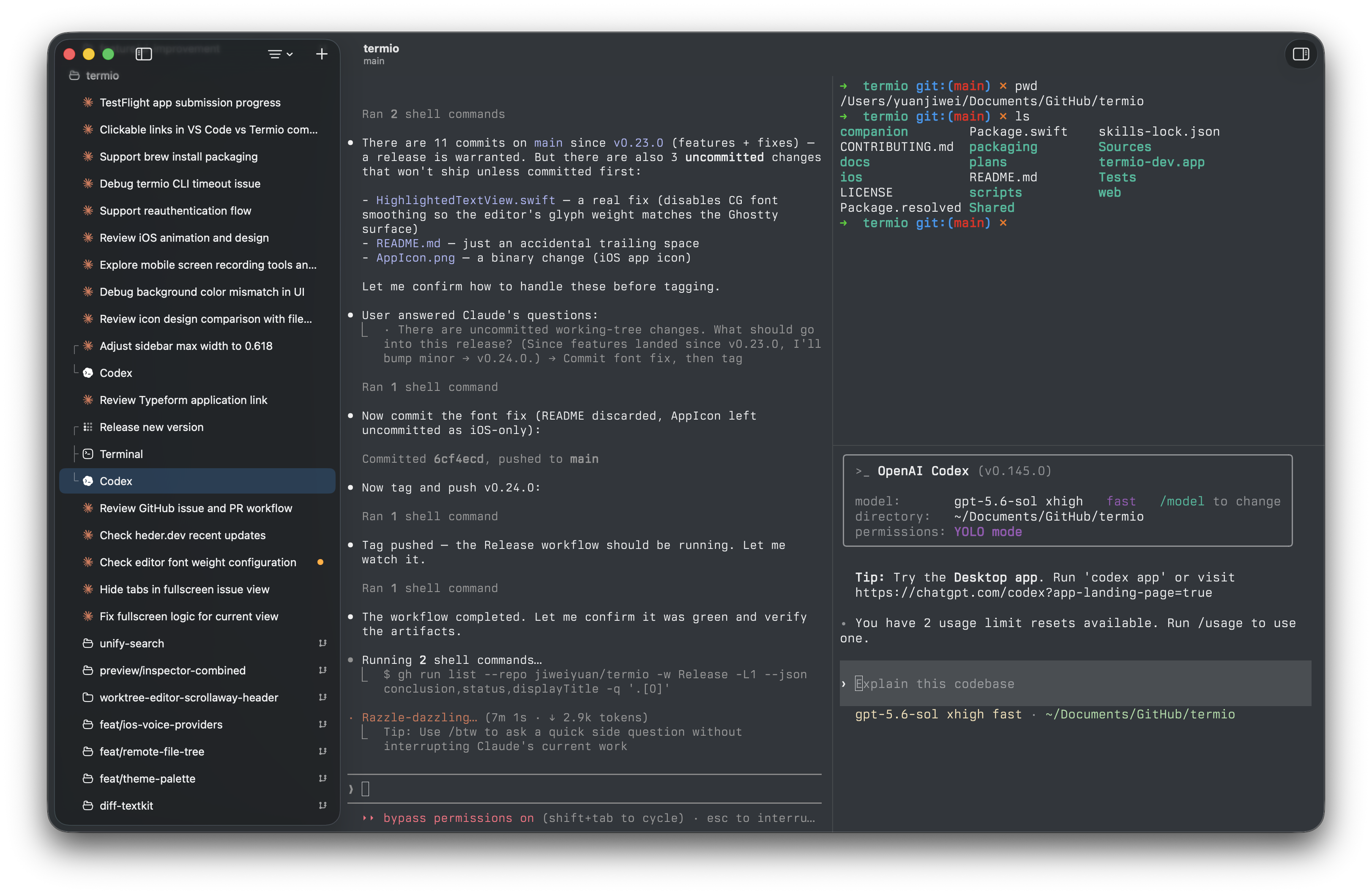
When agents write most of the code, the environment's job is to run them and to tell you which one needs you. Termio is that environment, and it's a real terminal because that's where the agents already live.
It wires up each agent's own hooks on first launch. A session reports working, idle, or needs you — a dot in the sidebar, a menu-bar tray that rings when one is blocked, the same signal on your phone. Claude Code, Codex, OpenCode, Pi, Amp, Cursor, Copilot, Kimi, Antigravity, Crush, Grok, and any other CLI agent.
Many people tell you to learn tmux. You don't have to. Every session's shell lives in termiod, a daemon, so quitting the app only detaches. Close the laptop, reopen Termio — the agent is where you left it, same process, same scrollback. Only Close Session (⌘W) ends one.
Any Linux VPS you can ssh to. Termio reads ~/.ssh/config and never rewrites it. Settings ▸ Devices ▸ Set Up copies one binary into ~/.local/bin over SSH, starts the daemon, and installs the agents' hooks there. Local and remote sessions run through the same host. The session lives on the box, not in the connection. Drop the link and the agent keeps working; reattach restores the exact screen.
Download Termio for macOS — free, no account, macOS 14+. Or with Homebrew:
brew install --cask termio-sh/tap/termio
On iPhone: get the companion beta on TestFlight, then pair it by scanning the QR code in the Mac app's Settings ▸ Mobile.
Projects hold sessionsOne project per checkout, its terminals and agents underneath. Chats sit above that — scratch agent sessions that don't belong to any project. 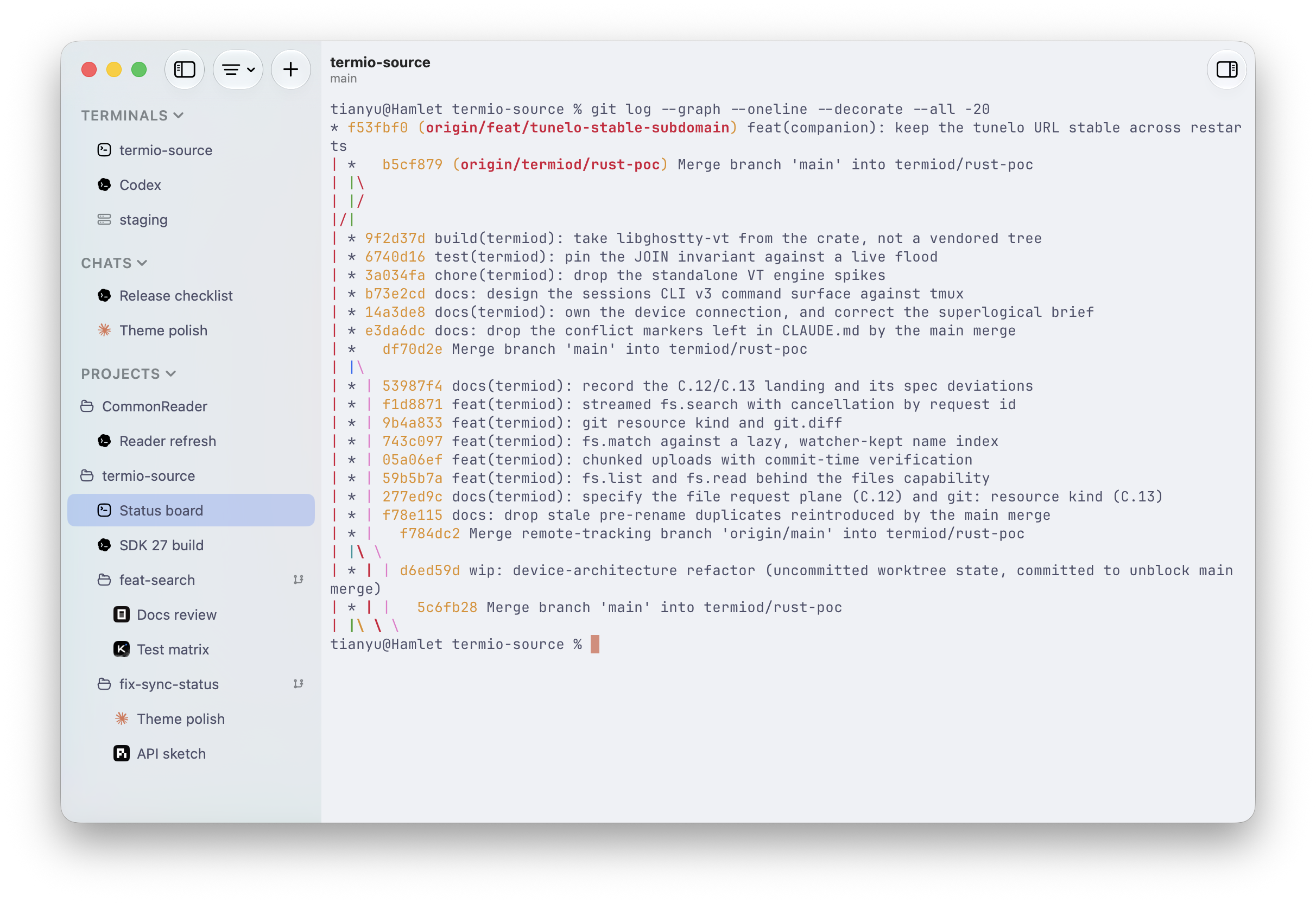
|
Git worktreesOne branch per parallel task, created from the sidebar. Worktrees nest under the project they came from. 
|
Split panes⌘D splits right, ⇧⌘D splits down. An agent, a dev server, and a shell in one window. 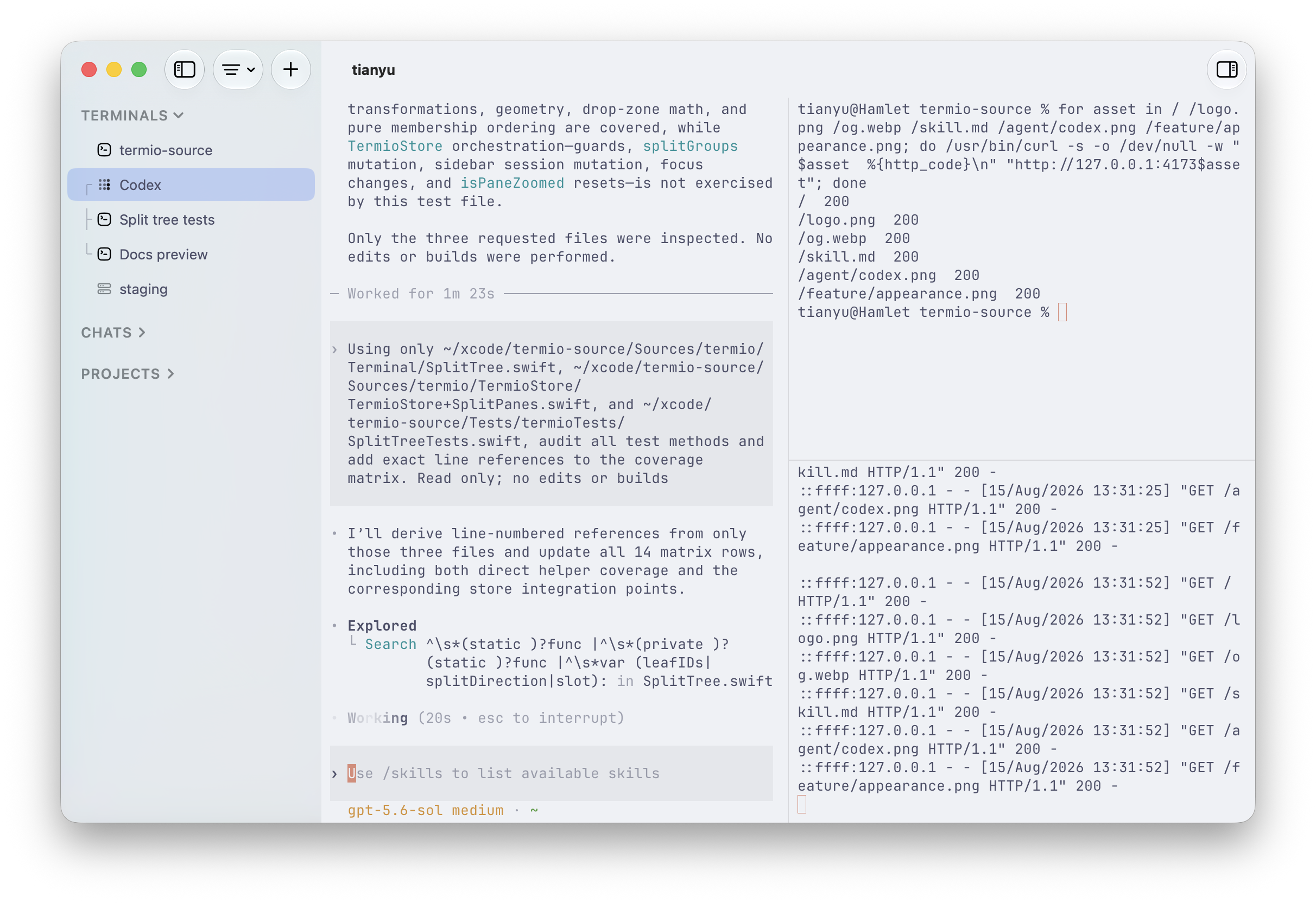
|
Status at a glanceWorking, idle, done, or needs you — a mark on every row. The same list is 
|
File editorClick a file in the tree. Syntax highlighting, autosave. The terminal stays the place where you commit. 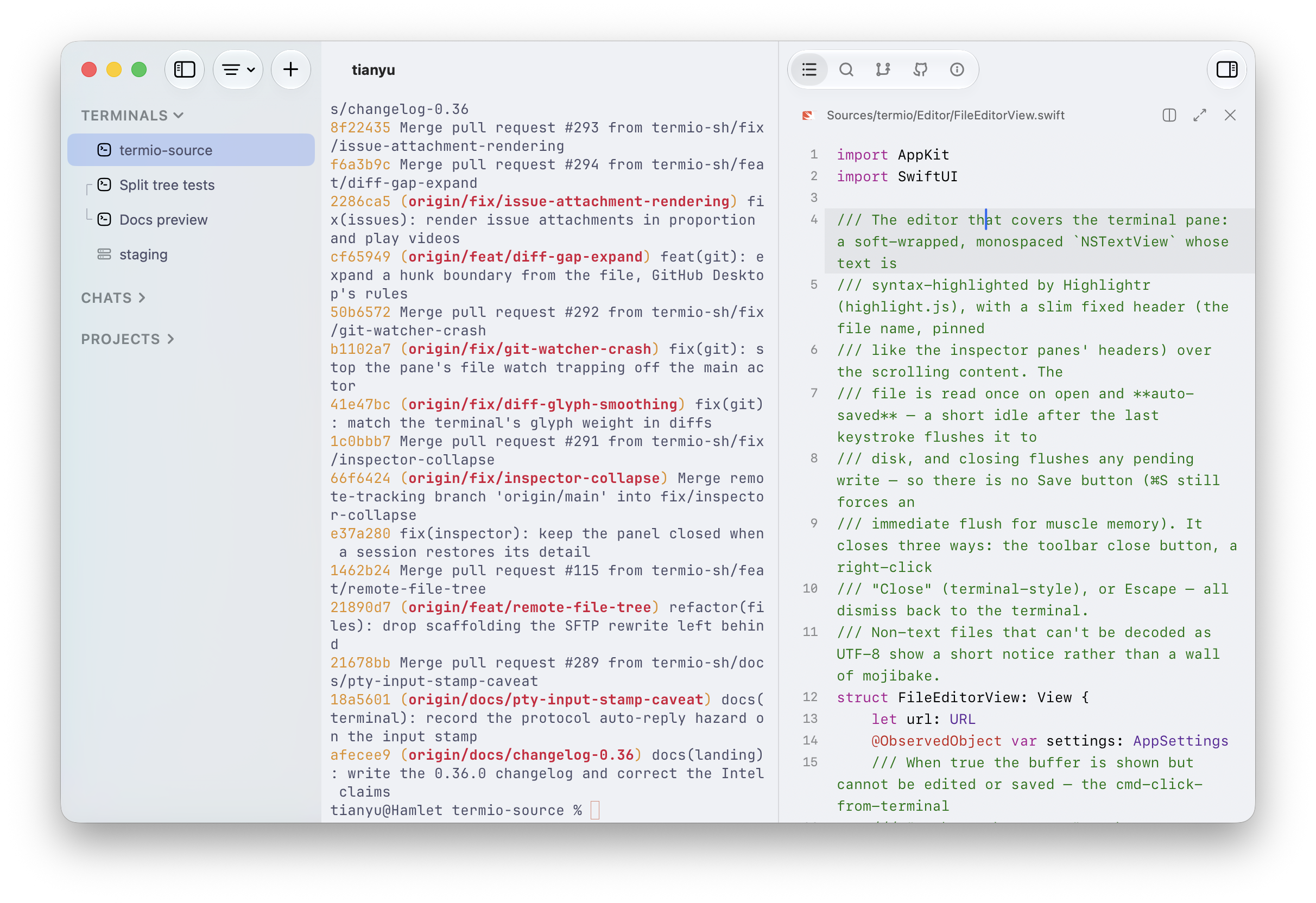
|
ChangesA read-only git pane with the current unified diff. Commit, push, and PR stay in the terminal. 
|
SearchProject-wide content search, jumping to the matching line in the editor. 
|
Command palette⌘⇧P. Split, focus, anything you'd hunt a menu for. 
|
The termio CLI drives the running app. An agent inside Termio can spawn a sibling, hand it a task, and read back the reply:
termio .                                    # open the current directory as a project
termio sessions list                        # who's working, idle, or waiting on you
termio sessions spawn "fix the flaky test"  # start a new agent session on a prompt
termio sessions run "pnpm test --watch"     # start a plain terminal session on a command
termio sessions send ab12cd34 "1"           # answer a sibling's permission prompt
termio sessions read ab12cd34 --lines 40    # print what's on a session's screen
termio sessions watch                       # stream status changes as they happen
termio sessions focus ab12cd34              # bring a session forward in the app
termio sessions close ab12cd34              # close it
termio notify "the migration finished"      # post a macOS notification
--wait blocks until the turn settles and comes back with the final status and the transcript range to read. --json makes any sessions command machine-readable. --agent picks which agent spawn starts. --direction / --ratio decide where the new pane lands and how big it is.
termio sessions spawn "run the migration" --agent codex --wait
Session control installs a termio agent skill into each agent's skills folder (~/.claude/skills, ~/.codex/skills) and keeps it current on every launch. Any other agent can install the same skill from this repo:
npx skills add termio-sh/termio --skill termio
The Termio iOS mirrors every session live — full TUI. A key bar puts esc, tab, ctrl, and arrows above the keyboard, and hold-to-speak transcribes into the prompt. Public beta on TestFlight.
 |  |  |
Every session lives in termiod. Clients only attach. Closing a client does not kill the agent. One protocol; only the pipe changes.
  ┌─────────────────┐ unix  ┌────────────┐         ┌─────────────────┐
  │ Mac app         │──────►│            │         │                 │
  ├─────────────────┤ unix  │            │         │                 │
  │ Windows (soon)  │──────►│            │         │                 │
  ├─────────────────┤ wss   │            │         │                 │
  │ iPhone          │──────►│  termiod   │── PTY ─►│  shell / agent  │
  ├─────────────────┤ unix  │   (Mac)    │         │                 │
  │ TUI (soon)      │──────►│            │         │                 │
  ├─────────────────┤ wss   │            │         │                 │
  │ Android (soon)  │──────►│            │         │                 │
  └─────────────────┘       └────────────┘         └─────────────────┘

  ┌─────────────────┐ ssh   ┌────────────┐         ┌─────────────────┐
  │ Mac app         │──────►│            │         │                 │
  ├─────────────────┤ ssh   │            │         │                 │
  │ Windows (soon)  │──────►│            │         │                 │
  ├─────────────────┤ wss   │            │         │                 │
  │ iPhone          │──────►│  termiod   │── PTY ─►│  shell / agent  │
  ├─────────────────┤ ssh   │  (Linux)   │         │                 │
  │ TUI (soon)      │──────►│            │         │                 │
  ├─────────────────┤ wss   │            │         │                 │
  │ Android (soon)  │──────►│            │         │                 │
  └─────────────────┘       └────────────┘         └─────────────────┘
The phone attaches to termiod on the box, not through the Mac. A session on a VPS is the same object as one on your laptop.
The reasoning is in termiod/ARCHITECTURE.md.
Follow along or weigh in on GitHub Issues.
Termio is looking for long-term maintainers. If you love using it and would like to own an area of the roadmap above — the web client, Windows, or the iOS companion — join the Discord and say hi, or just pick up an issue.

The WeChat code expires every few days. If it has, ask in Discord and it gets refreshed.
MIT.
Sign in to join the discussion.
No comments yet. Be the first to say what this is good for.
🪨 why use many token when few token do trick — Claude Code skill that cuts 65% of tokens by talking like caveman

The best-benchmarked open-source AI memory system. And it's free.

Orca is the ADE for working with a fleet of parallel agents. Run any coding agent with your own subscription. Available on desktop, mobile and remote runtime.

A cross-platform desktop All-in-One assistant for Claude Code, Codex, OpenCode, OpenClaw, Grok Build & Hermes Agent. Only official website: ccswitch.io

Never stop coding. Free MIT AI gateway: one endpoint, 352 providers (150+ free), 1200+ models Kimi, Claude, GPT, Gemini, GLM, DeepSeek, MiniMax. Works with Claude Code, Codex, Cursor, OpenCode, Cline & Copilot. Quota-aware auto-fallback, RTK+Caveman compression saves 15-95% tokens, MCP/A2A, Desktop/PWA. Built by 550+ contributors

Compress tool outputs, logs, files, and RAG chunks before they reach the LLM. 20% fewer tokens for coding agents, 60-95% fewer tokens for JSON, same answers. Library, proxy, MCP server.