
obra/
superpowers

obra/superpowersSkills
An agentic skills framework & software development methodology that works.
285k
1 add
Lattice packages reusable skills that teach assistants how to work with design, context, architecture, review, and team standards. It uses a shared `skills/` folder plus host-specific plugin manifests so the same workflow can run in Claude Code, Codex, Cursor, and other compatible clients.
Builders who want their coding assistant to follow the same design and review process every time.
You can turn ad hoc agent output into a repeatable workflow with project standards, structured design, and review steps.
Organizes work into atoms, molecules, and refiners so small rules can combine into larger workflows.
Guides work from `requirement-forge` to `design-blueprint`, `code-forge`, and `review`.
Writes standards, decisions, and review insights into `.lattice/` so the next cycle has more context.
Ships manifests for Claude Code, Codex, Cursor, Grok, and Kimi, plus an Agent Plugins standard package.
Includes `scripts/run-verification.sh` for running the verification step directly when a host has no subagent concept.
Provides `/lattice-init` and a sample project under `sample/` to start from an existing codebase or a template spec.
/plugins marketplace add techygarg/lattice
/plugins install lattice
/reload-plugins
codex plugin marketplace add techygarg/lattice
codex plugin add lattice@lattice
codex plugin list | rg -i lattice
git clone https://github.com/techygarg/lattice.git
cd lattice
./tools/install.sh /absolute/path/to/your/skills/folder
Composable AI skills that teach assistants structured thinking — design-first, context-aware, and architecture-guided.





AI coding assistants jump straight to code, silently make design decisions, forget constraints mid-conversation, and produce output nobody reviewed against real standards. Lattice fixes this with composable skills in three tiers — atoms, molecules, refiners — that embed battle-tested engineering disciplines plus a living context layer that accumulates your project's standards, decisions, and review insights across every feature cycle.
Three principles guided Lattice's design:
.lattice/ folder grows smarter with every feature cycle rather than being configured once and forgotten| Tier | Purpose |
|---|---|
| Atoms | Single-principle guardrails — clean code, architecture, DDD, secure coding, test quality, design-first, and more |
| Molecules | Multi-step workflows that compose atoms — design, implement, refactor, fix, review |
| Refiners | Guided interviews that produce project-specific standards, customizing how atoms behave for your team |
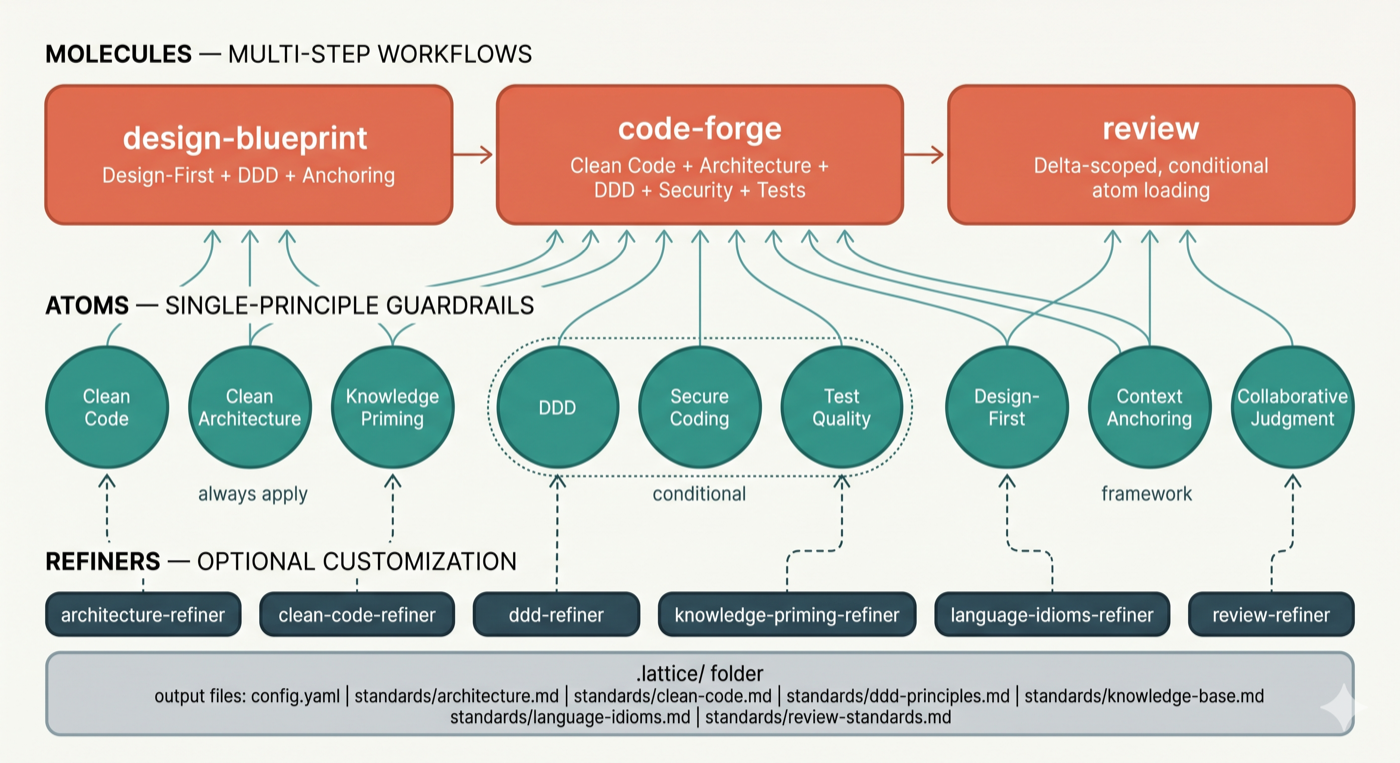
See How It Works for the full skill inventory and mechanics.
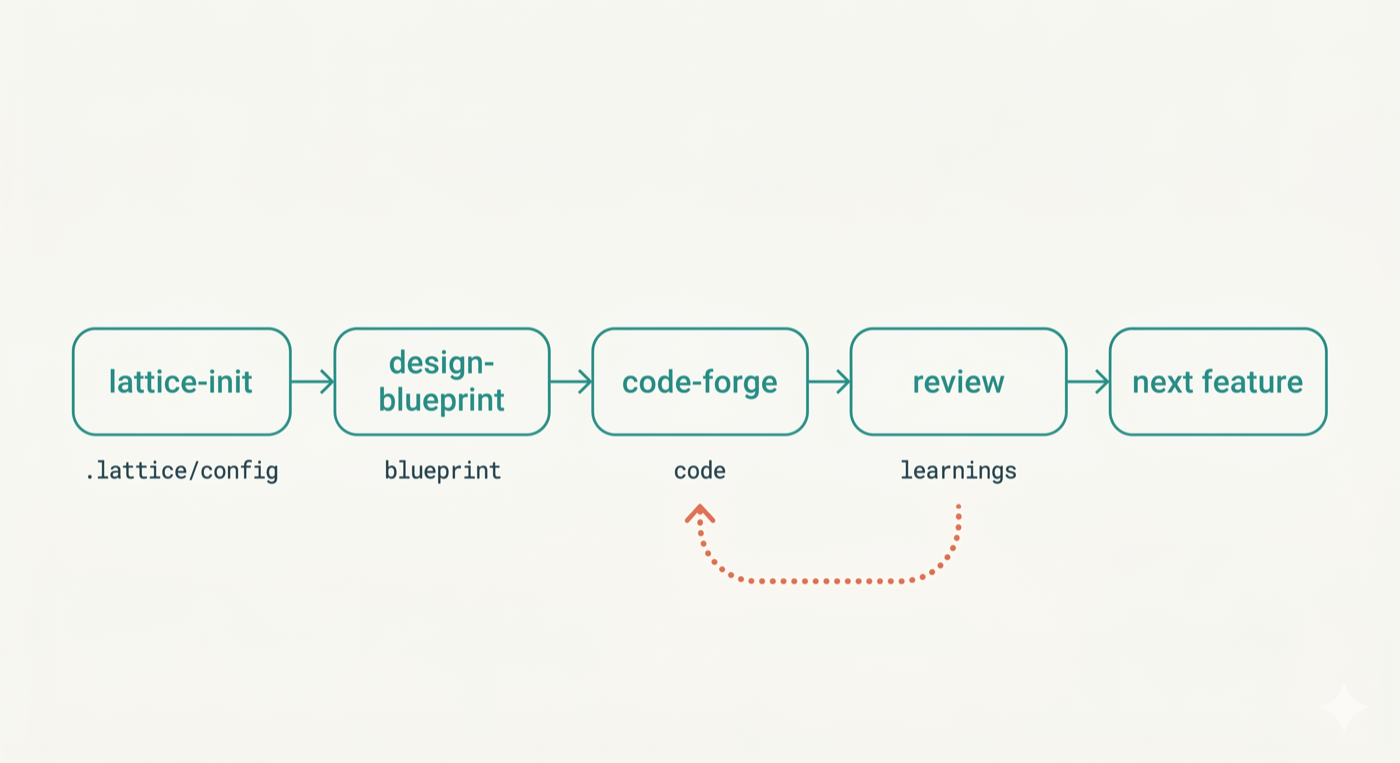
Skills form a delivery lifecycle: requirement-forge → design-blueprint → code-forge → review, with refactor-safely and bug-fix covering structural and defect-driven work. requirement-forge starts the pipeline — it acts as a senior PM + BA pair to produce structured feature specs in .lattice/requirements/ that feed directly into design-blueprint. For teams with existing codebases, architecture-compass sits before the pipeline — it scans the repository, runs a structured interview, and produces an agreed architectural direction that orients the team before any code changes begin. Each stage consumes and produces artifacts in .lattice/, growing the living context layer.
Install Lattice — choose the path that fits your setup:
Option A — Claude Code plugin (also works in Cursor — reads Claude Code skills automatically)
/plugins marketplace add techygarg/lattice
/plugins install lattice
/reload-plugins
Option B — Codex-compatible plugin package
codex plugin marketplace add techygarg/lattice
codex plugin add lattice@lattice
codex plugin list | rg -i lattice
The Codex plugin manifest lives in .codex-plugin/ and is registered by .agents/plugins/marketplace.json. Like every host plugin here, it's a thin manifest only — it points at the same shared, flat skills/ folder every other host uses, plus the verification runner script (scripts/run-verification.sh) — Codex has no subagent concept, so verification always runs the script directly rather than via a subagent. Grok (.grok-plugin/) and Kimi (.kimi-plugin/) follow the same pattern.
Option C — Clone and install locally (any AI tool)
git clone https://github.com/techygarg/lattice.git
cd lattice
./tools/install.sh /absolute/path/to/your/skills/folder
Pass the skills directory for your tool: ~/.claude/skills/ for Claude Code, .cursor/skills/ for Cursor, or any tool's skills folder.
Option D — Agent Plugins 1.0-conformant clients
A root plugin.json conforming to the open, vendor-neutral Agent Plugins standard ships alongside the host-specific manifests above — any conformant client auto-discovers skills straight from the skills/ folder with zero extra install steps. Shipped in Codex CLI, Cursor, VS Code / GitHub Copilot, and Kiro as of this writing.
See docs/plugins.md for the full per-host status table and how to add a new host.
Try it immediately. The repo includes
sample/— a realistic .NET 8 User Service spec with requirements, domain concepts, and constraints already written. Copy thesample/folder contents into any empty directory and follow the steps below.
Run /lattice-init in your AI tool's chat — scans the project, suggests refiners in priority order, creates .lattice/config.yaml. All skill commands (/lattice-init,/requirement-forge, /design-blueprint, /code-forge, etc.) are typed in the AI chat, not the terminal.
Spec (optional but recommended) — /requirement-forge acts as a senior PM + BA pair to define epics and feature specs before any design begins. Accepts existing PRDs, feature lists, or a verbal description. Produces .lattice/requirements/ as direct input to design-blueprint.
Design — /design-blueprint walks through five progressive design levels before any code is written.
Implement — /code-forge generates implementation from the approved blueprint, applying all quality atoms.
Review — /review audits the change and persists insights into .lattice/ for the next cycle.
.lattice/config.yaml key documentedHelper skills for creating and maintaining Lattice itself — see dev-skills/.
MIT
Sign in to join the discussion.
No comments yet. Be the first to say what this is good for.
An agentic skills framework & software development methodology that works.

Turn any codebase, with its docs, SQL schemas, configs, and PDFs, into a queryable knowledge graph. A /graphify skill for Claude Code, Cursor, Codex, and Gemini CLI: local deterministic AST parsing, every edge explained, no vector store.

Topic in, narrated explainer video out. A Claude Code / Codex skill that turns any topic into a black-canvas motion-graphics explainer video with TTS voiceover, subtitles and a chapter progress bar. Chinese or English; every frame drawn in code with Remotion.
Public repository for Agent Skills
Open-source AI job search: scan job portals, evaluate listings into a structured A-H report with a global 1-5 score, tailor your CV, track applications — runs locally in your AI coding CLI (Claude Code, Codex, OpenCode, Antigravity…)

Production-grade engineering skills for AI coding agents.