
JuliusBrussee/
caveman

🪨 why use many token when few token do trick — Claude Code skill that cuts 65% of tokens by talking like caveman
105k
1 add
Skills Manager is a macOS app that helps you find skills in GitHub repositories or local directories, then install them into Claude Code or Codex. It also lets you tag skills, filter them, and edit local skill markdown with preview.
Builders who want a desktop app to browse, tag, and install skills for Claude Code and Codex.
You can manage skills for multiple providers from one app instead of copying files by hand.
Discover skills from GitHub repositories such as `anthropics/skills`.
Load skills from any local folder through `file://` URLs.
View installed skills for Claude Code, Codex, or both.
Keep several GitHub skill catalogs in the same app.
Install to Claude Code, Codex, or both, then unlink or remove them later.
Create global custom tags and filter by SKILL.md tags or your own tags.
Open skill documentation with full markdown rendering and a split-pane editor with live preview.
Browse skills as cards or as a compact list.
git clone https://github.com/tddworks/SkillsManager.git
cd SkillsManager
swift build -c release
# Build first to get Sparkle tools
swift build

# Generate key pair
./scripts/sparkle-setup.sh



A macOS application for discovering, browsing, installing, and tagging skills for AI coding assistants. Manage skills for Claude Code and Codex from GitHub repositories or your local filesystem.
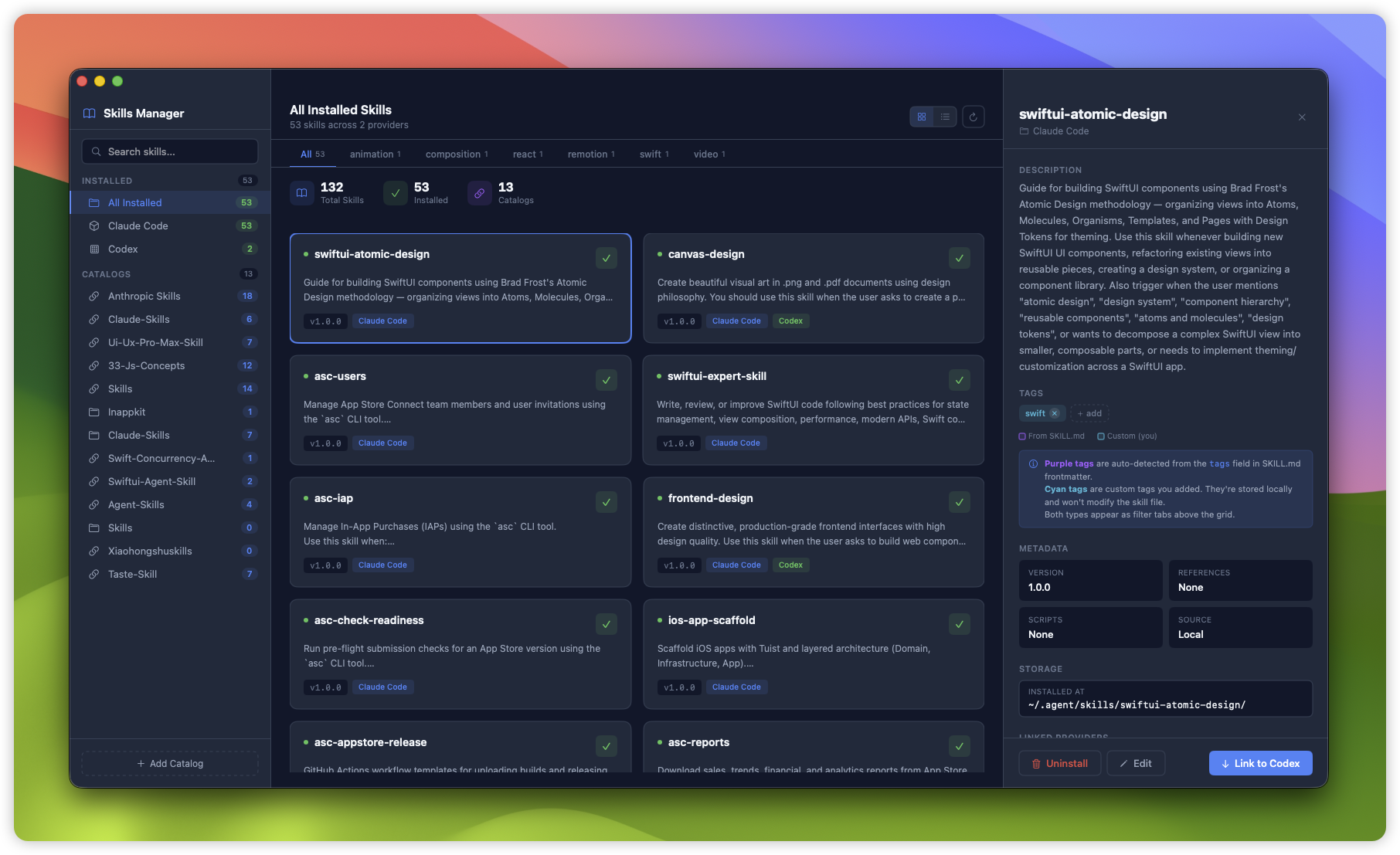
Browse, install, and tag skills for Claude Code and Codex
file:// URLs| Provider | Skills Path | Description |
|---|---|---|
| Claude Code | ~/.claude/skills | Anthropic's AI coding assistant |
| Codex | ~/.codex/skills/public | OpenAI's code generation tool |
Download the latest release from GitHub Releases.
git clone https://github.com/tddworks/SkillsManager.git
cd SkillsManager
swift build -c release
Launch the app to browse available skills. The three-column layout shows:
https://github.com/anthropics/skills) or browse for a folder# Build the project
swift build
# Run all tests
swift test
# Run the app
swift run SkillsManager
The project uses Tuist to generate Xcode projects with SwiftUI preview support.
# Install Tuist (if not installed)
brew install tuist

# Generate Xcode project
tuist generate

# Open in Xcode
open SkillsManager.xcworkspace

# Run tests via Tuist
tuist test
Full documentation: docs/ARCHITECTURE.md
Skills Manager uses a layered architecture with rich domain models and SwiftUI Atomic Design:
SkillLibrary (@Observable, coordinator)
├── localCatalog: SkillsCatalog     ← Installed skills (claude + codex)
├── remoteCatalogs: [SkillsCatalog] ← GitHub repos or local directories
│   └── skills: [Skill]             ← Each catalog OWNS its skills
└── skillTags: SkillTags            ← Global tag management aggregate
| Layer | Location | Purpose |
|---|---|---|
| Domain | Sources/Domain/ | Rich models (Skill, SkillsCatalog, SkillTags), protocols |
| Infrastructure | Sources/Infrastructure/ | Repositories, parsers, persistence |
| App | Sources/App/ | SwiftUI views (Atomic Design), coordinator, design tokens |
@Mockable protocols for testabilitySkillsManager/
├── Sources/
│ ├── Domain/
│ │ ├── Models/ # Skill, SkillsCatalog, SkillTags, Provider, SkillEditor
│ │ └── Protocols/ # SkillRepository, UserTagRepository, SkillInstaller (@Mockable)
│ ├── Infrastructure/
│ │ ├── Repositories/ # MergedSkillRepository
│ │ ├── Local/ # LocalSkillRepository, LocalDirectorySkillRepository
│ │ ├── Git/ # ClonedRepoSkillRepository
│ │ ├── Parser/ # SkillParser (YAML frontmatter)
│ │ ├── Installer/ # FileSystemSkillInstaller
│ │ └── UserDefaultsUserTagRepository.swift
│ └── App/
│ ├── SkillLibrary.swift # @Observable coordinator
│ ├── Theme/ # DesignTokens (DS enum)
│ └── Views/
│ ├── ContentView.swift # 3-column root layout
│ ├── Sidebar/ # SidebarView, SkillCardView, SkillRowView
│ ├── Detail/ # SkillDetailView, SkillEditorView, MarkdownView
│ ├── Atoms/ # TagChip, EditableTagsView, FlowLayout, etc.
│ ├── Molecules/ # CategoryTabsBar, StatsBar, ProviderLinkCard
│ └── Sheets/ # AddCatalogSheet, InstallSheet, UninstallSheet
├── Tests/
│ ├── DomainTests/ # SkillTests, SkillTagsTests, SkillEditorTests
│ ├── AppTests/ # SkillLibraryTests, SkillLibraryUserTagTests
│ └── InfrastructureTests/ # Parser, repository, installer tests
├── Project.swift # Tuist configuration
└── Package.swift # SPM configuration
The project includes CI/CD workflows and Sparkle integration for automatic updates.
Generate EdDSA keys for signing updates:
# Build first to get Sparkle tools
swift build

# Generate key pair
./scripts/sparkle-setup.sh
| Secret | Purpose |
|---|---|
APPLE_CERTIFICATE_P12 | Base64-encoded Developer ID certificate |
APPLE_CERTIFICATE_PASSWORD | Certificate password |
APP_STORE_CONNECT_API_KEY_P8 | Base64-encoded App Store Connect API key |
APP_STORE_CONNECT_KEY_ID | API key ID |
APP_STORE_CONNECT_ISSUER_ID | Team issuer ID |
SPARKLE_EDDSA_PRIVATE_KEY | EdDSA private key for signing updates |
CODECOV_TOKEN | (Optional) Codecov upload token |
Releases are triggered by:
git tag v1.0.0 && git push --tagsThe release workflow will:
MIT License - see LICENSE for details.
Sign in to join the discussion.
No comments yet. Be the first to say what this is good for.
🪨 why use many token when few token do trick — Claude Code skill that cuts 65% of tokens by talking like caveman

The best-benchmarked open-source AI memory system. And it's free.

Orca is the ADE for working with a fleet of parallel agents. Run any coding agent with your own subscription. Available on desktop, mobile and remote runtime.

A cross-platform desktop All-in-One assistant for Claude Code, Codex, OpenCode, OpenClaw, Grok Build & Hermes Agent. Only official website: ccswitch.io

Never stop coding. Free MIT AI gateway: one endpoint, 352 providers (150+ free), 1200+ models Kimi, Claude, GPT, Gemini, GLM, DeepSeek, MiniMax. Works with Claude Code, Codex, Cursor, OpenCode, Cline & Copilot. Quota-aware auto-fallback, RTK+Caveman compression saves 15-95% tokens, MCP/A2A, Desktop/PWA. Built by 550+ contributors

Compress tool outputs, logs, files, and RAG chunks before they reach the LLM. 20% fewer tokens for coding agents, 60-95% fewer tokens for JSON, same answers. Library, proxy, MCP server.