

JuliusBrussee/
caveman

🪨 why use many token when few token do trick — Claude Code skill that cuts 65% of tokens by talking like caveman
105k
1 add
AgentGraphed scans the JSONL logs that Claude Code and Codex already write on your machine and turns them into a searchable local dashboard. You can open past sessions, filter by project or model, generate a resume prompt, and review usage and cost over time.
Builders who want one place to search, resume, and review Claude Code and Codex sessions.
You can find past AI coding work, resume it, and understand where your time and model spend went.
Shows every session grouped by day, with status badges for started, continued, and closed work.
Lets you read past conversations and search by content, project, provider, or model.
Copies a `cd <cwd> && claude --resume <id>` command so you can continue unfinished work.
Detects git repo roots and shows session history, spend, and activity per project.
Shows charts, KPIs, top projects, and model cost breakdowns across your local sessions.
Re-scans local Claude Code and Codex logs every 5 minutes so new sessions appear automatically.
npx agentgraphed
npm install -g agentgraphed
agentgraphed
› Starting AgentGraphed on http://localhost:3737
› Scanning local AI coding sessions…
  Found 142 Claude + 8 Codex sessions (14821 messages indexed in 1943ms)
› Ready. Press Ctrl+C to stop.
Error: Could not locate the bindings file
npm install -g agentgraphed --foreground-scripts --ignore-scripts=false
# …or, if you run it with npx:
npm_config_ignore_scripts=false npx agentgraphed
Local-first history, search, and analytics for Claude Code and Codex.
Find old sessions, resume unfinished work, search past conversations, and see usage across every AI coding project on your machine.
No login. No cloud. Nothing leaves your computer.
🌐 Site: https://agentgraphed.com · 📦 npm: https://www.npmjs.com/package/agentgraphed


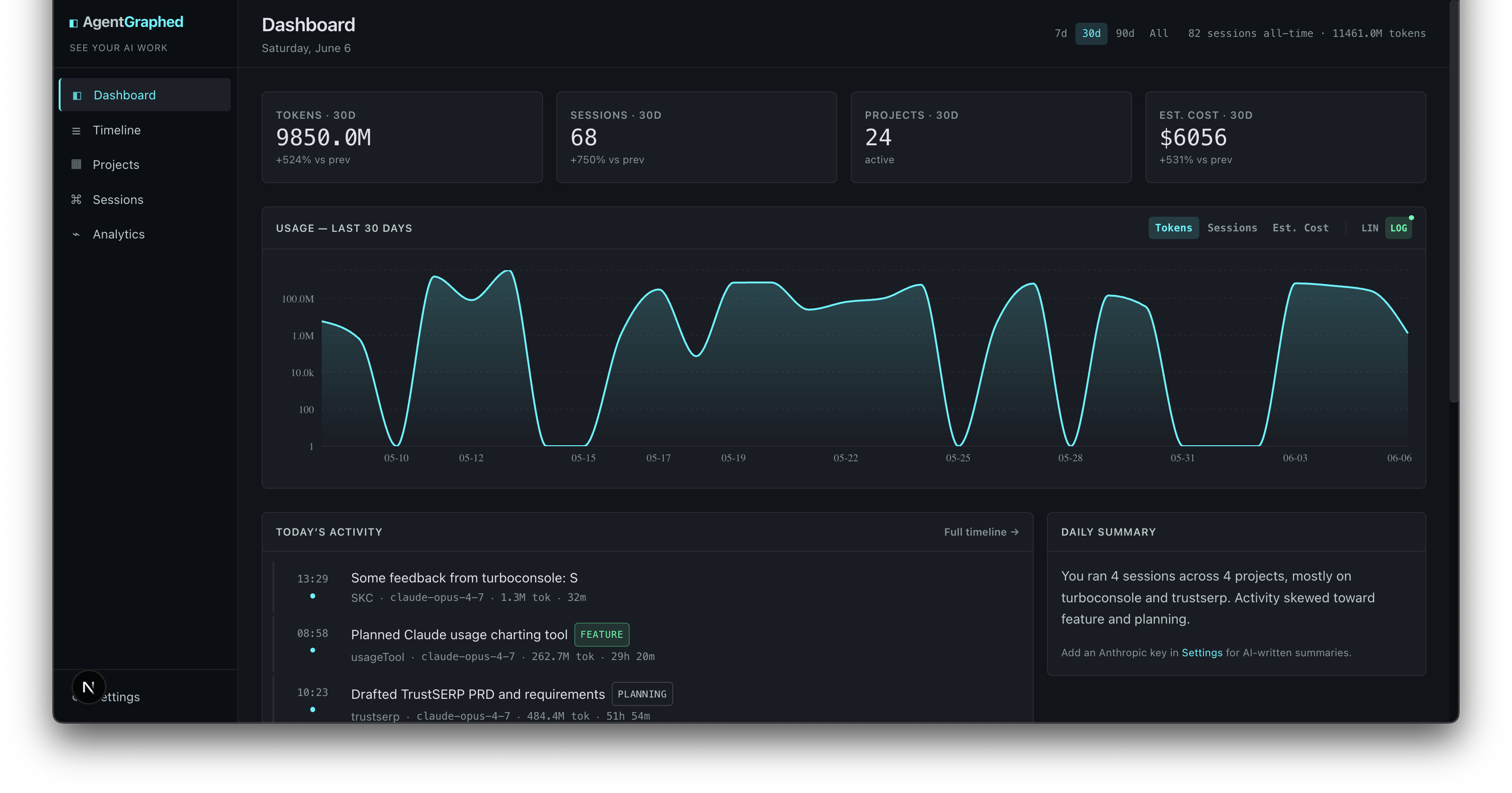
AgentGraphed automatically indexes every Claude Code and Codex session on your machine. With it you can:
Everything stays local. AgentGraphed reads the JSONL logs your CLI tools were already writing (~/.claude/projects/, ~/.codex/sessions/) and turns them into a real dashboard.
npx agentgraphed
That's the whole install. No clone, no signup, no config file. The dashboard opens at http://localhost:3737. Re-run any time, or leave it running — it re-scans every 5 minutes.
Prefer a global install?
npm install -g agentgraphed
agentgraphed
Don't have npx / Node? Install Node 20+ from https://nodejs.org (the LTS version is fine).
npx agentgraphed downloads the package once (~15 MB, takes 30-60s on a typical connection). Subsequent runs start in seconds — npm caches the package.npm warn exec line and a couple of npm warn deprecated warnings from transitive dependencies. Harmless.› Starting AgentGraphed on http://localhost:3737
› Scanning local AI coding sessions…
Found 142 Claude + 8 Codex sessions (14821 messages indexed in 1943ms)
› Ready. Press Ctrl+C to stop.
Ctrl+C. Your indexed data stays at ~/.agentgraphed/agentgraphed.sqlite for next time — even after Claude Code rotates the original log files off disk.better-sqlite3 errorsAgentGraphed uses better-sqlite3, a native module that compiles (or downloads
a prebuilt binary) during install via an npm install script. If your npm is
configured with ignore-scripts=true (common in hardened or corporate setups),
that step is skipped and you'll hit errors on launch like:
Error: Could not locate the bindings file
or a NODE_MODULE_VERSION mismatch. The fix is to (re)install while allowing
install scripts to run:
npm install -g agentgraphed --foreground-scripts --ignore-scripts=false
# …or, if you run it with npx:
npm_config_ignore_scripts=false npx agentgraphed
If it still fails, you likely need build tools for the native compile: Python 3
and a C++ toolchain (build-essential on Debian/Ubuntu, Xcode Command Line
Tools on macOS, or the "Desktop development with C++" workload on Windows).

Find old work — every session, grouped by day. Search and filter by project, provider, or model. |

Resume unfinished sessions — read the full conversation, copy a one-line resume command, or generate a primer to paste into a fresh chat. |

Browse project history — every git repo you've worked in, ranked by activity. Click any project to see only its sessions. |

See where your AI time goes — usage by day, model, project, and category, with retail-priced cost estimates from LiteLLM's 2700+ model catalog. |
STARTED · SPANS Nd / CONTINUED / CLOSED badges so multi-day work doesn't hide on a single bucket.cd <cwd> && claude --resume <id> to your clipboard.AgentGraphed is local-first by default. Everything lives in ~/.agentgraphed/agentgraphed.sqlite on your machine.
There are exactly three things that can ever leave your computer, and every one of them is opt-in:
LLM session classification + "Summarize for new chat" — only fires when you click the button or enable auto-classify. Sends a sampled set of your own prompts to your configured LLM provider with your API key. Nothing reaches AgentGraphed servers.
The opt-in leaderboard. Off by default. When you turn it on, every six hours (or sooner if you finished a new session since the last submit) your local app posts a batch of session-level rows to https://agentgraphed.com/api/leaderboard/submit. Each row contains: the handle you picked, a random per-session UUID, start time, duration, provider, model, tokens by kind (input/output/cache_read/cache_write), est. cost, and message count. No prompts, no project names, no session content, no file paths, no git branches, no API keys. Full breakdown of what is and isn't sent: https://agentgraphed.com/privacy.
API keys are stored in plaintext in your local SQLite file — same threat model as ~/.aws/credentials or a .env. Don't commit your home folder to git.
To verify any of this, read the source. The leaderboard submitter is one function (maybeSubmitLeaderboard) in src/lib/ingest/auto.ts. The wire format is one schema — what's not in the schema isn't sent.
To audit or delete your leaderboard data:
# See everything we have for your handle
curl "https://agentgraphed.com/api/leaderboard/my-data?handle=YOUR_HANDLE"

# Delete it all
curl -X DELETE "https://agentgraphed.com/api/leaderboard/my-data?handle=YOUR_HANDLE"
~/.claude/projects/*/*.jsonl~/.codex/sessions/YYYY/MM/DD/*.jsonlMore adapters coming. If you want a specific one, open an issue.
Without an API key, sessions show the first line of the first prompt as the title. With a key:
Click Settings → LLM provider, paste your key, then Classify uncategorized. Cost is fractions of a cent per session — typically $0.01–0.03 for a few hundred sessions.
Environment variables:
| Variable | Default | What it does |
|---|---|---|
AGENTGRAPHED_PORT | 3737 | Starting port (auto-increments if in use) |
AGENTGRAPHED_DATA_DIR | ~/.agentgraphed | Where to store the SQLite DB |
AGENTGRAPHED_CLAUDE_DIR | ~/.claude/projects | Override Claude Code log location |
AGENTGRAPHED_CODEX_DIR | ~/.codex/sessions | Override Codex log location |
AGENTGRAPHED_NO_OPEN | (unset) | Set to 1 to never open a browser (--no-open) |
Log directories can also be edited at Settings → Data sources without restarting.
To keep AgentGraphed running in the background so the dashboard is always at
http://localhost:3737, run it with --no-open (or AGENTGRAPHED_NO_OPEN=1)
under your OS service manager. The flag skips the browser launch, which would
otherwise pop a window on every (re)start.
Save as ~/Library/LaunchAgents/com.agentgraphed.plist (replace YOU with your
username), then launchctl bootstrap gui/$(id -u) ~/Library/LaunchAgents/com.agentgraphed.plist:
<?xml version="1.0" encoding="UTF-8"?>
<!DOCTYPE plist PUBLIC "-//Apple//DTD PLIST 1.0//EN" "http://www.apple.com/DTDs/PropertyList-1.0.dtd">
<plist version="1.0">
<dict>
    <key>Label</key>
    <string>com.agentgraphed</string>
    <key>ProgramArguments</key>
    <array>
        <string>/usr/bin/env</string>
        <string>npx</string>
        <string>agentgraphed</string>
        <string>--no-open</string>
    </array>
    <key>EnvironmentVariables</key>
    <dict>
        <key>PATH</key>
        <string>/opt/homebrew/bin:/usr/local/bin:/usr/bin:/bin</string>
        <key>HOME</key>
        <string>/Users/YOU</string>
    </dict>
    <key>RunAtLoad</key><true/>
    <key>KeepAlive</key><true/>
    <key>StandardOutPath</key><string>/Users/YOU/Library/Logs/agentgraphed.log</string>
    <key>StandardErrorPath</key><string>/Users/YOU/Library/Logs/agentgraphed.log</string>
</dict>
</plist>
Save as ~/.config/systemd/user/agentgraphed.service, then
systemctl --user enable --now agentgraphed (and loginctl enable-linger $USER
to keep it running after logout):
[Unit]
Description=AgentGraphed
After=network-online.target

[Service]
ExecStart=/usr/bin/env npx agentgraphed --no-open
Restart=always
RestartSec=5

[Install]
WantedBy=default.target
Node version note: the bundled
better-sqlite3ships prebuilt binaries for current LTS releases. Ifnpx agentgraphedfails to install on a very new Node with anode-gyp/compile error, install and run under the latest LTS (e.g. Node 22).
git clone https://github.com/sudomichael/agentgraphed.git
cd agentgraphed
npm install
npm run dev
Open http://localhost:3737. Hot reload, source under src/.
To produce a publishable build:
npm run build         # builds Next.js standalone bundle
npm pack              # creates agentgraphed-X.Y.Z.tgz
MIT © Michael Patrick
Built and maintained by @ushercakes.
Sign in to join the discussion.
No comments yet. Be the first to say what this is good for.
🪨 why use many token when few token do trick — Claude Code skill that cuts 65% of tokens by talking like caveman

The best-benchmarked open-source AI memory system. And it's free.

Orca is the ADE for working with a fleet of parallel agents. Run any coding agent with your own subscription. Available on desktop, mobile and remote runtime.

A cross-platform desktop All-in-One assistant for Claude Code, Codex, OpenCode, OpenClaw, Grok Build & Hermes Agent. Only official website: ccswitch.io

Never stop coding. Free MIT AI gateway: one endpoint, 352 providers (150+ free), 1200+ models Kimi, Claude, GPT, Gemini, GLM, DeepSeek, MiniMax. Works with Claude Code, Codex, Cursor, OpenCode, Cline & Copilot. Quota-aware auto-fallback, RTK+Caveman compression saves 15-95% tokens, MCP/A2A, Desktop/PWA. Built by 550+ contributors

Compress tool outputs, logs, files, and RAG chunks before they reach the LLM. 20% fewer tokens for coding agents, 60-95% fewer tokens for JSON, same answers. Library, proxy, MCP server.