

DietrichGebert/ponytailPlugins
Makes your AI agent think like the laziest senior dev in the room. The best code is the code you never wrote.
138k
1 add
RepoBrain adds a shared `.repobrain/` knowledge layer to a project, then uses refresh and ask commands to keep that layer current and answer codebase questions. It works through plugin packages, shared prompt and rule files, a Python CLI and engine, and an optional MCP server for hosts that want tool calls.

Builders who use Claude Code, Codex, Cursor, or Windsurf and want their agent to read the repository through shared project knowledge.
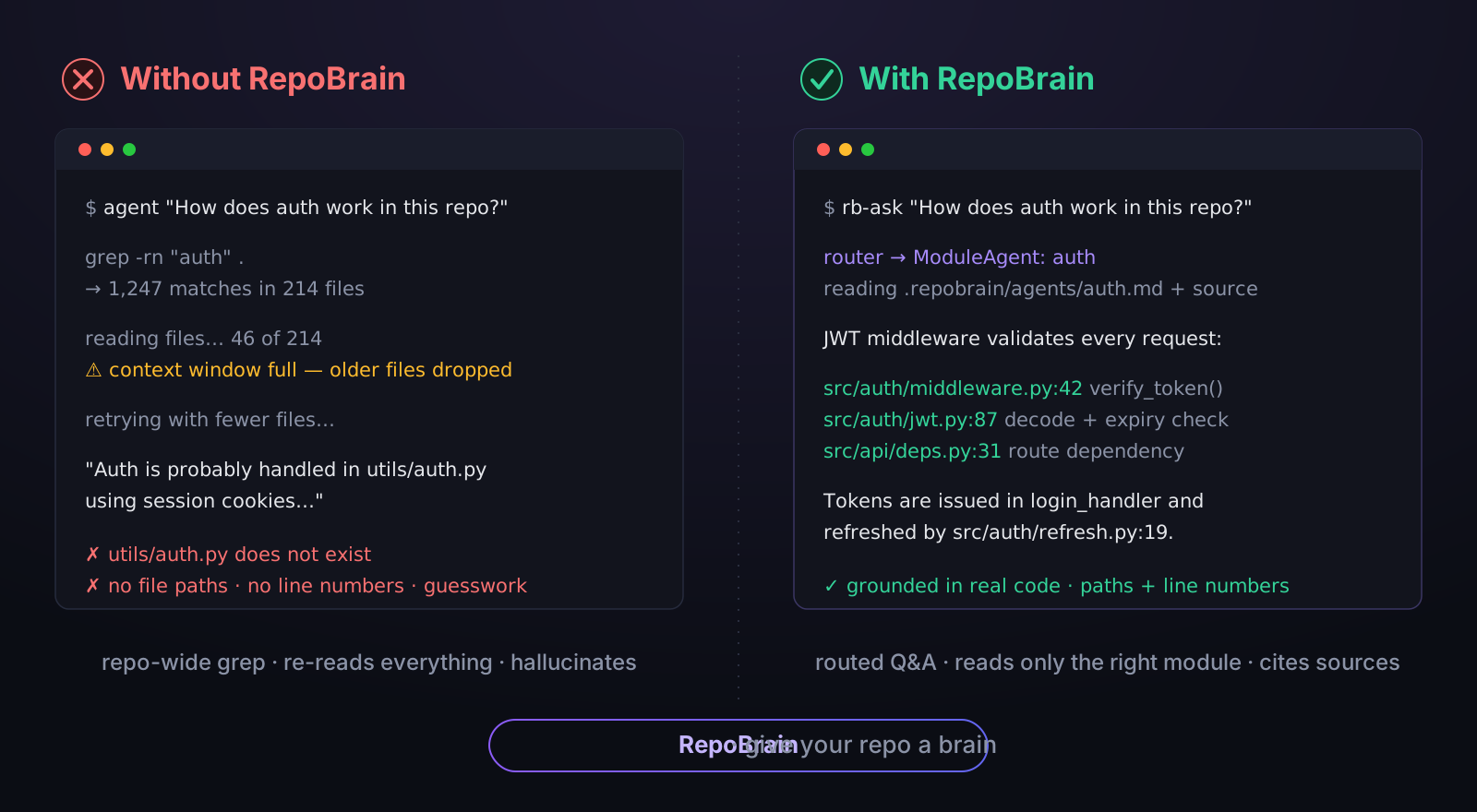
You can ask how the codebase works and get grounded answers instead of making your agent search blindly.
Ships `rb-setup`, `rb-refresh`, `rb-ask`, and `rb-init` as plugin commands for Claude Code and Codex CLI.
Builds and reads a `.repobrain/` folder with module docs, map files, and repo context that multiple hosts can use.
Exposes `ask_project` and `refresh_project` so Claude Code can query the repository as a live tool.
Generates or uses `AGENTS.md`, `CLAUDE.md`, `.cursorrules`, `.windsurfrules`, and Copilot instructions so different tools follow the same repo behavior.
Provides a Python CLI in `cli/` and a knowledge engine in `engine/` for refresh and question workflows.
Includes hook configuration and installers under `hooks/` for local setup around agent actions.
pip install git+https://github.com/study8677/repobrain.git#subdirectory=cli
rb init my-project && cd my-project
# IDE entry files bootstrap into AGENTS.md; dynamic knowledge is in .repobrain/

Formerly known as Antigravity Workspace Template — same project, new name.










🚀 实测推荐: TeamoRouter —— 非广告,我自己在 Codex、Claude Code 等 AI 编程工具里高强度使用:一个 API Key 接入 Claude、GPT-5.5 等,模型价格方便调整,价格优惠,并没有掺水的情况。接入指南见 openrouter-api-key。
# 1 — Install (Claude Code plugin marketplace)
/plugin marketplace add study8677/repobrain
/plugin install repobrain@repobrain

# 2 — Configure a backend (logged-in local CLI = no key, or paste an API key), build the knowledge base
/repobrain:rb-setup
/repobrain:rb-refresh

# 3 — Ask anything, grounded in real code with file paths + line numbers
/repobrain:rb-ask "How does auth work?"
95.83% weighted semantic accuracy · 4.04× faster scored queries than CodeGraph + Trae on the main track. Benchmark results ↓ Codex CLI users — drop the
repobrain:prefix; the same four slash commands ship there too.
Already in a logged-in AI IDE (Trae / Cursor / Claude Code / Codex)? Don't touch pip or an API key — paste this one line to your AI assistant and it does the rest (detects your logged-in CLI, wires up a zero-key backend, initializes the project, self-tests):
Read https://github.com/study8677/repobrain/blob/main/AI_INSTALL.md and follow it to install RepoBrain in this project.
Then just ask your AI anything about your codebase.
Cross-IDE repository knowledge engine for grounded codebase Q&A. Same .repobrain/ knowledge layer reads in every IDE; one engine, every host.
An AI Agent's capability ceiling = the quality of context it can read.
rb-refresh deploys a multi-agent cluster that autonomously reads your code — each module gets its own Agent that generates a knowledge doc. rb-ask routes questions to the right Agent, grounded in real code with file paths and line numbers.
Instead of handing Claude Code / Codex a repo-wide grep and making it hunt on its own, give it a ChatGPT for your repository.
Traditional approach:              RepoBrain approach:
  CLAUDE.md = 5000 lines of docs     Claude Code calls ask_project("how does auth work?")
  Agent reads it all, forgets most   Router → ModuleAgent reads actual source, returns exact answer
  Hallucination rate stays high      Grounded in real code, file paths, and git history
| Problem | Without RepoBrain | With RepoBrain |
|---|---|---|
| Agent forgets coding style | Repeats the same corrections | Reads .repobrain/conventions.md — gets it right the first time |
| Onboarding a new codebase | Agent guesses at architecture | rb-refresh → ModuleAgents self-learn each module |
| Switching between IDEs | Different rules everywhere | One .repobrain/ folder — every IDE reads it |
| Asking "how does X work?" | Agent reads random files | ask_project MCP → Router routes to the responsible ModuleAgent |
Architecture is files + a live Q&A engine, not plugins. Portable across any IDE, any LLM, zero vendor lock-in.
Flask, ripgrep, Vite, Prometheus · 20 questions × 3 repeats per product · same source access and model route (Seed-2.1-Turbo → seed-code-pro).
| Main-track metric | RepoBrain | CodeGraph + Trae |
|---|---|---|
| Weighted semantic accuracy | 95.83% | 84.17% |
| Successful queries | 60/60 | 53/60 |
| Scored query time | 5,106.67 s | 20,621.14 s |
| Query tokens | 22,326,315 | 86,027,974 |
| Cold build time | 7,420.63 s | 9.58 s |
| Cold build + scored queries | 12,527.30 s | 20,630.72 s |
Failures count as incorrect. Cold builds compare full AI knowledge generation with static code-graph indexing, not equivalent workloads. Results apply to this locked experiment only.
Plugin install for Claude Code / Codex CLI (recommended — the rb CLI and engine auto-install together on Claude's first session):
# Claude Code
/plugin marketplace add study8677/repobrain
/plugin install repobrain@repobrain
/repobrain:rb-setup            # interactive: use a logged-in local CLI (Codex/Trae/Claude, no key) or paste an API key; writes .env
/repobrain:rb-refresh          # first refresh auto-creates .repobrain/
/repobrain:rb-ask "How does this project work?"

# Codex CLI (manual engine install — Codex hooks are not yet supported)
pipx install "git+https://github.com/study8677/repobrain.git#subdirectory=engine"
pipx inject --force --include-apps repobrain-engine "git+https://github.com/study8677/repobrain.git#subdirectory=cli"
codex plugin marketplace add study8677/repobrain
/rb-setup
/rb-refresh
/rb-ask "How does this project work?"
Codex auto-discovers slash commands from the plugin's commands/ directory, so the same four commands work without the repobrain: namespace prefix. The raw CLI calls (rb-refresh --workspace ., rb-ask "..." --workspace .) also still work. If your Codex build supports MCP, register rb-mcp --workspace <project> separately.
# 1. Install engine + CLI
pip install "git+https://github.com/study8677/repobrain.git#subdirectory=cli"
pip install "git+https://github.com/study8677/repobrain.git#subdirectory=engine"

# 2. Configure .env with any OpenAI-compatible API key
cd my-project
cat > .env <<EOF
OPENAI_BASE_URL=https://your-endpoint/v1
OPENAI_API_KEY=your-key
OPENAI_MODEL=your-model
RB_ASK_TIMEOUT_SECONDS=120
EOF

# 3. Build knowledge base (ModuleAgents self-learn each module)
rb-refresh --workspace .

# 4. Ask anything
rb-ask "How does auth work in this project?"

# 5. (Optional) Register as MCP server for Claude Code
claude mcp add repobrain rb-mcp -- --workspace $(pwd)
pip install git+https://github.com/study8677/repobrain.git#subdirectory=cli
rb init my-project && cd my-project
# IDE entry files bootstrap into AGENTS.md; dynamic knowledge is in .repobrain/
See INSTALL.md for full install details, verification commands such as rb doctor, and troubleshooting notes for PATH, MCP, and host-specific plugin behavior.
Same four slash commands ship to both Claude Code and Codex CLI. Claude namespaces them as /repobrain:<name>; Codex auto-discovers commands/ and surfaces the bare /<name> form. No retraining — same flow on both hosts.
| Claude Code | Codex CLI | Purpose |
|---|---|---|
/repobrain:rb-setup | /rb-setup | First-time setup — pick LLM provider, write .env |
/repobrain:rb-refresh [quick] | /rb-refresh [quick] | Build a full baseline or manually update only affected Agent groups |
/repobrain:rb-ask <question> | /rb-ask <question> | Routed Q&A on the current codebase |
/repobrain:rb-init <name> | /rb-init <name> | Scaffold a new multi-agent repo from this template |
A typical first session is rb-setup → rb-refresh → rb-ask.
If installation or provider setup looks wrong, run rb doctor --workspace ..
rb-setup — first-time configurationRun this once per project, right after installing the plugin. Interactive picker that first detects the headless CLIs you're already logged into (Codex / Trae / Claude / Gemini) and offers a no-API-key local host-runner as the most convenient option — no key to paste, RepoBrain just drives your existing CLI login for both rb-ask and rb-refresh. If you'd rather use a hosted model, it also offers the API-key providers (OpenAI / DeepSeek / Groq / 阿里灵积 / NVIDIA NIM / Ollama local / any OpenAI-compatible endpoint). Either way it writes .env to the project root — RB_HOST_RUNNER + RB_HOST_COMMAND for a local CLI, or OPENAI_BASE_URL / OPENAI_API_KEY / OPENAI_MODEL for a provider — and ensures .env is in .gitignore. Skip it if you already have a working .env.
rb-refresh — build / refresh the knowledge baseDeploys the multi-agent cluster and creates an atomic generation baseline. The
first run must be a full refresh. Later, quick compares committed changes from
the active generation to HEAD, requires a clean worktree, and lets RepoBrain's
ImpactPlanner plus an independent Verifier execute only affected Agent groups.
It never falls back to a full refresh. Use failed-only to resume failed or
pending groups for the same target commit. rb-ask only warns about new commits;
it never refreshes knowledge automatically.
Time: a few minutes for small repos, longer for large ones. Requires rb-setup to have completed. Works with either backend: an API-key/OpenAI-compatible provider runs the full LLM refresh, while a local host-runner (Codex / Trae / Claude / …) runs the tool-free stages (module docs, map.md) through your logged-in CLI and automatically degrades the tool/handoff stages (conventions, git insights) to deterministic output — no API key needed. Add RB_REFRESH_SCAN_ONLY=1 only if you want a fast structure-only index with no LLM narration at all.
rb-ask — routed Q&A on the codebaseThe main reason this plugin exists. Routes your question to the right ModuleAgent (and GitAgent when applicable), then returns an answer grounded in actual source with file paths and line numbers. Use it before manually grepping or reading files — it's faster and more accurate. Good question shapes: "where is X defined/handled?", "why was Y done this way?", "how does the auth flow work?", "what depends on module Z?".
Requires a knowledge base — if you see "no index" or empty answers, run rb-refresh first.
Calling from another AI / script? Add --json for a stable, parseable envelope instead of human-formatted text — this is the lightweight way to let any agent that can run a shell command query RepoBrain, no MCP server required:
rb-ask "How does auth work?" --workspace . --json
# → {"answer": "...", "sources": [...], "limitations": [...], "workspace": "...", "question": "..."}
On failure, --json keeps stdout empty and writes {"error": "..."} to stderr with a non-zero exit code, so a calling agent can branch cleanly. It runs the same engine as everything else, so it works with an API-key provider or a no-API-key local host runner. See Let another AI call RepoBrain (CLI, no MCP).
rb-init — scaffold a new multi-agent repoCreates a new project from the RepoBrain template. Two modes: quick (fast scaffold, clean copy) and full (adds runtime profile, .env, mission file, sandbox config, optional git init). This is for starting a new repo — you do not need it before rb-refresh on an existing project.
The plugin also bundles the
agent-repo-initskill (the same backend thatrb-initinvokes — Codex / Claude can also match it by description) and the optionalrb-mcpMCP server (ask_project+refresh_project) for tool-style integration.
| Layer | Channels | Contract |
|---|---|---|
| Native plugins | Claude Code, Codex CLI | Bundled slash commands for rb-setup, rb-refresh, rb-ask, and rb-init. |
| Compatible IDEs | Cursor, Windsurf, Gemini CLI, VS Code + Copilot, Cline, Aider, DeepSeek Harness | Use shared context files, the rb/rb-* CLI entrypoints, or an MCP client. See INSTALL.md for the opt-in DSH overlay. |
| Advanced tool integration | rb-mcp | Exposes ask_project and refresh_project for hosts that can call MCP tools. |
| Workspace bootstrapping | rb-init, rb init | Starts a new repo or injects portable agent context into an existing one. |
The native plugins are the first-class install path today. Other environments are supported through the same repository knowledge artifacts rather than separate host-specific plugin packages.
  rb init             Inject context files into any project (--force to overwrite)
       │
       ▼
  .repobrain/       Shared knowledge base — every IDE reads from here
       │
       ├──► rb-refresh     Dynamic multi-agent self-learning → module knowledge docs + structure map
       ├──► rb-ask         Router → ModuleAgent Q&A with live code evidence
       └──► rb-mcp         Optional MCP server → IDE tool integration
Dynamic Multi-Agent Cluster — During rb-refresh, files are grouped by import graph, directory co-location, and filename prefix. Each sub-agent gets ~30K tokens of focused, related code pre-loaded (no tool calls needed) and writes a comprehensive Markdown knowledge doc to agents/*.md. Large modules → multiple agent docs in parallel (no merging, no information loss). A Map Agent indexes everything into map.md. During rb-ask, the Router reads map.md to pick modules, then feeds their agent docs to answer agents. Fully language-agnostic — pure directory-structure module detection, LLM-driven code analysis.
GitAgent — Dedicated agent for analyzing git history — who changed what and why.
NLPM Audit Feedback — Improved by NLPM, a natural-language programming linter by xiaolai.
rb-refresh — Multi-agent self-learning (8-step pipeline)rb-refresh --workspace my-project
conventions.mdstructure.md — language-agnostic file tree with line countsknowledge_graph.json + mermaid)agents/*.md). Large modules get multiple agent docs (one per group, no merging). Global API concurrency control prevents rate-limiting. Fully language-agnostic — works with any programming language._git_insights.mdmap.md (module routing index with descriptions and key topics)rb-ask — Router-based Q&Arb-ask "How does auth work in this project?"
Router reads map.md → selects modules → reads agents/*.md → LLM answers with code references. Multiple agent docs are read in parallel, then a Synthesizer combines answers.
Falls back to the legacy Router → ModuleAgent/GitAgent swarm when agent docs are not yet generated.
agent.md files — no merging or compression. Parallel reads + Synthesizer recombines at answer time.RB_API_CONCURRENCY limits total simultaneous LLM calls.__init__.py or any language-specific marker required.Architecture is encoded in files — any agent that reads project files benefits:
| IDE | Config File |
|---|---|
| Cursor | .cursorrules |
| Claude Code | CLAUDE.md |
| Windsurf | .windsurfrules |
| VS Code + Copilot | .github/copilot-instructions.md |
| Gemini CLI / Codex | AGENTS.md |
| Cline | .clinerules |
| Google Antigravity | .repobrain/rules.md |
All are generated by rb init: AGENTS.md is the single behavioral rulebook, IDE-specific files are thin bootstraps, and .repobrain/ stores shared dynamic project context.
The lightest way to let another LLM or agent use RepoBrain is the CLI — no long-running server, no protocol handshake. Any agent that can run a shell command can call:
rb-ask "<question>" --workspace /path/to/project --json
and read back a stable JSON object:
{
  "answer": "Auth is handled in engine/hub/auth.py …",
  "sources": ["engine/hub/auth.py:12", "engine/hub/auth.py:44"],
  "limitations": ["host-runner single-turn mode"],
  "workspace": "/path/to/project",
  "question": "<question>"
}
0.{"error": "..."} object is written to stderr with a non-zero exit code, so your wrapper can branch on it without scraping text.How agents discover this automatically: rb init drops an AGENTS.md (and CLAUDE.md for Claude Code) into the project telling any agent to prefer rb-ask over manual grep/file search. Editors like Cursor, Windsurf, Codex, and Gemini CLI read those files, so they'll call rb-ask on their own once the project is initialized.
Zero API key: rb-ask runs the same engine as everything else, so it honors a no-API-key local host runner. Put this in the project's .env (or run rb-setup) and the calling AI drives a CLI you're already logged into — no key changes hands:
RB_HOST_RUNNER=generic
RB_HOST_COMMAND=trae-cli exec --cd {workspace} --sandbox read-only --skip-git-repo-check --ephemeral -o {output_file}
RB_HOST_OUTPUT_MODE=file
Prefer this over the MCP server (below) whenever the caller can shell out; reach for rb-mcp only for clients that speak MCP exclusively.
Instead of reading hundreds of documentation files, Claude Code can call ask_project as a live tool — backed by a dynamic multi-agent cluster: Router routes questions to the right ModuleAgent, returning grounded answers with file paths and line numbers.
Setup:
# Install engine
pip install "git+https://github.com/study8677/repobrain.git#subdirectory=engine"

# Refresh knowledge base first (ModuleAgents self-learn each module)
rb-refresh --workspace /path/to/project

# Register as MCP server in Claude Code
claude mcp add repobrain rb-mcp -- --workspace /path/to/project
Tools exposed to Claude Code:
| Tool | What it does |
|---|---|
ask_project(question) | Router → ModuleAgent/GitAgent answers codebase questions. Returns file paths + line numbers. |
refresh_project(quick?) | Rebuild knowledge base after significant changes. ModuleAgents re-learn the code. |
MCPClientManager lets your agents connect to external MCP servers (GitHub, databases, etc.), auto-discovering and registering tools.
// mcp_servers.json
{
  "servers": [
    {
      "name": "github",
      "transport": "stdio",
      "command": "npx",
      "args": ["-y", "@modelcontextprotocol/server-github"],
      "enabled": true
    }
  ]
}
Set MCP_ENABLED=true in .env to make configured servers available, and set RB_ALLOW_MCP=true only when you want rb-ask to auto-connect those external servers. Stdio MCP servers inherit process environment plus configured env values, so treat enabled servers as local-permission code.
| Variable | Default | Options |
|---|---|---|
SANDBOX_TYPE | local | local · microsandbox |
SANDBOX_TIMEOUT_SEC | 30 | seconds |
RB_RETRIEVAL_MODE | compact | off · compact · full |
The default sandbox is for trusted local workspaces, not untrusted code isolation. Retrieval graph files redact common secrets before writing to disk, but full mode can still preserve source snippets. See Sandbox docs.
| Command | What it does | LLM needed? |
|---|---|---|
rb init <dir> | Inject cognitive architecture templates | No |
rb init <dir> --force | Re-inject, overwriting existing files | No |
rb refresh --workspace <dir> | CLI convenience wrapper around the knowledge-hub refresh pipeline | Yes |
rb ask "question" --workspace <dir> | CLI convenience wrapper around the routed project Q&A flow | Yes, or local Codex host runner |
rb-refresh | Multi-agent self-learning of codebase, generates module knowledge docs + conventions.md + structure.md | Yes |
rb-ask "question" | Router → ModuleAgent/GitAgent routed Q&A | Yes, or local Codex host runner |
rb-mcp --workspace <dir> | Start MCP server — exposes ask_project + refresh_project to Claude Code | Yes |
rb report "message" | Log a finding to .repobrain/memory/ | No |
rb log-decision "what" "why" | Log an architectural decision | No |
rb ask / rb refresh are available when both cli/ and engine/ are installed. rb-ask / rb-refresh
Sign in to join the discussion.
No comments yet. Be the first to say what this is good for.
Makes your AI agent think like the laziest senior dev in the room. The best code is the code you never wrote.

Graphs that teach > graphs that impress. Turn any code into an interactive knowledge graph you can explore, search, and ask questions about. Works with Claude Code, Codex, Cursor, Copilot, Gemini CLI, and more.

OmO: Just type "mass ulw" keyword with your prompt. Now you are the master of graph engineering.
Persistent Context Across Sessions for Every Agent – Captures everything your agent does during sessions, compresses it with AI, and injects relevant context back into future sessions. Works with Claude Code, OpenClaw, Codex, Gemini, Hermes, Copilot, OpenCode + More
Opinionated Oxlint rules for rejecting low-evidence TypeScript and JavaScript patterns
Teams-first Multi-agent orchestration for Claude Code