Trading Skills — AI-Powered Market Analysis
Most retail traders juggle 5+ tabs — broker, charting platform, screener, news feed, spreadsheet — just to decide whether to enter a trade. This project collapses all of that into a single conversational interface powered by Claude.
Ask a question in plain English, get back real data: technicals, fundamentals, option Greeks, risk metrics, earnings dates, correlation matrices, and full PDF reports. Connect your Interactive Brokers account and it manages your portfolio too — finds roll candidates for expiring shorts, flags earnings risk, and generates action reports.
Who is this for?
- Retail options traders who sell premium, run PMCCs, or manage covered calls
- Self-directed investors who want quick fundamental + technical scans without switching tools
- Python-literate traders who want to extend the analysis with custom scripts
- IBRK users who want AI-assisted portfolio management
Quick example — scan for bullish setups and check PMCC viability:
You: Scan AAPL,MSFT,NVDA,GOOGL,AMZN for bullish trends, then check the top picks for PMCC suitability
Claude: [runs scanner-bullish → filters top scores → runs scanner-pmcc]
NVDA: Bullish score 8/10, PMCC score 9.2/11 — LEAPS $95 call (Δ0.82),
sell $140 call (Δ0.18), net debit $5,420, annual yield 47%...
Another example — correlation check before adding to a portfolio:
You: Show correlation for SPY,GOOG,NVDA,ZM,RTX,PFE,XOM
Claude: NVDA is the standout diversifier — near-zero correlation with everything.
RTX/XOM at 0.86 — little diversification benefit between them.
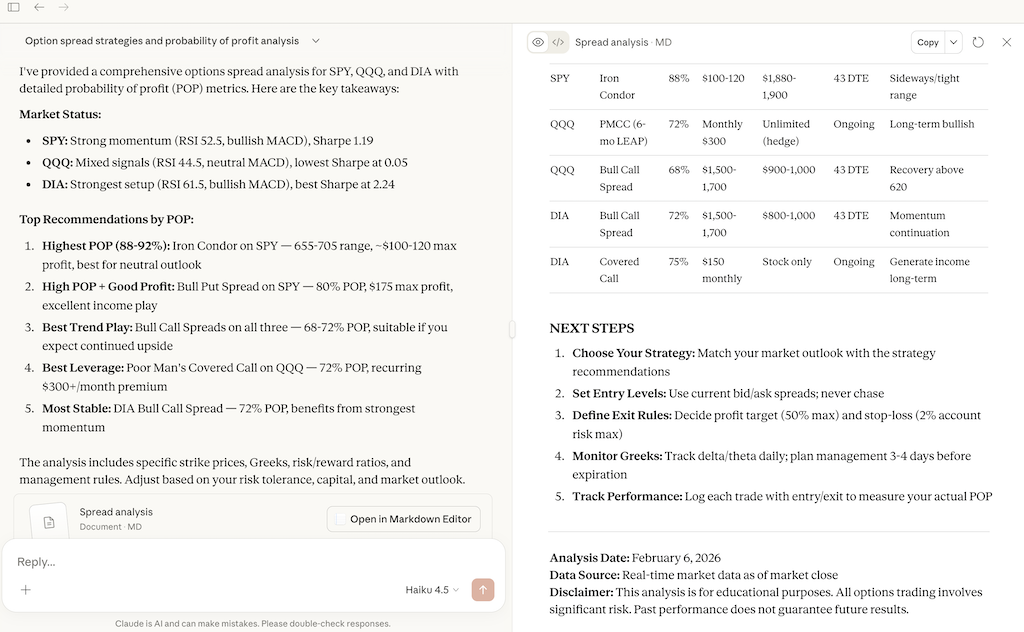
Real sessions in Claude Desktop (free account)
"Analyze option spread strategies and probability of profit for SPY, QQQ and DIA"
Requirements
- Python 3.12+
- uv package manager
- Claude Code, Claude Desktop, or Cursor with third-party skills enabled (fully installed and authenticated)
- Optional: TWS or IB Gateway for portfolio features
Two Ways to Use
Claude Code / Cursor (Full Experience)
Installation
git clone https://github.com/staskh/trading_skills.git
cd trading_skills
uv sync
Run Claude Code or Cursor in the repository root. All skills are available as interactive commands — ask questions about your IBKR portfolio, symbols, or companies of interest.
MCP Server (Claude Desktop)
The MCP server is a lightweight alternative for use with Claude Desktop (including the free tier). It exposes 23 trading analysis tools directly to Claude Desktop without needing Claude Code.
Installation
-
Install the package (requires Python 3.12+):
pip install trading-skills
-
Find the full path to the installed command:
macOS / Linux:
which trading-skills-mcp
Windows:
where trading-skills-mcp
If where doesn't find it, locate it manually:
python -c "import sysconfig; print(sysconfig.get_path('scripts'))"
The script will be trading-skills-mcp.exe in that directory (typically at C:\Users\<YourUsername>\AppData\Local\Programs\Python\Python<Version>\Scripts\)
-
Open Claude Desktop, go to Settings → Developer → Edit Config:
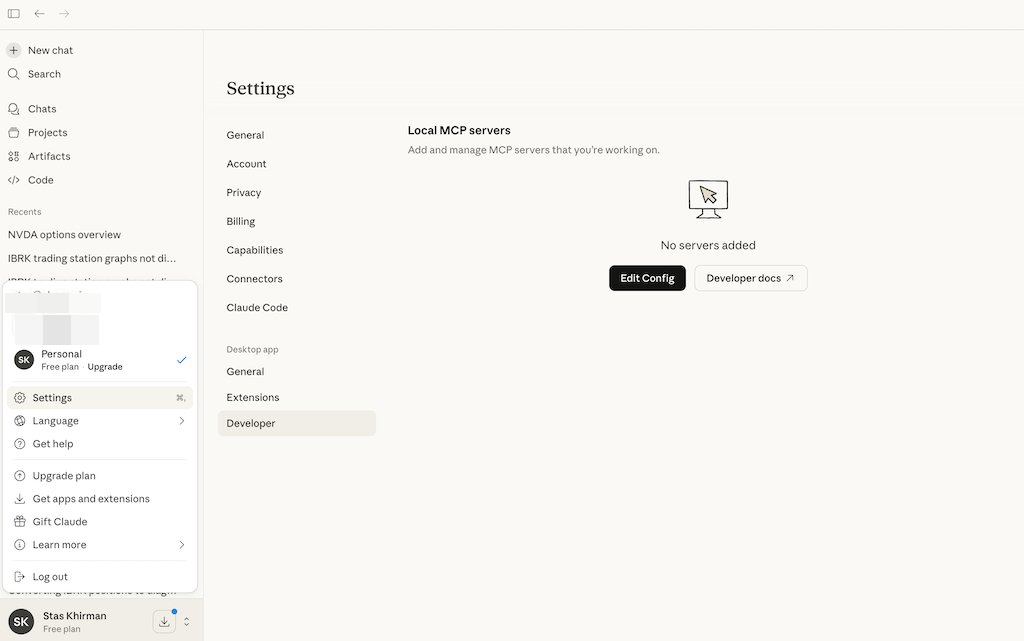
Add the following to claude_desktop_config.json:
macOS / Linux:
{
  "mcpServers": {
    "trading-skills": {
      "command": "/full/path/to/trading-skills-mcp"
    }
  }
}
Windows:
{
  "mcpServers": {
    "trading-skills": {
      "command": "C:\\full\\path\\to\\trading-skills-mcp.exe"
    }
  }
}
Replace the path with the output from step 2.
-
Restart Claude Desktop. Don't worry if you see an MCP error message — it will disappear once you try some of the examples below.
Installation from GitHub
Add the following to claude_desktop_config.json:
macOS / Linux:
{
  "mcpServers": {
    "trading-skills": {
      "command": "uvx",
      "args": ["--from", "git+https://github.com/staskh/trading_skills.git", "trading-skills-mcp"]
    }
  }
}
Windows:
{
  "mcpServers": {
    "trading-skills": {
      "command": "cmd",
      "args": ["/c", "uvx", "--from", "git+https://github.com/staskh/trading_skills.git", "trading-skills-mcp"]
    }
  }
}
Example Queries
- "What's AAPL's current price and 1y range?"
- "Run technical analysis on SPY with RSI/MACD"
- "Scan AAPL,MSFT,NVDA,GOOGL for bullish trends"
- "Find PMCC candidates from my watchlist"
- "Compare risk metrics for MSFT vs AAPL"
- "Show correlation between SPY,NVDA,GOOG,XOM"
- "When is NVDA's next earnings?"
- "Show my portfolio positions" (requires IB)
- "Generate portfolio action report" (requires IB)
- "Find roll candidates for my GOOG short call" (requires IB)
Available Skills (25)
Market Data
| Skill | Description |
|---|
stock-quote | Real-time price, volume, change, market cap, 52-week range |
option-chain | Calls and puts with strikes, bids, asks, volume, OI, IV |
price-history | Historical OHLCV data |
fundamentals | Financials, earnings, key metrics, Piotroski F-Score |
news-sentiment | Recent headlines and sentiment |
earnings-calendar | Upcoming earnings dates with BMO/AMC timing and EPS estimates |
insider-trading | SEC Form 4 insider transactions — executive buys/sells and sentiment |
Analysis
| Skill | Description |
|---|
technical-analysis | RSI, MACD, Bollinger Bands, SMA, EMA, ATR, ADX, correlation matrix |
greeks | Delta, gamma, theta, vega, IV (Black-Scholes) |
spread-analysis | Verticals, diagonals, straddles, strangles, iron condors |
risk-assessment | Volatility, beta, VaR, drawdown, Sharpe ratio |
Scanners
| Skill | Description |
|---|
scanner-bullish | Scan symbols for bullish trends (SMA, RSI, MACD, ADX) |
scanner-pmcc | Scan for PMCC suitability (delta, liquidity, spread, IV, yield) |
whale-hunting | Detect institutional option whale activity for an underlying (requires Massive API key) |
Portfolio (requires TWS/Gateway)
TWS API access levels:
- Read-only — fetches positions, prices, and Greeks; places no orders:
ib-account, ib-portfolio, ib-option-chain, ib-find-short-roll, ib-collar, ib-pmcc-advisor, ib-portfolio-action-report, ib-create-consolidated-report, ib-report-delta-adjusted-notional-exposure
- Read-write — can place and cancel conditional orders in TWS:
ib-stop-loss (only when --execute is passed; dry-run by default)
| Skill | Description |
|---|
ib-account | Account summary (cash, buying power, margin) |
ib-portfolio | Portfolio positions with market prices |
ib-option-chain | Real-time option chain data from IB (under development) |
ib-find-short-roll | Roll candidates for short positions or covered call/put selection |
ib-collar | Tactical collar strategy for earnings/event protection |
ib-pmcc-advisor | PMCC position analysis: assignment risk, P&L projections, ranked roll candidates |
ib-stop-loss | Conditional stop-loss management for PMCC, naked LEAPS, and stock positions |
ib-portfolio-action-report | Portfolio review with earnings risk and action items |
ib-create-consolidated-report | Consolidate IBRK trade CSVs into summary reports |
ib-report-delta-adjusted-notional-exposure | Delta-adjusted notional exposure across accounts |
Reports
| Skill | Description |
|---|
report-stock | Comprehensive PDF/markdown report with trend, PMCC, and fundamental analysis |
MCP Server Tools (32 tools)
The MCP server exposes skills as tools for Claude Desktop:
TWS API access levels for MCP tools:
- Read-only:
ib_account, ib_portfolio, ib_option_expiries, ib_option_chain, ib_find_short_roll, ib_collar, ib_pmcc_advisor, ib_portfolio_action_report, ib_delta_exposure
- Read-write (places/cancels orders):
ib_stop_loss when execute=True
| Category | Tools |
|---|
| Market Data | stock_quote, price_history, news_sentiment, insider_trading, fundamentals, piotroski_score, earnings_calendar |
| Technical | technical_indicators, price_correlation, risk_assessment |
| Options | option_expiries, option_chain, option_greeks |
| Spreads | spread_vertical, spread_diagonal, spread_straddle, spread_strangle, spread_iron_condor |
| Scanners | scan_bullish, scan_pmcc |
| Whale Hunting | whale_hunting |
| Reports | report_stock |
| IB Portfolio | ib_account, ib_portfolio, ib_option_expiries†, ib_option_chain, ib_find_short_roll, ib_collar, ib_pmcc_advisor, ib_stop_loss, ib_portfolio_action_report, ib_delta_exposure |
† MCP-only helper — not a standalone skill. Used in Claude Desktop to discover available expiry dates before calling ib_option_chain.
Sandbox Outputs (Not Committed)
Temporary reports, datasets, and notebooks are saved to sandbox/ and are not committed to git. Report filenames include timestamps: <name>_YYYY-MM-DD_HHmm.<ext>.
Interactive Brokers Setup
To use IB features:
- Install TWS or IB Gateway
- Enable API connections in TWS: Configure → API → Settings → Enable ActiveX and Socket Clients
- Note the port: 7497 (paper) or 7496 (live)
Massive (formerly Polygon.io) Setup
Whale-detection features (option_whales, whales_hunter) require a Massive API key (the platform was previously known as Polygon.io).
Claude Code / Cursor
Create a .env file in the repository root:
MASSIVE_API_KEY=your_polygon_api_key_here
The library loads it automatically via python-dotenv.
MCP Server (Claude Desktop)
Pass the key through the env field in claude_desktop_config.json:
macOS / Linux:
{
  "mcpServers": {
    "trading-skills": {
      "command": "/full/path/to/trading-skills-mcp",
      "env": {
        "MASSIVE_API_KEY": "your_massive_api_key_here"
      }
    }
  }
}
Windows:
{
  "mcpServers": {
    "trading-skills": {
      "command": "C:\\full\\path\\to\\trading-skills-mcp.exe",
      "env": {
        "MASSIVE_API_KEY": "your_massive_api_key_here"
      }
    }
  }
}
The env block is merged with the system environment, so other variables are not affected.
Development
# Run tests
uv run pytest tests/ -v

# Lint
uv run ruff check src/ tests/
uv run ruff format src/ tests/

# Test individual script
uv run python .claude/skills/fundamentals/scripts/fundamentals.py AAPL

# Debug MCP server with MCP Inspector
npx @modelcontextprotocol/inspector uv run python -m mcp_server.server
Architecture
User Query → Claude Code/Desktop → Skill or MCP Tool → Python Script → Response
Skills are SKILL.md files in .claude/skills/ that instruct Claude how to fetch and analyze data using Python scripts. Skill scripts live under .claude/skills/<skill-name>/scripts/, and progressive reference material belongs in .claude/skills/<skill-name>/references/.
The MCP server (mcp_server/server.py) wraps the same Python scripts as tools for Claude Desktop via the FastMCP framework.
Data Sources
| Source | Used by | Notes |
|---|
| Yahoo Finance | All market data, fundamental, and options skills | Free; up to 15-minute delay |
| Massive (formerly Polygon.io) | whale-hunting (whale_hunting MCP tool) | Paid API key required; see setup section below |
License
MIT



