
DietrichGebert/ponytailPlugins
Makes your AI agent think like the laziest senior dev in the room. The best code is the code you never wrote.
138k
1 add
Agentic Copilot is a thin plugin layer that puts Claude Code, Gemini CLI, or a custom CLI agent into an Obsidian workspace. It auto-detects the agent on your PATH, opens a chat sidebar, and sends vault context like the active file and selection.
Builders who want their agent to read and edit notes from inside Obsidian.
You can ask a local agent about your notes, get file edits as diffs, and keep working without leaving Obsidian.
Opens a sidebar chat view that streams agent responses and renders markdown, links, and code blocks.
Automatically includes the active file, selection, and vault path in prompts, with settings to turn each part on or off.
Autocompletes and runs agent-native slash commands like `/commit`, `/compact`, and `/review-pr` when the connected CLI exposes them.
Shows suggested edits as inline diffs with Accept and Reject buttons before changes are applied.
Lets you open multiple independent chat sessions and run different agent conversations in parallel.
Scans your PATH for supported CLI tools and switches between them from settings or the command palette.
Supports a generic CLI agent path or binary name so you can plug in your own tool.
# Claude Code (recommended)
npm install -g @anthropic-ai/claude-code

# — or —

# Opencode
curl -fsSL https://opencode.ai/install | bash
git clone https://github.com/spencermarx/obsidian-ai.git
cd obsidian-ai
npm install
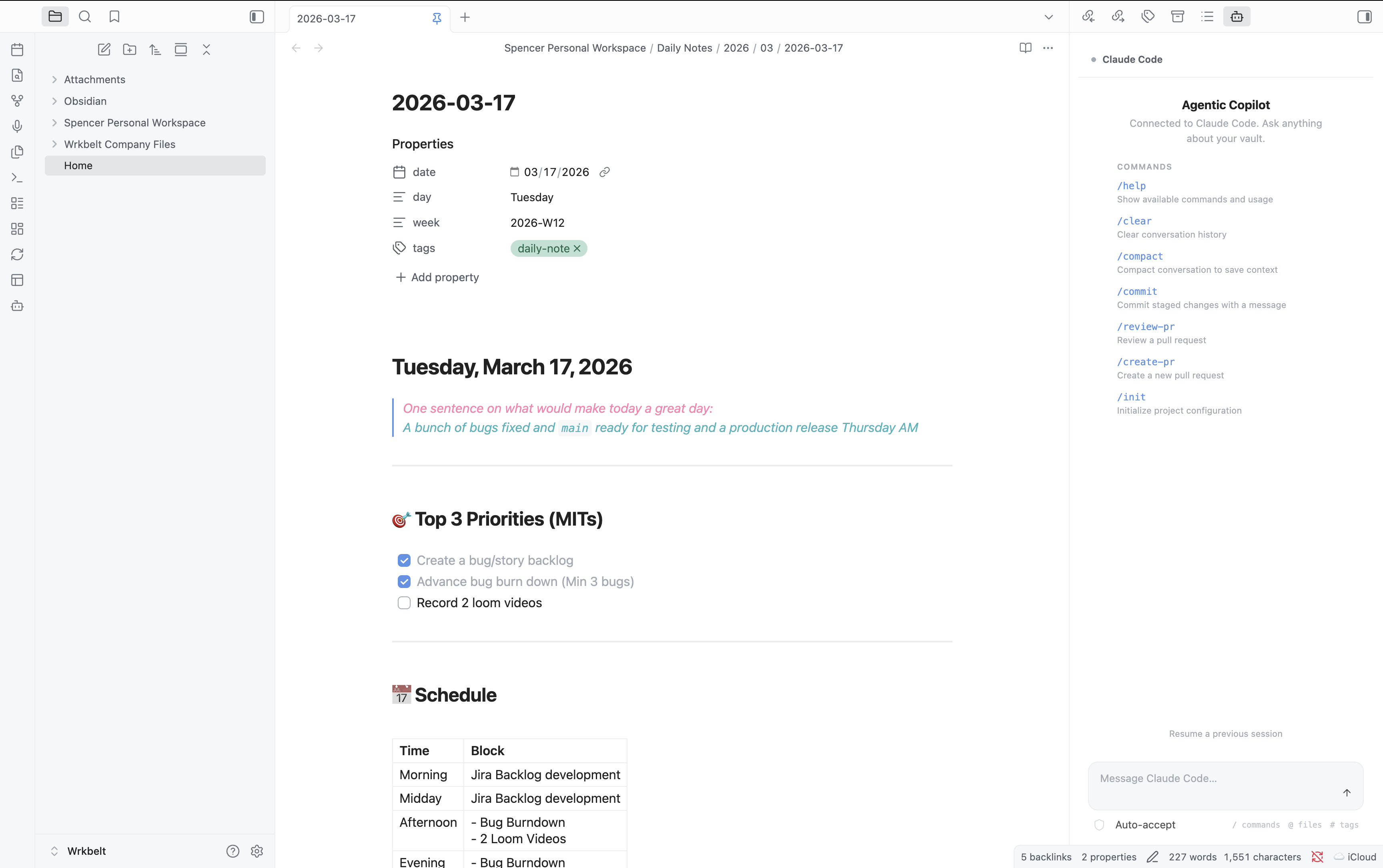
Bring agentic CLI tools into Obsidian as a workspace copilot.
Claude Code • Opencode • Gemini CLI • Any custom agent






Agentic Copilot is a thin orchestration layer that connects Obsidian to whatever agentic coding tool you already use. It doesn't reinvent the wheel — it gives the wheel a steering column inside your knowledge base. Auto-detects your environment. Zero configuration required.
Most AI plugins ship their own LLM integration, locking you into a specific provider and model. Agentic Copilot takes a different approach: it connects to the CLI tools you already have installed — tools that handle auth, model selection, context windows, and tool use on their own.
You (Obsidian) <-> Agentic Copilot <-> CLI Agent <-> LLM Provider
                   ~~~~~~~~~~~~~~~
                   (this plugin)
What you get:
# Claude Code (recommended)
npm install -g @anthropic-ai/claude-code

# — or —

# Opencode
curl -fsSL https://opencode.ai/install | bash
| Method | Steps |
|---|---|
| Community Plugins | Settings → Community Plugins → Browse → search "Agentic Copilot" → Install → Enable |
| BRAT (beta/pre-release) | Install BRAT → Add beta plugin → enter spencermarx/obsidian-ai |
| Manual | Download main.js, manifest.json, styles.css from the latest release into <vault>/.obsidian/plugins/agentic-copilot/ → restart Obsidian → enable |
Click the bot icon in the ribbon, or run Ctrl/Cmd+P → "Agentic Copilot: Open chat panel".
That's it. The plugin auto-detects your agent and you're ready to go.
A conversational side panel that streams agent responses in real-time, rendered with Obsidian's native markdown engine — links, code blocks, and themes all just work.
Every prompt automatically includes your active file, text selection, and vault path so the agent knows what you're looking at. Fully configurable in settings.
Type / in the chat input to autocomplete agent-native commands — /commit, /compact, /review-pr, /help, and more. Commands come directly from the connected CLI tool.
When the agent suggests file changes, they appear as inline diffs with Accept / Reject buttons. No changes are applied without your confirmation (unless you enable auto-apply).
Open multiple independent chat panels, each with its own agent session. Use different agents in different panels, or run parallel conversations with the same one.
Select text in any file, then:
On load, the plugin scans your PATH for known CLI tools and presents the first one found. Switch agents anytime via the command palette or settings.
| Agent | Binary | Output Mode | Status |
|---|---|---|---|
| Claude Code | claude | --output-format stream-json (structured streaming) | ✅ Full support |
| Opencode | opencode | run mode (text/JSON) | ✅ Full support |
| Custom | any | stdin/stdout pipes | ✅ Generic adapter |
| Gemini CLI | gemini | — | 🚧 Planned |
Want to add your agent? See Adding a New Agent — it's a single file.
Open with Ctrl/Cmd+P (command palette):
| Command | Description |
|---|---|
| Open chat panel | Open or focus the chat sidebar |
| Open new chat session | Open an additional chat panel (multi-session) |
| Ask agent about current file | Send the active file to the agent |
| Ask agent about selection | Send selected text to the agent |
| Explain selection | Ask the agent to explain selected text |
| Refactor selection | Ask the agent to refactor selected code |
| Run agent slash command | Fuzzy-search and execute an agent slash command |
| Restart agent session | Kill and restart the current session |
| Switch agent | Switch between detected CLI agents |
All commands are prefixed with
Agentic Copilot:in the command palette.
Open Settings → Agentic Copilot:
| Setting | Description | Default |
|---|---|---|
| Agent | Which CLI tool to use (Auto-detect, specific agent, or Custom) | Auto-detect |
| Custom binary path | Full path or command name for a custom CLI agent | — |
| Extra CLI arguments | Additional args appended to every invocation (e.g., --model opus) | — |
| Setting | Description | Default |
|---|---|---|
| Working directory | Agent's cwd: vault root or active file's parent directory | Vault root |
| Include active file | Auto-include the active file's content in every prompt | On |
| Include selection | Auto-include the current text selection in every prompt | On |
| Setting | Description | Default |
|---|---|---|
| Max concurrent sessions | Maximum simultaneous agent sessions | 5 |
| Setting | Description | Default |
|---|---|---|
| Auto-apply file edits | Apply agent-suggested edits without confirmation. Use with caution. | Off |
┌────────────────────────────────────────┐
│            Obsidian Plugin             │
│                                        │
│  ┌──────────┐    ┌──────────────────┐  │
│  │Chat View │    │ Editor Actions   │  │
│  │(ItemView)│    │ (context menu,   │  │
│  │          │    │  command palette) │  │
│  └────┬─────┘    └───────┬──────────┘  │
│       │                  │             │
│  ┌────▼──────────────────▼──────────┐  │
│  │       Session Manager            │  │
│  │  (spawn, lifecycle, streaming)   │  │
│  └──────────────┬───────────────────┘  │
│                 │                      │
│  ┌──────────────▼───────────────────┐  │
│  │       Adapter Layer              │  │
│  │  ┌──────────┐ ┌────────┐        │  │
│  │  │Claude    │ │Opencode│ ┌────┐ │  │
│  │  │Code      │ │        │ │Any │ │  │
│  │  │(stream-  │ │(run    │ │CLI │ │  │
│  │  │ json)    │ │ mode)  │ │    │ │  │
│  │  └──────────┘ └────────┘ └────┘ │  │
│  └──────────────────────────────────┘  │
└────────────────┬───────────────────────┘
                 │ child_process.spawn()
                 ▼
          ┌─────────────┐
          │  CLI Agent   │
          │  (your tool) │
          └──────┬──────┘
                 │ API calls
                 ▼
          ┌─────────────┐
          │ LLM Provider │
          └─────────────┘
child_process.spawn (not node-pty)?node-pty requires native compilation per platform — impractical for an Obsidian plugin that must install without a build step. Instead, we use Node.js child_process.spawn with piped stdio, and rely on structured output modes (e.g., Claude Code's --output-format stream-json) for rich, parseable data.
Trade-off: no full TTY emulation. Benefit: zero native dependencies, instant cross-platform install.
Implement the AgentAdapter interface in src/adapters/:
interface AgentAdapter {
  readonly id: string;            // unique identifier
  readonly displayName: string;   // shown in UI
  readonly binaryName: string;    // CLI binary name

  detect(): Promise<boolean>;     // is it installed?
  getVersion(): Promise<string | null>;

  buildSpawnArgs(opts: {
    prompt: string;
    context: VaultContext;
    cwd: string;
  }): SpawnArgs;

  parseOutputStream(stdout: Readable): AsyncIterable<AgentMessage>;

  getSlashCommands(cwd?: string): Promise<SlashCommand[]>;
  getBuiltinSlashCommands(): SlashCommand[];
  executeSlashCommand(command: string, args: string): Promise<SlashCommandResult>;
}
Then register it in src/adapters/detector.ts:
const ADAPTER_CONSTRUCTORS: Array<() => AgentAdapter> = [
  () => new ClaudeCodeAdapter(),
  () => new OpencodeAdapter(),
  () => new YourNewAdapter(),  // <-- add here
];
That's it. Detection, settings UI, and chat panel all pick it up automatically.
git clone https://github.com/spencermarx/obsidian-ai.git
cd obsidian-ai
npm install
npm run dev
Watches src/ and rebuilds main.js on every change. Symlink into a test vault:
# macOS / Linux
ln -s "$(pwd)" "/path/to/vault/.obsidian/plugins/agentic-copilot"

# Windows (PowerShell, as admin)
New-Item -ItemType SymbolicLink -Path "C:\path\to\vault\.obsidian\plugins\agentic-copilot" -Target "$(Get-Location)"
Then reload Obsidian (Ctrl/Cmd+R) to pick up changes.
npm run build
# 1. Bump version
npm version patch   # 1.0.0 → 1.0.1 (or: minor, major)

# 2. Push the tag — triggers the release workflow
git push --follow-tags
GitHub Actions builds the plugin and creates a release with main.js, manifest.json, styles.css, and a zip archive.
Note: Release tags must be bare version numbers (
1.0.1), not prefixed withv. This is required by both BRAT and the Obsidian community plugin system.
src/
├── main.ts                 # Plugin entry: onload, commands, views
├── constants.ts            # Settings interface, view type IDs
├── settings.ts             # PluginSettingTab implementation
├── adapters/
│   ├── types.ts            # AgentAdapter interface
│   ├── claude-code.ts      # Claude Code adapter
│   ├── opencode.ts         # Opencode adapter
│   ├── generic-cli.ts      # Generic fallback adapter
│   └── detector.ts         # Auto-detection logic
├── session/
│   ├── session-manager.ts  # Process lifecycle management
│   └── message-queue.ts    # Stream buffering
├── views/
│   ├── chat-view.ts        # Main chat panel (ItemView)
│   ├── chat-renderer.ts    # Markdown + tool-use rendering
│   └── onboarding-view.ts  # First-run setup
└── utils/
    ├── vault-context.ts    # Vault/file/selection context
    └── platform.ts         # Cross-platform utilities
The plugin couldn't find any known CLI binaries on your PATH.
claude --version or opencode version/Users/you/.nvm/versions/node/v20/bin/claude)Agentic Copilot: Restart agent session from the command paletteclaude -p "hello" should produce outputThe CLI tool crashed. Common causes:
ANTHROPIC_API_KEY). Set it in your shell profile so Obsidian inherits itThis plugin is desktop only. It requires Node.js child_process to spawn CLI tools, which is only available in Obsidian's Electron environment.
The plugin uses Obsidian's CSS variables for all styling. If something looks off:
No. The plugin itself sends nothing externally. It passes context to your locally-installed CLI agent, which then communicates with its configured LLM provider. Your data flows through the same path it would if you ran the CLI tool directly in a terminal.
No. The plugin requires Node.js child_process to spawn CLI tools, which is only available on desktop (Electron).
The plugin auto-detects both. By default it uses the first one found (Claude Code takes priority). You can switch anytime via Settings or the Switch agent command.
Yes. Set Agent to "Custom" in settings and enter the binary name or full path. The plugin will pipe your prompt as a CLI argument and read stdout as the response.
The plugin passes the vault path as the working directory, and optionally the active file's content and your text selection. The CLI agent can then read files within that directory as it normally would — same access as running it from a terminal in your vault folder.
If installed via Community Plugins or BRAT, updates are automatic. For manual installs, download the latest release files and replace the old ones.
Contributions are welcome! Here's how to get involved:
Please read the Code of Conduct before contributing.
Built with the Obsidian Plugin API. Inspired by the growing ecosystem of agentic coding tools and the Obsidian community's relentless drive to connect everything.
MIT — use it, fork it, ship it.
If Agentic Copilot is useful to you, consider giving it a star on GitHub — it helps others discover the project.
Sign in to join the discussion.
No comments yet. Be the first to say what this is good for.
Makes your AI agent think like the laziest senior dev in the room. The best code is the code you never wrote.

Graphs that teach > graphs that impress. Turn any code into an interactive knowledge graph you can explore, search, and ask questions about. Works with Claude Code, Codex, Cursor, Copilot, Gemini CLI, and more.

OmO: Just type "mass ulw" keyword with your prompt. Now you are the master of graph engineering.
Persistent Context Across Sessions for Every Agent – Captures everything your agent does during sessions, compresses it with AI, and injects relevant context back into future sessions. Works with Claude Code, OpenClaw, Codex, Gemini, Hermes, Copilot, OpenCode + More
Opinionated Oxlint rules for rejecting low-evidence TypeScript and JavaScript patterns
Teams-first Multi-agent orchestration for Claude Code