
obra/
superpowers

obra/superpowersSkills
An agentic skills framework & software development methodology that works.
285k
1 add
This repo gives AI agents a deterministic way to create draw.io diagrams. The CLI searches real stencil names, lays out shapes, validates the XML, and can render diagrams for a vision self-check.
Builders who want their agent to generate architecture diagrams with real draw.io stencils and consistent layout.
You can let an agent draft diagrams without hand-placing coordinates or fixing broken stencil names.
Ships `drawio-aws`, `drawio-azure`, `drawio-gcp`, `drawio-databricks`, and `drawio-bpmn` skills.
Lets the agent describe topology and nesting while the engine computes positions, sizes, spacing, and edge routing.
Checks XML for unknown stencils, bad nesting, dangling edges, geometry problems, and recolored AWS icons.
Can render `.drawio` files to PNG for a render-analyze-rectify workflow with the draw.io desktop app.
Provides `search` and `style` commands backed by committed catalogs for AWS and other icon packs.
npm i -g github:sparklabx/drawio-ai-kit && npx skills add sparklabx/drawio-ai-kit
npm uninstall -g drawio-ai-kit              # remove the CLI
npx skills remove drawio-aws              # remove a domain skill (repeat for each)
npm i -g github:sparklabx/drawio-ai-kit   # CLI/engine (icon search, workflow, validator, rules)
npx skills update                         # the Domain Skills (SKILL.md) — always pulls latest
drawio-ai search s3
drawio-ai search kubernetes --category Containers
drawio-ai search "aws cloud" --kind group
drawio-ai style s3
drawio-ai validate ../4_oncloud.drawio
drawio-ai categories
drawio-ai principles --mode aws
drawio-ai render out.drawio -o out.png





An orchestration and validation framework enabling AI agents to generate structurally precise and aesthetically standardized draw.io diagrams, optimized for AWS, Azure & GCP architectures.
It mitigates common AI agent hallucinations (such as generating non-existent stencil IDs that result in empty shapes) using three key components:
mxgraph.aws4.*) to their respective taxonomies and canonical color palettes.rules/principles.md).Exposed to the AI via the zero-dependency drawio-ai CLI.
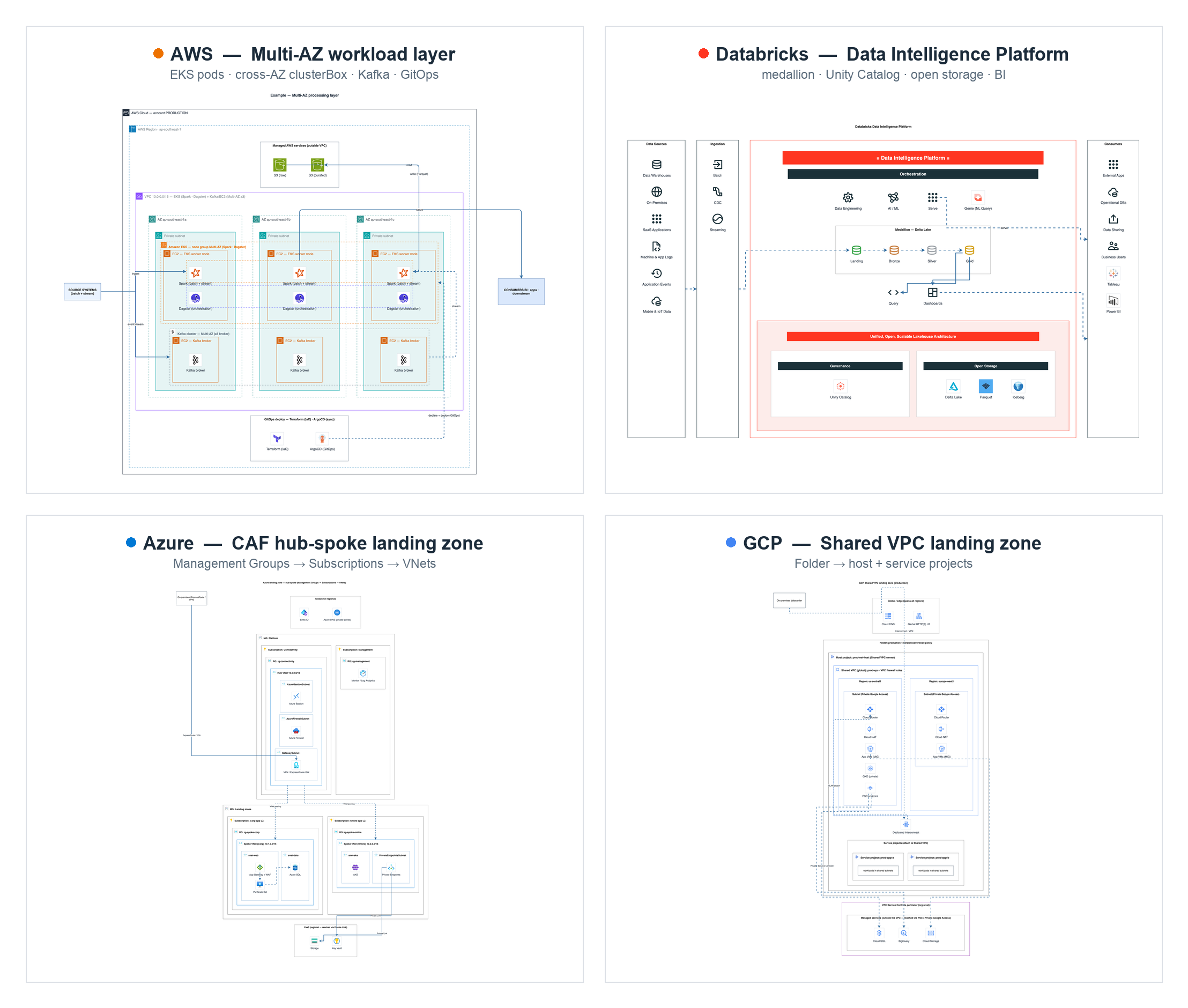
One diagram per platform — all generated end-to-end by the kit: no hand-placed coordinates, real stencils, validated, vision-checked. Full set in examples/.
Full install — the CLI plus all 5 Domain Skills (AWS, Azure, GCP, Databricks, BPMN) — in one line:
npm i -g github:sparklabx/drawio-ai-kit && npx skills add sparklabx/drawio-ai-kit
Restart your agent, then try: "draw an AWS 3-tier web app".
The first command puts the drawio-ai binary on PATH (installs straight from
GitHub — not yet on the npm registry; see INSTALL.md to pin a version
or install from a clone). The second registers the Domain Skills with your agent
(the skills CLI auto-detects Claude Code, Codex, Gemini CLI, …) — without it the
agent never picks the kit up on its own.
npx skills add sparklabx/drawio-ai-kit --skill drawio-aws (--list previews all 5)drawio-ai render (the vision self-check); Graphviz enables vendor/autolayout.py for large graphs. Details in INSTALL.md.Short answer: yes — and you don't have to take my word for it.
postinstall (or any lifecycle) hooks — nothing runs on npm install. Zero runtime dependencies. No sudo, no curl | bash, no remote code.@modelcontextprotocol/sdk) was removed at 1.0.0. The package is now fully self-contained.npm uninstall -g drawio-ai-kit # remove the CLI
npx skills remove drawio-aws # remove a domain skill (repeat for each)
npm i -g github:sparklabx/drawio-ai-kit   # CLI/engine (icon search, workflow, validator, rules)
npx skills update                         # the Domain Skills (SKILL.md) — always pulls latest
The skills are thin frontends that call drawio-ai at runtime, so engine fixes reach you the
moment you update the CLI — no skill re-install needed. npx skills update only refreshes the
SKILL.md text. Pin a specific release with github:sparklabx/drawio-ai-kit#v1.0.1.
To report a security issue, see SECURITY.md.
Define a diagram topology (pipeline/hierarchy/network/hubspoke/hybrid/mesh/sequence), declare the nested structure, and the layout engine programmatically computes spatial coordinates (x/y/w/h) — frames auto-size to fit their children, while rows and columns auto-space. You define the logical topology, not raw pixels.
import { Diagram } from "./src/builder.mjs";
import { group, icon, box, renderTree } from "./src/layout-engine.mjs";

const d = new Diagram("network");
const tree = group("region", "group_region", "Region", { dir: "row" }, [
  group("vpc", "group_vpc", "VPC", { dir: "col" }, [
    icon("alb", "elastic_load_balancing", "ALB"),
    icon("ec2", "ec2", "EC2"),
  ]),
]);
renderTree(d, tree);                 // engine lays everything out + sizes the page
d.title("My VPC");
d.link("alb", "ec2");                // edges by id; router picks straight/corridor
const res = d.validate();            // names real? colors/nesting/labels clean?
// d.mxfile("My VPC")  → write to .drawio, export PNG, then vision self-check
Icon names are retrieved from drawio-ai search to prevent name fabrication; edge routing, container sizing, alignment, and contextual corner styles are dynamically computed. The AI agent defines the logical layout and iterates via a render-analyze-rectify loop (vision-based self-correction). Example: examples/aws/build_mesh.mjs (zero manual coordinates).
At 1.0.0 the MCP server and bespoke installer were removed. To migrate:
claude mcp add ... mcp-server.mjs to npm i -g github:sparklabx/drawio-ai-kit.drawio-cloud-architect skill with the 5 thin Domain Skills — all at once with npx skills add sparklabx/drawio-ai-kit, or per domain with --skill drawio-aws etc.drawio-ai render → PNG → Read.npm uninstall -g drawio-ai-kit + remove each skill via the skills tooling.examples/)Each file builds one common architecture via the layout engine (zero hardcoded coordinates) — copy one as a starting point. Examples are organized into domain subfolders — see examples/README.md for the full index. Run any with node examples/<dir>/<file> → writes to out/*.drawio.
examples/aws/
| Example | Type | Architecture |
|---|---|---|
build_pipeline.mjs | pipeline | Layered data analytics pipeline (ingest → process → store → serve) + cross-cutting band |
build_landingzone.mjs | hierarchy | AWS Landing Zone / Control Tower org & OUs |
build_vpc.mjs | network | VPC Multi-AZ 3-tier (ALB spanning AZs) |
build_vpc_routing.mjs | network | Subnets + route tables + VPC Endpoint (Gateway) → S3 |
build_vpc_eks.mjs | network | VPC with Bastion, NAT, EKS, Auto Scaling worker nodes |
build_vpc_efs.mjs | network | VPC with Amazon EFS (a mount target per AZ) |
build_web3tier.mjs | network | 3-tier web app (Edge → Web → App → Data) |
build_eventdriven.mjs | hubspoke | Serverless event bus (EventBridge hub → consumers) |
build_serverless.mjs | sequence | Serverless web app, numbered request walkthrough |
build_hybrid.mjs | hybrid | On-prem ↔ AWS over Direct Connect + VPN, mirrored DR |
build_mesh.mjs | mesh | Multi-account connectivity / service mesh |
build_iam_accounts.mjs | hierarchy | Multi-account IAM + cross-account assume-role |
examples/azure/ · gcp/ · databricks/ · multicloud/ · bpmn/
| Example | Type | Architecture |
|---|---|---|
azure/build_azure_vnet.mjs | network | Azure N-tier: Subscription → Resource Group → VNet → Subnet tiers |
azure/build_azure_hub_spoke_lz.mjs | network | CAF hub-spoke landing zone (Management Groups, hub + spoke VNets, reserved subnets, peering, private endpoints) |
gcp/build_gcp_vpc.mjs | network | GCP global VPC across two regions (Project → global VPC → regional Subnets) |
gcp/build_gcp_shared_vpc_landing_zone.mjs | network | Shared VPC landing zone (host/service projects, regional Cloud Router/NAT, Interconnect, PSC, VPC-SC) |
databricks/build_lakehouse.mjs | pipeline | Databricks lakehouse medallion (Bronze/Silver/Gold) + Unity Catalog |
databricks/build_platform.mjs | hybrid | Databricks control-plane vs data-plane deployment topology |
databricks/build_data_intelligence_platform.mjs | pipeline | Databricks Data Intelligence Platform reference (signature bands, medallion, foundation) |
databricks/build_mlops.mjs | pipeline | Databricks MLOps — Git provider + Dev/Staging/Prod workspaces + Unity Catalog + Lakehouse |
multicloud/build_multicloud.mjs | hybrid | On-prem + AWS + Azure composed through a neutral interconnect |
bpmn/build_bpmn.mjs | bpmn | BPMN swimlane process (pool → lanes × phases) |
.nvmrc pins the current LTS) — orchestration and validation layer: CLI and validator (src/). Supported runtimes include Node 20, 22 (LTS), or 24..python-version) — data ingestion and compilation pipeline: catalog generator + icon-pack builder (scripts/build_pack.py, stdlib only).Install the dependencies:
nvm install --lts && nvm use --lts    # or: brew install node
brew install python@3.11              # then: python3.11 --version
| Command | Purpose |
|---|---|
search | Find a stencil by keyword/category → returns the exact name + ready-to-paste draw.io style (verbatim from the index: real names, official colors, connection points). |
style | Get the full style for one stencil by exact name. |
validate | Lint XML: unknown stencils, dangling edges, missing aspect=fixed, recolored AWS icons, broken AWS group nesting, geometry (overlap / child spills its frame / stacked arrowheads), plus an aesthetic audit (font/palette/fan-out/icon-size). |
audit | Aesthetic audit only (font/palette/fan-out/icon-size). |
render | Render the XML to PNG (drawio-ai render <file> -o out.png). Needs the draw.io desktop CLI; set DRAWIO_CLI to override the path. |
logo | Logo for non-AWS brands (AI/LLM + some) as an image style, via vendor/aiicons.py (lobe-icons). Needs python3. |
categories | List all catalog categories. |
types | List supported diagram topologies. |
principles | Design rules + architecture preset + catalog categories. Pass `--mode aws |
root | Print the installed Kit's absolute path (for import by path). |
workflow | Print the shared build → validate → render → write workflow. |
Each of the 5 Domain Skills (drawio-aws, drawio-azure, drawio-gcp, drawio-databricks, drawio-bpmn) wraps these commands into a full build-with-engine → validate → render + vision self-check → final-export workflow. Vendored helpers in vendor/: autolayout.py (Graphviz layout for >15-node graphs), aiicons.py, repair_png.py, encode_drawio_url.py (browser fallback).
The kit ships 5 thin Domain Skills — one per cloud/domain — distributed via the standard npm skills tooling:
| Skill | Domain |
|---|---|
drawio-aws | AWS |
drawio-azure | Azure |
drawio-gcp | GCP |
drawio-databricks | Databricks |
drawio-bpmn | BPMN |
Add one or more with the skills CLI, e.g. npx skills add sparklabx/drawio-ai-kit --skill drawio-aws (or drop --skill to install all 5; --list previews). Each skill is a thin frontend; the deterministic engine, validator, and rules live in the drawio-ai-kit package, reached via the drawio-ai CLI.
The kit isn't tied to one app — the "brains" live in the CLI + repo + rules, so
any Claude host that can run shell commands can use it. Point the agent at the
CLI: drawio-ai principles, drawio-ai search, drawio-ai validate, plus the
template index & reproduction loop in rules/diagram-types.md. (draw.io CLI is
only needed for PNG render / vision-check.)
drawio-ai search s3
drawio-ai search kubernetes --category Containers
drawio-ai search "aws cloud" --kind group
drawio-ai style s3
drawio-ai validate ../4_oncloud.drawio
drawio-ai categories
drawio-ai principles --mode aws
drawio-ai render out.drawio -o out.png
loadCatalog merges every catalog/*.json, so all icons are searchable together via drawio-ai search.
catalog/aws.json is generated from data/shape-index.json.gz (10,446-shape index from jgraph/drawio-mcp, Apache-2.0) — real stencil names (s3, eks, identity_and_access_management, ...), official per-icon colors, connection points, and aspect=fixed, all verbatim. No hand-guessing.
Regenerate after refreshing the index:
python3.11 scripts/ingest_index.py # data/shape-index.json.gz → catalog/aws.json (983 icons, 19 groups)
Brand/tech icons for the tools people draw alongside AWS — searchable by name (spark, kafka, postgres, kubernetes, argocd, prometheus, pytorch, …) as square tiles in the same house style:
| Pack | Icons | Examples |
|---|---|---|
database | 66 | postgres, mysql, mongodb, redis, clickhouse, snowflake |
bigdata | 48 | spark, kafka, airflow, flink, trino, dbt, minio |
cicd | 42 | jenkins, argocd, terraform, ansible, sonarqube |
aiml | 26 | pytorch, tensorflow, huggingface, ollama, langchain |
containers | 26 | kubernetes, docker, helm, istio, linkerd |
observability | 26 | datadog, prometheus, grafana, opentelemetry |
databricks | 24 | unity catalog, delta sharing, mosaic ai |
network | 15 | nginx, kong, traefik, haproxy, cloudflare |
The prebuilt catalog/*.json are committed — using the kit needs no rebuild. To add or refresh a pack, edit packs/<name>/manifest.json and:
python3 scripts/build_pack.py <name> # devicon → vectorlogo.zone → gilbarbara → simple-icons → text (needs macOS qlmanage)
See THIRD_PARTY_NOTICES.md for attributions.
npm test # node --test
LICENSE). Bundled icons/logos (AWS Architecture Icons + third-party project logos) are trademarks of their owners and are not covered by MIT — see NOTICE.custom-icons.json) only for icons draw.io lacks (Confluent, Starburst, OpenMetadata, MinIO, Dagster, internal/brand logos) or when rendering outside draw.io.Sign in to join the discussion.
No comments yet. Be the first to say what this is good for.
An agentic skills framework & software development methodology that works.

Turn any codebase, with its docs, SQL schemas, configs, and PDFs, into a queryable knowledge graph. A /graphify skill for Claude Code, Cursor, Codex, and Gemini CLI: local deterministic AST parsing, every edge explained, no vector store.

Topic in, narrated explainer video out. A Claude Code / Codex skill that turns any topic into a black-canvas motion-graphics explainer video with TTS voiceover, subtitles and a chapter progress bar. Chinese or English; every frame drawn in code with Remotion.
Public repository for Agent Skills
Open-source AI job search: scan job portals, evaluate listings into a structured A-H report with a global 1-5 score, tailor your CV, track applications — runs locally in your AI coding CLI (Claude Code, Codex, OpenCode, Antigravity…)

Production-grade engineering skills for AI coding agents.