
JuliusBrussee/
caveman

🪨 why use many token when few token do trick — Claude Code skill that cuts 65% of tokens by talking like caveman
105k
1 add
Reticle sits between your agent and MCP servers so you can inspect JSON-RPC messages as they happen. It can wrap stdio servers, proxy HTTP-based transports, launch a desktop UI, or run headless for logging and telemetry.

People who build with MCP-connected agents and want to inspect tool traffic, latency, and failures.
You can debug MCP integrations by seeing the exact messages, timing, and errors your agent exchanges with servers.
Shows raw JSON-RPC requests, notifications, and responses as they pass through the proxy.
Matches each request with its response so you can follow one interaction end to end.
Measures timing and estimates token usage for MCP calls.
Records server stderr output and crashes alongside the traffic.
Lets you record sessions and export logs for later review.
Works with stdio, Streamable HTTP, WebSocket, and HTTP/SSE transports.
Provides `mcp-reticle run`, `proxy`, `ui`, and `daemon` commands for different debugging setups.
# npm
npm install -g mcp-reticle

# pip
pip install mcp-reticle

# Homebrew
brew install labterminal/mcp-reticle/mcp-reticle
mcp-reticle ui
mcp-reticle run --log -- npx -y @modelcontextprotocol/server-memory
mcp-reticle proxy --name api --upstream http://localhost:8080 --listen 3001
git clone https://github.com/labterminal/mcp-reticle.git
cd mcp-reticle
just build

The Wireshark for the Model Context Protocol (MCP)





See what your agent sees.
Reticle intercepts, visualizes, and profiles MCP JSON-RPC traffic in real time — designed for microsecond-level overhead.
Quick start · Install · Docs · Security · Contributing
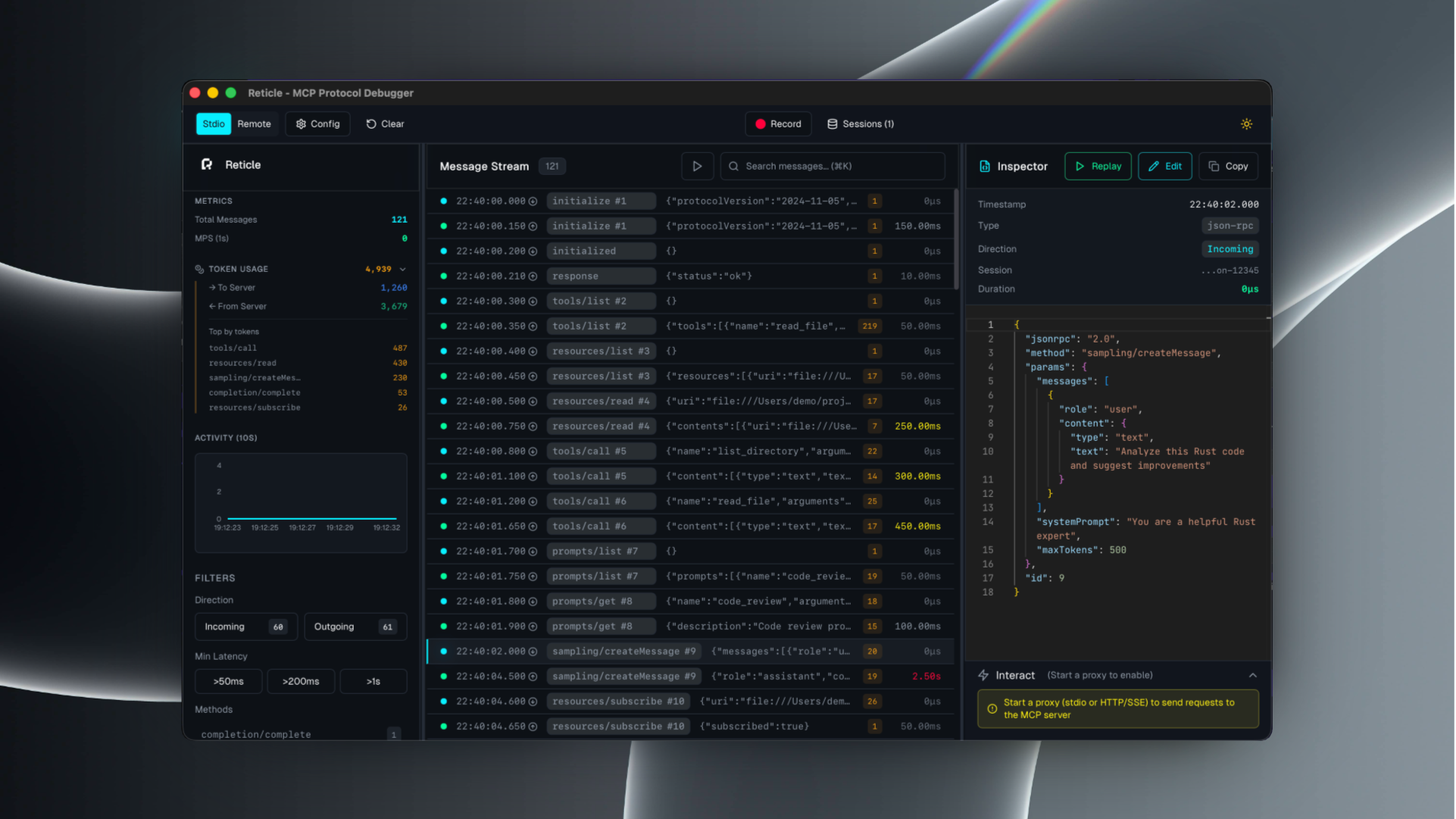
Reticle is a proxy + UI for debugging MCP integrations:
Supported transports: stdio, Streamable HTTP, WebSocket, HTTP/SSE.
# npm
npm install -g mcp-reticle

# pip
pip install mcp-reticle

# Homebrew
brew install labterminal/mcp-reticle/mcp-reticle
Replace your MCP server command with mcp-reticle run --name <name> -- <command...>.
Example (Claude Desktop-style config):
{
  "mcpServers": {
    "filesystem": {
      "command": "mcp-reticle",
      "args": ["run", "--name", "filesystem", "--", "npx", "-y", "@modelcontextprotocol/server-filesystem", "/Users/me/work"]
    }
  }
}
mcp-reticle ui
mcp-reticle run --log -- npx -y @modelcontextprotocol/server-memory
mcp-reticle proxy --name api --upstream http://localhost:8080 --listen 3001
If you prefer building from source:
git clone https://github.com/labterminal/mcp-reticle.git
cd mcp-reticle
just build
All guides and deep dives are in the GitHub Wiki:
| Command | Purpose |
|---|---|
mcp-reticle run | Wrap stdio MCP servers and inspect traffic |
mcp-reticle proxy | Reverse proxy HTTP/SSE/WebSocket transports |
mcp-reticle ui | Launch the desktop UI |
mcp-reticle daemon | Headless telemetry hub |
Full details: CLI reference
Reticle can capture tool inputs/outputs and server stderr. Treat recordings and exports as sensitive artifacts.
Recommended reading: Security & privacy
CONTRIBUTING.mdMIT — see LICENSE.
Sign in to join the discussion.
No comments yet. Be the first to say what this is good for.
🪨 why use many token when few token do trick — Claude Code skill that cuts 65% of tokens by talking like caveman

The best-benchmarked open-source AI memory system. And it's free.

Orca is the ADE for working with a fleet of parallel agents. Run any coding agent with your own subscription. Available on desktop, mobile and remote runtime.

A cross-platform desktop All-in-One assistant for Claude Code, Codex, OpenCode, OpenClaw, Grok Build & Hermes Agent. Only official website: ccswitch.io

Never stop coding. Free MIT AI gateway: one endpoint, 352 providers (150+ free), 1200+ models Kimi, Claude, GPT, Gemini, GLM, DeepSeek, MiniMax. Works with Claude Code, Codex, Cursor, OpenCode, Cline & Copilot. Quota-aware auto-fallback, RTK+Caveman compression saves 15-95% tokens, MCP/A2A, Desktop/PWA. Built by 550+ contributors

Compress tool outputs, logs, files, and RAG chunks before they reach the LLM. 20% fewer tokens for coding agents, 60-95% fewer tokens for JSON, same answers. Library, proxy, MCP server.