
JuliusBrussee/
caveman

🪨 why use many token when few token do trick — Claude Code skill that cuts 65% of tokens by talking like caveman
105k
1 add
ccsession scans local agent session stores, shows them in an fzf picker, and previews recent messages before you resume. When you choose a session, it changes back into that session's recorded working directory and launches the matching agent resume command.
Builders who want to recover prior agent context, compare old sessions, or hand off to a previous local session.
You can resume a past agent session from the exact project directory it started in.
Shows sessions from all projects in one place and sorts them by last activity.
Supports fuzzy search, directory-only search, and full-text grep over JSONL transcripts with switchable keys.
Displays the last messages from the highlighted session and highlights grep matches in the preview.
Changes into the recorded cwd before resuming so the agent starts with the same paths and tools.
Works with Claude Code by default and can also read sessions from OpenCode, Grok, Codex, Pi, Oh My Pi, and Kiro CLI.
Provides `list --json`, `preview --json`, and `resume-spec` so other tools can inspect sessions without launching them.
go install github.com/sorafujitani/ccsession/cmd/ccsession@latest
tar xzf ccsession_0.1.0_darwin_arm64.tar.gz
install -m 0755 ccsession ~/.local/bin/
xattr -d com.apple.quarantine ~/.local/bin/ccsession
nix run github:sorafujitani/ccsession             # one-off
nix profile install github:sorafujitani/ccsession # install into a profile
brew install sorafujitani/tap/ccsession
An fzf-powered session picker for resuming local agent sessions.
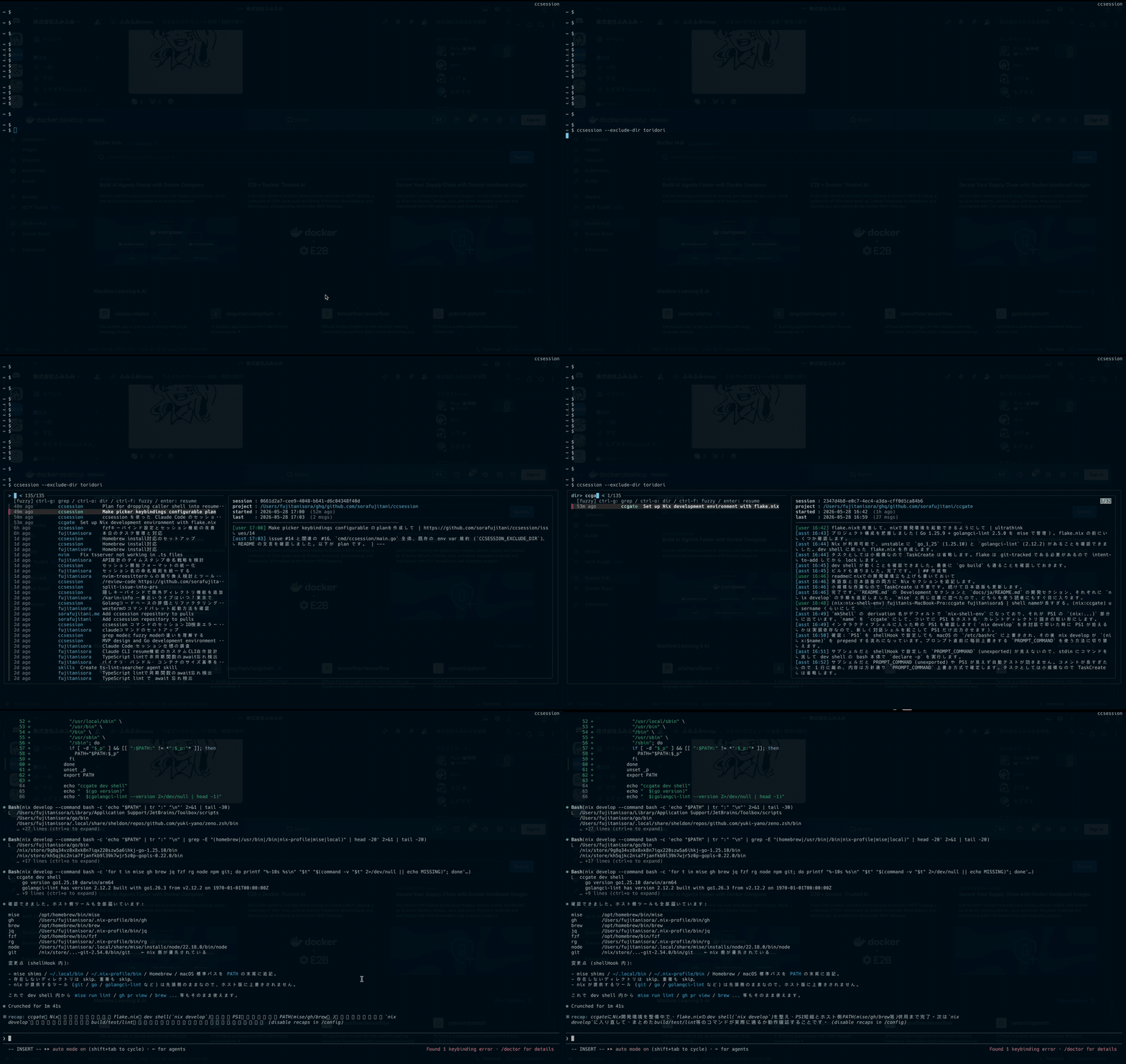
ccsession lists local agent sessions (Claude Code by default, with optional
OpenCode, Grok, Codex, Pi, Oh My Pi, and Kiro CLI backends), lets you fuzzy-find across all of your
projects with a live preview pane, and resumes the one you pick in its original
working directory.
CCSESSION_PREVIEW_MESSAGES to change the preview length.chdirs back to the session's original cwd before
exec'ing the selected agent's resume command, so paths and tooling Just Work.| Tool | Required for |
|---|---|
fzf >= 0.58.0 | interactive picker |
claude (Claude Code CLI) | resuming sessions |
opencode | listing & resuming OpenCode sessions (only with --source=opencode) |
grok (Grok Build TUI) | listing & resuming Grok sessions (only with --source=grok) |
codex (Codex CLI) | listing & resuming Codex sessions (only with --source=codex) |
pi (pi coding agent) | listing & resuming Pi sessions (only with --source=pi) |
omp (Oh My Pi) | listing & resuming Oh My Pi sessions (only with --source=omp) |
kiro-cli | listing & resuming Kiro CLI classic, v2, and v3 sessions (only with --source=kiro) |
ccsession depends on newer fzf actions such as transform, rebind,
unbind, disable-search, and change-nth. The newest of those,
change-nth, landed in fzf 0.58.0, so older versions may start but the mode
switch bindings will not work correctly.
go install github.com/sorafujitani/ccsession/cmd/ccsession@latest
Requires Go 1.25 or newer (the pure-Go SQLite reader for OpenCode support needs it; see #52).
Version metadata is recovered from runtime/debug.ReadBuildInfo, so
ccsession --version works for go install builds as well.
Grab the ccsession_<ver>_<os>_<arch>.tar.gz for your platform from the
Releases page, extract
it, and drop the binary somewhere on your PATH:
tar xzf ccsession_0.1.0_darwin_arm64.tar.gz
install -m 0755 ccsession ~/.local/bin/
If macOS Gatekeeper complains:
xattr -d com.apple.quarantine ~/.local/bin/ccsession
nix run github:sorafujitani/ccsession             # one-off
nix profile install github:sorafujitani/ccsession # install into a profile
brew install sorafujitani/tap/ccsession
The formula lives in
sorafujitani/homebrew-tap
and GoReleaser refreshes it on every tagged release. fzf is installed as a
dependency; the claude CLI must be installed separately. opencode, grok,
codex, pi, omp, and kiro-cli are needed only with their matching --source backends — they back
optional features (unlike fzf, which is always required), so they are
intentionally left out of the formula's depends_on.
ccsession                            # list -> fzf -> resume
ccsession --grok                     # use Grok sessions from ~/.grok/sessions
ccsession --codex                    # use Codex sessions from ~/.codex/sessions
ccsession --pi                       # use Pi sessions from ~/.pi/agent/sessions
ccsession --omp                      # use Oh My Pi sessions from ~/.omp/agent/sessions
ccsession --kiro                     # use Kiro CLI sessions
ccsession list  [--grep Q] [--regex] # emit TSV rows to stdout
ccsession list --json --grep Q --limit 5 # emit structured rows for agents
ccsession preview [--query Q] [--regex] <id> # render the preview pane (Q highlighted)
ccsession preview --json <id>        # emit structured preview data for scripts/agents
ccsession preview --no-color <id>    # force plain preview output
ccsession resume-spec <id>           # print the resume target without launching it
ccsession resume  <id>               # chdir to the session's cwd, exec the selected agent
ccsession --version
ccsession --help
This repository ships a Codex Agent Skill at
.agents/skills/ccsession. Use $ccsession when you want an agent to recover
prior context, compare historical sessions, preview a likely match, or hand off
to a previous local agent session.
When Codex is working from this repository checkout, Codex discovers the
repo-local skill from .agents/skills/ccsession. Invoke it explicitly with
$ccsession or ask for the same workflow in natural language, for example:
Use $ccsession to find the session where we worked on issue 84.
If you installed only the ccsession binary and want the skill available from
other repositories, install it with the skills CLI:
npx skills add sorafujitani/ccsession --skill ccsession
Here --skill ccsession selects this skill from the repository. The skill
itself is the standard Agent Skills directory format: a folder with SKILL.md
plus optional resources.
For a user-wide install:
npx skills add sorafujitani/ccsession --skill ccsession -g
When developing from a local checkout, install from the current directory:
npx skills add . --skill ccsession
Start a new Codex session after installing or updating the skill so the skill
metadata is reloaded. The skill assumes the ccsession binary is on PATH.
The skill teaches agents to use ccsession in a read-first workflow:
Search candidates with structured output:
ccsession list --json --grep "<query>" --limit 5
Use a source selector when the target backend is known:
ccsession --codex list --json --grep "<query>" --limit 5
ccsession --source all list --json --grep "<query>" --limit 5
Summarize a small candidate set for the user. The JSON rows include
source, id, locator, cwd, cwd_basename, label,
last_activity, cwd_exists, and cwd_unknown.
Preview the selected candidate before recommending resume:
ccsession preview --locator "<locator>" --query "<query>" "<id>"
ccsession preview --json --locator "<locator>" "<id>"
Show the non-launching handoff target:
ccsession resume-spec --locator "<locator>" "<id>"
resume-spec prints the selected backend, working directory, binary, and
arguments as JSON. It does not start an interactive process.
Run ccsession resume --locator "<locator>" "<id>" only after explicit user
confirmation. resume changes into the recorded cwd and execs the
selected agent CLI, replacing the current process.
When using --source, repeat the same source selector on list, preview,
resume-spec, and resume; global flags apply only to that ccsession
process and the fzf children it starts.
| Key | Mode |
|---|---|
Ctrl-G | grep — refilters by user/assistant content on every keystroke; matches are highlighted in the preview |
Ctrl-O | dir — fuzzy match restricted to the directory column |
Ctrl-F | fuzzy — default; matches across time / dir / label |
Enter | resume the selected session |
Esc | cancel |
The three mode-switch keys are the defaults and can be overridden (see below).
If a mode-switch key clashes with your terminal, shell, or muscle memory, you can remap any of the three. Keys are resolved in this order (first wins):
CLI flags > environment variables > config file > defaults
The on-screen header is regenerated from the resolved keys, so the hint always matches what is active.
# CLI flags (highest precedence)
ccsession --bind-grep ctrl-r --bind-fuzzy alt-f

# environment variables
export CCSESSION_BIND_GREP=ctrl-r
export CCSESSION_BIND_DIR=ctrl-o
export CCSESSION_BIND_FUZZY=alt-f
Config file at ~/.config/ccsession/config.toml (lowest precedence before
defaults; honors XDG_CONFIG_HOME). ccsession only reads this file — it
never creates it, so create it yourself only if you want file-based overrides:
[keybindings]
grep  = "ctrl-r"
dir   = "ctrl-o"
fuzzy = "alt-f"
Any key you leave unset falls through to the next source. A key name must be
lower-case fzf syntax (ctrl-r, alt-f, f1, …); the three keys must be
distinct and must not be a reserved fzf event name (enter, change, …), or
ccsession exits with an error instead of starting the picker.
ccsession list reads the selected backend (~/.claude/projects/*/ by
default, or --source=opencode / --source=grok / --source=codex /
--source=pi / --source=omp / --source=kiro) and prints one TSV row
per session (id, locator, epoch, relative time, cwd basename, label).
ccsession list --json --limit N emits the same candidates as a JSON array
for agent integrations.fzf consumes the TSV. The three key bindings swap fzf's matcher
between fuzzy mode, directory-only mode, and grep mode (which reloads
via ccsession list --grep <query> on every keystroke). The current
query is also forwarded to the preview as ccsession preview --query <query> <id>, which highlights its matches in the rendered messages.ccsession resume-spec <id> resolves the same target as resume and prints
the source, cwd, binary, and arguments as JSON without launching anything.Enter, ccsession resume <id> resolves the session's original
cwd, chdirs into it, and execves the selected agent's resume command
so the resumed process fully replaces the picker.Backend-specific homes can be overridden with GROK_HOME for Grok,
CODEX_HOME for Codex, PI_CODING_AGENT_SESSION_DIR for Pi, and
PI_CODING_AGENT_DIR / PI_CONFIG_DIR for Oh My Pi. KIRO_HOME overrides
Kiro CLI's v2 and v3 store, which defaults to ~/.kiro. Codex defaults to
~/.codex, reading sessions from its sessions subdirectory; Pi reads sessions
from ~/.pi/agent/sessions, and PI_CODING_AGENT_SESSION_DIR points directly
at that sessions directory. Oh My Pi reads sessions recursively from
~/.omp/agent/sessions; PI_CODING_AGENT_DIR overrides the agent root, while
PI_CONFIG_DIR changes the config root under the user's home when the agent-root
override is unset. ccsession reads the resulting agent/sessions subdirectory.
nix develop                    # Go + fzf + gopls + goreleaser
go build ./cmd/ccsession
go test ./...
goreleaser release --snapshot --clean --skip=publish
ls dist/
nix build
./result/bin/ccsession --version
Bug reports and pull requests are welcome at https://github.com/sorafujitani/ccsession. For larger changes, please open an issue first to discuss what you'd like to change.
Sign in to join the discussion.
No comments yet. Be the first to say what this is good for.
🪨 why use many token when few token do trick — Claude Code skill that cuts 65% of tokens by talking like caveman

The best-benchmarked open-source AI memory system. And it's free.

Orca is the ADE for working with a fleet of parallel agents. Run any coding agent with your own subscription. Available on desktop, mobile and remote runtime.

A cross-platform desktop All-in-One assistant for Claude Code, Codex, OpenCode, OpenClaw, Grok Build & Hermes Agent. Only official website: ccswitch.io

Never stop coding. Free MIT AI gateway: one endpoint, 352 providers (150+ free), 1200+ models Kimi, Claude, GPT, Gemini, GLM, DeepSeek, MiniMax. Works with Claude Code, Codex, Cursor, OpenCode, Cline & Copilot. Quota-aware auto-fallback, RTK+Caveman compression saves 15-95% tokens, MCP/A2A, Desktop/PWA. Built by 550+ contributors

Compress tool outputs, logs, files, and RAG chunks before they reach the LLM. 20% fewer tokens for coding agents, 60-95% fewer tokens for JSON, same answers. Library, proxy, MCP server.