
JuliusBrussee/
caveman

🪨 why use many token when few token do trick — Claude Code skill that cuts 65% of tokens by talking like caveman
105k
1 add
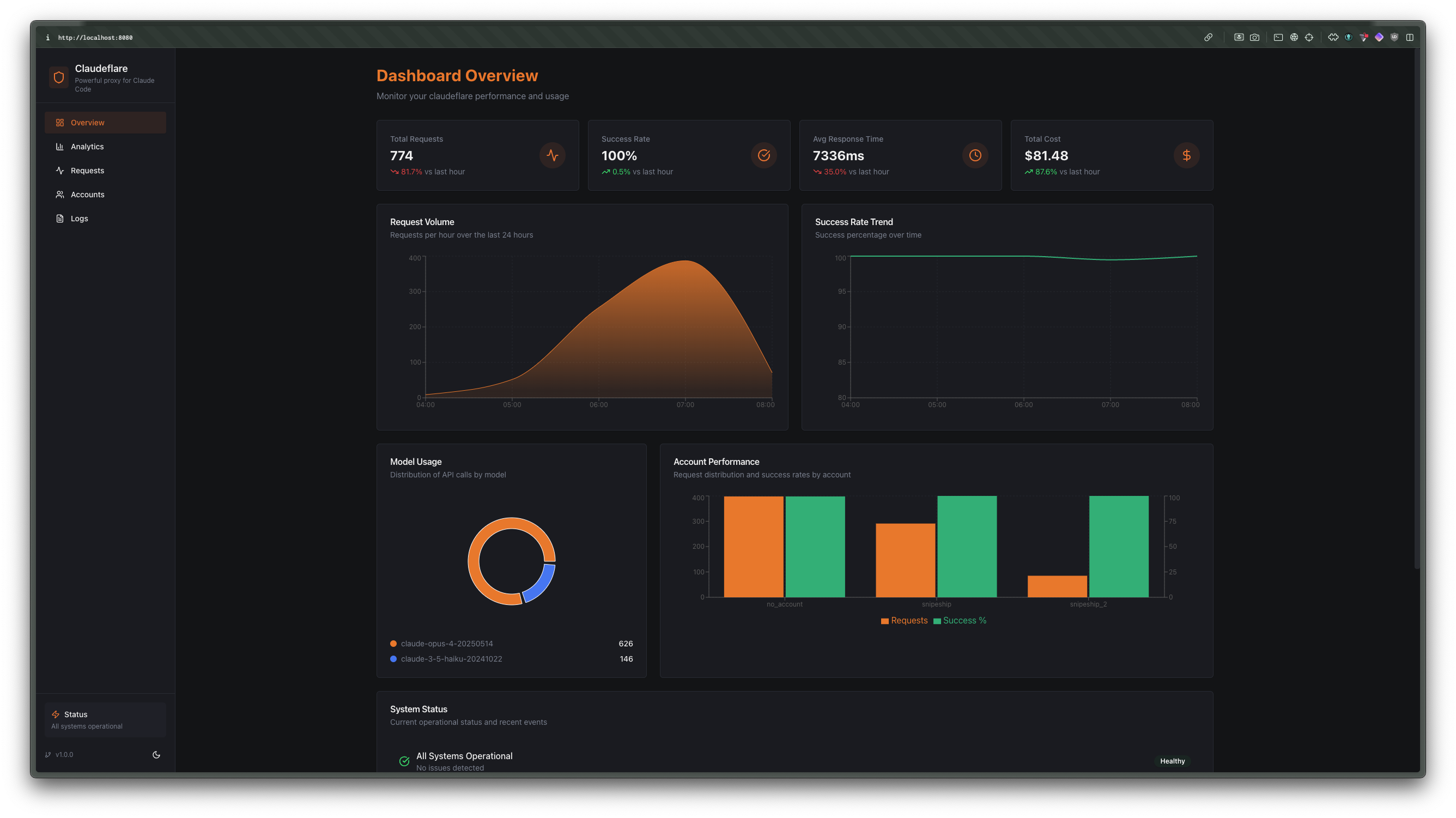
ccflare sits between your agent and Anthropic or OpenAI, then forwards requests by provider prefix without translating the payloads. It adds account-level routing, failover, health checks, request history, and analytics, plus a dashboard and TUI for managing accounts and settings.
Builders who want their agent traffic to go through one proxy with routing, failover, and usage tracking.
You can point Claude Code or OpenAI-compatible clients at one base URL and manage provider accounts from one place.
Routes requests by `/v1/anthropic/*`, `/v1/openai/*`, and `/v1/ccflare/*`.
Forwards Anthropic and OpenAI payloads without rewriting them.
Retries another account when one provider account is rate limited.
Records request summaries, detailed payloads, logs, stats, and aggregated analytics.
Includes a web dashboard and a terminal UI for managing the proxy and accounts.
Supports API key setup and interactive OAuth setup for Claude Code and Codex.
curl http://localhost:8080/health
# Claude Code OAuth
bun run ccflare --add-account work --provider claude-code

# Codex OAuth
bun run ccflare --add-account codex --provider codex
curl -X POST http://localhost:8080/v1/openai/chat/completions \
  -H "content-type: application/json" \
  -d '{
    "model": "gpt-4o-mini",
    "messages": [
      { "role": "user", "content": "Say hello from ccflare." }
    ]
}'curl -X POST http://localhost:8080/v1/openai/responses \
-H "content-type: application/json" \
-d '{
"model": "gpt-4o",
"input": "Summarize why provider-prefixed routing is useful."
}'curl -X POST http://localhost:8080/v1/ccflare/openai/chat/completions \
-H "content-type: application/json" \
-d '{
"model": "anthropic/claude-sonnet-4",
"messages": [
{ "role": "user", "content": "Say hello from the compatibility route." }
]
}'A multi-provider native proxy for Anthropic and OpenAI.
ccflare routes each provider by URL prefix, load-balances across multiple accounts, and keeps full request history, rate-limit state, and usage analytics without translating provider payloads.
/v1/{provider}/*/v1/ccflare/* with family-prefixed modelsgit clone https://github.com/snipeship/ccflare
cd ccflare
bun install
# Start the server + dashboard on http://localhost:8080
bun run start
# Or launch the TUI, which can also start the server
bun run ccflare
Verify the server is up:
curl http://localhost:8080/health
ccflare proxies requests by provider prefix:
http://localhost:8080/v1/anthropic/*http://localhost:8080/v1/openai/*http://localhost:8080/v1/ccflare/*Examples:
/v1/anthropic/v1/messages → https://api.anthropic.com/v1/messages/v1/openai/chat/completions → https://api.openai.com/v1/chat/completions/v1/openai/responses → https://api.openai.com/v1/responsesThe /v1/{provider} prefix is stripped exactly once before forwarding upstream.
Compatibility routes keep the client-facing schema but select a provider family from
the model prefix:
openai/<model-id> → prefers codex, then openaianthropic/<model-id> → prefers claude-code, then anthropicExamples:
/v1/ccflare/openai/chat/completions with "model":"openai/gpt-5.4"/v1/ccflare/openai/responses with "model":"anthropic/claude-sonnet-4"/v1/ccflare/anthropic/messages with "model":"openai/gpt-4o-mini"Add accounts through the management API:
curl -X POST http://localhost:8080/api/accounts \
-H "content-type: application/json" \
-d '{
"name": "anthropic-main",
"provider": "anthropic",
"auth_method": "api_key",
"api_key": "sk-ant-..."
}'
curl -X POST http://localhost:8080/api/accounts \
-H "content-type: application/json" \
-d '{
"name": "openai-main",
"provider": "openai",
"auth_method": "api_key",
"api_key": "sk-openai-..."
}'
Use the CLI/TUI for interactive OAuth setup:
# Claude Code OAuth
bun run ccflare --add-account work --provider claude-code
# Codex OAuth
bun run ccflare --add-account codex --provider codex
The management API also exposes provider-specific auth endpoints:
POST /api/auth/anthropic/initPOST /api/auth/anthropic/completePOST /api/auth/openai/initPOST /api/auth/openai/completePoint Anthropic SDKs or curl at the Anthropic-prefixed base URL:
export ANTHROPIC_BASE_URL=http://localhost:8080/v1/anthropic
Point OpenAI-compatible clients at the OpenAI-prefixed base URL:
export OPENAI_BASE_URL=http://localhost:8080/v1/openai
You can configure both providers at the same time and ccflare will keep account selection isolated per provider.
curl -X POST http://localhost:8080/v1/anthropic/v1/messages \
-H "content-type: application/json" \
-d '{
"model": "claude-3-7-sonnet",
"max_tokens": 128,
"messages": [
{ "role": "user", "content": "Say hello from ccflare." }
]
}'
curl -X POST http://localhost:8080/v1/openai/chat/completions \
-H "content-type: application/json" \
-d '{
"model": "gpt-4o-mini",
"messages": [
{ "role": "user", "content": "Say hello from ccflare." }
]
}'
curl -X POST http://localhost:8080/v1/openai/responses \
  -H "content-type: application/json" \
  -d '{
    "model": "gpt-4o",
    "input": "Summarize why provider-prefixed routing is useful."
}'
curl -X POST http://localhost:8080/v1/ccflare/openai/chat/completions \
  -H "content-type: application/json" \
  -d '{
    "model": "anthropic/claude-sonnet-4",
    "messages": [
      { "role": "user", "content": "Say hello from the compatibility route." }
    ]
  }'
Key endpoints:
GET /health — status, account count, strategy, supported providersGET /api/accounts — list accountsPOST /api/accounts — create an accountPATCH /api/accounts/:id — update an account (rename, change base_url)DELETE /api/accounts/:id — remove an accountPOST /api/accounts/:id/pause / resume — exclude or restore an accountPOST /api/accounts/:id/rename — rename an accountGET /api/requests — recent request summariesGET /api/requests/detail — detailed request info with payloadsGET /api/requests/stream — live request stream via SSEGET /api/analytics — aggregated analyticsGET /api/stats — usage and performance statsPOST /api/stats/reset — reset usage statisticsGET /api/logs/stream — live server logs via SSEGET /api/logs/history — historical log entriesGET /api/config — current configurationGET /api/config/strategy — current load balancing strategyPOST /api/config/strategy — update load balancing strategyGET /api/strategies — list available strategiesGET /api/config/retention — data retention settingsPOST /api/config/retention — update data retention settingsPOST /api/maintenance/cleanup — run data cleanupPOST /api/maintenance/compact — compact the databasehttp://localhost:8080bun run ccflarebun run startAdditional repo docs live in docs/:
MIT — see LICENSE.
Sign in to join the discussion.
No comments yet. Be the first to say what this is good for.
🪨 why use many token when few token do trick — Claude Code skill that cuts 65% of tokens by talking like caveman

The best-benchmarked open-source AI memory system. And it's free.

Orca is the ADE for working with a fleet of parallel agents. Run any coding agent with your own subscription. Available on desktop, mobile and remote runtime.

A cross-platform desktop All-in-One assistant for Claude Code, Codex, OpenCode, OpenClaw, Grok Build & Hermes Agent. Only official website: ccswitch.io

Never stop coding. Free MIT AI gateway: one endpoint, 352 providers (150+ free), 1200+ models Kimi, Claude, GPT, Gemini, GLM, DeepSeek, MiniMax. Works with Claude Code, Codex, Cursor, OpenCode, Cline & Copilot. Quota-aware auto-fallback, RTK+Caveman compression saves 15-95% tokens, MCP/A2A, Desktop/PWA. Built by 550+ contributors

Compress tool outputs, logs, files, and RAG chunks before they reach the LLM. 20% fewer tokens for coding agents, 60-95% fewer tokens for JSON, same answers. Library, proxy, MCP server.