
JuliusBrussee/
caveman

🪨 why use many token when few token do trick — Claude Code skill that cuts 65% of tokens by talking like caveman
105k
1 add
Claude Squad runs multiple agents in isolated workspaces so you can work on several tasks in parallel. It uses tmux for separate terminal sessions and git worktrees for branch isolation, with a TUI for creating, attaching to, reviewing, and resuming sessions.
Builders who want to run several terminal agents side by side without mixing their work.
You can keep multiple agent tasks moving at once and review each one before merging or pushing.
Starts each task in its own tmux session so agents can run in parallel.
Gives each session its own worktree to avoid branch conflicts.
Lets you inspect diffs, checkpoint work, and pause or resume sessions.
Lets you define named programs like `claude`, `codex`, and `aider` in the config file.
Can auto-accept prompts for supported agents with the `--autoyes` flag.
Provides keyboard-driven navigation, attach/detach, delete, and help actions in one terminal window.
brew install claude-squad
ln -s "$(brew --prefix)/bin/claude-squad" "$(brew --prefix)/bin/cs"
curl -fsSL https://raw.githubusercontent.com/smtg-ai/claude-squad/main/install.sh | bash
curl -fsSL https://raw.githubusercontent.com/smtg-ai/claude-squad/main/install.sh | bash -s -- --name <your-binary-name>
cs


Claude Squad is a terminal app that manages multiple Claude Code, Codex, Gemini (and other local agents including Aider) in separate workspaces, allowing you to work on multiple tasks simultaneously.
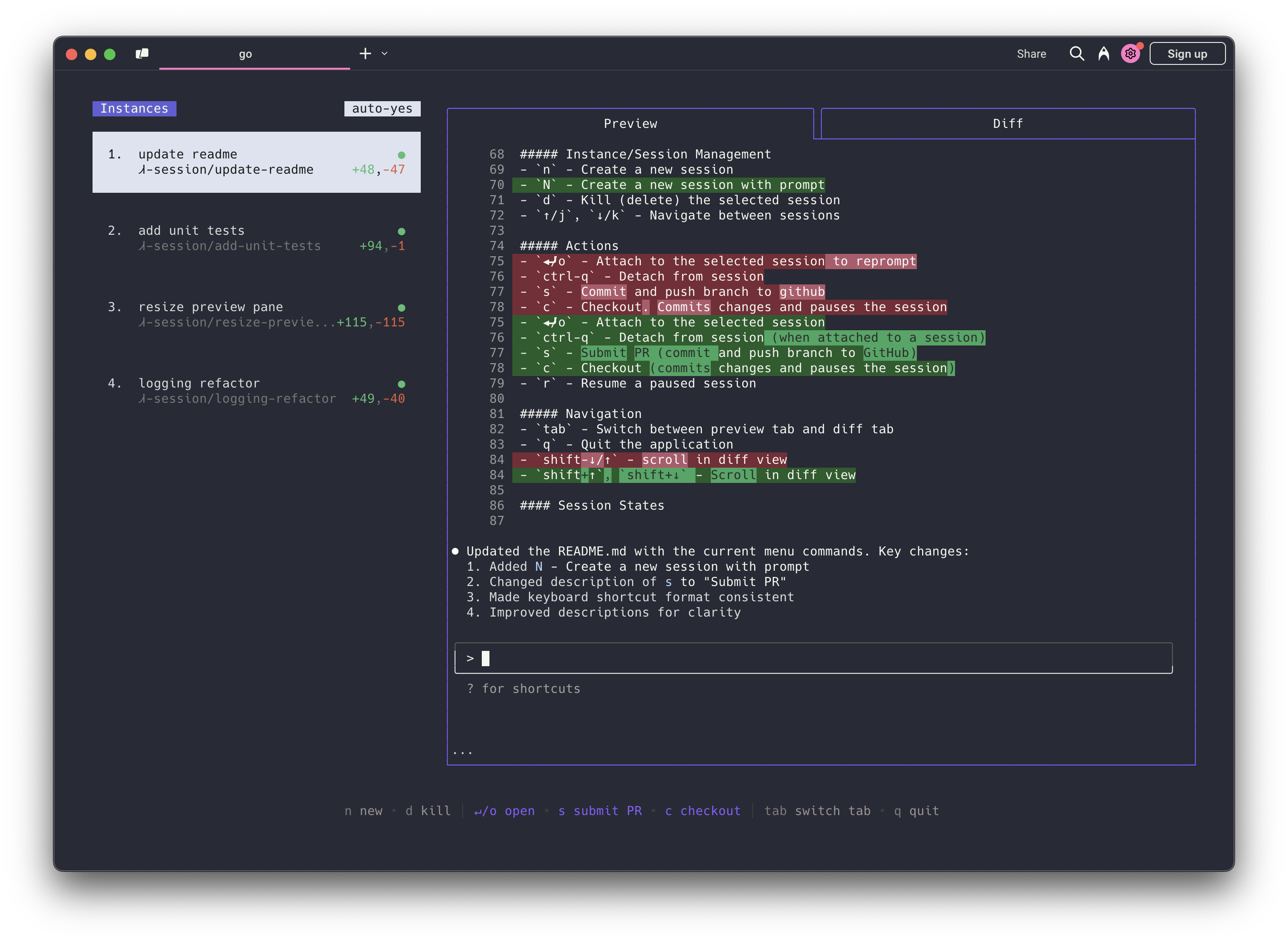
https://github.com/user-attachments/assets/aef18253-e58f-4525-9032-f5a3d66c975a
Both Homebrew and manual installation will install Claude Squad as cs on your system.
brew install claude-squad
ln -s "$(brew --prefix)/bin/claude-squad" "$(brew --prefix)/bin/cs"
Claude Squad can also be installed by running the following command:
curl -fsSL https://raw.githubusercontent.com/smtg-ai/claude-squad/main/install.sh | bash
This puts the cs binary in ~/.local/bin.
To use a custom name for the binary:
curl -fsSL https://raw.githubusercontent.com/smtg-ai/claude-squad/main/install.sh | bash -s -- --name <your-binary-name>
Usage:
  cs [flags]
  cs [command]

Available Commands:
  completion  Generate the autocompletion script for the specified shell
  debug       Print debug information like config paths
  help        Help about any command
  reset       Reset all stored instances
  version     Print the version number of claude-squad

Flags:
  -y, --autoyes          [experimental] If enabled, all instances will automatically accept prompts for claude code & aider
  -h, --help             help for claude-squad
  -p, --program string   Program to run in new instances (e.g. 'aider --model ollama_chat/gemma3:1b')
Run the application with:
cs
NOTE: The default program is claude and we recommend using the latest version.
Using Claude Squad with other AI assistants:
export OPENAI_API_KEY=<your_key>cs -p "codex"cs -p "aider ..."cs -p "gemini"cs debug)The menu at the bottom of the screen shows available commands:
n - Create a new sessionN - Create a new session with a promptD - Kill (delete) the selected session↑/j, ↓/k - Navigate between sessions↵/o - Attach to the selected session to repromptctrl-q - Detach from sessions - Commit and push branch to githubc - Checkout. Commits changes and pauses the sessionr - Resume a paused session? - Show help menutab - Switch between preview tab and diff tabq - Quit the applicationshift-↓/↑ - scroll in diff viewClaude Squad stores its configuration in ~/.claude-squad/config.json. You can find the exact path by running cs debug.
Profiles let you define multiple named program configurations and switch between them when creating a new session. When more than one profile is defined, the session creation overlay shows a profile picker that you can navigate with ←/→.
To configure profiles, add a profiles array to your config file and set default_program to the name of the profile to select by default:
{
  "default_program": "claude",
  "profiles": [
    { "name": "claude", "program": "claude" },
    { "name": "codex", "program": "codex" },
    { "name": "aider", "program": "aider --model ollama_chat/gemma3:1b" }
  ]
}
Each profile has two fields:
| Field | Description |
|---|---|
name | Display name shown in the profile picker |
program | Shell command used to launch the agent for that profile |
If no profiles are defined, Claude Squad uses default_program directly as the launch command (the default is claude).
If you get an error like failed to start new session: timed out waiting for tmux session, update the
underlying program (ex. claude) to the latest version.
Sign in to join the discussion.
No comments yet. Be the first to say what this is good for.
🪨 why use many token when few token do trick — Claude Code skill that cuts 65% of tokens by talking like caveman

The best-benchmarked open-source AI memory system. And it's free.

Orca is the ADE for working with a fleet of parallel agents. Run any coding agent with your own subscription. Available on desktop, mobile and remote runtime.

A cross-platform desktop All-in-One assistant for Claude Code, Codex, OpenCode, OpenClaw, Grok Build & Hermes Agent. Only official website: ccswitch.io

Never stop coding. Free MIT AI gateway: one endpoint, 352 providers (150+ free), 1200+ models Kimi, Claude, GPT, Gemini, GLM, DeepSeek, MiniMax. Works with Claude Code, Codex, Cursor, OpenCode, Cline & Copilot. Quota-aware auto-fallback, RTK+Caveman compression saves 15-95% tokens, MCP/A2A, Desktop/PWA. Built by 550+ contributors

Compress tool outputs, logs, files, and RAG chunks before they reach the LLM. 20% fewer tokens for coding agents, 60-95% fewer tokens for JSON, same answers. Library, proxy, MCP server.