


JuliusBrussee/
caveman

🪨 why use many token when few token do trick — Claude Code skill that cuts 65% of tokens by talking like caveman
105k
1 add
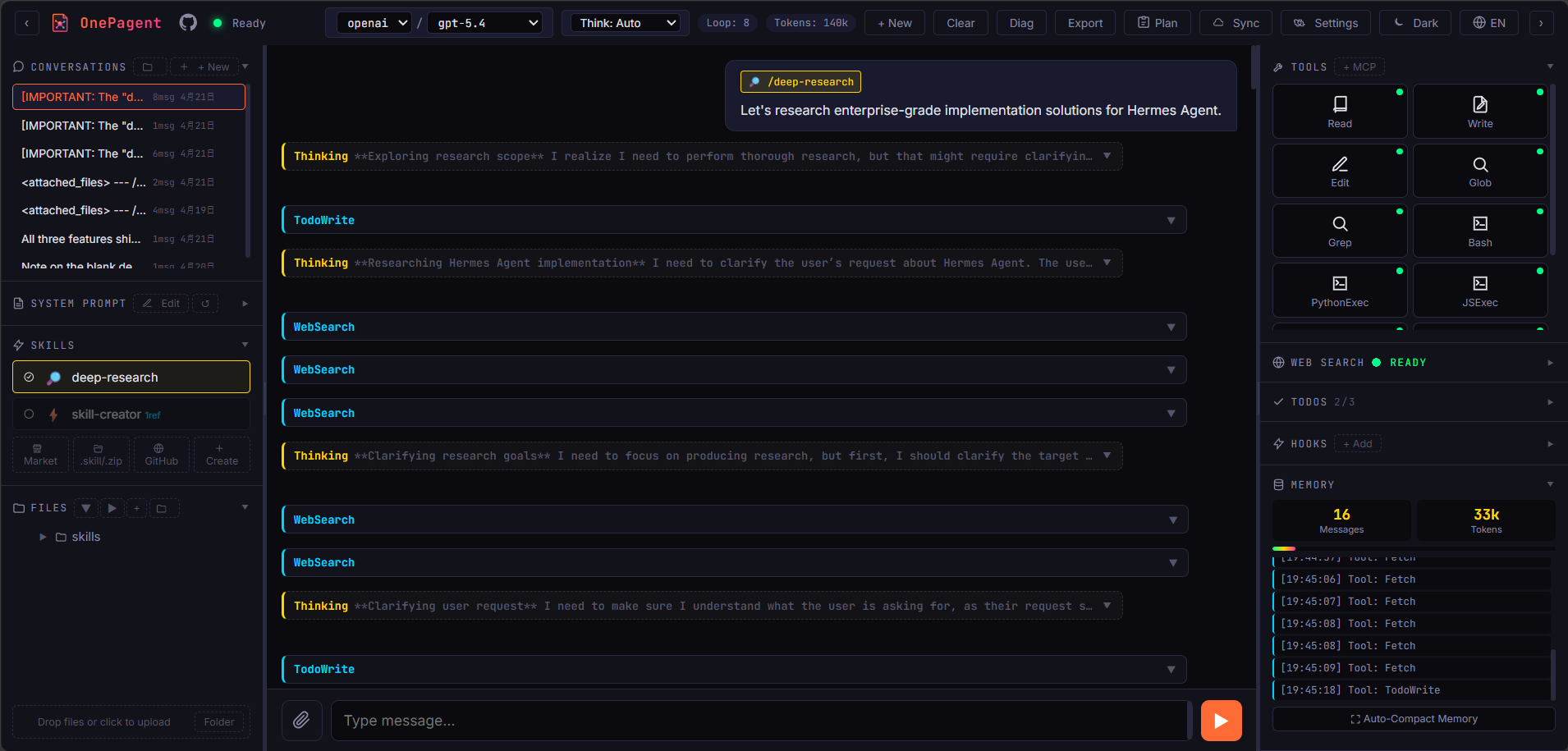
OnePagent puts an AI agent workbench into one HTML file. It runs in the browser and supports chat, tool use, skills, memory, MCP server imports, and Python execution without a backend.
Builders who want a browser-based agent workspace they can run locally or deploy as static files.
You can run and extend an agent workflow from one local page instead of wiring up a separate app and backend.
Open `onepagent.html` locally or put it on any static host.
Connect Anthropic, OpenAI, or DeepSeek endpoints with BYOK keys stored in the browser.
Save facts, preferences, events, and skills across sessions with search and CRUD tools.
Install `.skill` and `.zip` packs, pull from GitHub, or create skills in the app.
Paste `mcpServers` JSON to add `streamable_http` or `sse` connectors.
Run Python in-browser through Pyodide, with an optional remote sandbox for heavier tasks.
Use Plan Mode, Ralph Loop, sub-agents, human approval prompts, and swarm-style parallel runs.
Sync browser state to S3-compatible storage with optional AES-256-GCM encryption.
git clone https://github.com/sligter/OnePagent.git
cd OnePagent
python -m http.server 8000
# or
npx serve .

The browser-native AI agent workbench that lives in a single file.



English | 简体中文
Open one HTML file and you get a fully-featured, internet-aware, programmable, extensible AI agent — multi-turn chat, tool calls, Python sandbox, web search, skills, context compaction, long-term memory, file operations, cloud sync — all running on a single page.
No backend. No
npm install. No Docker. Just one.htmlthat carries an entire universe.
| Capability | Description |
|---|---|
| Single-file deployment | Drop onepagent.html on any static host or open it locally |
| Multi-provider LLM | Anthropic / OpenAI / DeepSeek with custom endpoints; BYOK keys are stored locally and sent directly to the configured API endpoint |
| Reasoning levels | Inline selector with OpenAI none / low / medium / high / xhigh / max tiers (plus Auto) |
| Long context compaction | Per-model context window with automatic LLM-driven summary compression |
| Long-term memory | Opt-in persistent facts / preferences / events / skills across sessions — auto-extraction, agent tools, manual CRUD, tag & keyword search |
| MCP Servers | Paste mcpServers JSON to import (streamable_http / sse), Bearer auth, optional CORS proxy |
| Plan Mode | Agent investigates with read-only tools, drafts a Markdown plan for approval, then executes |
| Ralph Loop | Fully unattended continue-until-done mode with marker, max/unlimited iterations, Stop, and no-progress guard |
| Sub-agents | Delegate bounded read-only research tasks and monitor runs in the side panel |
| Agent Swarm | Opt-in parallel orchestrator-worker fanout: lead emits multiple SwarmSpawn calls in one turn, role-scoped workers (researcher / critic / writer / coder) run concurrently with token budgets |
| Human-in-the-loop | Agent can ask for text, choices, or confirmations when a task needs user input |
| TodoWrite | Agent maintains a visible task list (pending / in-progress / completed) |
| Hooks | User-defined JS handlers on 6 agent lifecycle events |
| Python sandbox | Execute Python in-browser via Pyodide |
| Remote sandbox | Optional isolated runtime for heavier code tasks |
| Web Search | Tavily integration with basic / advanced depth modes |
| Skills system | Install .skill / .zip packs, pull from GitHub, create in-page, or let AI manage skills with SkillManager |
| Conversation management | Multiple sessions, folders, drag-and-drop, IndexedDB persistence, one-click export |
| Cloud Sync | Incremental sync to S3-compatible buckets with optional AES-256-GCM encryption |
┌─────────────────────────────────────────────────────────────┐
│                    onepagent.html                           │
│  ┌───────────┐  ┌──────────┐  ┌────────────┐  ┌──────────┐  │
│  │  UI Shell │  │  Chat /  │  │  Tools /   │  │  Skills  │  │
│  │ (3-column)│  │  Streams │  │  MCP Bus   │  │ Registry │  │
│  └─────┬─────┘  └────┬─────┘  └─────┬──────┘  └────┬─────┘  │
│        │             │              │              │        │
│  ┌─────┴─────────────┴──────────────┴──────────────┴─────┐  │
│  │          Pretext Layout Engine (inlined)             │  │
│  │  markdown → blocks → lines → flowed DOM              │  │
│  └──────────────────────────────────────────────────────┘  │
│        │                                                    │
│  ┌─────┴───────┐ ┌──────────────┐ ┌───────────┐ ┌────────┐  │
│  │ Service     │ │ LocalStorage │ │ Pyodide   │ │ S3     │  │
│  │ Worker      │ │ + IndexedDB  │ │ (Python)  │ │ SigV4  │  │
│  │ (PWA cache) │ │ (all state)  │ │           │ │ Client │  │
│  └─────┬───────┘ └──────────────┘ └───────────┘ └───┬────┘  │
└────────┼──────────────────────────────────────────────┼─────┘
         │                                              │
         ▼                                              ▼
  ┌──────────────┐  ┌────────────┐  ┌──────────┐  ┌─────────────┐
  │  Anthropic   │  │  OpenAI    │  │  Tavily  │  │ Your bucket │
  │  DeepSeek    │  │  …         │  │          │  │ AWS/R2/MinIO│
  └──────────────┘  └────────────┘  └──────────┘  └─────────────┘
git clone https://github.com/sligter/OnePagent.git
cd OnePagent
Double-click onepagent.html, or serve it from any static server:
python -m http.server 8000
# or
npx serve .
Visit http://localhost:8000/onepagent.html, click Settings in the top bar to configure Provider / API Key / Models. Takes effect immediately.
Service Worker note: the bundled
sw.jsis only a PWA/offline cache for the app shell and static assets. LLM and Tavily requests are browser direct fetches with the configured BYOK credentials; the Service Worker does not proxy, inject, or hide API keys.
Install skills from the left Skills panel via Market, .skill/.zip, GitHub, or Create. GitHub folder URLs are supported, e.g. https://github.com/anthropics/skills/tree/main/skills/skill-creator.
The agent can also use SkillManager to list, install, update, enable/disable, or remove skills; remote installs and destructive/high-risk changes require confirmation.
Remote sandbox gives OnePagent an optional isolated runtime for code-heavy work while keeping the app itself a single static HTML file.
OnePagent is a pure static site — runs on any static host:

| Platform | Steps |
|---|---|
| Vercel | Click button, sign in, Deploy — done in ~10 seconds |
| Zeabur | Click button, select your fork, auto-detected as static, Generate Domain |
| Cloudflare Pages | Connect to Git, Framework: None, Build command: empty, Output: /, Deploy |
| GitHub Pages | Settings, Pages, Source: GitHub Actions, push to deploy |
All data lives in the browser. Different domains do not share state. Use Cloud Sync for cross-domain / cross-device sync.
Back up and sync across devices via any S3-compatible bucket. Configure it in Settings → Cloud Sync.
Ralph Loop keeps the agent working after a normal response ends. Turn on Ralph, send a task, and OnePagent will re-enter it until it sees the completion marker or a guard stops the run.
RALPH_DONE).AskUser uses defaults or cancels instead of opening a modal; Plan Mode is never auto-approved.Example: Audit this page, fix what you can, and when finished include RALPH_DONE.
Long-term memory stores reusable facts across conversations. Enable it in Settings → Memory.
fact / preference / event / skill / note records in IndexedDB.memory_save, memory_search, memory_update, memory_forget.AskUser supports text, choices, and confirmations for decisions the model should not guess.Opt-in parallel multi-agent runtime. Enable in Settings → Agent Swarm.
SwarmSpawn(role, task) calls in one turn; they run in parallel up to Max concurrency. Built-in roles: researcher, critic, writer, coder.SwarmHandoff(role, brief), e.g. researcher → critic → writer. Cycles and depth-overflow rejected.bb_write / bb_read / bb_list / bb_post_task / bb_claim. Latest entries auto-injected into each worker's prompt.bindSkills grants any installed skill's tools. JSON import / export.Guards: per-worker and per-turn token budgets, concurrency cap, Plan Mode inheritance, Ralph Loop mutex, recursion blocked. Hooks pre_swarm_spawn / post_swarm_spawn join the existing six. Set Worker model override (e.g. Haiku) to keep workers cheap while the lead runs on a frontier model.
Best for breadth-first work (research, comparison). Skip for tightly coupled refactors.
All settings and conversations live in the browser (localStorage + IndexedDB). OnePagent has no server; requests go from your browser to your configured API endpoint.
Single-file project — fork it, edit it, send a PR.
onepagent.html runnable on its ownindex.html is a redirect shim only — no real logicMIT (c) OnePagent contributors
One Page. Omnipotent Agent.
Built for people who believe a single HTML can still do everything.
Sign in to join the discussion.
No comments yet. Be the first to say what this is good for.
🪨 why use many token when few token do trick — Claude Code skill that cuts 65% of tokens by talking like caveman

The best-benchmarked open-source AI memory system. And it's free.

Orca is the ADE for working with a fleet of parallel agents. Run any coding agent with your own subscription. Available on desktop, mobile and remote runtime.

A cross-platform desktop All-in-One assistant for Claude Code, Codex, OpenCode, OpenClaw, Grok Build & Hermes Agent. Only official website: ccswitch.io

Never stop coding. Free MIT AI gateway: one endpoint, 352 providers (150+ free), 1200+ models Kimi, Claude, GPT, Gemini, GLM, DeepSeek, MiniMax. Works with Claude Code, Codex, Cursor, OpenCode, Cline & Copilot. Quota-aware auto-fallback, RTK+Caveman compression saves 15-95% tokens, MCP/A2A, Desktop/PWA. Built by 550+ contributors

Compress tool outputs, logs, files, and RAG chunks before they reach the LLM. 20% fewer tokens for coding agents, 60-95% fewer tokens for JSON, same answers. Library, proxy, MCP server.