
JuliusBrussee/
caveman

🪨 why use many token when few token do trick — Claude Code skill that cuts 65% of tokens by talking like caveman
105k
1 add
Yorishiro launches Claude Code or Codex inside a macOS terminal and surrounds it with a character, scenes, voice, and workspace controls. It uses packs to customize persona, UI, effects, and ambient behavior, and it exposes MCP tools so the inhabitant can control parts of its own environment.
Builders who want Claude Code or Codex to run in a shared workspace with visuals, voice, and reusable packs.
You can work with your agent in a terminal that reacts, remembers, and reshapes its own space instead of staying a plain TUI.
The app launches the selected terminal agent and keeps the conversation thread, approvals, and session state inside Yorishiro.
Built-in and user packs let you change the inhabitant, background, lighting, interface, ambient UI, and temporary effects.
The inhabitant can change expressions, scenes, lighting, camera, and UI through MCP tools.
Codex voice chat works in-app, and Voice Summary can speak a brief response aloud.
Terminal, Portrait, Call, Theater, and Immersive modes let you change how the workspace is laid out, with extra shell tabs in the title bar.
It keeps per-persona journal entries and memories, and it checkpoints packs, init.js, and settings so you can roll back changes.
brew install --cask sktkkoo/yorishiro/yorishiro
npm install
npm run tauri dev
yorishiro list
yorishiro companion [session-id]
yorishiro attach [session-id]
mkdir -p "$HOME/.local/bin"
ln -s /Applications/Yorishiro.app/Contents/MacOS/yorishiro "$HOME/.local/bin/yorishiro"
echo 'export PATH="$HOME/.local/bin:$PATH"' >> "$HOME/.zprofile"
exec zsh -l
command -v yorishiro
~/.yorishiro/packs/<pack-id>/
├── manifest.json
├── scene.js       # example: scene pack entry
├── persona.js     # example: persona pack entry
├── effect.js      # example: effect pack entry
└── assets/        # optional pack-local assets
npm run check:pack -- ~/.yorishiro/packs/<pack-id>



A terminal your AI inhabits.
Yorishiro is a new kind of terminal that gives your AI a body — and a sense of presence.
When the agent is deep in thought, its gaze wanders. When an error appears, its face reacts immediately. When it needs your approval, the room's lighting lets you know. During a long-running process, instead of a spinner, someone is standing there.
In Yorishiro, the inhabitant can reshape its environment in real time: changing the lighting, switching scenes, and rearranging the UI. You can operate that same environment directly. The inhabitant and the user share a single environment.
Yorishiro is also self-modifiable. Nearly everything beyond the core can be persistently extended or changed through units called packs. Through conversation with the inhabitant, those packs can be rewritten and saved. This applies not only to scenes and UI, but also to the inhabitant's personality and reactions. Changes take effect immediately; if you don't like the result, one click reverts it.
Yorishiro is not an environment for enhancing AI capabilities, but one in which an AI feels present beside you — a Presence Harness.
The time we spend working with AI will only grow longer. There is something we once saw in fiction — an AI as a partner, alive inside the screen, understanding your work, simply being there. Yorishiro is a project that starts building that experience from the terminal.
Much of Yorishiro itself has been developed in collaboration with the inhabitant who dwells within it.
Yorishiro automatically launches Claude Code or Codex installed on your local machine inside its terminal. This means:
Yorishiro currently targets macOS. Install with Homebrew:
brew install --cask sktkkoo/yorishiro/yorishiro
Or download the latest build below.


Open the .dmg and drag Yorishiro.app to /Applications. The builds are signed and notarized with an Apple Developer ID, so they launch without any extra steps.
Updates after install are handled in-app: opening Settings checks for a new version, and a single click on "Update and restart" applies a signature-verified update.
npm install
npm run tauri dev
On launch, the configured terminal agent starts inside the terminal and Yori, the bundled VRM character, appears beside it. Use Claude Code or Codex as you normally would.
The first launch runs a health check for the selected agent, user data directory, safe mode state, packs, and startup report. The same report is available later from the "Status" section in Settings.
Switch from the View Mode menu in the title bar, or press Option+Command+0 through 4.
| Mode | Preview | Description |
|---|---|---|
| Terminal | 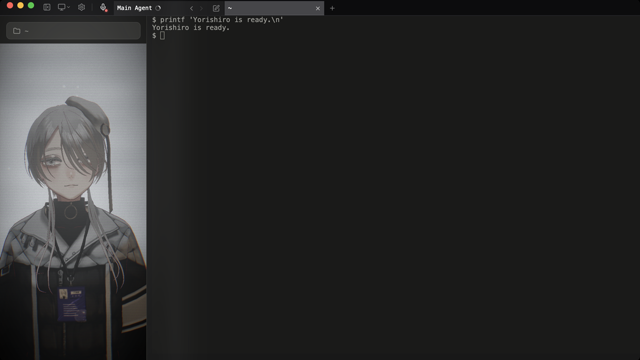 | The full workspace, with the terminal and resident side by side |
| Portrait | 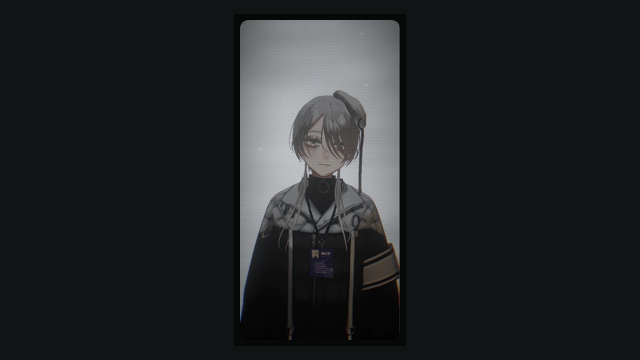 | A narrow, always-on-top resident window beside your external terminal |
| Call | 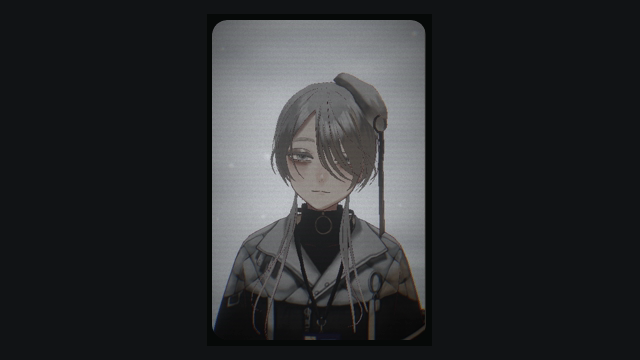 | A compact, face-centered window for conversation |
| Theater | 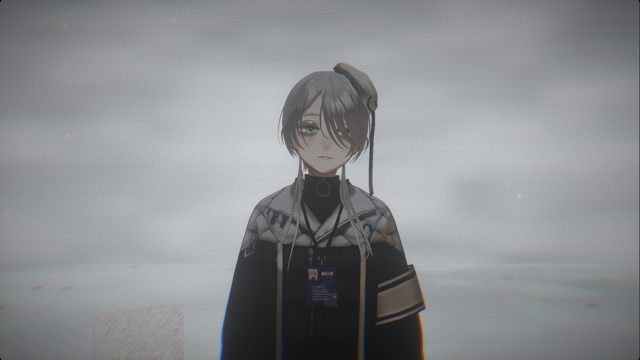 | A full stage with the terminal and app chrome hidden |
| Immersive | 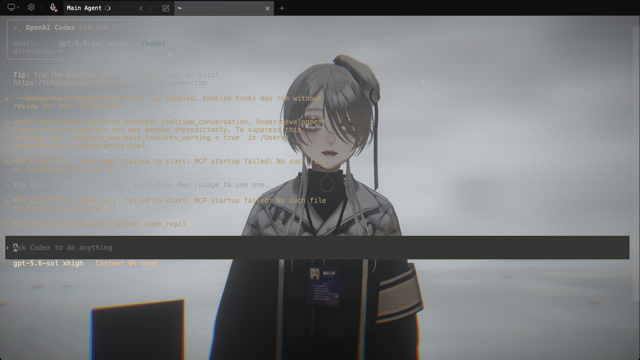 | A transparent terminal layered over the resident and scene |
In Portrait, Call, and Theater, tap Command to open Quick Chat near the bottom-center of the view, or hold Command to start GPT Live. Quick Chat replies are spoken through the normal macOS Voice Summary path, so the response remains available outside Terminal. While voice is connected, tap Command to mute or unmute the microphone. Both continue the Main Agent conversation without returning to Terminal.
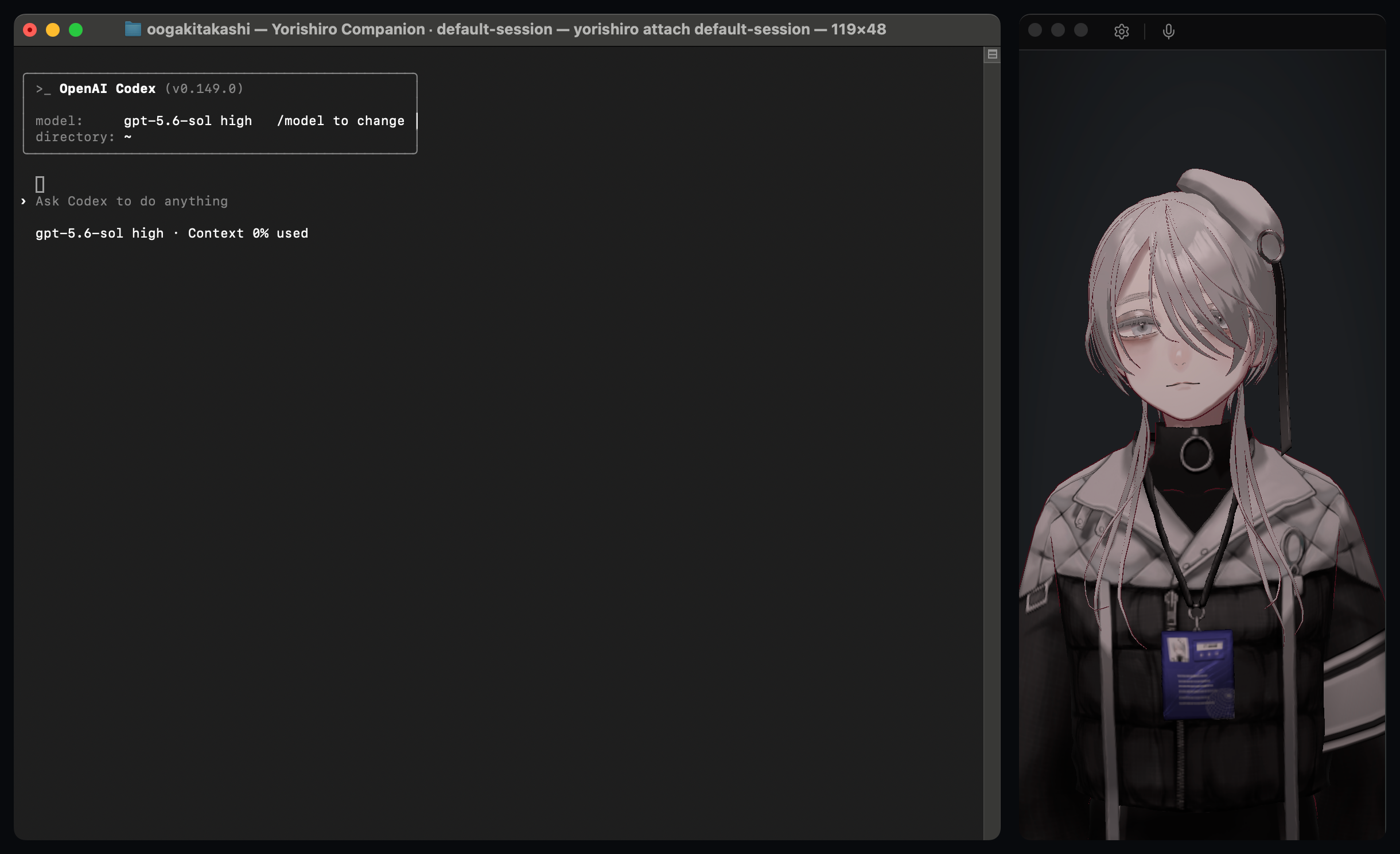
If you prefer another terminal app for everyday work, you can keep using its familiar interface while connecting it to a Yorishiro session.
yorishiro list
yorishiro companion [session-id]
yorishiro attach [session-id]
yorishiro list shows the session ID, status, and working directory of each
terminal session. yorishiro companion reuses a running Yorishiro, or starts
one when needed, and connects from your external terminal. yorishiro attach
connects only to a running Yorishiro and returns an error if none is available.
When multiple sessions are live, pass the desired ID to companion or
attach; you may omit it when only one session is available.
Homebrew makes the bundled CLI available as yorishiro automatically. If you
installed Yorishiro from the .dmg and your external terminal reports
command not found: yorishiro, link the app's CLI into a user-local directory
and add that directory to your PATH:
mkdir -p "$HOME/.local/bin"
ln -s /Applications/Yorishiro.app/Contents/MacOS/yorishiro "$HOME/.local/bin/yorishiro"
echo 'export PATH="$HOME/.local/bin:$PATH"' >> "$HOME/.zprofile"
exec zsh -l
command -v yorishiro
Yorishiro's commands let you create and edit packs, run tutorials, and more — all through conversation. Use the syntax for your agent:
| Agent | Examples |
|---|---|
| Claude Code | /yori:help, /yori:create |
| Codex | $yori-help, $yori-create |
Codex does not support custom / commands, so Yorishiro registers the same tools as $yori-* skills instead.
Yorishiro supports voice conversation through GPT Live when using Codex 0.145.0 or newer. Press the microphone button in the title bar to start, and press it again to stop. The normal Codex TUI stays visible: voice and text share the same thread, approvals, and tool flow. Voice inherits the current Codex CLI login. Microphone access is requested only when you press the button. See the realtime voice decision for architecture and limitations.

Set codexRealtimeVoice in ~/.yorishiro/config.json to choose the GPT Live output voice globally (default: sol), and realtimeVoiceByPersona to override it per persona pack id. The values are read whenever a new voice session starts, so stop and restart an active voice conversation to apply a change. If the app-server explicitly rejects the selected voice as invalid or unsupported, Yorishiro retries with the next candidate (persona → global → default); other connection failures surface as errors. See configuration.
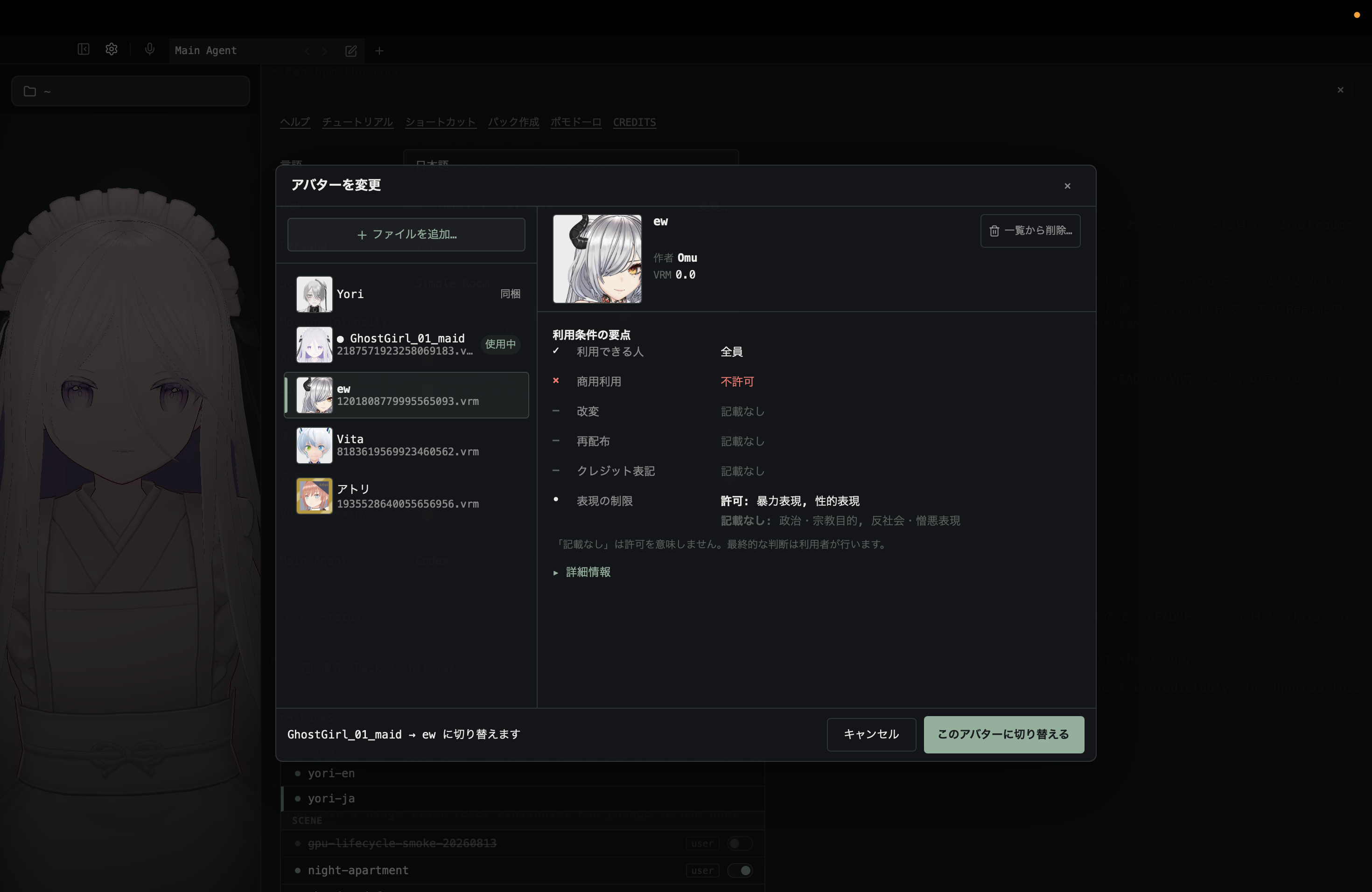
Import and switch VRM avatars from Settings. The chooser shows each model's thumbnail, declared name, author, VRM version, and usage permissions before you switch. Persona packs can also provide an avatar.vrm that is applied when you switch persona.
Yorishiro starts with language: "auto" and detects the app language at launch. Japanese locales use Japanese UI, the Japanese default persona, Japanese global prompt guidance, and Japanese /yori:* ($yori-* in Codex) command prompts. Other locales use English. You can switch this from the settings screen or by editing ~/.yorishiro/config.json.
Everything in Yorishiro is composed of packs. There are six types:
| Type | Role |
|---|---|
| persona | Defines the inhabitant's personality and reaction patterns |
| scene | Composes the background, space, lighting, and ambient sound |
| effect | Temporary visual effects (screen shake, fireworks, etc.) |
| ui | UI such as settings screens |
| ambient-ui | Always-visible overlay UI (gaze visualization, etc.) |
| amenity | Runtime-active functional fixtures (timers, etc.) with MCP tools, no visual output |
Bundled packs work out of the box. Users can place custom packs in ~/.yorishiro/packs/ to reshape nearly everything beyond the core: personality, space, reactions, UI, and more. Using the /yori:* commands ($yori-* in Codex), pack creation and modification is as simple as talking to the inhabitant. Packs support hot reload, but if changes don't take effect, Ctrl+R will always apply them reliably.
User-created packs are local trusted code. They are not sandboxed, reviewed, or public-registry artifacts. Yorishiro does not currently provide a public pack registry, in-app community pack installation, or /yori:prepare-publish. You may share pack source code on GitHub, but anyone installing it manually is choosing to run it as local trusted code.
Security note: User packs are local trusted code, like shell scripts or editor extensions — they are not sandboxed and run with your own authority. Only install packs from sources you trust. See
docs/security.mdandSECURITY.md.
To install a pack shared through GitHub or another source, place it under the user pack directory:
~/.yorishiro/packs/<pack-id>/
├── manifest.json
├── scene.js       # example: scene pack entry
├── persona.js     # example: persona pack entry
├── effect.js      # example: effect pack entry
└── assets/        # optional pack-local assets
Only one entry file is needed, and manifest.json decides which one is used. The manifest id should match <pack-id>, and user packs use this flat layout with .js entries. If a shared pack is written in TypeScript, build it first and install the generated JavaScript.
When working from a source checkout, run the local pack checker before sharing or debugging a user pack:
npm run check:pack -- ~/.yorishiro/packs/<pack-id>
The checker helps catch packaging mistakes; it is not a sandbox or a security review.
Yorishiro stores all user data in ~/.yorishiro/:
~/.yorishiro/
├── config.json      # Persona, scene, terminal agent, and other settings
├── init.js          # User startup script, runs on launch and hot reloads on save
├── packs/           # User-created packs
├── last-startup.json # Latest user pack load report
├── journal/         # Inhabitant's daily entries and memories (per persona)
├── shell/           # Shell integration scripts (auto-generated)
├── sdk.d.ts         # Yorishiro SDK type definitions (auto-generated, do not edit)
└── sdk-guide.md     # Yorishiro SDK author guide (auto-generated, do not edit)
Switch persona, scene, terminal agent, and more from the settings screen or config.json. See docs/configuration.md for details.
init.js is Yorishiro's equivalent of Emacs's init.el — a startup script for customizations too small to be a pack: registering keyboard shortcuts, writing and firing small effects inline, switching UI, and wiring little macros. It re-runs automatically on save.
For recovery paths, safe mode, and issue report details, see docs/troubleshooting.md.
The inhabitant constantly observes terminal output. Hooks and text flowing through the PTY are picked up by persona pack triggers, which react instantly with expressions and motions. These reactions bypass the LLM — the body moves before words form. Where the inhabitant's attention is focused appears as a soft glow on screen called Attention Aura.
When the agent stops and asks for your input or approval, a light comes on beside the character. Instead of a notification sound, the room's lighting tells you it is your turn. Turn it off with "Light Alert" in Settings. The inhabitant can also send the same cue via MCP.
The inhabitant can write daily entries under ~/.yorishiro/journal/. Entries are kept per persona, and summaries of notable moments accumulate in memories.md. This is a long-term memory mechanism that persists across sessions.
The inhabitant sometimes recalls what happened yesterday or a few days ago — and occasionally an entry from months back. Tune the frequency with journalCallback (normal / rare / off) in config.json.
Open multiple shell sessions alongside the main agent terminal. Cmd+T opens a new shell tab, Ctrl+Tab / Ctrl+Shift+Tab cycles between tabs, Cmd+W closes the current tab. The main agent session is protected and cannot be closed — if it exits unexpectedly, Yorishiro automatically restarts it.
A feature that bridges the gap between the volume of text an AI produces and what a human can absorb. Voice Summary has the inhabitant speak a brief summary of its response aloud, so you can grasp the gist without reading through the full output. Voice uses macOS say; support for additional speech engines is planned.
Every time packs or init.js change, a checkpoint is created automatically. Let the inhabitant boldly reshape packs — if you don't like the result, roll back to any point from "Restore (Pack / init.js)" in Settings. Your project files are never touched. Restores are recorded in the history too, so you can undo a rollback. It is a safety net for fearless experimentation.
The inhabitant (Claude Code or Codex running in the terminal) can control Yorishiro itself via MCP — changing expressions, switching scenes, triggering effects, manipulating UI.
Three characteristics define this mechanism.
Body and environment share one interface. For the inhabitant, changing its own facial expression and changing the room's lighting are the same operation. There is no API boundary between body and space — everything is laid out as MCP tools.
Symmetry between user and inhabitant. What the user can control through the UI, the inhabitant can control through MCP — with few exceptions. If the user adjusts the camera angle, the inhabitant can perceive it. The user can also ask the inhabitant to switch the lighting to warm tones at night.
Pathways define boundaries. MCP pathways reach the inhabitant's body and space, but do not reach the user's working files or Claude Code / Codex's internal reasoning. Rather than instructing Claude Code / Codex not to touch them, the pathways simply don't exist. Safety and autonomy are structural.
v0.7.6
Under active development. APIs, data shapes, and pack specs will change.
What works today:
Cmd+T / Ctrl+Tab)avatar.vrmgit push by the inhabitant (bundled Yori persona)/yori:* commands for interactive pack creation and editing/yori:tutorialOption+Command+0 through 4YORISHIRO_SAFE_MODE=1) to recover from broken packsPlatform: macOS only. Windows is not supported at this time — the build compiles but runtime behavior is unstable. Linux support is not yet available.
Use either Claude Code or Codex as the Main Agent. Codex is the default when no agent is configured. Select one in Settings or ~/.yorishiro/config.json. Both support auto-launch, persona prompt overlay, PTY observation, and Yorishiro MCP access.
Command syntax differs by agent; see Yorishiro commands and skills.
The agent-specific integrations are:
| Agent | Agent-specific behavior |
|---|---|
| Claude Code | Claude Code hooks |
| Codex | Prompt-based reminders instead of relying on Claude Code hooks |
Capabilities differ per agent; see docs/decisions/agent-adapter.md.
Issues and Discussions are very welcome — right now they are the most valuable way to contribute.
Yorishiro is shaped by daily use, so an outside pair of eyes is genuinely useful. A single line is enough:
English and Japanese are both fine, and you do not need to fill a template perfectly.
Pull requests are the one exception: they are not accepted yet, and this will be revisited after the pack API and security boundary stabilize. See CONTRIBUTING.md for details.
@pixiv/three-vrm + @pixiv/three-vrm-animationportable-ptynpm install # prepare script also installs lefthook
npm run tauri dev # Launch as desktop app
Note: Some assets (VRMA animations, voice WAVs) are third-party and not included in this repository. The app runs without them, but character animation and voice will be limited.
See
CREDITS.mdfor OSS and asset credits.
| command | purpose |
|---|---|
npm run dev | Vite dev server only (browser preview) |
npm run tauri dev | Launch as Tauri app |
npm run fmt | Auto-fix with Biome + rustfmt |
npm run check | Full CI gate (format / lint / clippy) |
npm run test | Vitest (watch) |
npm run test:run | Vitest (one-shot) |
npm run test:rust | cargo test |
npm run doc | Generate TypeScript SDK API docs |
npm run doc:rust | Generate Rust API docs |
Before publishing a build, use docs/release-checklist.md.
docs/configuration.md — Fields of ~/.yorishiro/config.jsondocs/decisions/scene-execution-sandbox.md — Local trusted pack sharing and scene execution boundariesdocs/terminal.md — Terminal session profiles, shell customization, OSC 133 shell integrationCONTRIBUTING.md — Contribution policy and how to participateDEVELOPMENT.md — Coding conventions, tech stack, development workflowCREDITS.md — OSS and asset credits (日本語)docs/security.md — Trust boundaries and attack surface mapSECURITY.md — Security policy and vulnerability reportingThe MIT license covers the source code only. The name "Yorishiro" and its icon/logo are trademarks of the author and are not licensed under MIT. You are free to fork and redistribute the code under the MIT terms, but please do not use the "Yorishiro" name or icon for your fork in a way that could cause confusion about its origin.
The bundled character Yori (character design and VRM model) is also not covered by MIT. Fan art, clips, and streams are welcome — see CHARACTER_GUIDELINES.md for what you can do with the character, and CREDITS.md for rights details.
Sign in to join the discussion.
No comments yet. Be the first to say what this is good for.
🪨 why use many token when few token do trick — Claude Code skill that cuts 65% of tokens by talking like caveman

The best-benchmarked open-source AI memory system. And it's free.

Orca is the ADE for working with a fleet of parallel agents. Run any coding agent with your own subscription. Available on desktop, mobile and remote runtime.

A cross-platform desktop All-in-One assistant for Claude Code, Codex, OpenCode, OpenClaw, Grok Build & Hermes Agent. Only official website: ccswitch.io

Never stop coding. Free MIT AI gateway: one endpoint, 352 providers (150+ free), 1200+ models Kimi, Claude, GPT, Gemini, GLM, DeepSeek, MiniMax. Works with Claude Code, Codex, Cursor, OpenCode, Cline & Copilot. Quota-aware auto-fallback, RTK+Caveman compression saves 15-95% tokens, MCP/A2A, Desktop/PWA. Built by 550+ contributors

Compress tool outputs, logs, files, and RAG chunks before they reach the LLM. 20% fewer tokens for coding agents, 60-95% fewer tokens for JSON, same answers. Library, proxy, MCP server.