
affaan-m/
ECC

affaan-m/ECCHarnesses
The agent harness performance optimization system. Skills, instincts, memory, security, and research-first development for Claude Code, Codex, Opencode, Cursor and beyond.
258k
cap-evolve takes an agent, an eval, and a candidate capability set, then searches for edits that improve the score without regressing held-out tasks. It works on system prompts, tools, MCP surfaces, and skill packages, and records each accepted change as a git-backed run.
Builders who want their agent to get better by running against their own evals.
You can tune an agent’s prompts, tools, and skills with held-out checks instead of manual guesswork.
Runs evaluate, diagnose, propose, validate, and commit cycles from failed trajectories and task-level feedback.
Can change system prompts, tool code, MCP tool surfaces, and skill packages in one run.
Uses a validation split with a significance gate and keeps the test split sealed until the end.
Stores each candidate as a commit so you can inspect diffs, lineage, and accepted changes.
Shows runs in the CLI and in a dashboard with tasks, cost, logs, diffs, and trajectories.
Includes starter adapters for common benchmark styles so you can wire in your own eval faster.
git clone https://github.com/skillberry-ai/cap-evolve.git
cd cap-evolve

python3 -m venv .venv && source .venv/bin/activate
pip install ./core                 # package: cap-evolve-core · CLI: cap-evolve · zero runtime deps

bash examples/toy_calc/run.sh
baseline_val 0.0 -> test_reward 1.0 (gate-accepted, test sealed) + dashboard.html

watch capability evolve

-orange)

-success)


cap-evolve improves an AI agent's prompts, tools, and skills by learning from failed evaluation traces.
You bring the agent and the eval you already have. cap-evolve runs the loop — evaluate → diagnose the failures → propose an edit → keep it only if it beats a held-out split by a significant margin → commit — and reports one honest number. It optimizes what your agent reads, not its weights.
▶︎ Watch
the 85-second demo · plays inline on the site
Quickstart · Documentation · Examples · Results · Contributing
toy_calc is a deterministic stand-in agent that only answers correctly when its system
prompt contains a [CALC] marker. The mock optimizer adds it, so the score provably
rises — no model is called.
git clone https://github.com/skillberry-ai/cap-evolve.git
cd cap-evolve

python3 -m venv .venv && source .venv/bin/activate
pip install ./core                 # package: cap-evolve-core · CLI: cap-evolve · zero runtime deps

bash examples/toy_calc/run.sh
Expected — the seed prompt scores 0.0 on val; the optimized prompt is gate-accepted and
scores 1.0 on the sealed test split:
baseline_val 0.0 -> test_reward 1.0 (gate-accepted, test sealed) + dashboard.html
Open the printed dashboard.html in any browser. Full walkthrough:
Getting started.
Start with no arguments — cap-evolve prints a branded home screen with the golden path and
every command grouped by what it's for.
cap-evolve                         # home: the 3-step path + all commands
cap-evolve init                    # scaffold a project and write capevolve.yaml
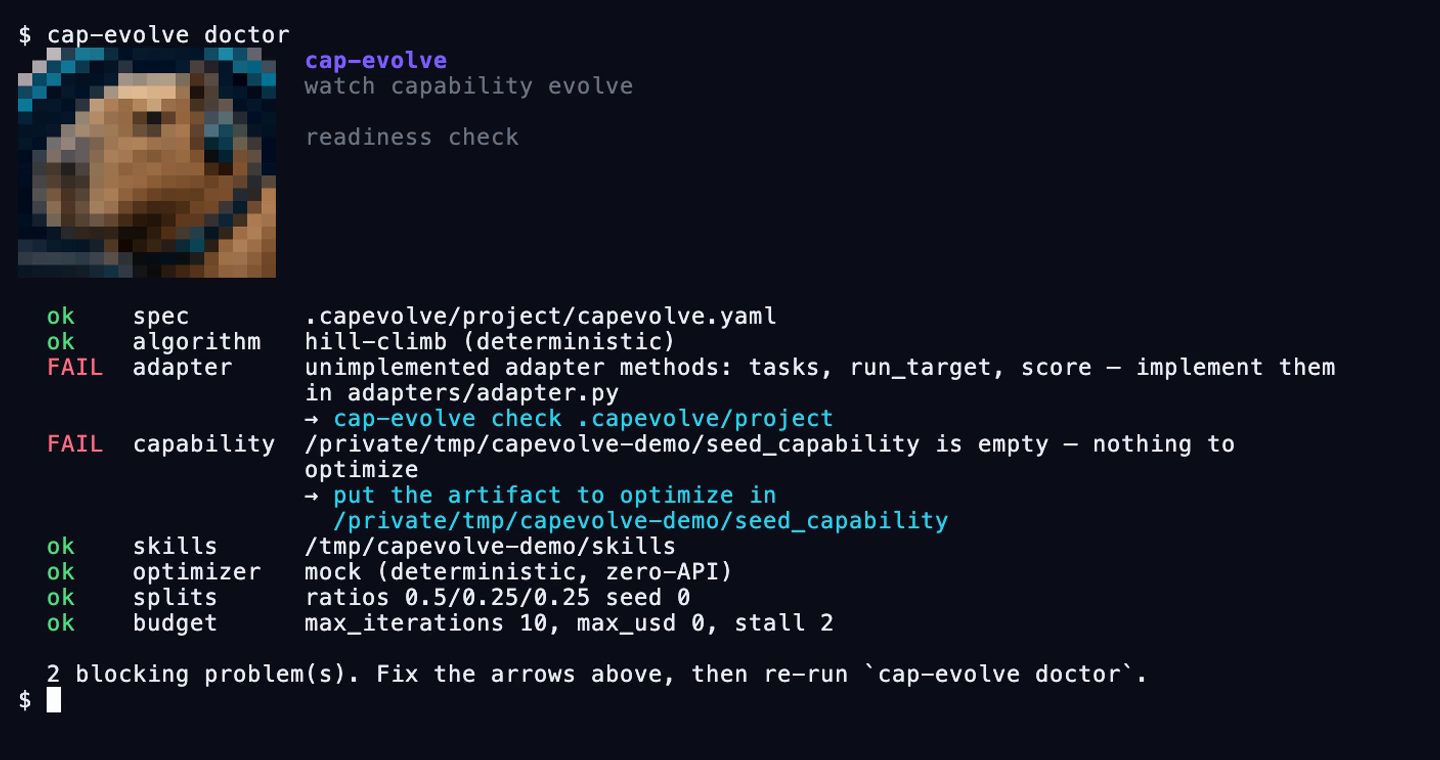
cap-evolve doctor                  # readiness check: what's missing + the command that fixes it
cap-evolve algorithms              # the five algorithms and the exact spec lines to pick one
cap-evolve help <command>          # full help with copy-paste examples
doctor is the one to run before spending anything. Every failing row names the fix:
Every candidate is a snapshot, so you can read the edit that moved the number — unified below 120 columns, side-by-side above:
cap-evolve diff --best             # seed → the winning candidate
cap-evolve diff cand_0003          # against its parent
cap-evolve diff cand_0003 --stat   # just the per-file +/- counts
cap-evolve watch                   # live view of the newest run
cap-evolve replay --demo           # no API key, no config — replays a bundled recording
cap-evolve run --tui               # the live view instead of the line log
cap-evolve watch --diff            # …and show what each accepted candidate changed
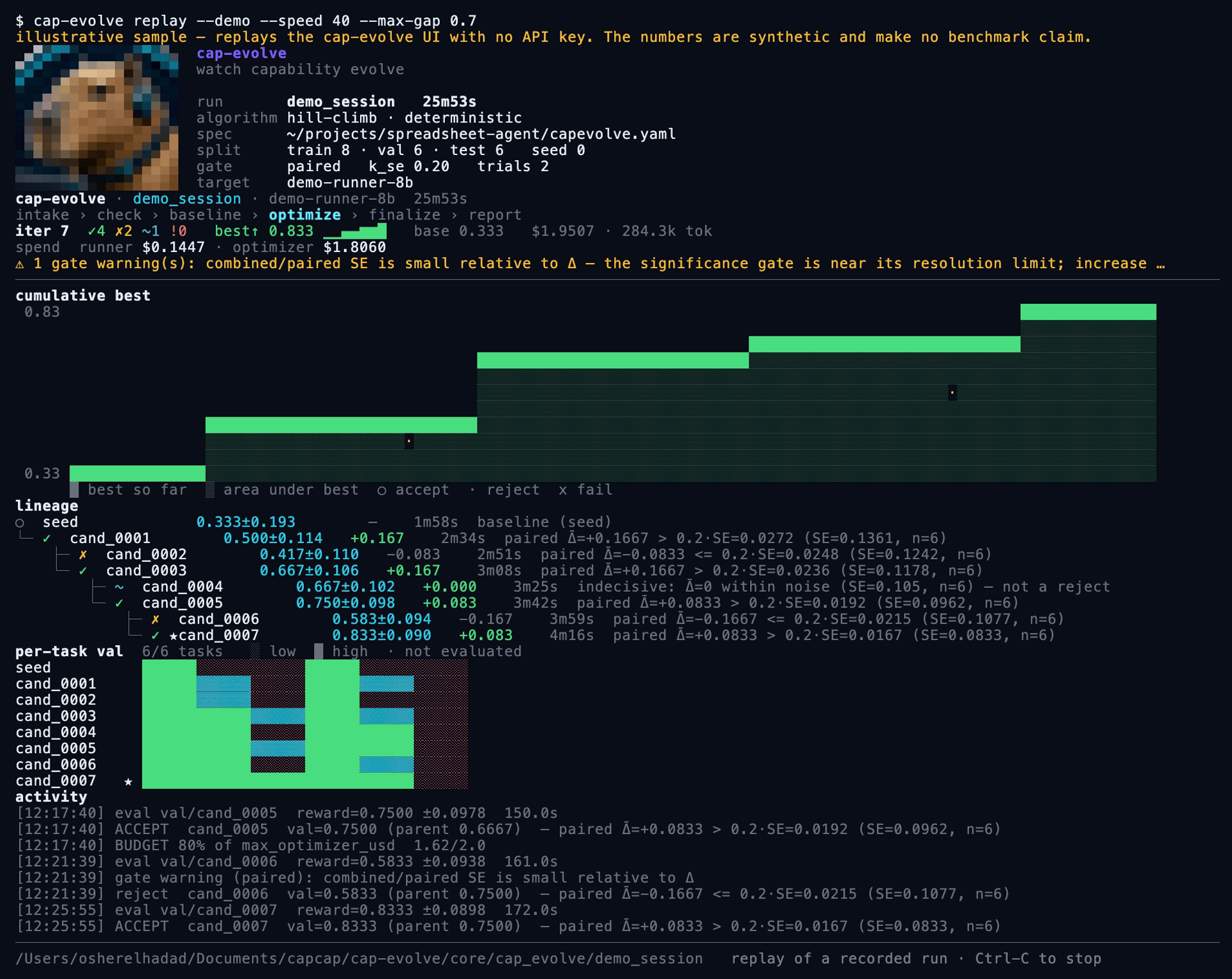
The live view. The masthead answers is this the run I meant to launch? — resolved
spec, algorithm and mode, split sizes, gate bar. Then the cumulative-best stair, the lineage
with the paired-gate reason behind every accept (✓), reject (✗) and
indecisive (~) step, a per-task heatmap that marks
not evaluated distinctly from failed, and spend split into
runner / optimizer / intake.
cap-evolve dashboard # live, over a base dir of runs
Every run gets the same tabs whatever algorithm produced it — Overview, Candidates, Gate,
Tasks, Cost, Logs, Diffs, Trajectories, Memory, Files — and an algorithm that has extra signal
gets an extra tab rather than a different dashboard. GEPA's minibatch-vs-full-val gates and
Pareto selection, SkillOpt's epochs and edit-budget schedule, and
agent-optimize's free-form rounds are all read from events the engine already emitted.
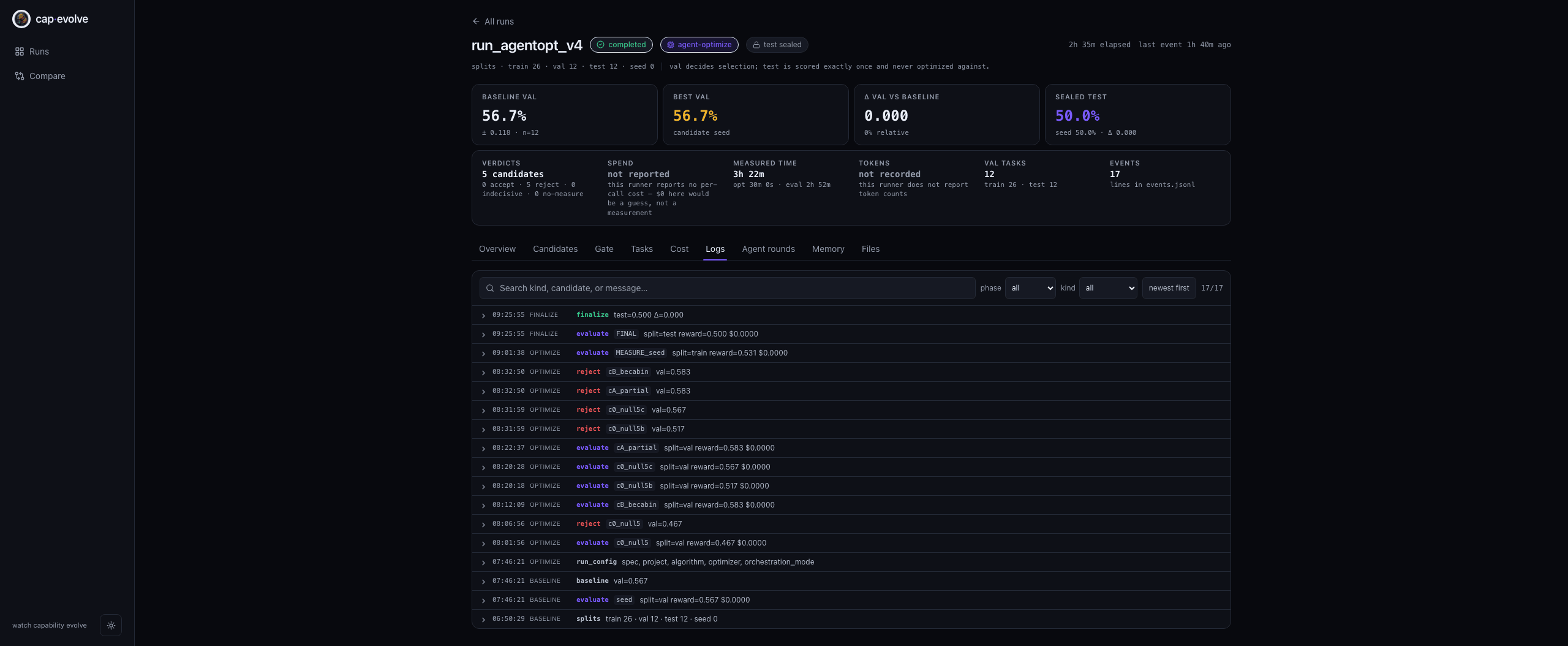
Logs: every line of events.jsonl, phase-tagged and filterable — including the
optimizer's own stderr and each budget warning. Model- and subprocess-authored text is
sanitized and rendered as text nodes only, so a log line can never drive the page.
The dashboard and the terminal are the same projection (events.jsonl → reduce_run), so they
cannot disagree about what happened. run also writes a self-contained dashboard.html that
needs no server.
| Path | Use it when | Start |
|---|---|---|
| Claude Code plugin | You use Claude Code and want slash commands + honesty hooks | claude --plugin-dir ./plugins/cap-evolve then follow RUN.md |
| Another coding-agent host | Codex, Gemini, opencode, Cursor, Droid, Copilot, Kimi, Pi, Antigravity, openclaw, IBM Bob, bare | ./install.sh --host <name> then follow RUN.md |
| Manual adapter + CLI | You want to wire the adapter yourself and drive cap-evolve directly | Optimize your own agent |
Each path shares the same core install and the same honesty guarantees. Full setup, credentials, and the optional dashboard: Installation.
| Capability | What the optimizer may change |
|---|---|
| System prompts | Rewrite / consolidate / add rules, examples, output contracts — never drop a needed rule |
| Tool implementations | Edit tool code for deterministic enforcement; add/wrap/swap tools (never bare-remove) |
| MCP tool surfaces | Safe edits only — tool docs, in-description examples, and which tools are exposed |
| Skill packages | An Agent Skill dir — SKILL.md bodies, references, and executable scripts |
Combine them, e.g. [system-prompt, tools]. See Architecture.
Each result is labeled fit metric (no holdout) or held-out (test scored once on ids the optimizer never saw). Full detail, models, task/trial counts, commits, and costs: docs/RESULTS.md. Every row is cross-checked against a committed run artifact except RH-SWE-bench, whose artifact is not in this repo — see the caveats in docs/RESULTS.md before quoting it.
| Benchmark | Split | Baseline → Optimized | Gain |
|---|---|---|---|
| RH-SWE-bench (skill-package + system-prompt, Harbor) | val — fit metric (119 tasks) | 0.580 → 0.765 | +0.185 / +31.9% |
| toy_calc (zero-API) | sealed test | 0.0 → 1.0 | deterministic proof |
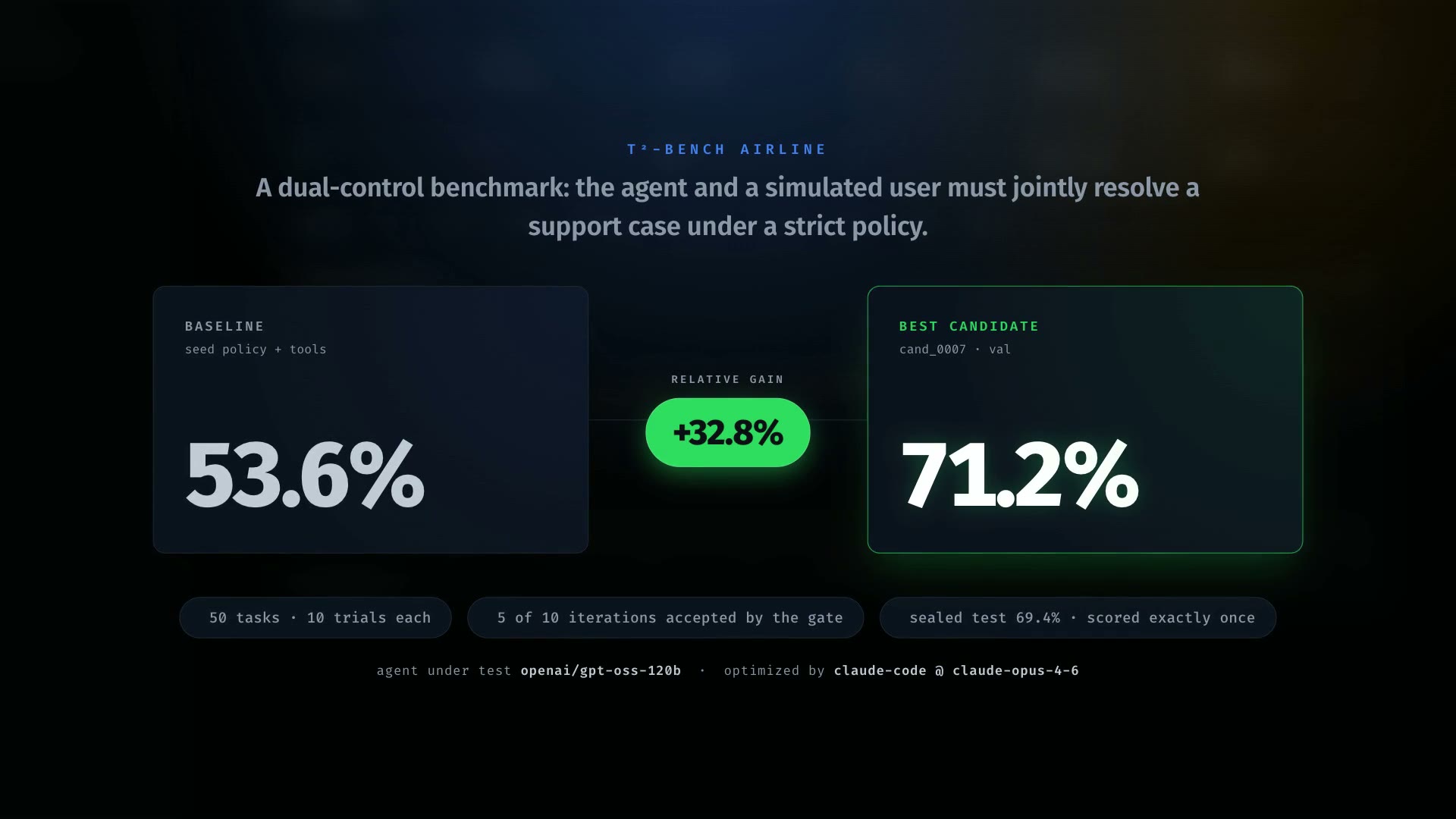
| τ²-bench airline (policy + tools) | val — fit metric | 0.536 → 0.712 | +0.176 / +32.8% |
| τ²-bench airline, held-out 30(=val)/20 | sealed test | 30.0 → 47.5 | +17.5 pp / +58.3% |
| SkillsBench (skill package) | sealed test (held-out) | 0.556 → 0.667 | +0.111 / +20.0% |
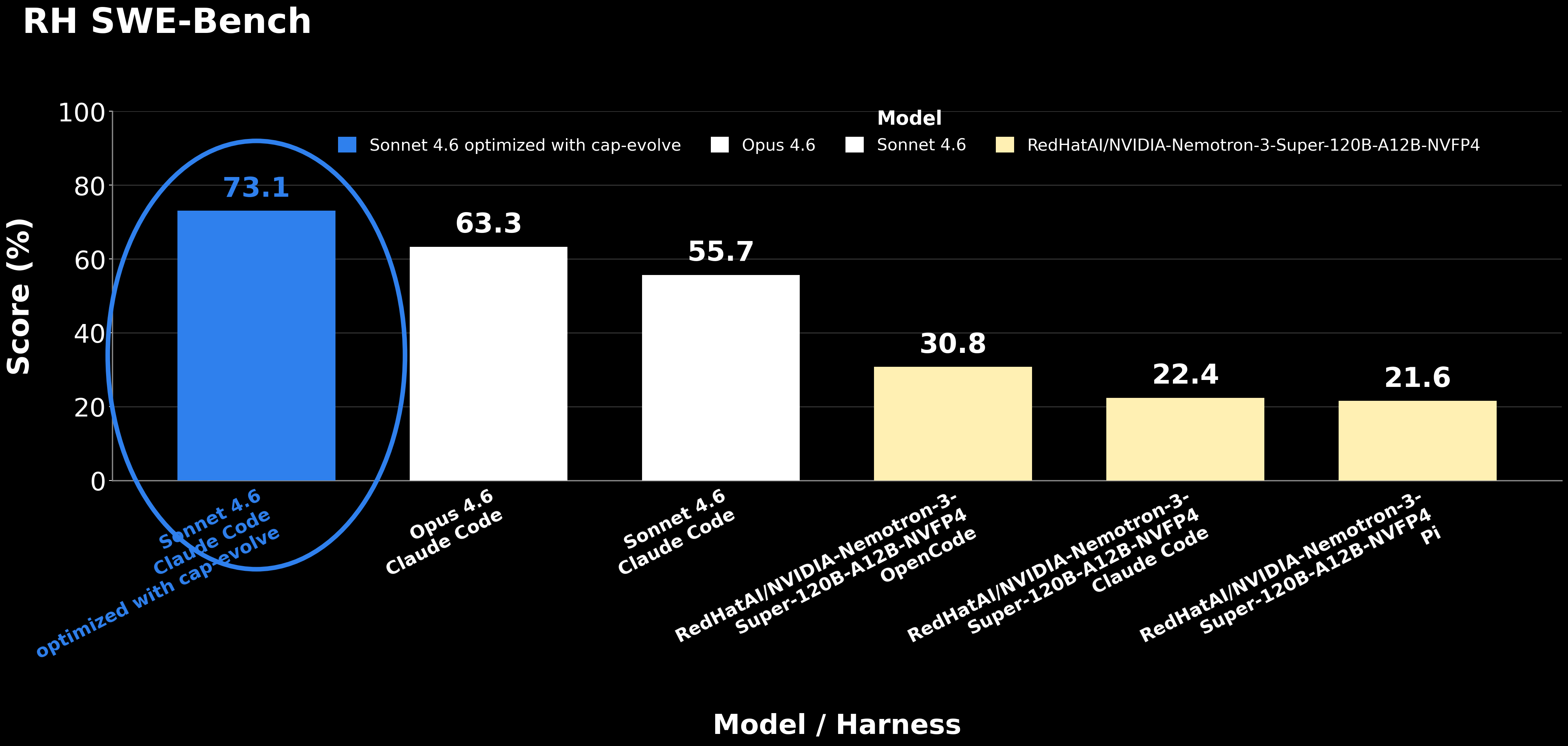
RH SWE-Bench by model and harness: a cap-evolve-optimized Sonnet 4.6 (73.1) scores
above an unoptimized Opus 4.6 (63.3) and its own unoptimized baseline (55.7).
This chart's numbers are a different measurement from the 58.0 → 76.5 fit-metric run in
the table above, and the relationship between the two is unresolved — see
the caveats.
At a glance — baseline → optimized across all benchmarks:
reward × 100
─────────────────────────────────────────────────────────────────────
RH-SWE-bench (119 tasks, fit metric)    ●────────────●  58.0 → 76.5  +18.5 pp / +31.9%
τ²-bench airline (50 tasks, fit metric) ●──────────●    53.6 → 71.2  +17.6 pp / +32.8%
τ²-bench airline (20 tasks, held-out)   ●──────────●    30.0 → 47.5  +17.5 pp / +58.3%
SkillsBench (3 tasks, held-out)         ●──────●        55.6 → 66.7  +11.1 pp / +20.0%
─────────────────────────────────────────────────────────────────────
○ = baseline (seed)   ● = optimized (best candidate)
Not an apples-to-apples leaderboard. For how the held-out τ²-bench result sits next to external tool-optimization work (EvoTool on the original τ-Bench, and Evolutionary Context Search), with defined criteria and caveats, see docs/COMPARISON.md.
flowchart LR
    A[Prompt, tools, MCP, or skills] --> B[Run evaluation]
    B --> C[Diagnose failures]
    C --> D[Generate candidate]
    D --> E[Validation gate]
    E -->|Accepted| F[Git-versioned best candidate]
    E -->|Rejected| C
    F --> G[Final evaluation and report]
Each iteration receives the current best capability, its failed trajectories, per-task impact (what previous edits broke and fixed), and the history of previous attempts. It proposes one bold, multi-part candidate, evaluates it on val, and records whether the gate accepted it. The pipeline is intake → implement-and-check → baseline → algorithm → finalize → report; the exact optimizer-context files, run-dir layout, and honesty guarantees are in Architecture and Honest evaluation.
Wire one small adapter — three required methods (plus optional hooks):
tasks(split)                   -> list[Task]   # your eval cases for 'train'|'val'|'test'|'all'
run_target(task, ctx, *, seed) -> Rollout      # run your agent with the candidate LIVE as ctx
score(task, rollout)           -> Score        # reward in [0,1] + feedback (never leak the gold)
Everything else — splits, trials, gating, pass^k, the sealed test, memory, and the dashboard — is provided by the core. Two ways to get there:
RUN.md. It runs intake, asks for anything missing, writes
the adapter, passes cap-evolve check, then runs the loop.Both are walked through in docs/OPTIMIZE_YOUR_OWN.md; the contract is in docs/ADAPTER_CONTRACT.md. For common cases, don't write an adapter from scratch — copy a ready-made adapter template (JSONL, HuggingFace, tau2-bench, SWE-bench, SkillsBench) and switch providers with a one-line env change: docs/ADAPTER_TEMPLATES.md.
| Example | What it shows | Needs | Run |
|---|---|---|---|
toy_calc | The full loop, deterministically | nothing | bash examples/toy_calc/run.sh |
tau2_airline | Onboard a real benchmark from one prompt; optimize policy + tool code | gateway creds, Claude Code | bash examples/tau2_airline/setup.sh && bash examples/tau2_airline/run.sh |
skillsbench | Optimize a skill package; agent runs in Docker | Docker, uv, Claude creds | bash examples/skillsbench/setup.sh && bash examples/skillsbench/run.sh |
Each example's paste-to-agent brief is its PROMPT.md, its narrative is DEMO.md, and its
committed run is under run_full/. See the full interactive dashboard for the tau2 run with
no backend: cd examples/tau2_airline/run_full/ui && python3 -m http.server 8000. Reproduce
from zero: tau2 · SkillsBench.
| Document | Use it when |
|---|---|
| Site (home) | You want the interactive site — hero, results, and doc navigation in one place |
| Getting started | You want your first successful run |
| Installation | You need host-specific setup, credentials, or the dashboard |
| Optimize your own agent | You want to integrate your agent or benchmark |
| Adapter templates | You want a copy-and-run adapter (JSONL, HuggingFace, tau2, SWE-bench, SkillsBench) |
| Adapter contract | You are implementing an adapter |
| Architecture | You want to understand the pipeline and optimizer context |
| Agent orchestration | You want the agent to drive the loop itself (orchestration_mode: agent, agent-optimize) |
| Honest evaluation | You need details on splits, gates, and sealing |
| Results | You want the full experiments and artifacts |
| Comparison | You want positioning vs other tools and external results |
| Extending cap-evolve | You are adding a capability, optimizer, or algorithm |
| Troubleshooting | Installation or a run failed |
| Roadmap | You want planned work |
| How-to guides | You want a specific harness + benchmark recipe |
| Docker/Podman on CCC | You are running on a cluster with no root, no sudo, no subuid range (IBM CCC), or submitting cap-evolve through LSF |
Beta (0.x). Contributions welcome — see CONTRIBUTING.md and the
Code of Conduct. Report security issues via SECURITY.md.
Changes are tracked in CHANGELOG.md.
@software{cap-evolve,
  title  = {cap-evolve: a skills-native, host-agnostic harness for honestly
            optimizing AI-agent capabilities},
  year   = {2026},
  note   = {https://github.com/skillberry-ai/cap-evolve}
}
Acknowledgements. cap-evolve includes no third-party code — the gepa and
skillopt skills are independent implementations of the GEPA (arXiv:2507.19457) and
SkillOpt (arXiv:2605.23904) papers, and it draws on ideas from DSPy and Anthropic's
Agent Skills standard. The bundled example uses
tau2-bench (MIT). Full citations:
docs/sources.bib.
Apache-2.0.
Sign in to join the discussion.
No comments yet. Be the first to say what this is good for.
The agent harness performance optimization system. Skills, instincts, memory, security, and research-first development for Claude Code, Codex, Opencode, Cursor and beyond.
from vibe coding to agentic engineering - practice makes claude perfect
🌊 The original agent meta-harness. Deploy intelligent multi-player swarms, coordinate autonomous workflows, and build conversational AI systems. Features adaptive memory, self-learning intelligence, RAG integration, and native Claude Code / Codex / Hermes and many more Integrated
Practical patterns, starters & CLI tools for loop engineering with AI coding agents. Design systems that prompt and orchestrate agents (inspired by Addy Osmani and Boris Cherny). Includes loop-audit, loop-init, loop-cost.

Git. Ship. Done - Core

The most RAM efficient harness