
DietrichGebert/ponytailPlugins
Makes your AI agent think like the laziest senior dev in the room. The best code is the code you never wrote.
138k
1 add
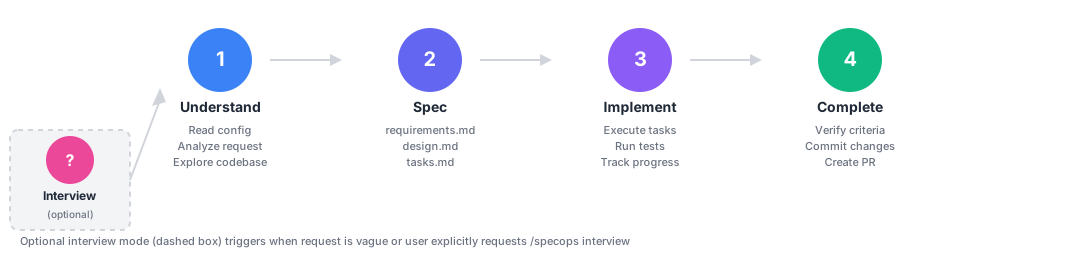
SpecOps adds a four-phase workflow to agent-led coding: understand, spec, implement, and complete. It stores specs in git, adds review and dependency gates, and checks for drift so later sessions can pick up the same work.
Builders who want Claude Code, Cursor, Codex, or Copilot to write from requirements and design instead of jumping straight into code.
You can turn a vague feature request into a reviewed spec, ordered tasks, and checked implementation before the agent starts coding.
Runs understand, spec, implement, and complete as one guided flow for a feature request.
Keeps requirements, design, and tasks in `.specops/` so the work survives across sessions.
Loads prior decisions and learnings so the agent does not forget earlier context.
Blocks implementation until specs are reviewed and accepted when configured.
Checks new packages for scope fit, maintenance, size, security, and license before install.
Compares code and specs after implementation and flags when they diverge.
Works from one source across Claude Code, Cursor, Codex, and Copilot outputs.
Captures post-deployment discoveries and surfaces them in later specs that touch the same code.
/plugin marketplace add sanmak/specops
/plugin install specops@specops-marketplace
/reload-plugins
bash <(curl -fsSL https://raw.githubusercontent.com/sanmak/specops/main/scripts/remote-install.sh)
# Inspect the script first: https://github.com/sanmak/specops/blob/main/scripts/remote-install.sh
git clone https://github.com/sanmak/specops.git && cd specops && bash setup.sh
/specops Add user authentication with OAuth


You describe a feature to your AI coding assistant. It starts writing code immediately. No requirements. No design. No task breakdown. You spend the next hour correcting assumptions it made in the first minute.
The problem isn't the AI. It's that nobody told it to think first.
SpecOps adds a structured thinking step to AI coding. One command triggers a 4-phase workflow:
Specs are git-tracked, survive across sessions, and work natively with Claude Code, Cursor, OpenAI Codex, GitHub Copilot, and Google Antigravity.
Claude Code (plugin marketplace):
/plugin marketplace add sanmak/specops
/plugin install specops@specops-marketplace
/reload-plugins
One-line install (any platform):
bash <(curl -fsSL https://raw.githubusercontent.com/sanmak/specops/main/scripts/remote-install.sh)
# Inspect the script first: https://github.com/sanmak/specops/blob/main/scripts/remote-install.sh
Or clone and run:
git clone https://github.com/sanmak/specops.git && cd specops && bash setup.sh
Try it:
/specops Add user authentication with OAuth
Platform-specific install details: QUICKSTART.md | Full command reference: docs/COMMANDS.md
Without SpecOps:
You: "Add OAuth authentication"
Agent: *writes auth.ts, picks JWT without asking, hardcodes Google,
       skips rate limiting, creates 6 files*
You: "No, I needed GitHub too, and..." (30 min of corrections)
With SpecOps:
You: "/specops Add OAuth authentication"
Agent:
  requirements.md  ->  4 user stories, 12 acceptance criteria (EARS notation)
  design.md        ->  JWT vs sessions trade-off, provider abstraction layer
  tasks.md         ->  8 ordered tasks with dependencies and effort estimates
  Then implements each task against verified criteria.
| Problem | How SpecOps handles it |
|---|---|
| AI starts coding without understanding the domain | 7 vertical templates: backend, frontend, infra, data pipelines, library/SDK, fullstack, builder |
| Specs lost when you close the session | Git-tracked spec files with cross-session context recovery |
| Agent forgets decisions from yesterday | Local memory layer, loaded automatically every session |
| No way to review specs before coding starts | Built-in team review workflow with configurable approval gates |
| Agent hallucinates vague acceptance criteria | EARS notation for precise requirements: WHEN [event] THE SYSTEM SHALL [behavior] |
| Specs drift from codebase after implementation | 5 automated drift checks with audit and reconcile commands |
| AI adds packages without checking maintenance or license | Dependency introduction gate: 5-criteria evaluation (scope, maintenance, size, security, license) before any install |
| Agent marks its own work as "done" without scrutiny | Adversarial evaluation: separate evaluator scores specs and implementations against hard thresholds |
| Production reveals things specs missed | Production learnings layer: capture discoveries, link to specs, surface in future work |
| Locked into one AI coding tool | One source of truth, 5 platform outputs |
Every feature of SpecOps was specified, designed, and implemented using the SpecOps workflow. All specs are public in .specops/. The friction log captures 42 lessons learned that shaped the tool.
Large features that span multiple bounded contexts are automatically detected and split into coordinated specs.
You: "/specops Add OAuth authentication and payment processing"
Agent:
  Scope assessment → 2 bounded contexts detected (auth, payments)
  Proposed split:
    Spec 1: oauth-authentication (wave 1 — walking skeleton)
    Spec 2: payment-processing (wave 2 — depends on auth)
  Initiative: oauth-payments (tracks both specs)

  You approve → 2 specs created, linked via specDependencies
  /specops initiative oauth-payments → executes both in order
Dependency gates, execution waves, and initiative tracking handle the coordination automatically.
Specs end at "completed." But production reveals things specs missed. SpecOps closes this loop: capture discoveries with /specops learn, link them to originating specs, and surface relevant learnings automatically when future specs touch the same code.
/specops learn batch-processing
→ Learning: "Concurrent writes above 500 connections degrade P99"
→ Prevention: "Design docs must include concurrency limits for write-heavy ops"

# Later, a new spec touching the same files loads this automatically
Full details: docs/LEARNINGS.md
Full comparison with Superpowers, Kiro, EPIC/Reload, and Spec Kit | Plan Mode vs Spec Mode
| Platform | Trigger |
|---|---|
| Claude Code | /specops [description] |
| Cursor | Use specops to [description] |
| OpenAI Codex | Use specops to [description] |
| GitHub Copilot | Use specops to [description] |
| Google Antigravity | Use specops to [description] |
Create .specops.json in your project root. Configuration is optional. SpecOps uses sensible defaults.
{
  "specsDir": ".specops",
  "vertical": "backend",
  "team": {
    "conventions": ["Use TypeScript", "Write tests for business logic"],
    "reviewRequired": true
  }
}
Examples: examples/ | Full schema reference: REFERENCE.md | Steering files: STEERING_GUIDE.md
Specs follow principles from Orwell, Bezos, Lamport, Brooks, Beck, and Leveson. Every requirement passes the ANT test: if a statement cannot be false, it carries no information and gets rewritten. Writing rules | Engineering rules
Contributions welcome. See CONTRIBUTING.md for guidelines.
Sign in to join the discussion.
No comments yet. Be the first to say what this is good for.
Makes your AI agent think like the laziest senior dev in the room. The best code is the code you never wrote.

Graphs that teach > graphs that impress. Turn any code into an interactive knowledge graph you can explore, search, and ask questions about. Works with Claude Code, Codex, Cursor, Copilot, Gemini CLI, and more.

OmO: Just type "mass ulw" keyword with your prompt. Now you are the master of graph engineering.
Persistent Context Across Sessions for Every Agent – Captures everything your agent does during sessions, compresses it with AI, and injects relevant context back into future sessions. Works with Claude Code, OpenClaw, Codex, Gemini, Hermes, Copilot, OpenCode + More
Opinionated Oxlint rules for rejecting low-evidence TypeScript and JavaScript patterns
Teams-first Multi-agent orchestration for Claude Code