Sandbox
@rygel/AIUsageTracker

Token usage tracker for Claude Code and other AI tools

AI Usage Tracker shows AI API usage, costs, and quota status in a compact dashboard and system tray app. It can discover keys from environment variables, Claude Code credentials, and common config files, then refresh provider data and show pace, resets, and remaining capacity.

45 stars5 forksC#Updated 7d ago
Who it's for

Builders who want one place to watch usage across their AI coding tools and provider accounts.

What it delivers

You can see spend and quota risk at a glance instead of checking each provider separately.

What it does

Multi-provider tracking

Tracks Anthropic, Gemini, OpenAI, GitHub Copilot, Codex, OpenCode, DeepSeek, Mistral, Kimi, Minimax, Z.AI, and more.

Automatic provider discovery

Scans environment variables, Claude Code credentials, and standard config files for existing API keys.

Dashboard and tray view

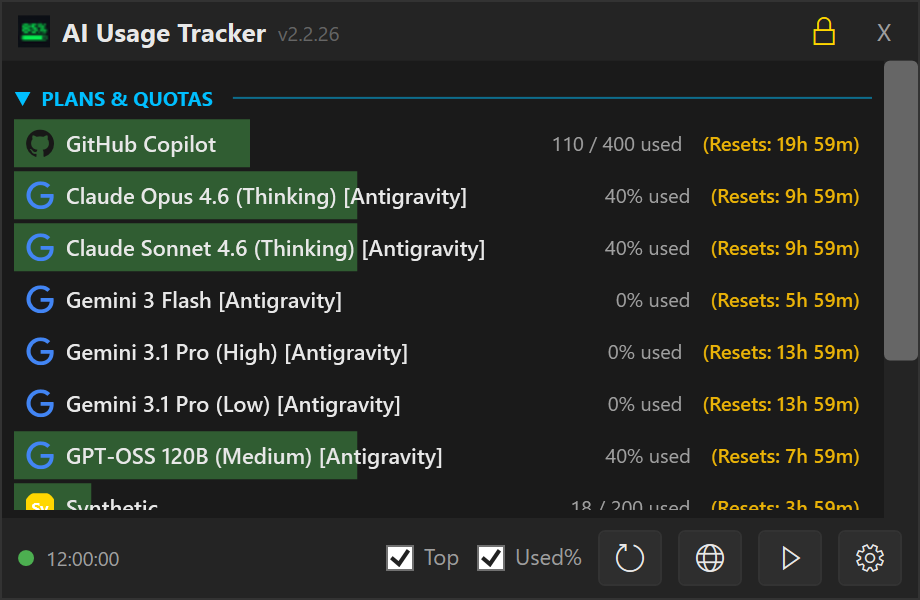
Shows a compact topmost window plus tray icons, with auto-hide and live progress bars.

Pace projection

Estimates whether you will hit a quota limit before the reset window ends.

Settings for provider management

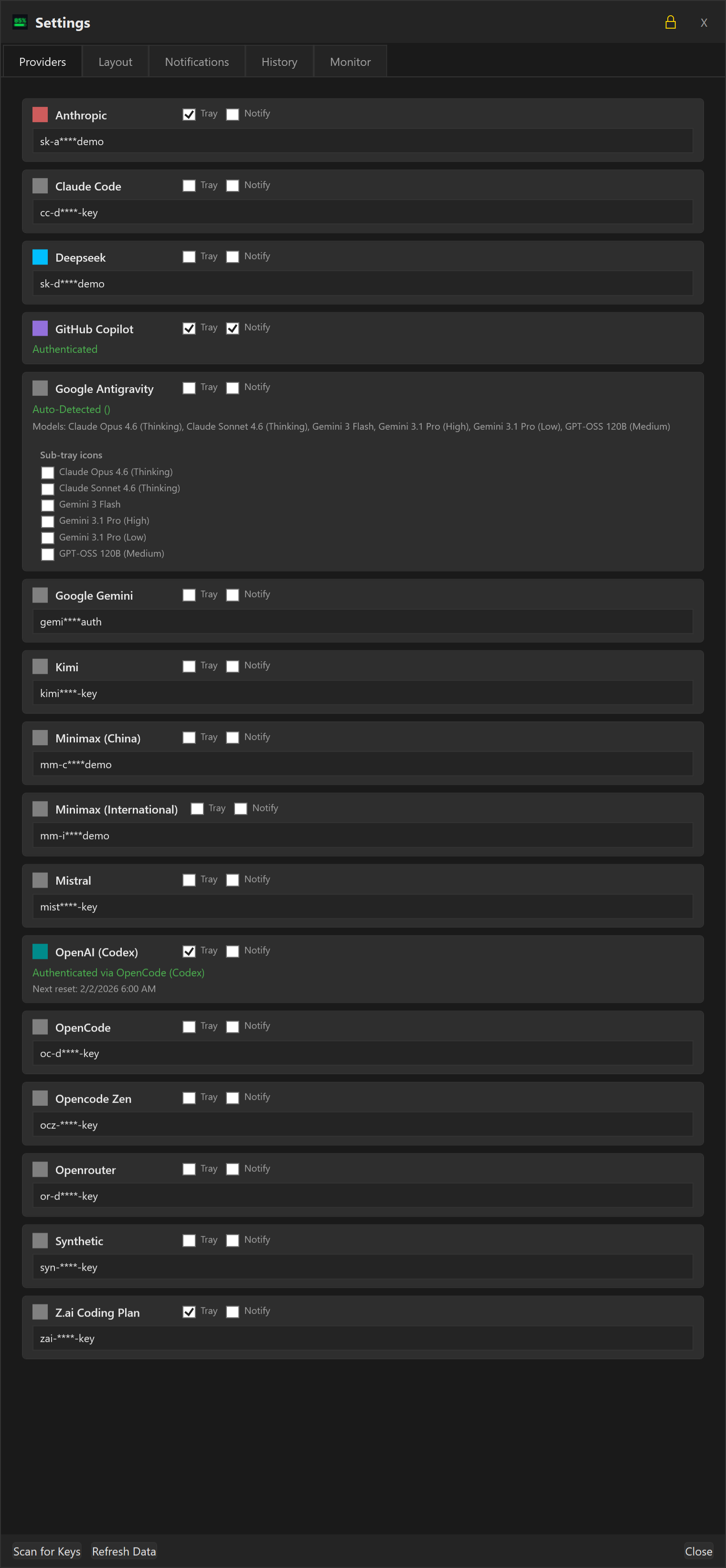
Lets you enter keys, enable tray tracking, and pin sub-quotas for providers like Antigravity.

Auto-update notice

Checks for new releases and offers a one-click download link from the dashboard.

README

AI Usage Tracker

Version License Platforms Language Downloads

Dashboard

A streamlined Windows dashboard and tray utility to monitor AI API usage, costs, and quotas across multiple providers.

Website: aiusagetracker.outerstellar.net

Support

If you want to support me and are interested in different AI model providers, you can sign up with my referral codes:

  • Opencode Go:GLM-5.1, Kimi K2.6, MiMo-V2.5 (Pro), MiniMax M3, Qwen3.7 Max, DeepSeek V4 Pro/Flash
  • Z.AI: GLM-5.1, GLM-5, GLM-4.7, GLM-4.6, GLM-4.7-flash
  • MiniMax: Minimax M2.7
  • synthetic.new: Minimax M2.1, Kimi K2.5, GLM-4.7, etc.

Documentation

Community

Join the discussion on our Discord Server.

Download

Download the latest installer or .zip file from the Release page.

Key Features

  • OpenAI resets and expiration dates: Hover over the OpenAI quota bar and quickly see the resets and their expiration dates
  • Multi-Provider Support: Track usage for Anthropic, Gemini, OpenRouter, OpenCode, Kilo Code, DeepSeek, OpenAI, GitHub Copilot, Codex, Mistral, and more.
  • Smart Discovery: Automatically scans environment variables, Claude Code credentials, and standard configuration files for existing API keys.
  • Auto-Updates: Notifies you of new releases directly in the dashboard with a one-click download link.
  • Minimalist Dashboard: A compact, topmost window providing a quick overview of your current spend and token usage.
  • Compact Settings UI: Streamlined provider cards with 40-50% less vertical space, larger dialog for better visibility.
  • Dynamic Tray Integration:
    • Auto-Hide: Dashboard hides automatically when focus is lost.
    • Individual Tracking: Option to spawn separate tray icons for specific providers.
    • Live Progress Bars: Tray icons feature "Core Temp" style bars that reflect usage levels in real-time.
  • Pace Projection & Badges: See at a glance whether you'll exhaust your quota before it resets.
    • Headroom (green) — projected usage under 70%, plenty of room left.
    • On pace (green) — projected 70–100%, healthy usage rate.
    • Over pace (red) — projected over 100%, on track to hit the limit before reset.
    • Shows the projected end-of-period percentage (e.g. "Projected: 73%") so you can judge for yourself.
    • Works independently for both 5-hour burst and 7-day rolling windows.
    • Can be toggled on/off in Settings → Cards → "Pace-Aware Colours".
  • Inverted Progress Bars: Default "Health Bar" mode showing Remaining capacity (starting green/full) instead of "Used" capacity.
  • Improved DeepSeek Support: Detailed multi-currency (CNY/USD) balance tracking with official branding.
  • Secure Management: Manage all keys and preferences through a refined, dark-themed settings menu.

Supported Providers

ProviderIntegrationStatusComment
Antigravityvia Antigravity GUI✅ Tested
Claude Code✅ Tested
DeepSeekAPI Key¹⚠️ BetaTesters welcome
GeminiOAuth Device Flow✅ Tested
GitHub CopilotOAuth Device Flow✅ Tested
Kimi (Moonshot)API Key¹✅ Tested
Minimax (China)API Key¹⚠️ BetaTesters welcome
Minimax (International)API Key¹⚠️ BetaTesters welcome
MistralAPI Key¹✅ Testedbut Mistral does not provide usage information via their API
OpenAI (Codex)via Opencli OAuth️ ⚠️ BetaTesters welcome
OpenRouternot integrated yet🚧 PlannedTesters welcome
Opencode Zen (coding plan)API Key¹⚠️ BetaTesters welcome
Opencode Zen (pay-as-you-go)API Key¹✅ Tested
SyntheticAPI Key¹✅ Tested
Z.AI (Coding Plan)API Key¹✅ Tested

¹ API Key can be either entered directly or discovered automatically via opencode configuration

Screenshots

Dashboard (Main Interface) Dashboard

Providers Providers

For the complete screenshot set (all settings tabs, info dialog, tray states, and context menu), see the User Manual.

Installation

Manual

  1. Download the latest AIUsageTracker_Setup_v2.3.4-beta.11.exe from the Releases page.
  2. Run the installer.
  3. The app will launch and automatically scan for common API keys.

Configuration & Settings

Access the Settings menu by right-clicking the tray icon or using the gear icon on the dashboard.

Application Settings

  • Show All Providers: Toggle to show all configured providers, even those with 0 usage or errors.
  • Compact Mode: Reduces the height of each item, removing the icon and condensing the layout.
  • Pin Window: Keeps the dashboard open even when focus is lost.
  • Always On Top: Ensures the dashboard floats above other windows.
  • Invert Progress Bars:
    • Checked: Bars represent Remaining capacity (Start Full/Green -> End Empty/Red).
    • Unchecked: Bars represent Used capacity (Start Empty -> End Full/Red).
  • Color Thresholds: Customize the percentage at which bars turn Yellow (Warning) or Red (Critical).
  • Auto Refresh Interval:
    • Minutes: Set how often (in minutes) the app should automatically check provider APIs for new consumption data.
    • Disable: Set to 0 to disable automatic background refreshing.

Provider Management

  • API Keys: enter or update specific keys for each provider.
  • Track in Tray: Check the box next to any provider to add a dedicated icon for it in your system tray.
  • Sub-Quotas: For complex providers like Antigravity, you can pin specific model quotas to the tray.

Storage

Configuration is stored in auth.json in the application data directory.

  • Automatic Backup: Your previous configuration is preserved during updates.
  • Secure: API keys are stored locally.

License

MIT

Files in the repo

Repository payload46 top-level entries
  • .analyzer-gate
  • .claude
  • .githooks
  • .github
  • .papi
  • AIUsageTracker.CLI
  • AIUsageTracker.Core
  • AIUsageTracker.Infrastructure
  • AIUsageTracker.Monitor
  • AIUsageTracker.Monitor.Tests
  • AIUsageTracker.Tests
  • AIUsageTracker.UI.Slim
  • AIUsageTracker.Web
  • AIUsageTracker.Web.Tests
  • appcast
  • design
  • docs
  • manifests
  • scripts
  • test-fixtures
  • .actionlint.yaml
  • .editorconfig
  • .env.example
  • .gitattributes
  • .gitignore
  • .gitleaks.toml
  • .gitleaksbaseline.json
  • AGENTS.md
  • AIUsageTracker.runsettings
  • AIUsageTracker.sln
  • ARCHITECTURE.md
  • CHANGELOG.md
  • CLAUDE.md
  • CONTRIBUTING.md
  • Ctempbuild-warnings.txt
  • DESIGN.md
  • Directory.Build.props
  • global.json
  • LICENSE
  • merge-build3.err
  • merge-test.err
  • nuget.config
  • README.md
  • SONARQUBE.md
  • stylecop.json
  • TODO.md

Discussion (0)

Ask about usage, or say what you built with it

Sign in to join the discussion.

No comments yet. Be the first to say what this is good for.

More tools

JuliusBrussee/
caveman

🪨 why use many token when few token do trick — Claude Code skill that cuts 65% of tokens by talking like caveman

105k
1 add
MemPalace/
mempalace

The best-benchmarked open-source AI memory system. And it's free.

59k
stablyai/
orca

Orca is the ADE for working with a fleet of parallel agents. Run any coding agent with your own subscription. Available on desktop, mobile and remote runtime.

66k

A cross-platform desktop All-in-One assistant for Claude Code, Codex, OpenCode, OpenClaw, Grok Build & Hermes Agent. Only official website: ccswitch.io

132k

Never stop coding. Free MIT AI gateway: one endpoint, 352 providers (150+ free), 1200+ models Kimi, Claude, GPT, Gemini, GLM, DeepSeek, MiniMax. Works with Claude Code, Codex, Cursor, OpenCode, Cline & Copilot. Quota-aware auto-fallback, RTK+Caveman compression saves 15-95% tokens, MCP/A2A, Desktop/PWA. Built by 550+ contributors

64k
headroomlabs-ai/
headroom

Compress tool outputs, logs, files, and RAG chunks before they reach the LLM. 20% fewer tokens for coding agents, 60-95% fewer tokens for JSON, same answers. Library, proxy, MCP server.

71k