
JuliusBrussee/
caveman

🪨 why use many token when few token do trick — Claude Code skill that cuts 65% of tokens by talking like caveman
105k
1 add
Dossier turns a product into a visible map of workflows and feature cards, with context attached to each card. You use it to review requirements, select files, and dispatch agents with only the context they need. It also tracks runs, branches, commits, and checks so you can follow the build from planning to shipping.
Builders who are shipping large apps with agent help and want one place to plan, scope, and track the work.
You can keep agent work aligned to the product plan instead of re-explaining context in every new prompt.
Shows products, workflows, and feature cards in a hierarchy so you can see the whole build at once.
Stores requirements, facts, assumptions, questions, planned files, and linked docs for each feature.
Shows agent activity and status in real time while work is running.
Connects a GitHub repo, picks files for context, and lets agents work against the mapped codebase.
Runs builds per card or workflow, creates feature branches, commits changes, and tracks checks and run status.
Keeps product state and run state in SQLite and embeddings in RuVector on your machine.
npm i -g dossier-agentic-product-planner-builder
dossier
npx dossier-agentic-product-planner-builder
git clone https://github.com/rwliebs/Dossier.git
cd Dossier
pnpm install        # or: npm install
pnpm run build
pnpm run dossier
npm install -g windows-build-tools
Out of the weeds. Back to crafting products.
Dossier is an AI-native product building platform. It gives you a living map of your entire product — structured, visible, and agent-ready — so you can stay focused on the product vision while your agents build the details.
You've learned to build with AI. Dossier is what comes next.
The tools that got you here worked fine — until the project got real.
Now you're juggling ten chat windows, losing track of what's done and what's broken, pasting context into every new prompt, and watching agents confidently build the wrong thing. The build is ballooning. Consistency is slipping. You're spending more time managing the process than shaping the product.
This isn't a tool problem. It's a scale problem. And it's the natural inflection point Dossier is built for.
Dossier structures your product into a hierarchical map — Product → Workflow → Feature card — and attaches a rich context card to every piece. Workflows describe the user's perspective; feature cards describe how the software will work. Each card holds the facts, assumptions, and questions that matter for that feature. When you dispatch an agent, it gets precisely the context it needs. Nothing more, nothing less.
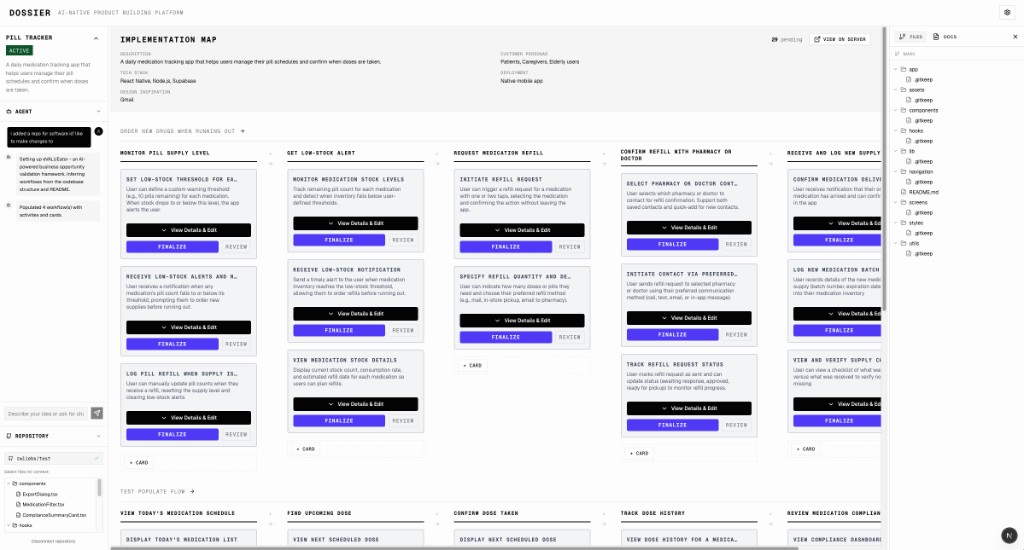
The user story map is the core of Dossier. Workflows run left to right, feature cards stack beneath them. Every card shows its status. Your agents show their activity in the left panel in real time. The whole product is always visible — you never lose the forest for the trees.
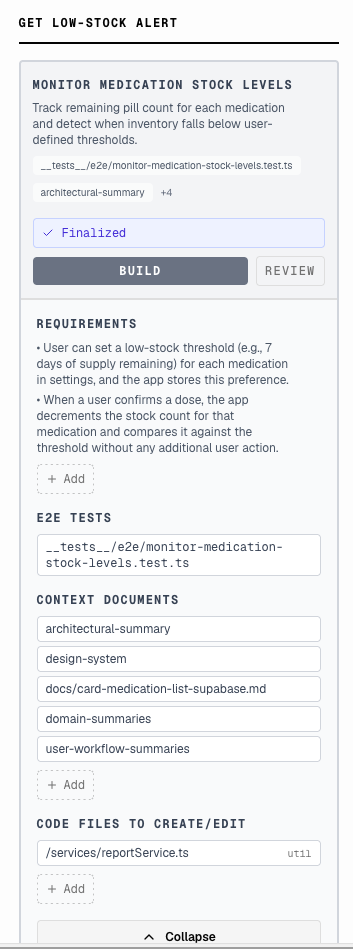
Every feature has a card. Before an agent touches a feature, the card holds what it needs to know: requirements, linked test files, context documents, and the code files it should create or edit. You review and approve. Then you build. The agent receives only what's relevant — focused context is what separates a clean implementation from a hallucinated one.
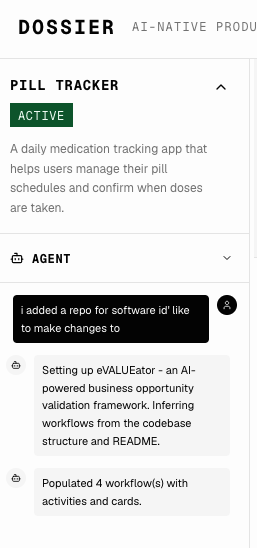
Watch your agents work. The agent panel surfaces activity, reasoning, and completion status in real time. No more pasting into a black box and hoping. You see what's happening and you stay in control.

Every product has a top-level brief: description, tech stack, customer personas, deployment target, design inspiration. This context flows down through every workflow and feature card. Agents always know what they're building and for whom.
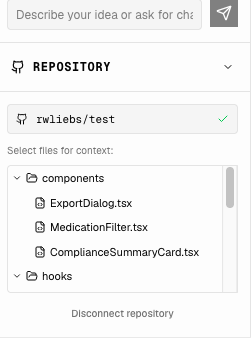
Connect a GitHub repository (optional) and select files for context. Agents can write files locally; GitHub is required only when you want to open PRs. Dossier maps your product structure directly onto your codebase. Agents know which files to touch, which to leave alone, and how the pieces fit together.
NEW: Pull an updated copy of your remote repo without leaving Dossier.
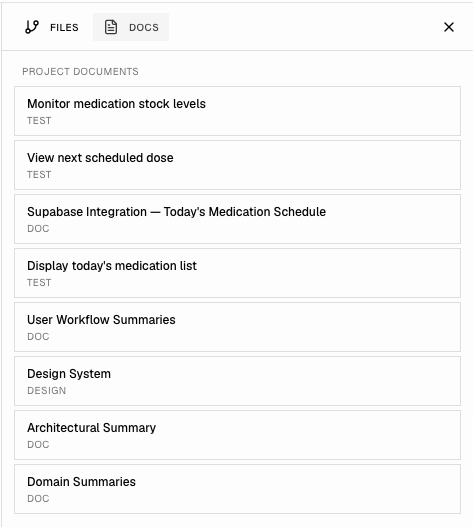
Add and edit project documents by asking the agent in chat (e.g. architectural summaries, design systems, domain knowledge, test specs). Direct editing in the UI is coming later. Dossier surfaces the right documents to the right agent at the right time. Context isn't lost between sessions.
Dossier separates three distinct layers of state:
| Layer | What it contains | Storage |
|---|---|---|
| Product structure | Project → Workflow → Activity → Card hierarchy, rich context cards | SQLite (dossier.db) + RuVector (ruvector/vectors.db) for embeddings |
| Run state | Orchestration runs, card assignments, agent executions, checks | SQLite (dossier.db) |
| Code state | Branches, commits, file changes | Git (one feature branch per card per run) |
The product structure layer is Dossier's differentiator. This is where your vision lives, where context accumulates, and where you shape what gets built.
Project
└── Workflow (many)               — user's perspective (journey, actions)
    └── WorkflowActivity (many)   — grouping within a workflow
        └── Card (many)           — a unit of functionality to build
            ├── Requirements        — what must be true
            ├── Facts               — known truths about this feature
            ├── Assumptions         — working beliefs to validate
            ├── Questions           — unresolved decisions
            ├── Planned files       — files/folders the build may touch
            └── Context artifacts   — linked docs, designs, e2e tests (many-to-many)

Build (tracked separately, keyed to cards):
OrchestrationRun (many)
└── CardAssignment (per card)
    ├── AgentExecution            — agent run; status pending | running | success | failed
    └── AgentCommit               — commits on the card's feature branch
OrchestrationRun also has → RunCheck, ApprovalRequest, PullRequestCandidate
| Layer | Technology |
|---|---|
| Frontend | React 19 + TypeScript + Tailwind CSS (Next.js App Router) |
| API | Next.js App Router route handlers (in-process; no separate backend service) |
| Database | SQLite (local-first, ~/.dossier/dossier.db); RuVector for embeddings (~/.dossier/ruvector/vectors.db) |
| Build agents | @anthropic-ai/claude-agent-sdk query() (in-process); agent definitions from agentic-flow |
| Isolation | One feature branch per card per run (feat/run-<run8>-<card8>) |
Install from npm (Node 20+):
npm i -g dossier-agentic-product-planner-builder
dossier
Or try without installing:
npx dossier-agentic-product-planner-builder
Or from source:
git clone https://github.com/rwliebs/Dossier.git
cd Dossier
pnpm install        # or: npm install
pnpm run build
pnpm run dossier
Your browser will open to http://localhost:3000. First run creates ~/.dossier.
On first run you'll be guided through API key setup, or navigate directly to /setup.
Prerequisites: Node.js 20+, Anthropic API key. For GitHub (listing repos, HTTPS git, PR flow), use Connect GitHub on /setup after setting GITHUB_OAUTH_CLIENT_ID in .env.local (see .env.example), or paste a personal access token with repo scope. You can also set GITHUB_TOKEN in the environment (e.g. CI). Agents can write files locally without GitHub.
Windows users: Dossier uses native SQLite, which requires a C++ compiler during install. Install Visual Studio Build Tools with the "Desktop development with C++" workload, or run this from an elevated PowerShell:
npm install -g windows-build-toolsThis is a one-time setup. macOS and Linux typically have the required build tools already.
| Topic | Link |
|---|---|
| System architecture | docs/SYSTEM_ARCHITECTURE.md |
| Development | docs/development-reference.md |
| Testing | docs/testing-reference.md |
| Configuration | docs/reference/configuration-reference.md |
| API endpoints | docs/reference/api-endpoints.md |
| Database schema | docs/reference/database-schema.md |
| Full doc index | docs/README.md |
Configuration (API keys, GitHub via OAuth or PAT) can be set via the web UI at /setup or by editing ~/.dossier/config. See .env.example and the configuration reference — GitHub OAuth for OAuth variables and precedence.
NEW: Use your Claude MAX account directly, no extra setup required (if you've got Claude Code installed locally.)
~/.dossier/dossier.db); vector embeddings in a local RuVector store (~/.dossier/ruvector/vectors.db); build clones under ~/.dossier/repos/. No data leaves your machine except via your Anthropic and (if used) GitHub connection.You could. That instinct — to build the infrastructure rather than use it — is exactly the trap Dossier is designed to free you from.
Dossier is the product of hard-won experience: a year of building seriously with AI agents, learning what actually controls quality at scale. Not what's promised in a demo. The patterns inside it — the context card structure, the layer-by-layer verification, the way prompts are generated from product hierarchy — took real iteration to get right. Building a version yourself puts you back in the weeds. Dossier gets you out of them.
Contributions are welcome. Open an issue to discuss what you'd like to change, or submit a pull request.
Free to use for any purpose that does not compete with Dossier. You can fork it, build on it, self-host it, and integrate it into your own products — as long as you're not building a competing AI-native product planning or build orchestration tool. See LICENSE for the full terms.
Sign in to join the discussion.
No comments yet. Be the first to say what this is good for.
🪨 why use many token when few token do trick — Claude Code skill that cuts 65% of tokens by talking like caveman

The best-benchmarked open-source AI memory system. And it's free.

Orca is the ADE for working with a fleet of parallel agents. Run any coding agent with your own subscription. Available on desktop, mobile and remote runtime.

A cross-platform desktop All-in-One assistant for Claude Code, Codex, OpenCode, OpenClaw, Grok Build & Hermes Agent. Only official website: ccswitch.io

Never stop coding. Free MIT AI gateway: one endpoint, 352 providers (150+ free), 1200+ models Kimi, Claude, GPT, Gemini, GLM, DeepSeek, MiniMax. Works with Claude Code, Codex, Cursor, OpenCode, Cline & Copilot. Quota-aware auto-fallback, RTK+Caveman compression saves 15-95% tokens, MCP/A2A, Desktop/PWA. Built by 550+ contributors

Compress tool outputs, logs, files, and RAG chunks before they reach the LLM. 20% fewer tokens for coding agents, 60-95% fewer tokens for JSON, same answers. Library, proxy, MCP server.