

JuliusBrussee/
caveman

🪨 why use many token when few token do trick — Claude Code skill that cuts 65% of tokens by talking like caveman
105k
1 add
ACID is a CLI and TUI that runs transaction scenarios against a live database and shows how each step behaves. You can hide or reveal results, inspect locks, and replay predefined or custom TOML sequences while an agent walks you through the lesson.
Builders who want to explore SQL isolation and concurrency with a terminal agent as a coach.
You can test and understand transaction anomalies on a real database instead of guessing from diagrams.
Defines scenarios with `setup`, transaction commands like `begin` and `commit`, and SQL steps in simple TOML files.
Hides responses until you choose to reveal them, so you can predict the outcome before seeing it.
Shows when transactions wait for resources, making concurrency behavior visible in the TUI.
Includes built-in scenarios such as Lost Update, Dirty Read, and Phantom Reads.
Uses `acid serve`, `acid status`, `acid run`, and `acid toggle` with `AGENTS.md` or `CLAUDE.md` prompts for guided learning.
`acid init` creates `.env`, learning prompts, a `sequences/` folder, and a `Makefile` for a fresh workspace.
# macOS (Homebrew)
brew install --cask rusinikita/acid/acid

# Linux / macOS (shell script)
curl -fsSL https://raw.githubusercontent.com/rusinikita/acid/main/install.sh | sh
acid init my-learning
cd my-learning
make pg       # PostgreSQL in Docker (matches .env default)
# or
make mysql    # MySQL in Docker
FIRST    make serve     # starts acid serve on :7331
SECOND   claude         # or: gemini, or any LLM agent
acid run -f sequences/lost_update.toml
acid toggle    # reveal results


A CLI tool to bootstrap and enhance LLM agent-driven database learning. A TUI visualizes multi-transaction scenarios executed on real databases, letting you observe transaction anomalies and gotchas firsthand.
1. Zero to hero — deep understanding of database behavior
Start from scratch and build real intuition for how databases handle concurrency. An AI coach walks you through each anomaly — dirty reads, lost updates, phantom reads, deadlocks — with live scenarios on a real database, not toy diagrams.
"I'm new to databases. Teach me ACID properties and transaction isolation from the ground up."
2. Interview prep and topic revision
Quickly revisit specific concepts before a system design interview or when a topic feels fuzzy. Predict outcomes, get corrected, understand why — the prediction-first loop makes knowledge stick.
"I have a system design interview tomorrow. Run me through isolation levels and the most common concurrency gotchas."
3. Testing database behavior during feature design
Unsure how your database will behave under concurrent writes? Write a scenario for your exact table structure and query pattern, run it, and see the real result before committing to an approach.
"I'm designing a booking system. Show me what happens when two users claim the last seat at the same time."
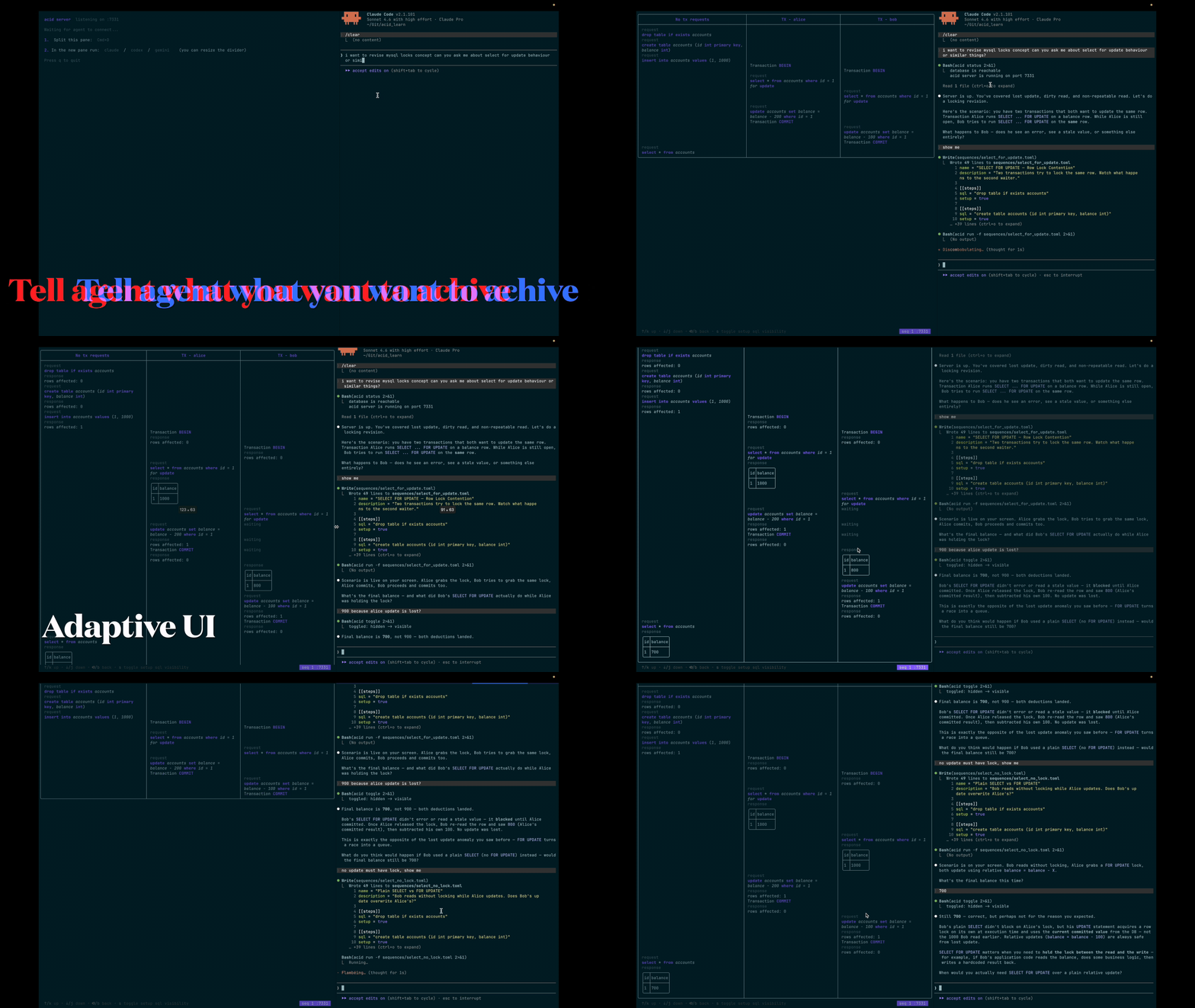 ☝️ click to open app demo video
name = "Lost Update"
description = "Two transactions read and write the same row — only one update survives"
drop_tables = ["accounts"]

[[steps]]
sql = "CREATE TABLE accounts (id INT PRIMARY KEY, owner TEXT, balance INT)"
setup = true

[[steps]]
cmd = "begin"
trx = "alice"

[[steps]]
cmd = "begin"
trx = "bob"

[[steps]]
sql = "SELECT balance FROM accounts WHERE id = 1"
trx = "alice"

[[steps]]
sql = "SELECT balance FROM accounts WHERE id = 1"
trx = "bob"

[[steps]]
sql = "UPDATE accounts SET balance = balance - 100 WHERE id = 1"
trx = "alice"

[[steps]]
sql = "UPDATE accounts SET balance = balance - 100 WHERE id = 1"
trx = "bob"

[[steps]]
cmd = "commit"
trx = "alice"

[[steps]]
cmd = "commit"
trx = "bob"
Sequence building blocks:
setup = true — initialization SQL, hidden by default (press s to show)cmd = "begin" / "commit" / "rollback" with a trx label — transaction lifecyclesql = "..." with a trx label — runs inside that transactionsql = "..." with no trx — auto-committed single-statement querySQL sequences run with hidden responses, allowing you to test your understanding or quiz others on transaction behavior.
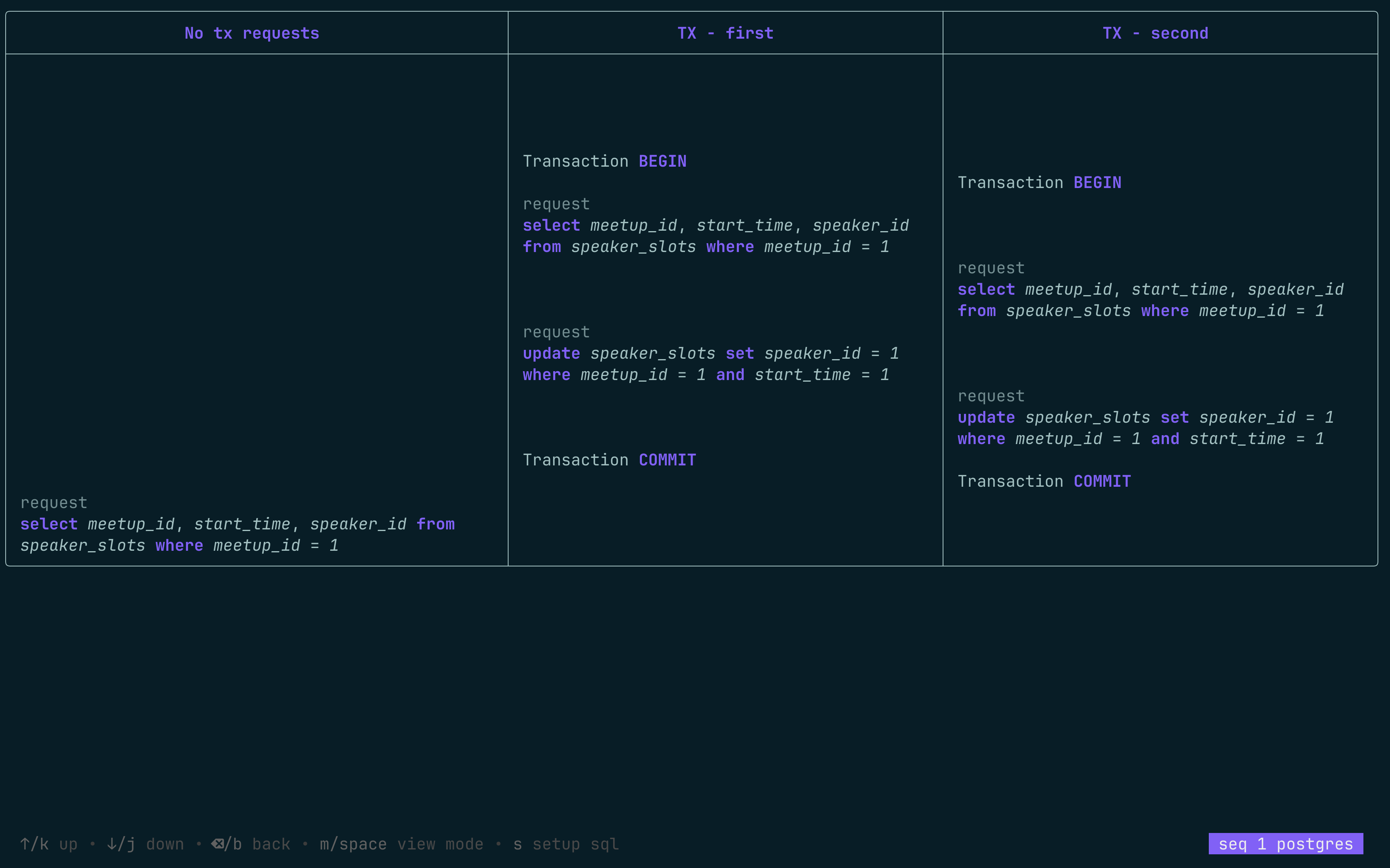
Press m or space to show responses.
Every request runs concurrently, with the UI showing when transactions wait for resource access.
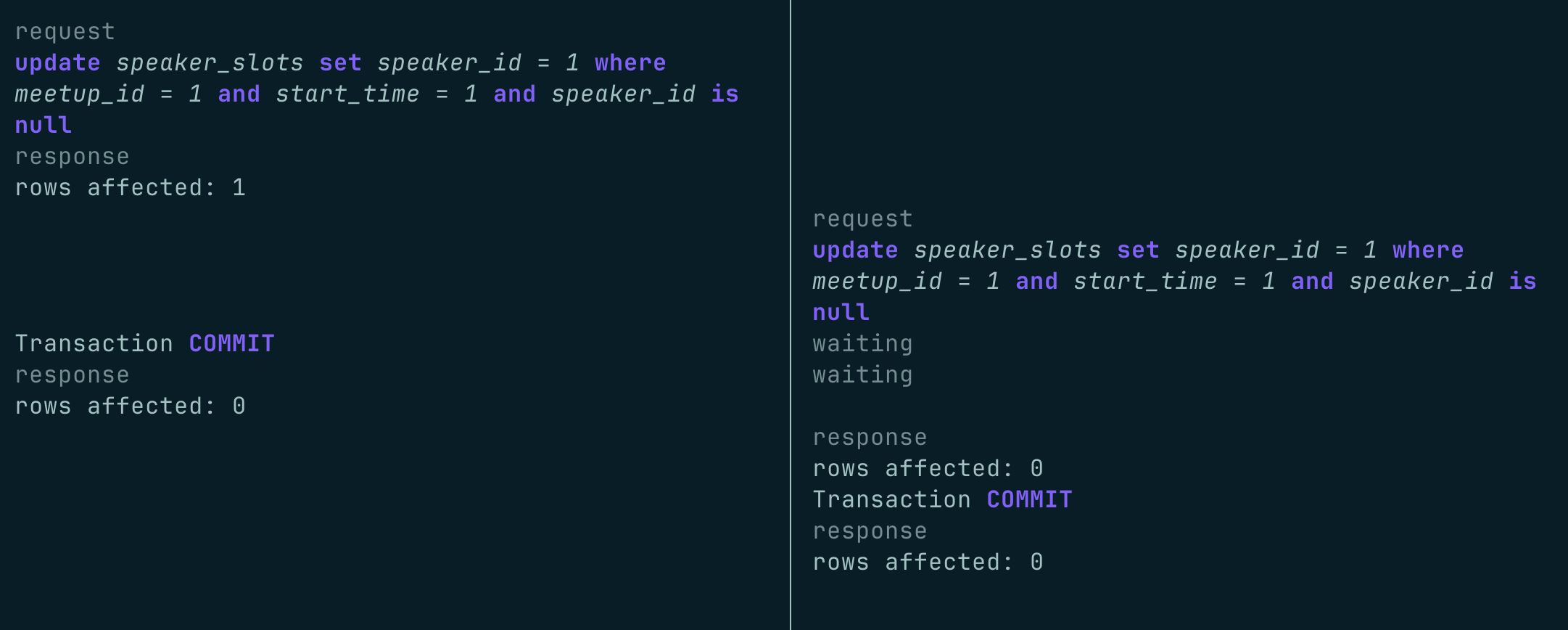
Explore predefined sequences for common transaction scenarios.
The primary workflow pairs acid serve with an LLM agent (Claude, Gemini, or any agent that reads AGENTS.md) acting as a Socratic database coach.
Terminal 1                         Terminal 2
──────────────────────────────     ──────────────────────────────
make serve                         claude
  │                                  │
  │  acid serve starts on :7331      │  Agent reads AGENTS.md / CLAUDE.md
  │  Results hidden by default       │
  │                                  │  acid status          ← checks DB + server
  │  ┌─────────────────────┐         │  acid run -f sequences/lost_update.toml
  │  │ scenario plays out  │◄────────┤
  │  │ results are hidden  │         │  "What will the final balance be?"
  │  └─────────────────────┘         │
  │                                  │  [student answers]
  │  ┌─────────────────────┐         │
  │  │ results revealed    │◄────────┤  acid toggle
  │  └─────────────────────┘         │
  │                                  │  Debrief → next scenario
The agent writes new .toml files in sequences/, runs them with acid run, waits for your prediction, then calls acid toggle to reveal the results. acid init scaffolds the full environment including a pre-loaded coaching prompt in AGENTS.md/CLAUDE.md.
Agent commands:
acid status                              # verify DB connectivity and server health
acid run -f sequences/lost_update.toml  # stream scenario to the serve TUI
acid toggle                              # reveal results after student predicts
You can also run built-in sequences by name:
acid run "Lost Update"
acid run "Dirty Read"
acid run "Phantom Reads"
# macOS (Homebrew)
brew install --cask rusinikita/acid/acid

# Linux / macOS (shell script)
curl -fsSL https://raw.githubusercontent.com/rusinikita/acid/main/install.sh | sh
acid init my-learning
cd my-learning
This creates .env, AGENTS.md/CLAUDE.md (AI coaching prompt), learning_plan.md, a sequences/ folder with example TOML files, and a Makefile.
init command creates docker-compose.yml and Makefile for convenience.
make pg       # PostgreSQL in Docker (matches .env default)
# or
make mysql    # MySQL in Docker
Or edit .env to point at an existing cloud database (neon.com for PostgreSQL, planetscale.com for MySQL).
FIRST    make serve     # starts acid serve on :7331
SECOND   claude         # or: gemini, or any LLM agent
Say "Let's start" — the agent verifies the server is up, then kicks off the first scenario.
acid run -f sequences/lost_update.toml
acid toggle    # reveal results
| Key | Action |
|---|---|
↑/↓ | Navigate sequences |
Enter | Run selected sequence |
s | Show/hide setup steps |
m or Space | Toggle response visibility |
q or Ctrl+C | Quit application |
We welcome contributions! Here's how you can help:
GPL-3.0 License - see LICENSE file for details.
Sign in to join the discussion.
No comments yet. Be the first to say what this is good for.
🪨 why use many token when few token do trick — Claude Code skill that cuts 65% of tokens by talking like caveman

The best-benchmarked open-source AI memory system. And it's free.

Orca is the ADE for working with a fleet of parallel agents. Run any coding agent with your own subscription. Available on desktop, mobile and remote runtime.

A cross-platform desktop All-in-One assistant for Claude Code, Codex, OpenCode, OpenClaw, Grok Build & Hermes Agent. Only official website: ccswitch.io

Never stop coding. Free MIT AI gateway: one endpoint, 352 providers (150+ free), 1200+ models Kimi, Claude, GPT, Gemini, GLM, DeepSeek, MiniMax. Works with Claude Code, Codex, Cursor, OpenCode, Cline & Copilot. Quota-aware auto-fallback, RTK+Caveman compression saves 15-95% tokens, MCP/A2A, Desktop/PWA. Built by 550+ contributors

Compress tool outputs, logs, files, and RAG chunks before they reach the LLM. 20% fewer tokens for coding agents, 60-95% fewer tokens for JSON, same answers. Library, proxy, MCP server.