
JuliusBrussee/
caveman

🪨 why use many token when few token do trick — Claude Code skill that cuts 65% of tokens by talking like caveman
105k
1 add
claude-swap manages multiple Claude Code logins from one tool. It backs up account credentials, switches the active account, watches usage to rotate before limits, and can launch parallel session-mode runs without disturbing your default login.
Builders who use Claude Code and need a way to move between multiple accounts, track quota, or run more than one session at once.
You can keep working across several Claude Code accounts without repeated logouts, manual quota checks, or stalled sessions.
Switch to the next account or a specific account by number, email, or alias with `cswap switch`.
Watch 5-hour, 7-day, and model limits, then move to the best account before the current one runs out with `cswap auto`.
Show every account's usage, reset times, and status in `cswap list` or the full-screen TUI.
Launch Claude Code under one account in the current terminal while other terminals keep using the default login with `cswap run`.
Bind a repo or folder to an account so `cswap run` can pick the right login automatically.
Export and import account data with `cswap export` and `cswap import`, including slot-based restores.
Use the optional menu bar app to view usage and switch accounts from the desktop status item.
Emit machine-readable account, switch, and auto-switch events with `--json` for automation.
uv tool install claude-swap
pipx install claude-swap
git clone https://github.com/realiti4/claude-swap.git
cd claude-swap
uv sync
uv run cswap help
cswap upgrade          # uv/pipx installs on macOS/Linux: auto-detects and upgrades
# or run your installer directly:
uv tool upgrade claude-swap
pipx upgrade claude-swap
cswap add
cswap add
Multi-account switcher for Claude Code. Easily switch between multiple Claude accounts without logging out, or let it switch for you before you hit a rate limit. Track usage for every account in a live dashboard, and run accounts in parallel. Works with both the Claude Code CLI and the VS Code extension.
uv tool install claude-swap
pipx install claude-swap
git clone https://github.com/realiti4/claude-swap.git
cd claude-swap
uv sync
uv run cswap help
cswap upgrade          # uv/pipx installs on macOS/Linux: auto-detects and upgrades
# or run your installer directly:
uv tool upgrade claude-swap
pipx upgrade claude-swap
Log into Claude Code with your first account, then:
cswap add
Log in with another account, then:
cswap add
Do not run /logout first: current Claude Code may revoke the refresh token stored for the account you are leaving.
Rotate to the next account:
cswap switch
Or switch to a specific account:
cswap switch 2
cswap switch user@example.com
cswap switch dev                # or by alias, once set with `cswap alias 2 dev`
Not sure which one? cswap list is the dashboard — every account's 5-hour and 7-day usage and reset times at a glance:
cswap list
Or let claude-swap auto-pick by remaining quota — cswap switch --strategy best (most quota left) or --strategy next-available (skip rate-limited accounts).
Note: You usually don't need to restart — on Linux/Windows the new account is picked up automatically, and on macOS after the Keychain cache expires. To apply it instantly, restart Claude Code or reopen the VS Code extension tab. See Tips for the per-platform details.
Let claude-swap watch your usage and switch for you. When the active account's 5-hour or 7-day window reaches the threshold (default 90%), it switches to the account with the most quota left — before you hit the limit, and safe to run while Claude Code is working:
cswap auto                     # foreground loop, polls every 60s
cswap auto --threshold 80      # switch earlier
cswap auto --model Fable       # also switch when the Fable weekly limit is hit
cswap auto --once              # single check-and-switch, for cron/scripts
cswap auto --dry-run           # log what it would do, never switch
cswap auto --strategy consume-first   # burn the soonest-resetting account first
--strategy, or cswap config set autoswitch.strategy): best (default) stays put until the active account nears its limit, then moves to the account with the most quota left. consume-first proactively keeps you on the account whose weekly window resets soonest — use-it-or-lose-it — switching to a sooner-resetting account (with room to spare) even below the threshold, so perishable weekly quota isn't wasted.cswap add --slot N, or replace its stored credentials from a known-good export — a plain cswap import backup.cswap replaces dead-token slots on its own (--force is still required to replace other existing accounts; note a stale export can carry an already-superseded token). API-key accounts are never rotated onto unless you pass --include-api-key-accounts.cswap disable <num|email>; cswap enable <num|email> puts it back. Disabled accounts are skipped by auto-switch, bare cswap switch, and the best / next-available strategies, but stay fully managed and remain a valid explicit cswap switch <num|email> target. They show a (disabled) marker in cswap list, in the TUI, and in the menu bar — both of which also let you toggle the state in place (TUI: menu → Disable / enable account…; menu bar: Disable / enable account).--model Fable (or cswap config set autoswitch.model Fable) to fold that model's window into the decision, so it switches off an account whose model quota is spent even while its 5h/7d windows still have room.
display_names, matched case-insensitively. The exact strings for your accounts are the per-model rows in cswap list (e.g. a line reading Fable: 100%).For cron/systemd timers, --once reports the outcome in its exit code (0 switched, 1 error, 2 nothing to do, 3 blocked — no viable target), and --json emits one JSON event per line:
*/5 * * * * cswap auto --once --json >> ~/.cswap-auto.log 2>&1
Defaults like the threshold and cooldown are configurable with cswap config set autoswitch.threshold 80 — flags override them (see Configuration).
Launch Claude Code as a specific account in the current terminal only — every other terminal and the VS Code extension stay on your default account, so two accounts can work in parallel.
cswap run 2                     # launch Claude Code as account 2, here only
cswap run user@example.com      # by email
cswap run 2 -- --resume         # everything after '--' is forwarded to claude
cswap run 2 --share-history     # share your chat history with this account too
cswap run 2 --require-session   # refuse rather than run plain claude if 2 is the default login
Sessions use your normal ~/.claude setup (settings, CLAUDE.md, skills, MCP servers, etc.), but each account keeps its own chat history — pass --share-history if you want your accounts to continue the same conversations.
Running the account that is already your default login launches plain claude on that login instead of a session (a second copy of the active credential would go stale). Scripts that need the isolation guaranteed can pass --require-session, which refuses in that case instead.
A session refreshes its own copy of the account's token, so once it exits, the credential it rotated is captured back into the account's stored backup before a switch or usage check uses that backup. While a session is still running, cswap switch refuses to move the default login onto its account if the stored backup has already fallen behind (activating it could only fail); exit the session first, or pick another account. While a session runs, its account's usage is read with the session's own credential and never refreshed by cswap; a read the server refuses shows as token expired, and is not requested again, until the session renews the credential on its next call.
--share-history, a session started under one account shows up in --resume under the others, and nothing already saved is lost.claude mcp add -s user) are mirrored from your default profile on every launch — manage them there; changes made inside a session don't persist. Definitions are copied as-is (including inline env/headers values), but MCP OAuth logins are not — HTTP servers may ask you to authenticate once per profile via /mcp.--no-share turns sharing off and removes the mirrored MCP config (profiles that never mirrored are left alone).Bind a directory to an account, and a bare cswap run there launches that account in session mode — e.g. work account in work repos, personal elsewhere:
cswap map 2 ~/work/client-app   # map a directory to account 2
cswap map user@example.com      # map the current directory
cswap map                       # list mappings
cswap unmap ~/work/client-app   # remove one (defaults to current directory)

cd ~/work/client-app/src
cswap run                       # → account 2, session mode
Subfolders inherit the nearest mapped ancestor. In an unmapped directory, cswap run just launches plain claude with your default login. Mappings are per-machine (not part of cswap export) and are cleaned up when their account is removed.
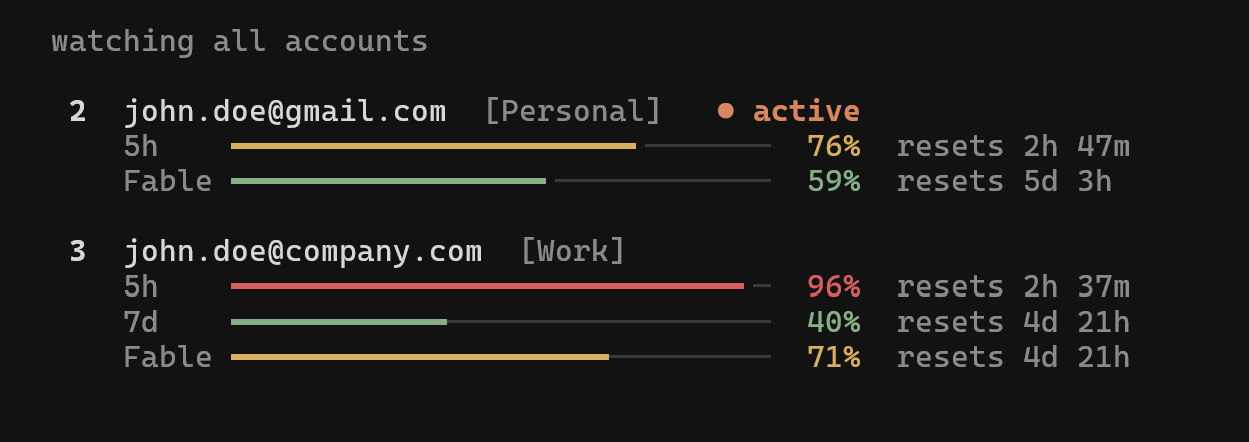
Run cswap on its own (or cswap tui) for the full-screen dashboard: live usage for every account, switching, and the auto-switcher, all keyboard-driven. cswap watch opens it straight to the live monitor. Works on macOS, Linux, and Windows.
If an account's token expires, log back into Claude Code with that account and re-run:
cswap add
This will update the stored credentials without creating a duplicate.
cswap run 2                     # Run an account in this terminal only (session mode)
cswap auto                      # Auto-switch when nearing rate limits (see above)
cswap config                    # Show or edit settings (see Configuration below)
cswap list                      # Show all accounts with 5h/7d usage and reset times
cswap list --token-status       # Add source-labelled OAuth token diagnostics
cswap status                    # Show current account
cswap add --slot 3              # Add account to a specific slot (prompts before overwrite)
cswap add --alias dev           # Add account and give it a short alias
cswap remove 2                  # Remove an account
cswap disable 2                 # Hold an account out of auto-rotation (keeps its login)
cswap enable 2                  # Return a disabled account to rotation
cswap alias 2 dev               # Give an account a short alias (usable anywhere NUM|EMAIL is)
cswap alias 2 --unset           # Remove an account's alias
cswap alias                     # List all aliases
cswap move 2 1                  # Assign an account to a slot (relocates to an empty slot, swaps if taken)
cswap unclaimed                 # List stashed credential entries (slot + why they were stashed)
cswap unclaimed --purge ID      # Drop one (deletes its bytes; recover with /login + `cswap add`)
cswap tui                       # Interactive dashboard (also: bare `cswap`)
cswap watch                     # Dashboard, opened on the live watch page
cswap upgrade                   # Upgrade claude-swap to the latest version
cswap purge                     # Remove all claude-swap data
The original flag spellings (cswap --switch, cswap --list, ...) keep working.
cswap switch in any terminal and carry on. If you'd prefer a clean start, close and reopen Claude Code (or the VS Code extension tab) and use --resume to pick your previous session. Either way, the first message on the new account may use extra usage as its conversation cache rebuilds.cswap add --slot N, or by replacing its stored credentials from a known-good export — a plain cswap import backup.cswap replaces dead-token slots automatically)· 6m ago just means the next scheduled check hasn't come yet, not that something is stuck.| Platform | Credentials | Config backups |
|---|---|---|
| Windows | File-based (inside the backup directory, under credentials/) | ~/.claude-swap-backup/ |
| macOS | macOS Keychain | ~/.claude-swap-backup/ |
| Linux / WSL | File-based (inside the backup directory, under credentials/) | ${XDG_DATA_HOME:-~/.local/share}/claude-swap/ |
Session-mode profiles (cswap run) live under the backup directory in sessions/. Tool preferences (settings.json) and auto-switch state (autoswitch_state.json — cooldown and quarantined accounts; delete it to reset) live in the backup directory root.
On Linux/WSL, set XDG_DATA_HOME to override the default location.
Needs the menubar extra (macOS only):
uv tool install 'claude-swap[menubar]'   # or: pipx install 'claude-swap[menubar]'
cswap menubar
Shows every account's 5h / 7d / spend usage and switches with a click (specific / rotate / best / next-available), plus the TUI's add / disable-enable / remove / refresh actions. Enable Settings → Auto-switch accounts to run the same engine as cswap auto in the background; it shares the autoswitch.* settings, so the menu bar and CLI stay in sync. Off until you turn it on.
Keep it running without a terminal. cswap menubar runs in the foreground, so the status item dies with the terminal that started it and does not come back after a reboot. --install-service hands it to launchd instead — starts at login, restarts on crash, no .app bundle:
cswap menubar --install-service     # start now, and at every login
cswap menubar --service-status      # installed? loaded? pid?
cswap menubar --uninstall-service   # stop it and remove the plist
The agent lives at ~/Library/LaunchAgents/com.cswap.menubar.plist and logs to ~/Library/Logs/com.cswap.menubar.{log,err}. It pins the cswap console script, whose path survives an upgrade — but the running process keeps the old build until it restarts, so after cswap upgrade either re-run --install-service or launchctl kickstart -k gui/$(id -u)/com.cswap.menubar.
Tool preferences live in settings.json in the backup root; cswap config reads and edits it with validation, so you never have to find the file or guess valid ranges.
cswap config                              # list effective settings ("(default)" = not set)
cswap config get autoswitch.threshold
cswap config set autoswitch.threshold 80  # validated: rejects out-of-range values loudly
cswap config set autoswitch.model Fable   # per-model switching (see "auto"); Fable,Opus for several
cswap config unset autoswitch.threshold   # back to the default
cswap config path                         # where settings.json lives
cswap config --help lists every key with its valid range and default. Hand-editing the file still works — cswap config is just a safer front door. list and get take --json for scripting.
Move account data between machines or back it up:
cswap export backup.cswap                    # All accounts to a file
cswap export backup.cswap --account 2        # One account
cswap export backup.cswap --full             # Include full ~/.claude.json and credential object (same-PC backup)
cswap import backup.cswap                    # Skips accounts that already exist
cswap import backup.cswap --force            # Overwrite existing
The export file is plaintext JSON and, by default, carries only each account's own login — machine-shared MCP/plugin OAuth tokens and the device token stay on the source machine (--full keeps everything, for same-PC backups). If you need encryption, pipe through your tool of choice (e.g. cswap export - | gpg -c > backup.gpg).
If an imported account is the one you're currently logged in as, activate the imported credentials with cswap switch N --force (a plain switch to the current account is a safe no-op and won't touch the import).
Add --json to list, status, or switch to emit a single machine-readable JSON object on stdout (human-readable notices go to stderr). Useful for scripting auto-swap and quota tracking.
cswap list --json                   # all accounts with usage/quota
cswap status --json                 # current active account
cswap switch --strategy best --json # switch, then report the result
cswap switch 2 --json
{
  "schemaVersion": 1,
  "activeAccountNumber": 2,
  "accounts": [
    { "number": 2, "email": "you@example.com", "active": true, "usageStatus": "ok",
      "usage": { "fiveHour": { "pct": 25.0, "resetsAt": "2026-06-22T23:29:59Z" },
                 "sevenDay": { "pct": 16.0, "resetsAt": "2026-06-26T17:59:59Z" } } }
  ]
}
Every payload carries a schemaVersion (currently 1); on a handled error stdout is {"schemaVersion":1,"error":{...}} with a non-zero exit code. --switch/--switch-to report {"switched": true|false, "from": …, "to": …, "reason": …}.
Usage is served from a per-account cache: when the usage API is briefly unreachable, the last-known numbers are shown instead of nothing (the human view marks them with their age, e.g. · 2m ago). Rows with decision-trusted usage carry additive usageFetchedAt/usageAgeSeconds fields telling you how old the measurement is. Whenever usage is null but a last-known measurement exists — data too old to drive a decision (usageStatus stays unavailable), or a row in a non-ok state such as token_expired — additive lastGoodUsage/lastGoodFetchedAt/lastGoodAgeSeconds fields preserve the human display without making the account actionable. When usage is null and nothing else explains it (usageStatus is unavailable), an additive usageError names the last fetch failure by kind (e.g. http-429, timeout) and, while the cache is backing off from it, usageRetryAt gives the time of the next attempt. These fields apply to list rows and the managed active row from status --json. An account held out of rotation with cswap disable carries an additive "disabled": true on its row (absent otherwise).
A row carries an additive loginExpiresAt (ISO-8601 UTC) when the stored login records when its refresh token expires, which is the moment the slot will need a fresh /login and cswap add --slot N; a script can warn a few days ahead instead of discovering relogin_required. Absent when Claude Code recorded no such date for that login.
An account row also carries an additive alias field once one is set with cswap alias (e.g. "alias": "dev"); accounts without one simply omit the key.
Weekly windows (sevenDay and per-model scoped entries — never fiveHour) additively carry pace fields once the week is ~a day old: expectedPct (where usage would sit if spread evenly across the week) and aheadOfPace (true when meaningfully above that — the same signal the human views show as an (ahead)/(ahead of pace) marker). projectedExhaustionAt/willLastToReset extrapolate the current rate into an ETA to 100% and a yes/no "will it last to the reset"; they stay --json-only since a linear projection is too rough to present as fact in the UI.
cswap auto --json emits an event stream instead — one JSON object per line ({"schemaVersion":1,"event":"switch","ts":…, …} with kinds like poll, switch, no-switch, account-quarantined, all-exhausted, error). The contract is additive: new kinds and fields may appear, so scripts should ignore unknown ones.
If you only have a long-lived setup-token (e.g., produced by claude setup-token)
or a managed API key (sk-ant-api...) and you don't want to log in via the browser
flow first — useful on headless servers or when receiving a token from another
machine — register it directly. The token type is auto-detected:
cswap add-token sk-ant-oat01-...             # OAuth setup-token
cswap add-token sk-ant-api03-...             # managed API key
cswap add-token sk-ant-oat01-... --slot 3
cswap add-token - --slot 3                   # read token from stdin
cswap add-token --email user@example.com     # optional label override
--email is optional; omitted values use setup-token-{slot}@token.local
(or api-key-{slot}@token.local for API keys). No Anthropic API calls are made.
API-key accounts. An sk-ant-api... value registers a managed API-key account
(the kind Claude Code uses after /login with a key) rather than an OAuth
setup-token. It switches like any other account; since API keys have no subscription
quota, they show no usage and the usage-aware switch strategies never skip them as
rate-limited.
Remove all data:
cswap purge
Then uninstall the tool:
uv tool uninstall claude-swap
# or
pipx uninstall claude-swap
MIT
Sign in to join the discussion.
No comments yet. Be the first to say what this is good for.
🪨 why use many token when few token do trick — Claude Code skill that cuts 65% of tokens by talking like caveman

The best-benchmarked open-source AI memory system. And it's free.

Orca is the ADE for working with a fleet of parallel agents. Run any coding agent with your own subscription. Available on desktop, mobile and remote runtime.

A cross-platform desktop All-in-One assistant for Claude Code, Codex, OpenCode, OpenClaw, Grok Build & Hermes Agent. Only official website: ccswitch.io

Never stop coding. Free MIT AI gateway: one endpoint, 352 providers (150+ free), 1200+ models Kimi, Claude, GPT, Gemini, GLM, DeepSeek, MiniMax. Works with Claude Code, Codex, Cursor, OpenCode, Cline & Copilot. Quota-aware auto-fallback, RTK+Caveman compression saves 15-95% tokens, MCP/A2A, Desktop/PWA. Built by 550+ contributors

Compress tool outputs, logs, files, and RAG chunks before they reach the LLM. 20% fewer tokens for coding agents, 60-95% fewer tokens for JSON, same answers. Library, proxy, MCP server.