
JuliusBrussee/
caveman

🪨 why use many token when few token do trick — Claude Code skill that cuts 65% of tokens by talking like caveman
105k
1 add
Engineering Notebook watches your Claude Code and Codex session files, parses out the usable conversation, and stores it in SQLite. It groups work by date and project, asks an LLM to write journal entries, and serves a web app for reading the result.
Builders who want to review past AI coding sessions as a journal instead of raw logs.
You can turn scattered agent sessions into a searchable record of what you built, when, and why.
Scans Claude Code and Codex JSONL session folders, strips tool calls and thinking blocks, and saves the conversation to SQLite.
Groups sessions by date and project, then uses Claude to generate headlines, summaries, topics, and open questions.
Shows journal entries, project timelines, calendar and Gantt views, transcript detail, and full-text search.
Shows a `claude --resume <id>` command for each transcript so you can continue the same session.
Can sync session files from remote machines over SSH before ingesting them.
Exposes a calendar feed for journal entries at `/api/calendar.ics`.
git clone https://github.com/prime-radiant-inc/engineering-notebook.git
cd engineering-notebook
bun install
bun link  # makes `engineering-notebook` available globally
engineering-notebook ingest                    # scan default sources
engineering-notebook ingest --source ~/extra   # add an extra source directory
engineering-notebook ingest --force            # re-ingest already-processed sessions
engineering-notebook summarize --all                      # summarize everything unsummarized
engineering-notebook summarize --date 2026-02-22          # summarize a specific date
engineering-notebook summarize --project myapp            # summarize a specific project
engineering-notebook summarize --date 2026-02-22 --project myapp  # both filters
engineering-notebook serve              # default port 3000
engineering-notebook serve --port 8080  # custom port
A CLI tool that ingests Claude Code and Codex session transcripts, generates LLM-powered daily summaries, and serves a web UI for browsing your engineering journal.
Think of it as an automatic engineering diary — it watches your AI coding sessions and distills them into a searchable, browsable narrative of what you built, what problems you hit, and what decisions you made.
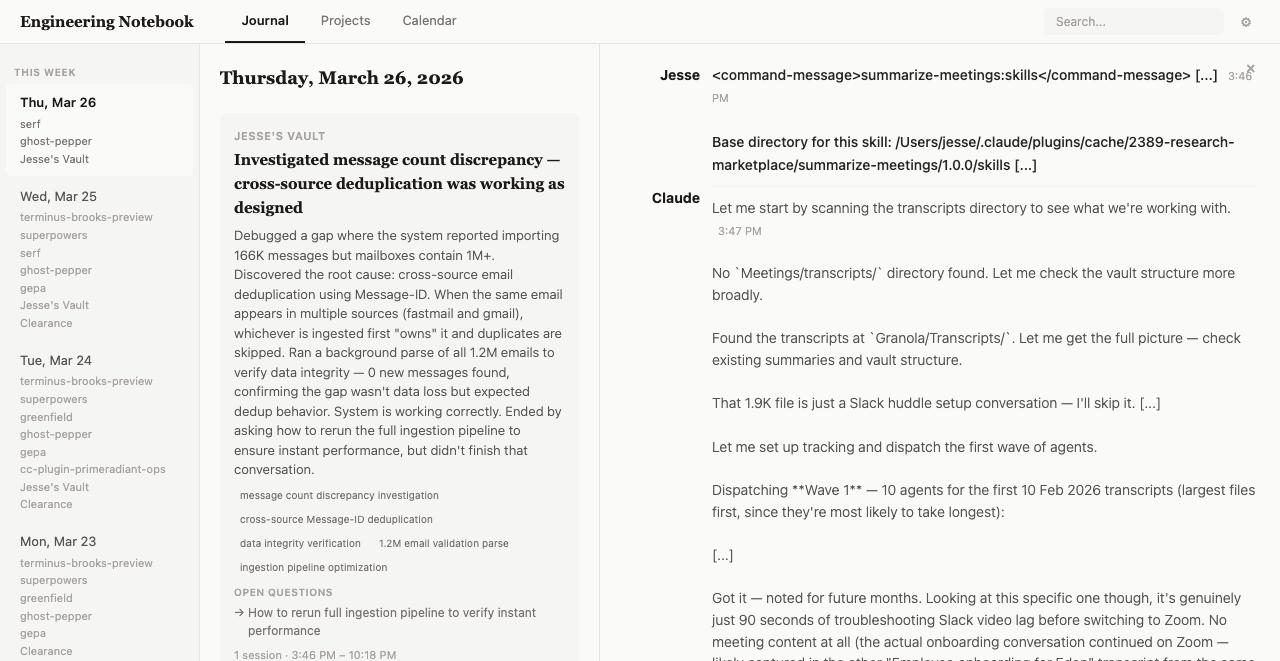
Requires Bun v1.1+.
git clone https://github.com/prime-radiant-inc/engineering-notebook.git
cd engineering-notebook
bun install
bun link  # makes `engineering-notebook` available globally
# 1. Ingest your sessions (defaults to ~/.claude/projects and ~/.codex/sessions)
engineering-notebook ingest

# 2. Generate journal summaries (requires ANTHROPIC_API_KEY)
engineering-notebook summarize --all

# 3. Browse your journal
engineering-notebook serve
# Open http://localhost:3000
The web interface has several views:
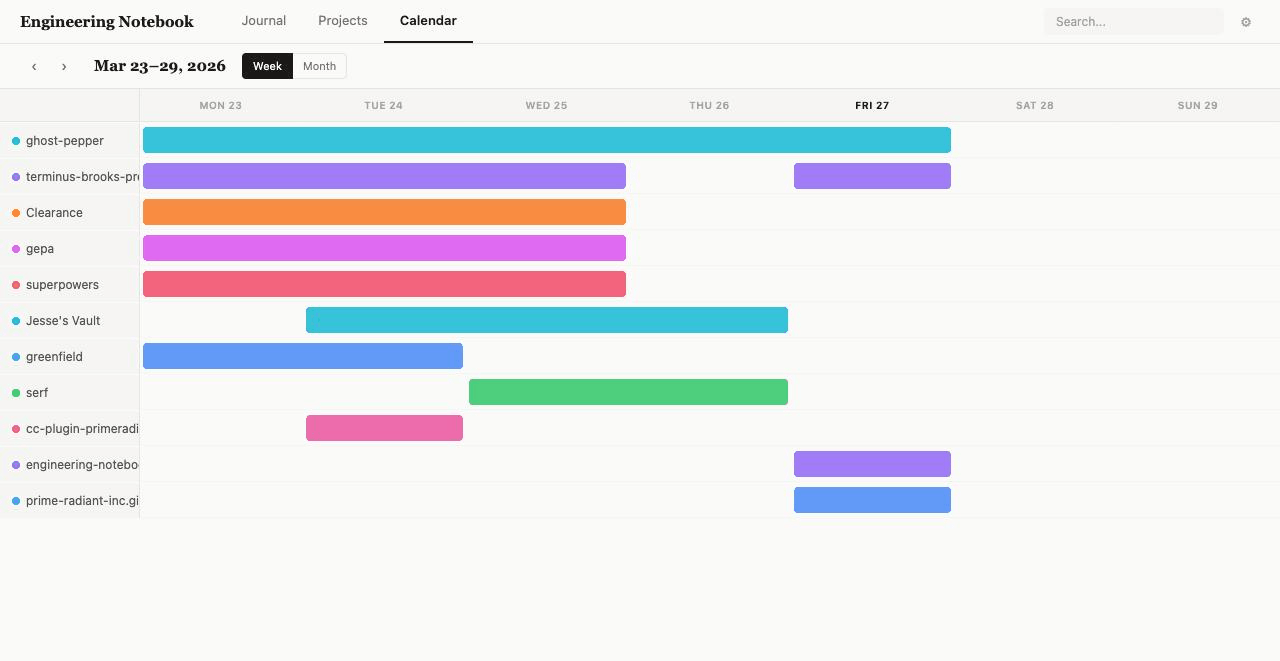 | 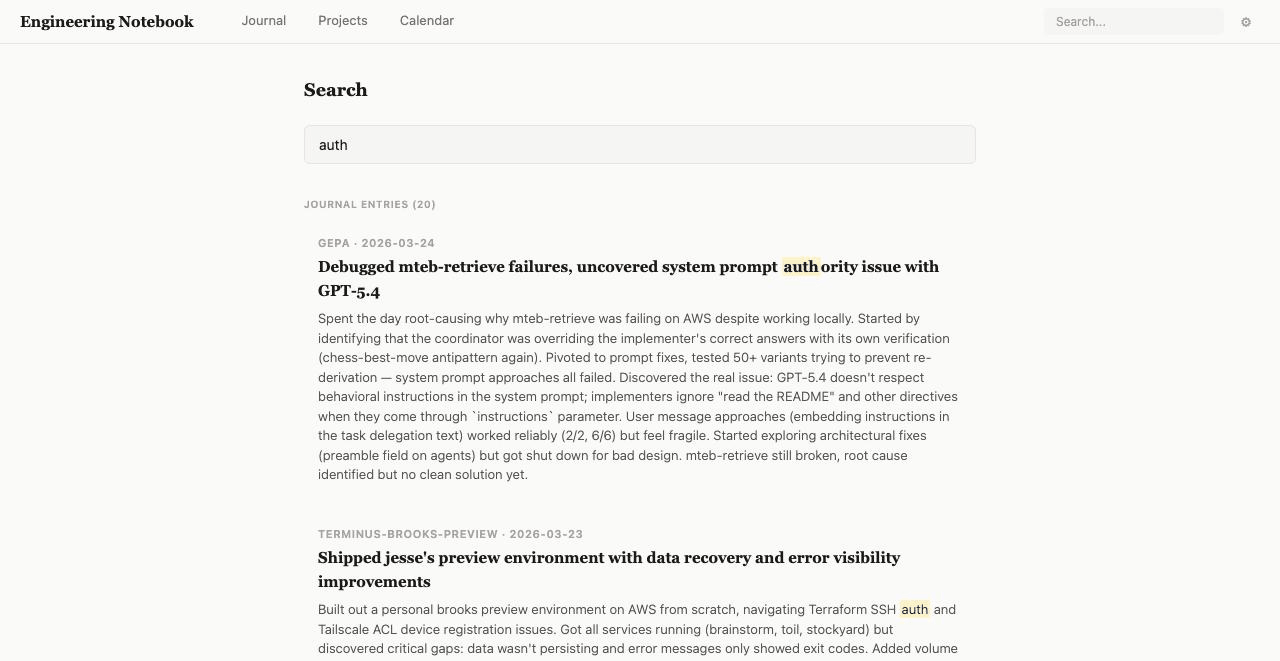 |
|---|---|
| Calendar/Gantt view | Full-text search |
Each session transcript includes a resume command (claude --resume <id>) with a copy button for picking up where you left off.
engineering-notebook ingestScan source directories and ingest session files into the database.
engineering-notebook ingest                    # scan default sources
engineering-notebook ingest --source ~/extra   # add an extra source directory
engineering-notebook ingest --force            # re-ingest already-processed sessions
engineering-notebook summarizeGenerate LLM summaries for ingested sessions.
engineering-notebook summarize --all                      # summarize everything unsummarized
engineering-notebook summarize --date 2026-02-22          # summarize a specific date
engineering-notebook summarize --project myapp            # summarize a specific project
engineering-notebook summarize --date 2026-02-22 --project myapp  # both filters
engineering-notebook serveStart the web server.
engineering-notebook serve              # default port 3000
engineering-notebook serve --port 8080  # custom port
The server auto-syncs remote sources and re-ingests on a configurable interval (default: 60 seconds).
Config lives at ~/.config/engineering-notebook/config.json:
{
  "sources": ["~/.claude/projects", "~/.codex/sessions"],
  "exclude": ["-private-tmp*", "*-skill-test-*"],
  "db_path": "~/.config/engineering-notebook/notebook.db",
  "port": 3000,
  "day_start_hour": 5,
  "summary_instructions": "",
  "remote_sources": [],
  "auto_sync_interval": 60
}
| Field | Description | Default |
|---|---|---|
sources | Directories to scan for session files | ["~/.claude/projects", "~/.codex/sessions"] |
exclude | Glob patterns for directories to skip | ["-private-tmp*", "*-skill-test-*"] |
db_path | SQLite database location | ~/.config/engineering-notebook/notebook.db |
port | Web server port | 3000 |
day_start_hour | Hour (0-23) when a "day" starts (for grouping late-night sessions with the previous day) | 5 |
summary_instructions | Custom instructions appended to the LLM summarization prompt | "" |
remote_sources | SSH remote sources to sync before ingesting | [] |
auto_sync_interval | Seconds between auto-syncs when serving | 60 |
Sync session files from remote machines over SSH:
{
  "remote_sources": [
    {
      "name": "workstation",
      "host": "work.local",
      "path": "~/.claude/projects",
      "enabled": true
    }
  ]
}
When the server is running, subscribe to the iCal feed at:
webcal://localhost:3000/api/calendar.ics
This creates calendar events for each journal entry, viewable in Apple Calendar, Google Calendar, Outlook, etc.
bun install
bun test          # run tests
bun src/index.ts  # run from source
Apache 2.0 — see LICENSE.
Sign in to join the discussion.
No comments yet. Be the first to say what this is good for.
🪨 why use many token when few token do trick — Claude Code skill that cuts 65% of tokens by talking like caveman

The best-benchmarked open-source AI memory system. And it's free.

Orca is the ADE for working with a fleet of parallel agents. Run any coding agent with your own subscription. Available on desktop, mobile and remote runtime.

A cross-platform desktop All-in-One assistant for Claude Code, Codex, OpenCode, OpenClaw, Grok Build & Hermes Agent. Only official website: ccswitch.io

Never stop coding. Free MIT AI gateway: one endpoint, 352 providers (150+ free), 1200+ models Kimi, Claude, GPT, Gemini, GLM, DeepSeek, MiniMax. Works with Claude Code, Codex, Cursor, OpenCode, Cline & Copilot. Quota-aware auto-fallback, RTK+Caveman compression saves 15-95% tokens, MCP/A2A, Desktop/PWA. Built by 550+ contributors

Compress tool outputs, logs, files, and RAG chunks before they reach the LLM. 20% fewer tokens for coding agents, 60-95% fewer tokens for JSON, same answers. Library, proxy, MCP server.