
DietrichGebert/ponytailPlugins
Makes your AI agent think like the laziest senior dev in the room. The best code is the code you never wrote.
138k
1 add
Notebook Intelligence adds a chat panel, inline code generation, auto-complete, and notebook-aware agent actions to JupyterLab. It can talk to Claude Code, GitHub Copilot, Ollama, or OpenAI-compatible endpoints, and it also supports MCP servers, skills, rulesets, and Claude plugins.
Builders who work in JupyterLab and want their agent to edit and run notebooks with connected tools.
You can keep notebook work, chat, and agent actions in one place instead of switching between tools.
Adds a chat sidebar, inline chat popover, and notebook toolbar generation for code and notebook work.
Provides code-cell and Python file completions that you accept with Tab.
Lets the built-in agent create, edit, and execute notebooks, and fix issues it finds in cells.
Uses the Claude Code CLI for chat while keeping Claude models available for inline chat and auto-complete.
Connects the agent to external tools and services through Model Context Protocol servers.
Manages Claude skills, rulesets, and Claude plugins from inside JupyterLab.
Works with the active notebook’s kernel and language, and attaches cell outputs back into chat.
Supports GitHub Copilot, OpenAI-compatible and LiteLLM-compatible endpoints, Ollama, and Claude.
pip install notebook-intelligence
jupyter lab     # restart JupyterLab if it was already running
Notebook Intelligence (NBI) is an AI coding assistant and extensible AI framework for JupyterLab. It adds chat, inline edit, auto-complete, and an agent that can drive notebooks — backed by GitHub Copilot, an OpenAI-compatible or LiteLLM-compatible endpoint, local Ollama models, or Anthropic's Claude Code CLI.
NBI is free and open-source. Connect it to a free or paid LLM provider of your choice — GitHub Copilot, any OpenAI- or LiteLLM-compatible endpoint, Ollama (local), or Anthropic Claude (via the Claude Code CLI). Provider charges, when applicable, are paid directly to the provider.
npx.pip install notebook-intelligence
jupyter lab # restart JupyterLab if it was already running
After restart:
If the panel stays empty or login does nothing, see Troubleshooting.
A short glossary you'll see referenced throughout these docs.
@mention-able persona inside the chat panel (@workspace, @mcp, …). Participants route the request to a specific tool surface.PATH.api.anthropic.com) is the HTTPS endpoint NBI calls directly for inline chat and auto-complete in Claude mode. Claude Code is Anthropic's local CLI agent that NBI shells out to for the chat panel; it talks to Anthropic itself.~/.jupyter/nbi/rules/ that get injected into the system prompt to enforce conventions, coding standards, or domain rules.~/.claude/skills/ (or <project>/.claude/skills/) holding a SKILL.md plus helper files. Claude can invoke it like a callable plugin scoped to a workspace.claude plugin install, distributed through a marketplace (typically a GitHub repo that publishes a manifest of plugins). Distinct from NBI's own labextension; plugins run inside Claude Code sessions.NBI provides a dedicated mode for Claude Code integration. In Claude mode, NBI uses the Claude Code CLI for the chat panel, and Claude models (via the Anthropic API) for inline chat and auto-complete suggestions. This brings Claude Code's tools, skills, MCP servers, and custom commands into JupyterLab.
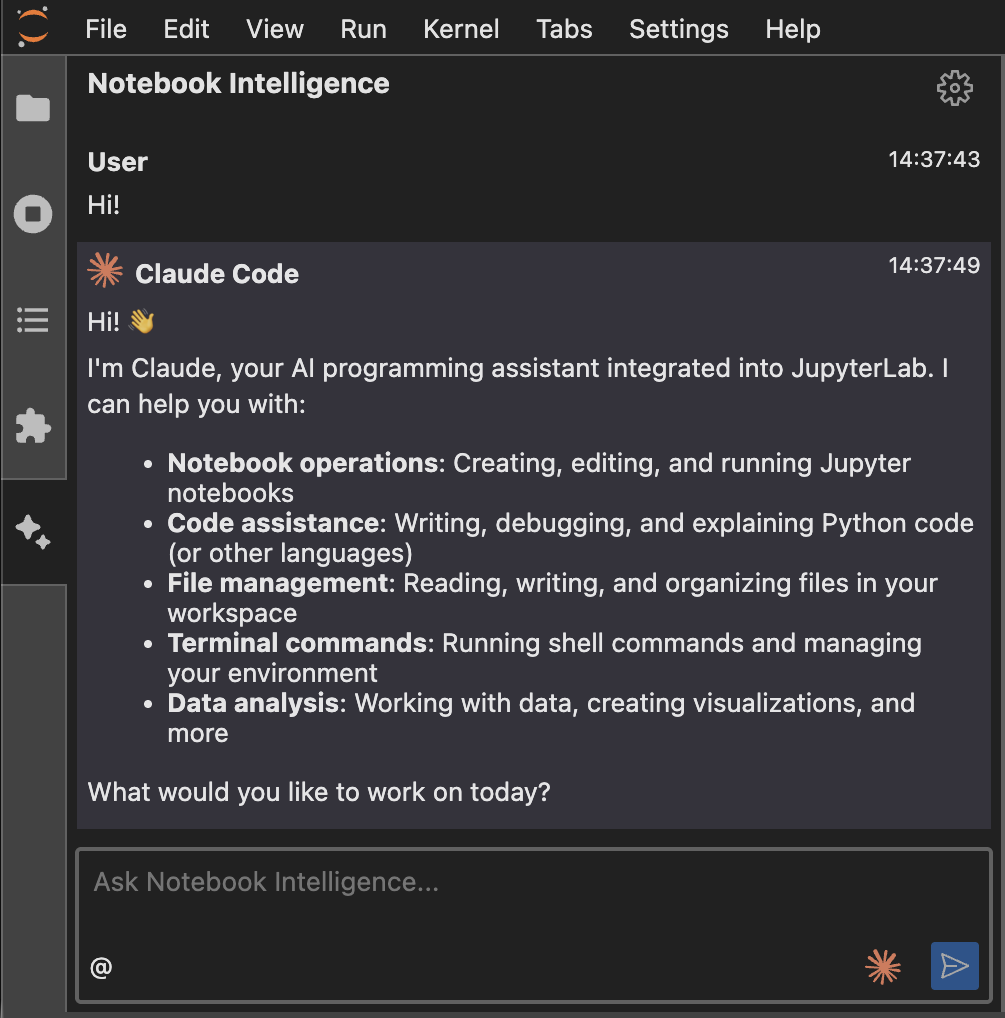
Configure via the NBI Settings dialog (gear icon in the chat panel, or Settings → Notebook Intelligence Settings). Toggle Enable Claude mode, then:
$ cost figure appears only when NBI is running against a direct Anthropic API key on Anthropic's own endpoint: the SDK prices from the CLI's built-in public list rates, which are not the marginal cost on a subscription login and not the rate on a custom base_url, so NBI omits a number it cannot stand behind rather than showing a misleading one.Model defaults. With no model selected, the chat model resolves to the newest Sonnet (claude-sonnet-5 today) and auto-complete to the newest Haiku, both matched against the model list fetched from the configured endpoint rather than a hardcoded ID. If a configured ID no longer exists, NBI falls back within the same tier by version rather than alphabetically, so claude-sonnet-99 resolves to the newest Sonnet. The fetched list is cached per endpoint, so changing Base URL does not reuse the previous endpoint's models. Auto-complete responses are capped at 1024 tokens, since a suggestion is at most a few dozen lines; NBI_CLAUDE_INLINE_COMPLETION_MAX_TOKENS overrides the cap and is clamped to [1, 4096].
If the Claude Code CLI is on PATH, NBI launches it automatically. To override the location, set the NBI_CLAUDE_CLI_PATH environment variable before starting JupyterLab.
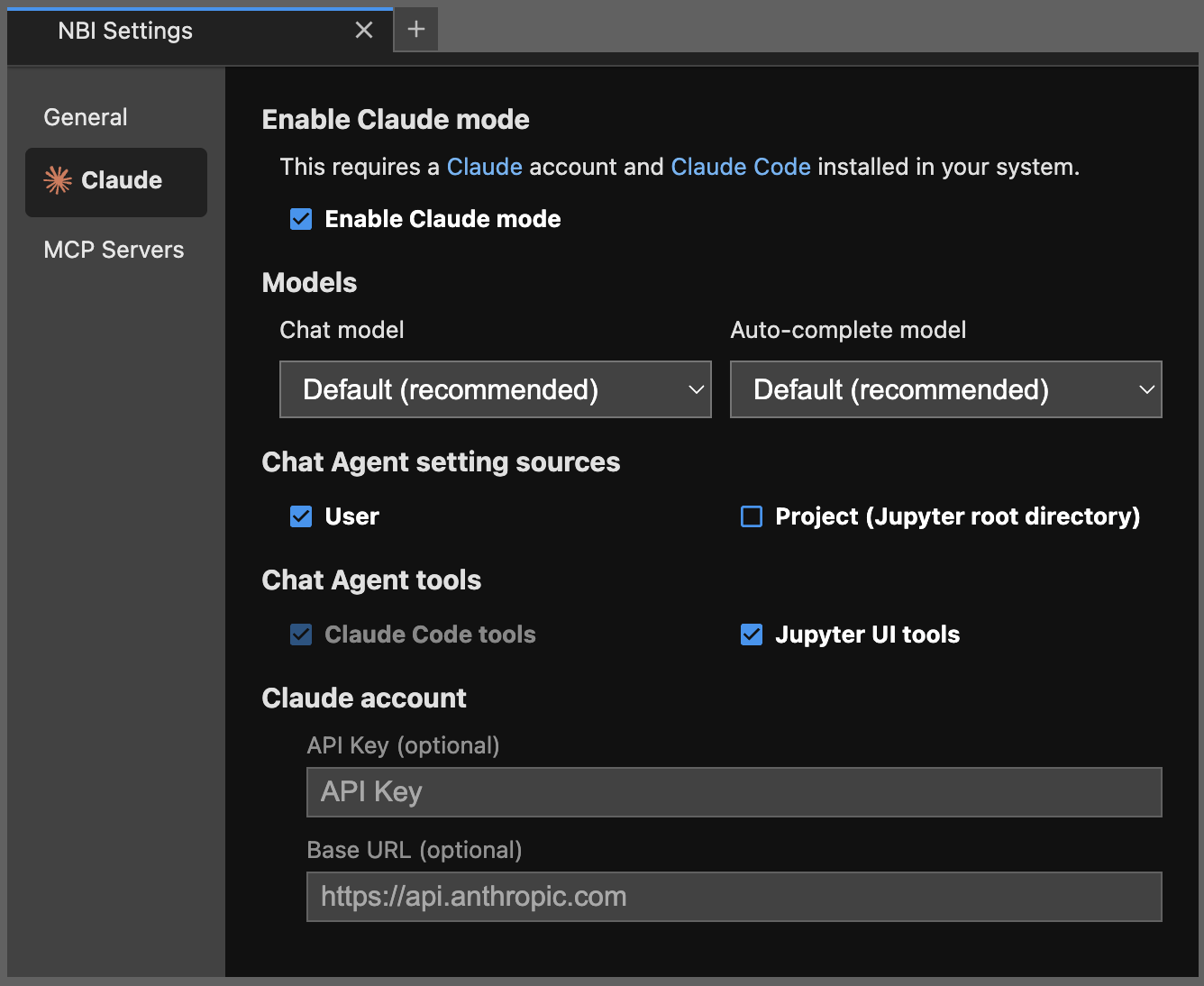
In Claude mode the chat input footer shows a shield-icon button (to the left of the send button) that sets the agent's permission mode for the chat panel, matching the modes in Claude Code and the Claude VS Code extension. Click it to choose:
/enter-plan-mode slash command.Default, Accept Edits, and Plan switch the moment you pick them. The selected mode travels with each message you send and is applied to the agent before the turn runs; switching mid-conversation takes effect on your next message.
Bypass Permissions never persists: starting a New chat session (or /clear) always drops it and it has to be re-armed manually. The other modes carry over across a reset, and a fresh Claude client's starting mode is Default (or an administrator's managed permissions.defaultMode).
Choosing Bypass Permissions does not arm it immediately. It opens a confirmation step; only after you confirm does bypass take effect, and while it is active the shield turns into a red warning icon as a persistent indicator. Bypass must be re-armed each session: starting a new chat or restarting the Claude client drops back to Default. And because the server re-checks the requested mode on every message, an armed bypass can never outlive a policy that an administrator has since turned off.
Admin gating. Bypass Permissions is off by default and hidden from the selector unless an administrator enables it: it is governed by the claude_bypass_permissions policy (NBI_CLAUDE_BYPASS_PERMISSIONS_POLICY), one of three admin policies that default to force-off rather than user-choice (the others gate the experimental ACP agent mode and ACP full access). The requested mode is also clamped on the server for every message, so the gate can't be bypassed by a hand-crafted request. Independently, NBI honors Claude Code's enterprise managed settings: permissions.disableBypassPermissionsMode removes the option regardless of the NBI policy, and permissions.defaultMode sets the selector's starting mode (Bypass excepted, since it never auto-arms). See Allowing Bypass Permissions in the admin guide.
The /enter-plan-mode and /exit-plan-mode slash commands still work if typed but are no longer offered in autocomplete; the selector replaces them and will retire the commands in a future release.
When Claude mode is on, the chat sidebar shows a history icon next to the gear. Click it to list the Claude Code sessions recorded for the current working directory (the same transcripts the Claude Code CLI stores under ~/.claude/projects/). Selecting a session reconnects via resume, so the next message you send continues that transcript with full prior context. A New chat session button next to the gear restarts the SDK client without typing /clear.
Long Claude turns surface an elapsed-time counter and a heartbeat-driven pulse with a "may be slow" copy flip after 30 seconds. Each tool the agent runs shows up as a persistent status card with a kind icon and a live in-progress / done / failed state; edits carry an inline diff, and a run of consecutive calls collapses into one expandable group, so the sidebar reflects what the agent is doing rather than appearing stuck.
In Claude mode, workspace files attached as chat context arrive as @-mention pointers rather than inlined file contents. Claude's Read tool fetches them on demand, which means images, large files, and notebooks (cell-aware) now work where the older content-injection path silently truncated or skipped them.
Enable Show usage after each turn in the Settings dialog to append a small footer under each Claude-mode reply with the turn's duration, token counts (with a cached-input breakdown), and cost — for example 12.3s · 45.2K in (38.1K cached) / 1.2K out · $0.0842. It is off by default.
The cost figure comes from the Claude Code CLI, priced from Anthropic's public list rates. It is shown only when NBI is configured with a direct Anthropic API key on the default endpoint, and is omitted otherwise — on a subscription login (where the marginal cost is effectively $0), an enterprise-negotiated contract, or a custom Base URL (proxy, gateway, or non-Anthropic endpoint) — since the list-price figure would not match your actual billing. Duration and token counts are always shown.
When the Claude CLI is on PATH, the JupyterLab launcher (the panel that opens with new tabs) shows a Claude Code tile alongside the standard kernel launchers. Clicking it opens a session picker; search across past transcripts and resume one in a fresh terminal, or start a new session in the file browser's active subdirectory. Session IDs are copyable from the picker for paste into a claude --resume <id> command.
When any of the following CLIs are on PATH, the launcher adds a tile for each. Clicking a tile opens a terminal at the file browser's current directory and runs the CLI:
NBI_OPENCODE_CLI_PATH)NBI_PI_CLI_PATH)NBI_GITHUB_COPILOT_CLI_PATH)NBI_CODEX_CLI_PATH)Tiles add and remove themselves as CLIs become available or unavailable; they do not require Claude mode. Clicking any tile (or New Session from the Claude resume dialog) prompts for a start directory, so the terminal opens where you want rather than always at the file-browser cwd.
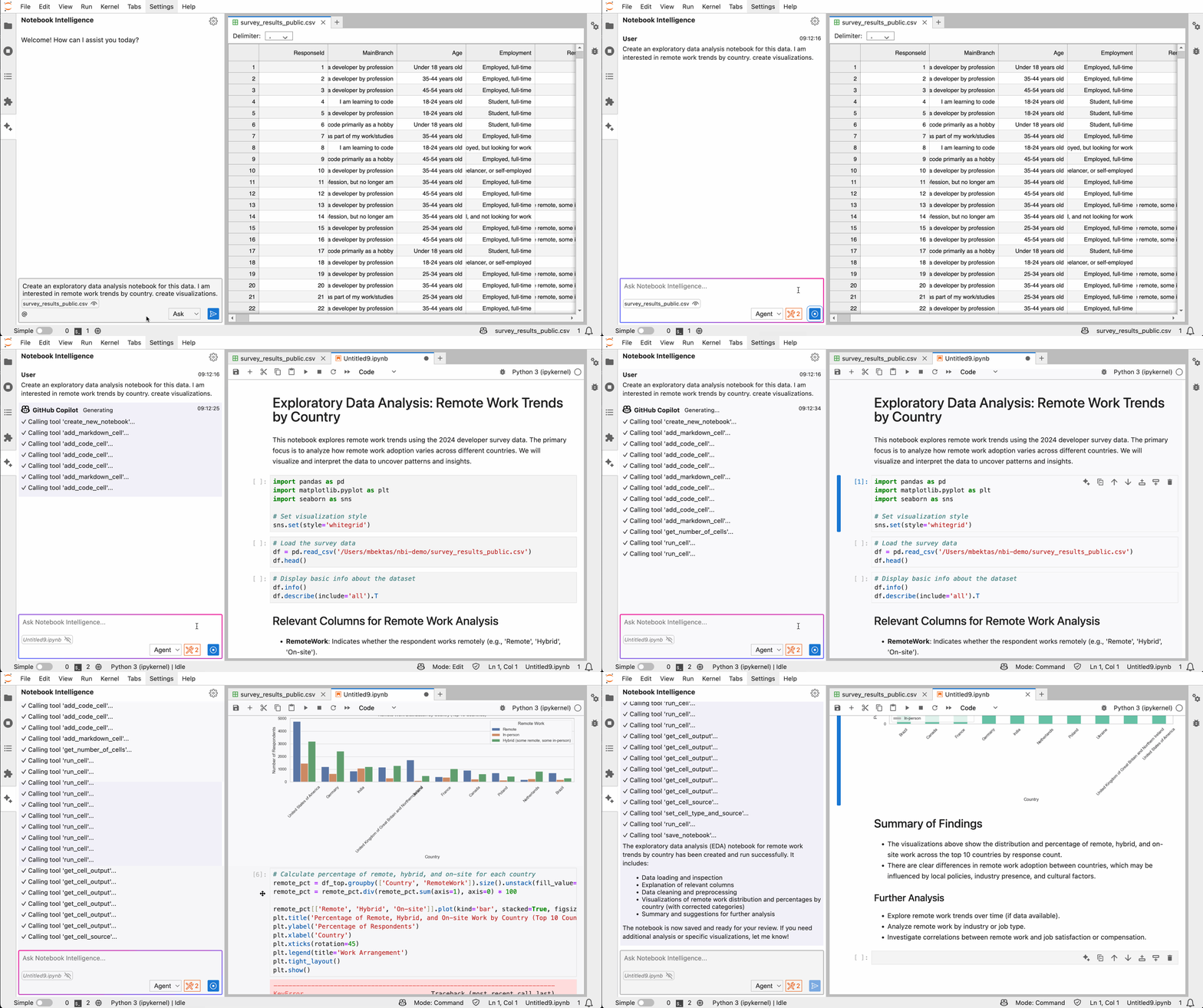
In Agent mode, the built-in AI agent creates, edits, and executes notebooks for you interactively. It can detect issues in cells and fix them.
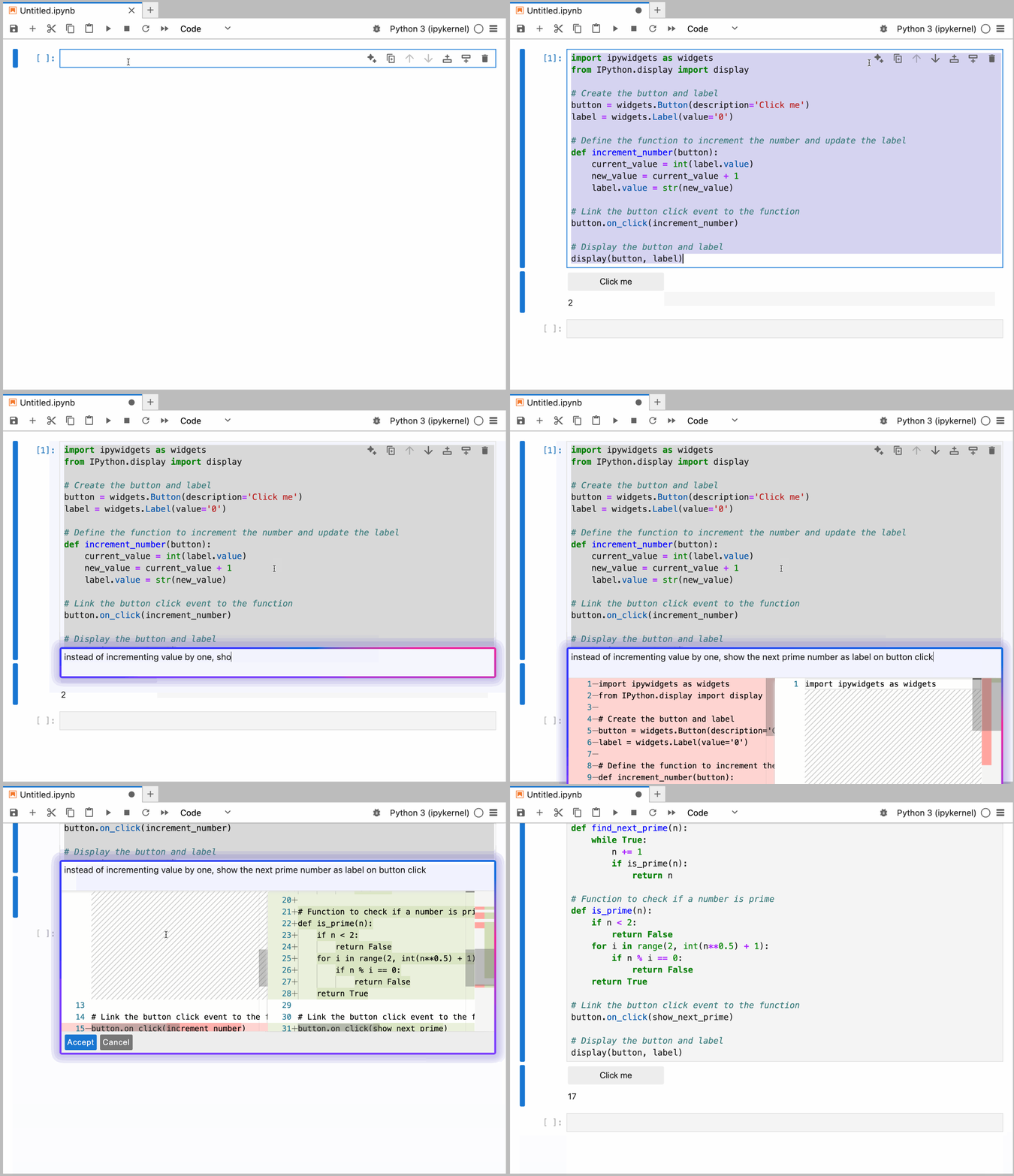
Use the sparkle icon on the cell toolbar or the keyboard shortcut to show the inline chat popover.
Ctrl+G / Cmd+G opens the popover. Ctrl+Enter / Cmd+Enter accepts the suggestion. Esc closes it. The accept shortcut overrides JupyterLab's default run cell binding only while the popover is open — outside the popover, Ctrl+Enter / Cmd+Enter still runs the active cell.
Auto-complete suggestions are shown as you type. Tab accepts. NBI provides auto-complete in code cells and Python file editors.
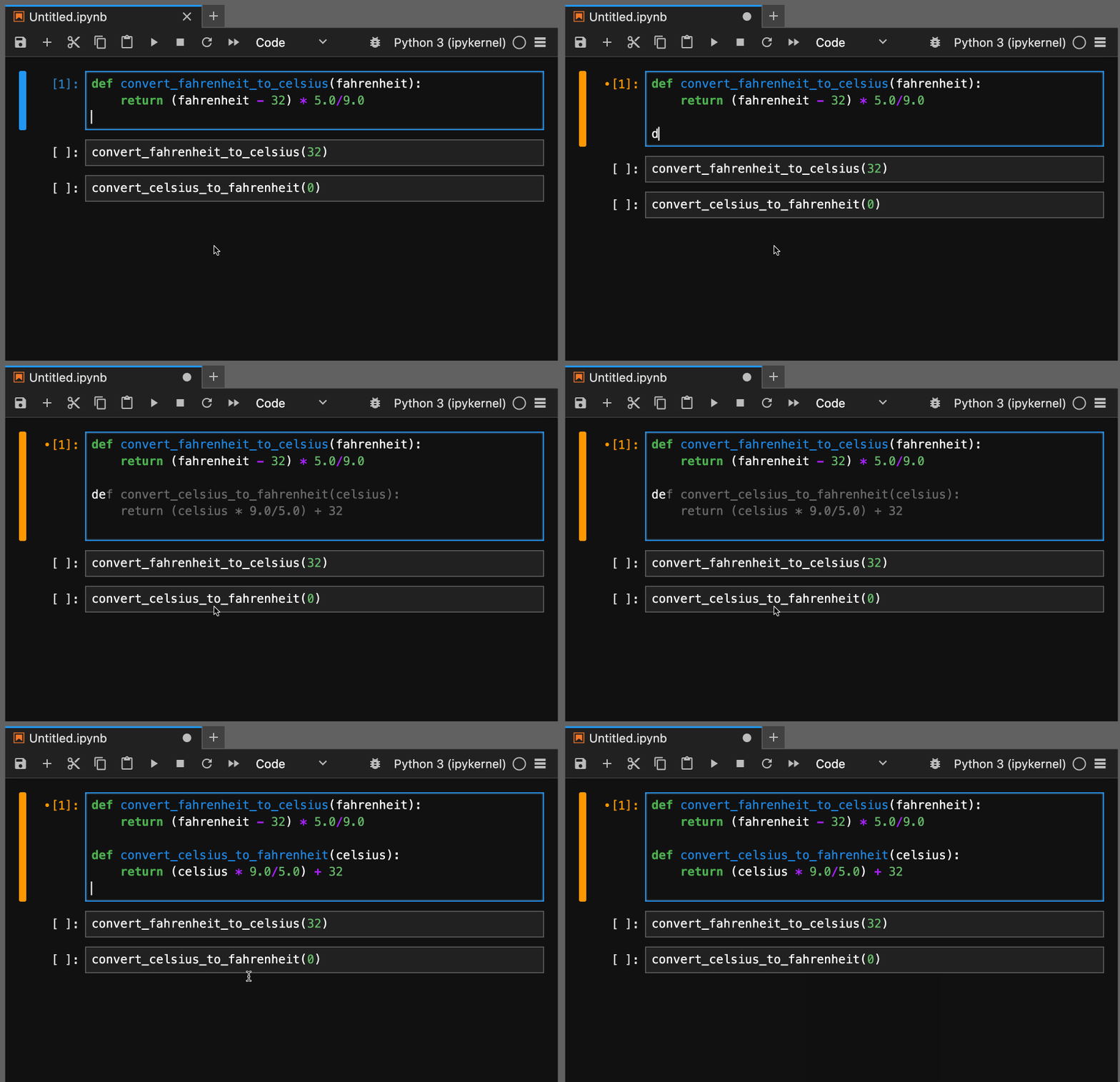
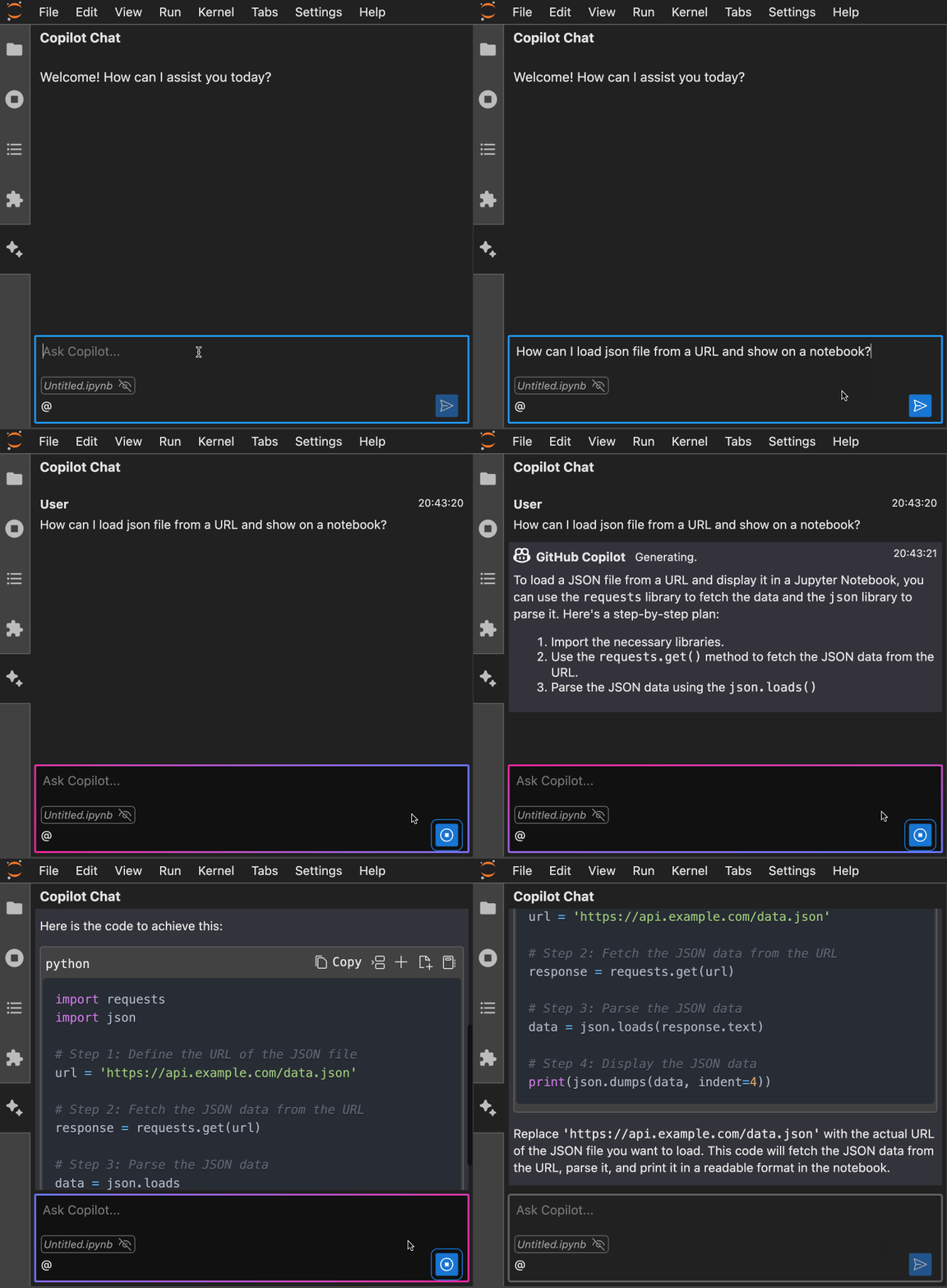
You can paste or attach images alongside a chat prompt — the image goes to the model as input when the active model supports vision.
Right-click a cell output (or hover for the toolbar) to send it straight into the chat as context:
Each is per-user toggleable from Settings (saved as enable_explain_error, enable_output_followup, enable_output_toolbar in config.json, default on) and admin-lockable via NBI_EXPLAIN_ERROR_POLICY / NBI_OUTPUT_FOLLOWUP_POLICY / NBI_OUTPUT_TOOLBAR_POLICY.
Active notebooks show a sparkle icon on the toolbar. Click it to open a popover that scopes the generation request to that specific notebook — handy for multi-notebook sessions where you don't want the chat sidebar to compete for context.
Notebook creation, cell insertion, and inline generation follow the notebook you are actually in rather than assuming Python. NBI resolves the active notebook's kernel and language and carries both through the chat context, the built-in tools, and ruleset scoping, so generated code matches the target notebook, and a rule scoped to languages: ['r'] or kernel_names: ['ir'] applies where you would expect (including in inline generation, which previously did not receive the kernel).
When the agent needs a notebook in a language the current context has not established, it calls a list-available-notebook-kernels tool and picks from the kernelspecs that are actually installed instead of guessing a name. Asking for a kernel that is not installed now fails with a clear error rather than silently producing a Python notebook.
NBI reloads open document tabs when their files change on disk, so edits an AI agent makes via its Read/Write tools appear in the editor without a manual refresh. Tabs with unsaved local edits are skipped so user work is never clobbered. Toggle via the NBI Settings dialog → External changes → "Refresh open files when changed on disk" (default on).
Configure your provider, model, and API key from NBI Settings — the gear icon in the chat panel, the /settings chat command, or the JupyterLab command palette. For background, see the provider blog post.
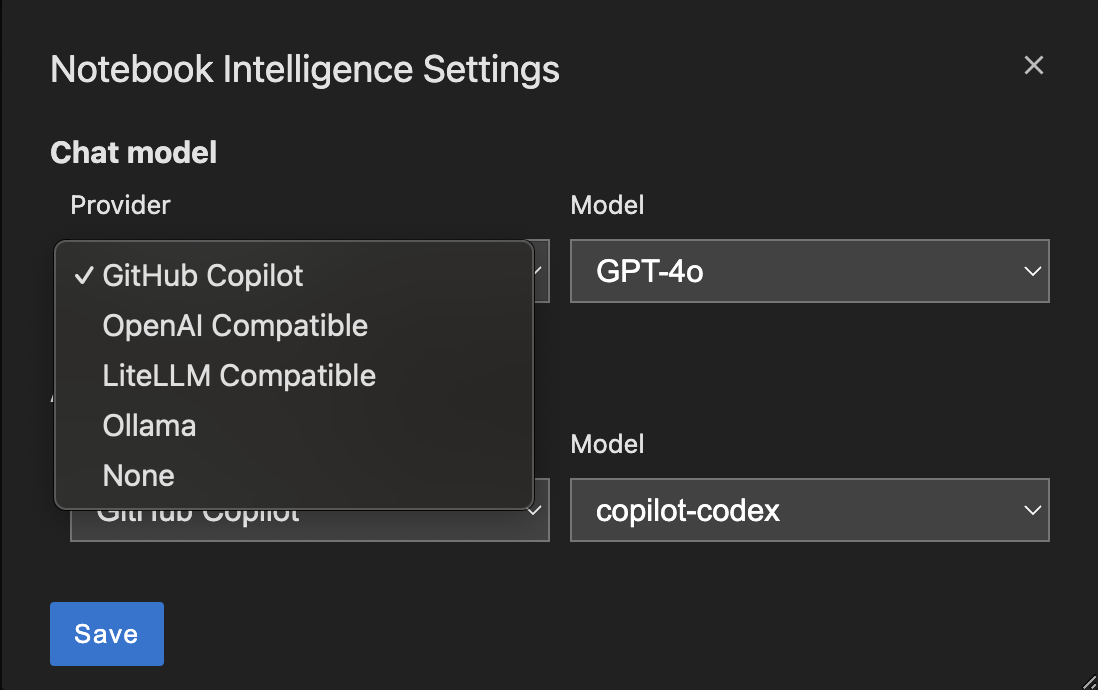
NBI saves configuration at ~/.jupyter/nbi/config.json. It also supports an environment-wide base configuration at <env-prefix>/share/jupyter/nbi/config.json — organizations can ship default configuration there, and user changes save as overrides on top.
These config files store provider, model, and MCP configuration. API keys for custom LLM providers are also stored here in plaintext — never commit ~/.jupyter/nbi/config.json to git, share it, or sync it across users. If a key leaks, rotate it at the provider immediately.
Manual edits to
config.jsonrequire a JupyterLab restart to take effect. Edits via the Settings dialog are picked up live.
Most settings panel toggles can be locked by org administrators. Two shapes:
Boolean policies use the *_POLICY suffix and accept three values: user-choice (default — user toggles freely), force-on (locked enabled), force-off (locked disabled). When forced, the panel control is disabled with a "Locked by your administrator" tooltip and any client-side write is ignored.
| Env var | Locks the Settings panel control for |
|---|---|
NBI_EXPLAIN_ERROR_POLICY | "Explain cell errors" |
NBI_OUTPUT_FOLLOWUP_POLICY | "Ask about cell outputs" |
NBI_OUTPUT_TOOLBAR_POLICY | "Show output toolbar" |
NBI_CLAUDE_MODE_POLICY | "Enable Claude mode" |
NBI_ACP_MODE_POLICY | "Enable ACP mode" (experimental agent mode over the Agent Client Protocol, with Codex as the first agent type; defaults to force-off, set user-choice to allow it) |
NBI_ACP_FULL_ACCESS_POLICY | "Full access" for the ACP agent: run tools without asking (defaults to force-off, so the agent asks before anything beyond trusted read-only commands; user-choice lets users opt into unattended runs) |
NBI_CLAUDE_CONTINUE_CONVERSATION_POLICY | "Remember conversation history" |
NBI_CLAUDE_CODE_TOOLS_POLICY | "Claude Code tools" |
NBI_CLAUDE_JUPYTER_UI_TOOLS_POLICY | "Jupyter UI tools" |
NBI_CLAUDE_SETTING_SOURCE_USER_POLICY | Setting source: User |
NBI_CLAUDE_SETTING_SOURCE_PROJECT_POLICY | Setting source: Project |
NBI_STORE_GITHUB_ACCESS_TOKEN_POLICY | "Remember my GitHub Copilot access token" |
NBI_SKILLS_MANAGEMENT_POLICY | The Skills tab (force-off hides it and 403s the API; also disables the managed-skills reconciler) |
NBI_CLAUDE_MCP_MANAGEMENT_POLICY | The Claude-mode MCP Servers tab (force-off hides it and 403s /claude-mcp/*; independent of the non-Claude MCP Servers tab) |
NBI_CLAUDE_PLUGINS_MANAGEMENT_POLICY | The Claude-mode Plugins tab (force-off hides it and 403s /plugins/*) |
NBI_CLAUDE_BYPASS_PERMISSIONS_POLICY | "Bypass Permissions" in the Claude permission-mode selector (defaults to force-off, as do NBI_ACP_MODE_POLICY and NBI_ACP_FULL_ACCESS_POLICY; user-choice exposes the option, wh |
Sign in to join the discussion.
No comments yet. Be the first to say what this is good for.
Makes your AI agent think like the laziest senior dev in the room. The best code is the code you never wrote.

Graphs that teach > graphs that impress. Turn any code into an interactive knowledge graph you can explore, search, and ask questions about. Works with Claude Code, Codex, Cursor, Copilot, Gemini CLI, and more.

OmO: Just type "mass ulw" keyword with your prompt. Now you are the master of graph engineering.
Persistent Context Across Sessions for Every Agent – Captures everything your agent does during sessions, compresses it with AI, and injects relevant context back into future sessions. Works with Claude Code, OpenClaw, Codex, Gemini, Hermes, Copilot, OpenCode + More
Opinionated Oxlint rules for rejecting low-evidence TypeScript and JavaScript patterns
Teams-first Multi-agent orchestration for Claude Code