
JuliusBrussee/
caveman

🪨 why use many token when few token do trick — Claude Code skill that cuts 65% of tokens by talking like caveman
105k
1 add
Agent Flow watches Claude Code and Codex sessions and renders them as an interactive node graph. You can see tool calls, branches, timing, transcripts, and file attention as the session runs. It works as a browser app, a standalone dev setup, or a VS Code extension, and it can also tail JSONL event logs. Claude Code hooks and Codex session files feed the visualizer through an event relay.
Builders who want to inspect agent runs in Claude Code, Codex, or a VS Code-compatible editor.
You can understand, debug, and compare agent behavior without replaying the whole session in your head.
Shows agent execution as an interactive graph with branching, return flows, and tool calls.
Detects sessions from both runtimes and can show them side by side.
Uses a hook server for live event streaming from Claude Code.
Reads `~/.codex/sessions/**/rollout-*.jsonl` and surfaces Codex event data.
Lets you review the run timeline, transcript, and file attention heatmap.
Can watch or replay any JSONL event log file.
Adds commands, settings, and an editor panel for opening and connecting to sessions.
npx agent-flow-app
git clone https://github.com/patoles/agent-flow.git
cd agent-flow
pnpm i
pnpm run setup      # configure Claude Code hooks (one-time)
pnpm run dev        # start the web app + event relay
Real-time visualization of Claude Code and Codex agent orchestration. Watch your agents think, branch, and coordinate as they work. Demo video here.
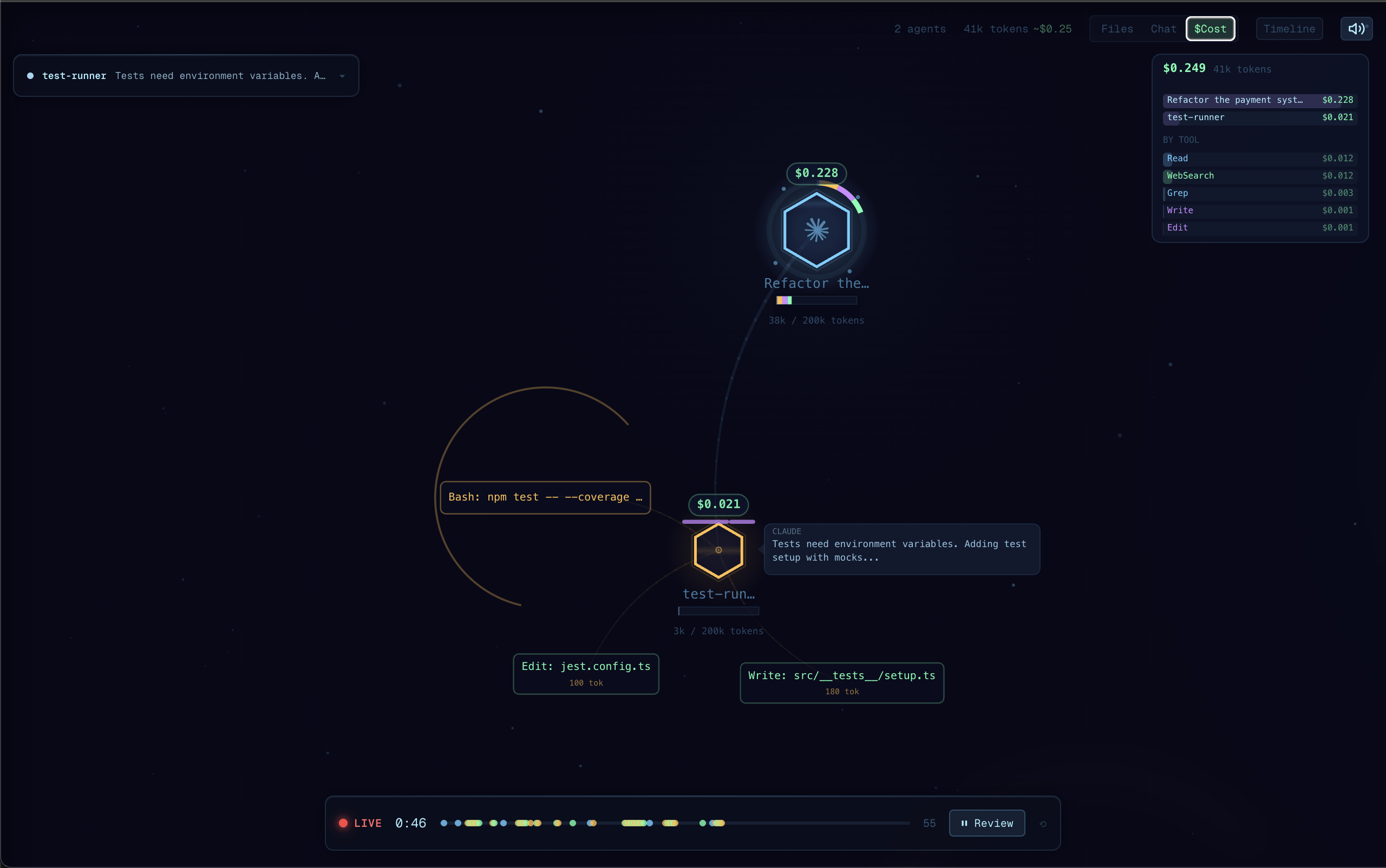
I built Agent Flow while developing CraftMyGame, a game creation platform driven by AI agents. Debugging agent behavior was painful, so we made it visual. Now we're sharing it.
Claude Code is powerful, but its execution is a black box — you see the final result, not the journey. Agent Flow makes the invisible visible:
agentVisualizer.runtime setting~/.codex/sessions/**/rollout-*.jsonl (respects CODEX_HOME) and surfaces tool calls, reasoning, and authoritative token counts from Codex's own event streamnpx agent-flow-app
This starts the visualizer in your browser. Start a Claude Code session in another terminal — events will stream in real-time.
Options:
--port <number> — change the server port (default: 3001)--no-open — don't open the browser automatically--verbose — show detailed event logsgit clone https://github.com/patoles/agent-flow.git
cd agent-flow
pnpm i
pnpm run setup # configure Claude Code hooks (one-time)
pnpm run dev # start the web app + event relay
Open http://localhost:3000 and start a Claude Code session in another terminal — events will stream to the browser in real-time.
Cmd+Shift+P) and run Agent Flow: Open Agent FlowAgent Flow automatically configures Claude Code hooks the first time you open the panel. To manually reconfigure, run Agent Flow: Configure Claude Code Hooks from the Command Palette.
By default Agent Flow watches both Claude Code (~/.claude/projects/) and Codex (~/.codex/sessions/) concurrently in all three entry points (VS Code extension, pnpm run dev, npx agent-flow-app). Sessions are shown side-by-side and tagged by runtime. If you only use one, the other is a harmless no-op — no visible effect, no user action needed.
To restrict to one runtime:
agentVisualizer.runtime to "auto" / "claude" / "codex" in your settingspnpm run dev and npx agent-flow-app: set the AGENT_FLOW_RUNTIME environment variable to claude or codex (defaults to watching both)For non-default Codex installs, set the CODEX_HOME environment variable.
You can also point Agent Flow at a JSONL event log file:
agentVisualizer.eventLogPath in your VS Code settings to the path of a .jsonl file| Command | Description |
|---|---|
Agent Flow: Open Agent Flow | Open the visualizer panel |
Agent Flow: Open Agent Flow to Side | Open in a side editor column |
Agent Flow: Connect to Running Agent | Manually connect to an agent session |
Agent Flow: Configure Claude Code Hooks | Set up Claude Code hooks for live streaming |
| Shortcut | Action |
|---|---|
Cmd+Alt+A (Mac) / Ctrl+Alt+A (Win/Linux) | Open Agent Flow |
| Setting | Default | Description |
|---|---|---|
agentVisualizer.runtime | "auto" | Which agent runtime(s) to watch: "auto" (both), "claude", or "codex" |
agentVisualizer.devServerPort | 0 | Development server port (0 = production mode) |
agentVisualizer.eventLogPath | "" | Path to a JSONL event log file to watch |
agentVisualizer.autoOpen | false | Auto-open when an agent session starts |
pnpm i              # install dependencies for all packages
pnpm run setup      # configure Claude Code hooks (one-time)
pnpm run dev        # start dev server + event relay
pnpm run dev starts both the Next.js dev server and an event relay that receives Claude Code events and streams them to the browser via SSE.
Other scripts:
| Script | Description |
|---|---|
pnpm run dev:demo | Start with demo/mock data |
pnpm run dev:relay | Run the event relay server standalone |
pnpm run dev:extension | Watch-build the extension |
pnpm run build:all | Production build (webview + extension) |
pnpm run build:web | Build the Next.js web app |
pnpm run build:extension | Build the extension |
pnpm run build:webview | Build the webview assets |
Created by Simon Patole, for CraftMyGame.
Agent Flow ships opt-out anonymous usage telemetry, enabled by default only
in the published npx agent-flow-app binary. pnpm run dev and the VS Code
extension emit nothing. Only aggregate events are sent — session count,
duration, event count, OS/arch, Agent Flow version, distinct model IDs
observed, which runtimes were watched, and error class names. Prompts, file
paths, tool calls, user info, and environment variables are never sent.
export AGENT_FLOW_TELEMETRY=false or export DO_NOT_TRACK=1
(disabled installs write zero state to disk — no ~/.agent-flow/ directory)cat ~/.agent-flow/telemetry/events.jsonlserialize() function
in scripts/telemetry.ts~/.agent-flow/installation-id —
a fresh random UUIDv4 will be generated on next runApache 2.0 — see LICENSE for details.
The name "Agent Flow" and associated logos are trademarks of Simon Patole. See TRADEMARK.md for usage guidelines.
Sign in to join the discussion.
No comments yet. Be the first to say what this is good for.
🪨 why use many token when few token do trick — Claude Code skill that cuts 65% of tokens by talking like caveman

The best-benchmarked open-source AI memory system. And it's free.

Orca is the ADE for working with a fleet of parallel agents. Run any coding agent with your own subscription. Available on desktop, mobile and remote runtime.

A cross-platform desktop All-in-One assistant for Claude Code, Codex, OpenCode, OpenClaw, Grok Build & Hermes Agent. Only official website: ccswitch.io

Never stop coding. Free MIT AI gateway: one endpoint, 352 providers (150+ free), 1200+ models Kimi, Claude, GPT, Gemini, GLM, DeepSeek, MiniMax. Works with Claude Code, Codex, Cursor, OpenCode, Cline & Copilot. Quota-aware auto-fallback, RTK+Caveman compression saves 15-95% tokens, MCP/A2A, Desktop/PWA. Built by 550+ contributors

Compress tool outputs, logs, files, and RAG chunks before they reach the LLM. 20% fewer tokens for coding agents, 60-95% fewer tokens for JSON, same answers. Library, proxy, MCP server.