





JuliusBrussee/
caveman

🪨 why use many token when few token do trick — Claude Code skill that cuts 65% of tokens by talking like caveman
105k
1 add
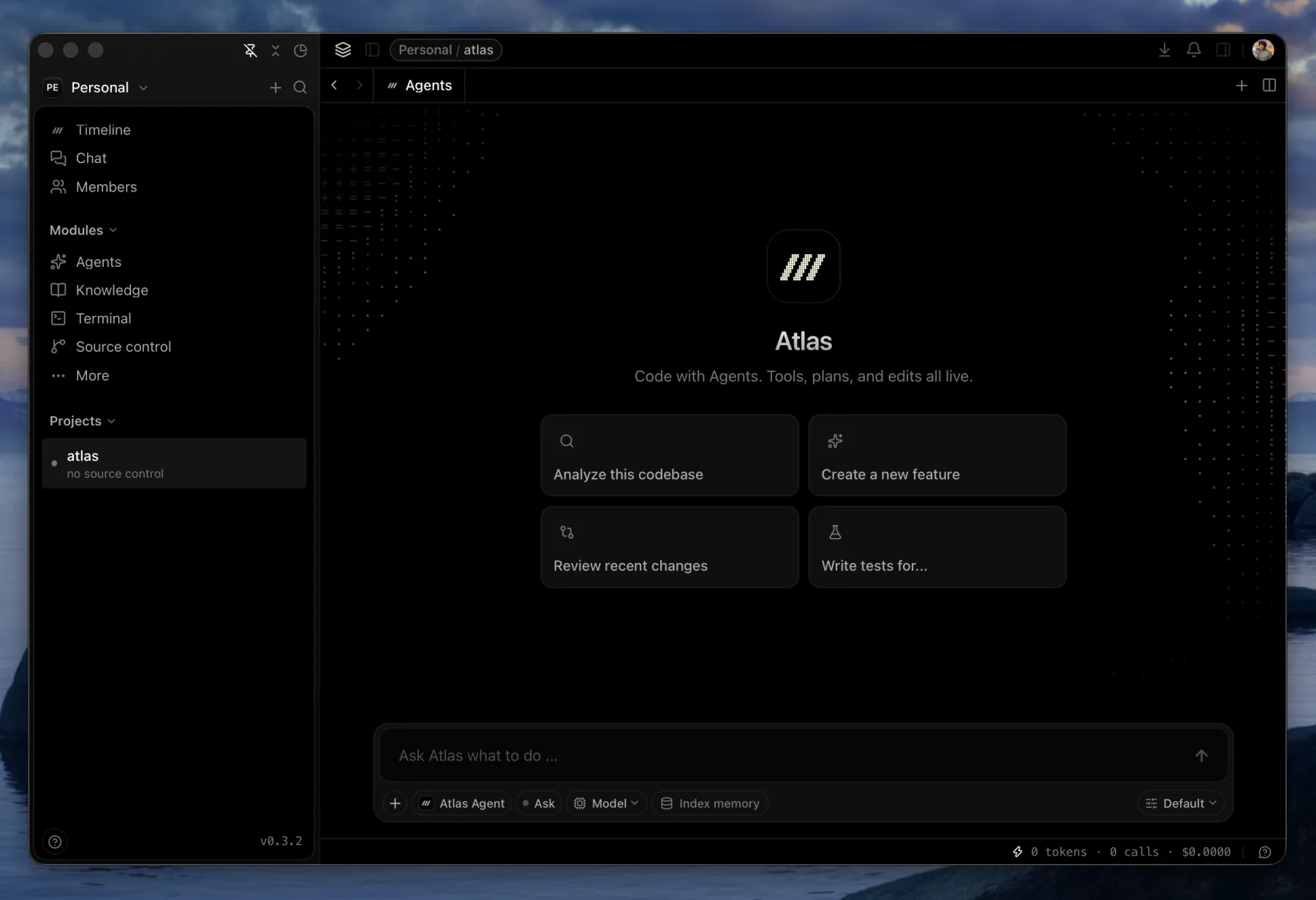
Atlas is a local app for tracking agent work as source control. It records sessions, attaches them to commits as checkpoints, and lets you inspect what each agent did and why. It works with Claude Code, Codex, Atlas’s native agent, and other ACP-compatible agents. The app also adds shared memory, local `@` mentions, a knowledge base, and git tools around those sessions.
Builders who want their agent work, prompts, and commits tracked in one local workspace.
You can switch between coding agents without losing the thread of a task.
Run Claude Code, Codex, Atlas’s native agent, and other ACP registry agents in parallel sessions.
Link commits back to the session that produced them, with prompts, tool calls, and reasoning kept together.
Store plans, decisions, failures, and architecture notes in a local memory index that every agent can read.
Resolve files, folders, symbols, branches, commits, notes, papers, and past sessions before sending the prompt.
Keep markdown notes in `.atlas/knowledge/` with backlinks, a link graph, and export options.
Edit code, inspect diffs, stage and commit changes, and run commands in the same app.
Record prompts, messages, tool calls, touched files, and patches in `.atlas/sessions.db`, and import existing Claude Code history.
Keep code, notes, and sessions on your machine by default, with optional account sync later.
sudo apt install -y libglib2.0-dev libgtk-3-dev libwebkit2gtk-4.1-dev
sudo dnf install glib2-devel gtk3-devel webkit2gtk4.1-devel
sudo pacman -S glib2 gtk3 webkit2gtk-4.1
sudo zypper install glib2-devel gtk3-devel webkit2gtk3-devel
git clone https://github.com/pacifio/atlas
cd atlas
bun install
bun run dev:app
bun run build:app       # .app bundle
bun run build:app:dmg   # .app + .dmg installer
Atlas is source control for coding agents. Every agent run produces checkpoints: commits are linked back to the session that made it alongside the prompts, tool calls, and reasoning. You see which agent did exactly what and why.
Run Claude Code, Codex, Atlas's own agent, or anything from the ACP registry side by side against the same codebase, with shared memory so switching agents mid-task doesn't mean starting over.
.atlas/knowledge/, plus the CLAUDE.md and AGENTS.md you already wrote, feed every agent in the project.@ anything into a prompt. Files, folders, symbols, branches, commits, notes, papers, and past sessions resolve locally before the prompt is sent.Grab the latest .dmg from tryatlas.cc or the releases page.
[!NOTE] macOS is the supported platform. Linux and Windows build from the same Tauri codebase but are untested — see Build from source.
Agents now write a large share of the code and keep none of the reasoning behind it. The prompt that produced a change, the tool calls it made, the approach it tried first and abandoned — all of it lives in a scrollback buffer until the buffer scrolls.
What survives is a commit message, written by a model, summarising a diff. Months later that is the only record of why the code looks the way it does.
Three problems follow, and every editor designed before agents has all three:
CLAUDE.md, AGENTS.md, and each agent's own memory files. Nothing reads all of them at once.Two commitments shape how Atlas answers them:
.atlas/, because it is queried, not read.A checkpoint is what a commit doesn't tell you on its own: which session produced it, what the agent was asked, the tool calls it made, and the reasoning behind the change, kept together instead of lost the moment the terminal scrolls.
Atlas records every agent session locally in .atlas/sessions.db, with secrets scrubbed before anything touches disk. When you commit (from any tool, even with Atlas closed), the commit is linked back to the session that produced it as a checkpoint, and links survive rebases and amends.
You don't have to read the raw transcript to get the context back: select a checkpoint and chat with it directly, and it answers from what actually happened in that session. Local mode works fully offline with no account.
Atlas runs your agents as they are, and enriches what they see.
Claude Code and Codex run as external subprocesses over ACP, the most-used, most-tested path. Atlas Agent, the native agent, runs in-process on a hard fork of the Codex engine (see CONTEXT.md and ADR-0004).
Beyond those, Atlas can spawn any agent in the ACP registry (Cursor, OpenCode, Kilo Code, and more), pulling in each one's official binary automatically. All of them go through the same send path, so everything below applies whichever one you pick.
[!NOTE] QA on the long tail of registry agents is ongoing.
Before your message reaches the agent, Atlas assembles context around it:
| Injected | Where it comes from | When |
|---|---|---|
@ mentions | Resolved locally in Rust before the prompt is sent. Notes, skills, papers, and past sessions are inlined; files and folders resolve to a path | Every turn |
| Shared agent memory | Active plan, decisions, file changes, failures, and architecture notes, written by any agent | Every turn |
| Semantic matches | Your message is embedded on-device and matched against the project's memory index | Every turn |
| Session handoff | A curated fact pack plus the tail of your last session in this project, including one from a different agent | First message |
| What you already wrote | Knowledge notes, CLAUDE.md, AGENTS.md, Claude Code's memory files, and Codex's history, folded into one index | Continuously |
@-ing a 5000-line file sends a path the agent reads on demand, so one mention doesn't occupy the context window for the rest of the session.| Capability | Description | Link |
|---|---|---|
| Multi-agent sessions | Claude Code, Codex, and Atlas's native agent, selectable per session and running in parallel across tabs. Sessions are independent of tabs, so switching never drops a run in flight | Chat & Sessions |
| Shared agent memory | On-device semantic index (local embeddings, HNSW search) that every agent reads from and writes to | Memory |
| @ mentions | Local resolution of files, folders, symbols, branches, commits, notes, skills, papers, and past sessions | Chat & Sessions |
| Skills | SKILL.md files scoped globally or per project, enabled per agent by symlinking into that agent's own skills directory | Skills |
| Packs | Install a GitHub repo of skills, subagents, commands, hooks, rules, and scripts, discovered through the skills.sh index | Skills |
| Model chat | Talk to a model directly in its own tab, with no agent loop around it | Chat & Sessions |
| Organisations | Sign in, create an organisation, and sync across devices and teammates | Organisations |
| Capability | Description |
|---|---|
| Session capture | Every session recorded to .atlas/sessions.db: prompts, messages, tool calls, the files each one touched, and the patches it applied |
| Checkpoints | Each session linked to the commits it produced. Commits are observed rather than intercepted, so one made from a terminal, from another editor, or while Atlas was closed still finds its session |
| Survives history rewrites | Links re-point through amend and rebase by patch-id reconciliation. When a squash makes the link genuinely ambiguous, it orphans instead of guessing |
| Transcript import | Backfills your existing Claude Code history, so the record starts before you installed Atlas |
| Secrets scrubbed on write | Redaction runs before anything is persisted, so the local store is never itself a disclosure risk |
| Capture health | One signal per workspace, OK, Degraded, or Stopped, each with a reason and the next step |
| Mission control | Dashboard for agent activity: usage over time, consumption breakdown, timelines, and a filterable log table |
Works with no account and no network.
| Capability | Description | Link |
|---|---|---|
| Editor | CodeMirror editing surface, with per-project editor state restored across restarts | Editor |
| Git | Real commit graph with lane assignment, stage/unstage/commit, branch operations, and file-level diffs | Git & Diff |
| Terminal | Block terminal where each command carries its own output, exit code, and duration, plus a full interactive surface for vim, htop, and friends | Terminal |
| Knowledge base | Plain markdown notes in .atlas/knowledge/, versioned next to the code, with backlinks, a link graph, and export to HTML or a standalone server binary | Knowledge base |
| Research | Search arXiv and Semantic Scholar, pull papers in, read them in-app, and @-mention them into a prompt | Research |
| Browser | Native WebKit webview in a tab, with real logins, cookies, and a reader mode | Explorer |
| Spaces | Spatial board for notes and their connections, persisted as JSON in the project | Chat & Sessions |
| Split view | Up to three resizable columns, each with its own tabs | Editor |
| Activity log | Every significant event in the project, filterable, with rows you can pin across restarts | Timeline |
To use the Claude Code agent, install the claude CLI and put it on your PATH. Atlas's native agent needs no external CLI.
Requires Bun, Rust (stable, via rustup), and Xcode Command Line Tools.
sudo apt install -y libglib2.0-dev libgtk-3-dev libwebkit2gtk-4.1-dev
sudo dnf install glib2-devel gtk3-devel webkit2gtk4.1-devel
sudo pacman -S glib2 gtk3 webkit2gtk-4.1
sudo zypper install glib2-devel gtk3-devel webkit2gtk3-devel
git clone https://github.com/pacifio/atlas
cd atlas
bun install
bun run dev:app
The first Rust compile takes a few minutes; after that it is seconds. Use bun run dev for frontend-only iteration, though anything calling invoke() needs dev:app.
Production builds:
bun run build:app       # .app bundle
bun run build:app:dmg   # .app + .dmg installer
See CONTRIBUTING.md. One thing catches people out:
main. main only receives a finished version branch, and that merge is the release.ARCHITECTURE.md covers how Atlas is built. SECURITY.md covers reporting vulnerabilities.
.atlas/sessions.db and stays there. No account required, and nothing sent anywhere until you explicitly opt in to sync.MIT. See LICENSE.
Sign in to join the discussion.
No comments yet. Be the first to say what this is good for.
🪨 why use many token when few token do trick — Claude Code skill that cuts 65% of tokens by talking like caveman

The best-benchmarked open-source AI memory system. And it's free.

Orca is the ADE for working with a fleet of parallel agents. Run any coding agent with your own subscription. Available on desktop, mobile and remote runtime.

A cross-platform desktop All-in-One assistant for Claude Code, Codex, OpenCode, OpenClaw, Grok Build & Hermes Agent. Only official website: ccswitch.io

Never stop coding. Free MIT AI gateway: one endpoint, 352 providers (150+ free), 1200+ models Kimi, Claude, GPT, Gemini, GLM, DeepSeek, MiniMax. Works with Claude Code, Codex, Cursor, OpenCode, Cline & Copilot. Quota-aware auto-fallback, RTK+Caveman compression saves 15-95% tokens, MCP/A2A, Desktop/PWA. Built by 550+ contributors

Compress tool outputs, logs, files, and RAG chunks before they reach the LLM. 20% fewer tokens for coding agents, 60-95% fewer tokens for JSON, same answers. Library, proxy, MCP server.