

HKUDS/
Vibe-Trading

HKUDS/Vibe-TradingOther
"Vibe-Trading: Your Personal Trading Agent"
33k
OpenOps is a full FinOps platform, not a building block. It combines a workflow editor, an Excel-like tables layer, analytics, and integrations with cloud and business tools so teams can manage cloud cost actions in one place.
Builders who want to automate cloud cost operations with a ready-made platform.
You can turn cost-saving ideas into tracked workflows with approvals, logs, and integrations.
Ready-made workflows cover cost optimization, tagging, budgeting, allocation, and reporting.
You can build workflows from scratch or customize existing ones without starting in code.
Approval steps support critical actions across multiple channels.
The platform tracks workflow versions, test steps, and action logs.
OpenOps includes an Excel-like table system and visualization layer for managing opportunities and reporting.
It connects with cloud providers, databases, communication tools, and project management systems.




OpenOps is a No-Code FinOps automation platform that helps organizations reduce cloud costs and streamline financial operations.
It provides customizable workflows to automate key FinOps processes like allocation, unit economics, anomaly management, workload optimization, safe de-provisioning and much, much more.
It also comes bundled with its own Excel-like database (OpenOps Tables) and its own visualization system (OpenOps Analytics).
At the same time, OpenOps enables collaboration between FinOps teams, engineers, DevOps, finance, and leadership, ensuring that cost-saving measures are not just identified but effectively implemented.
OpenOps integrates seamlessly with major cloud providers, many third-party FinOps tools, various communication platforms and a handful of project management tools.
🏁 Just want to get started? Click here.
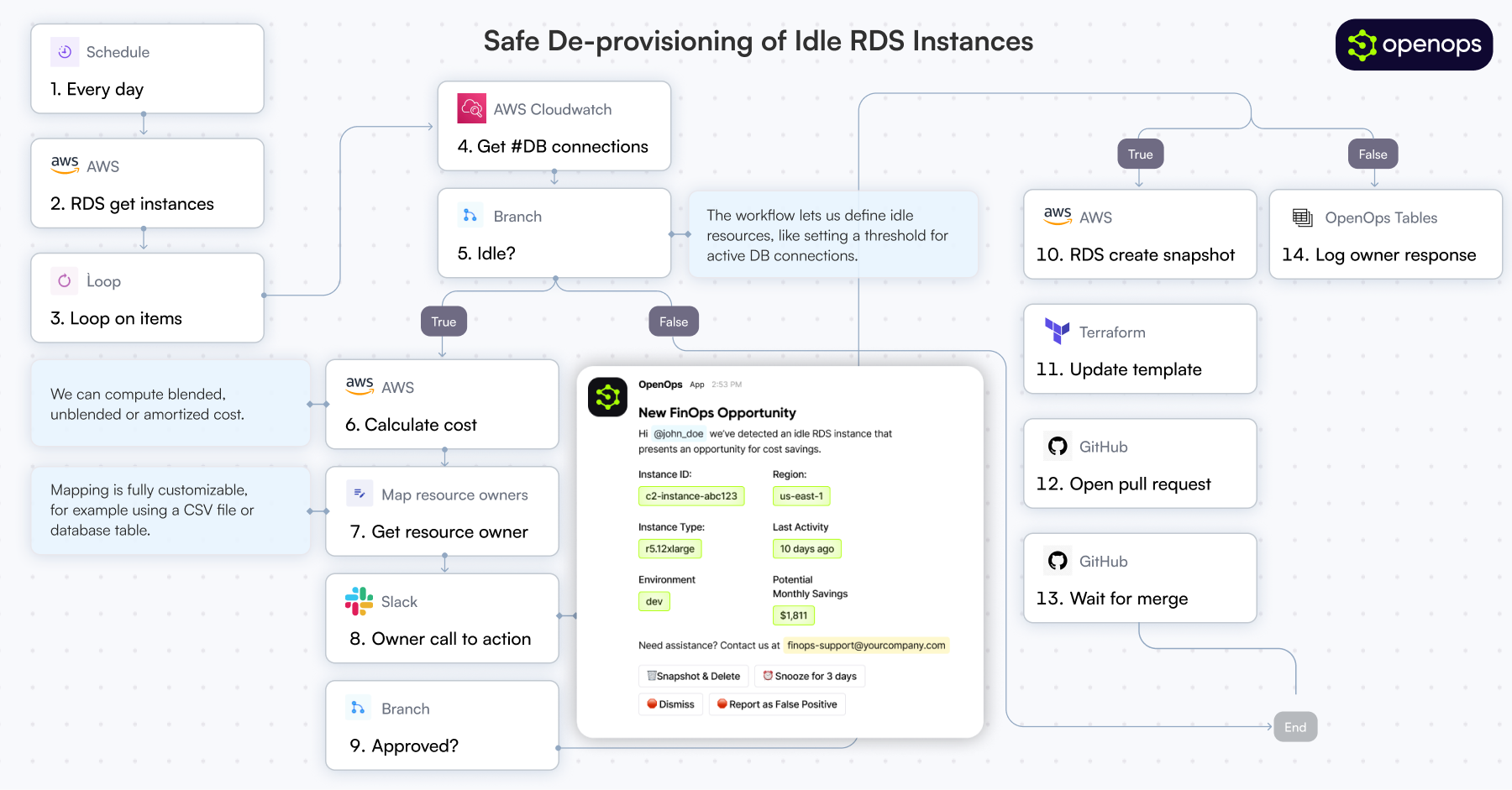
FinOps practitioners struggle with visibility tools that surface cost-saving opportunities but lack implementation capabilities. Traditional automation tools, whether custom-built or off-the-shelf, fail to balance flexibility and maintainability.
OpenOps solves these challenges by:
With OpenOps, organizations can automate cloud cost optimization, ensuring that FinOps processes are efficient, actionable, and aligned with business goals.
OpenOps integrates with a broad range of platforms, including cloud providers, databases, FinOps tools, communication platforms, and task management services.
OpenOps is available as:
docker-compose-based installation (can be installed locally or in the cloud)For detailed documentation, visit our documentation portal.
We welcome contributions to OpenOps! See our contributing guide for details.
OpenOps is licensed under the Apache License 2.0.
OpenOps has a Slack community - feel free to join here.
Sign in to join the discussion.
No comments yet. Be the first to say what this is good for.
"Vibe-Trading: Your Personal Trading Agent"

Your Personal AI Assistant; easy to install, deploy on your own machine or on the cloud; supports multiple chat apps with easily extensible capabilities.

macOS video editor built for AI
😎 Awesome lists about all kinds of interesting topics [NOTE: Pull requests are temporarily disabled until I have a chance to catch up with the existing ones]
Open-source Claude Design alternative. One-click import your Claude Code / Codex API key. Prompt → prototype / slides / PDF. Multi-model (Claude, GPT, Gemini, Kimi, GLM, Ollama). BYOK, local-first, MIT.
🤯 LobeHub is your Chief Agent Operator, organizing your agents into 7×24 operations by hiring, scheduling, and reporting on your entire AI team.